
Best Invoice Software for Freelancers (2026)
Complete guide to invoice software for freelancers. Compare best tools to issue and organize invoices from suppliers. Free and paid options reviewed.

Getting paid and managing expenses shouldn't be the hardest parts of freelancing, but for many independent professionals, they are. Research shows that 29% of freelance invoices get paid late, with over 75% of late invoices paid within 14 days of the due date. Even worse, 18% of freelancers currently have at least one completely unpaid invoice, with the average unpaid amount reaching $2,847.
But here's what most freelancers miss: you're not just sending invoices, you're also receiving them. Every software subscription, contractor payment, equipment purchase, and business expense comes with an invoice that needs tracking for tax deductions, profitability analysis, and financial planning.
The typical freelancer manages two completely different invoice workflows:
Issuing invoices to clients for your services, the outgoing revenue that pays your bills. Receiving invoices from suppliers, vendors, and service providers, the incoming expenses that reduce your tax burden and impact profitability.
Most freelancers cobble together solutions: Wave for client invoicing, spreadsheets for expense tracking, email folders for storing supplier invoices, physical receipts shoved in a drawer. This fragmented approach costs hours monthly and risks missing deductible expenses worth thousands annually.
This guide examines both sides of freelance invoice management. You'll discover the best tools for issuing professional invoices that get paid quickly, plus the best solutions for capturing and organizing the invoices you receive from others. Whether you're just starting out or already established, you'll find software combinations that fit your workflow and budget.
For a deeper look at what disorganized invoice processing actually costs your business, see our analysis of the real cost of manual invoice processing. For an overview of all invoice management options beyond freelance tools, check our complete buyer's guide to invoice management software.
PART 1: Issue Invoices to Clients
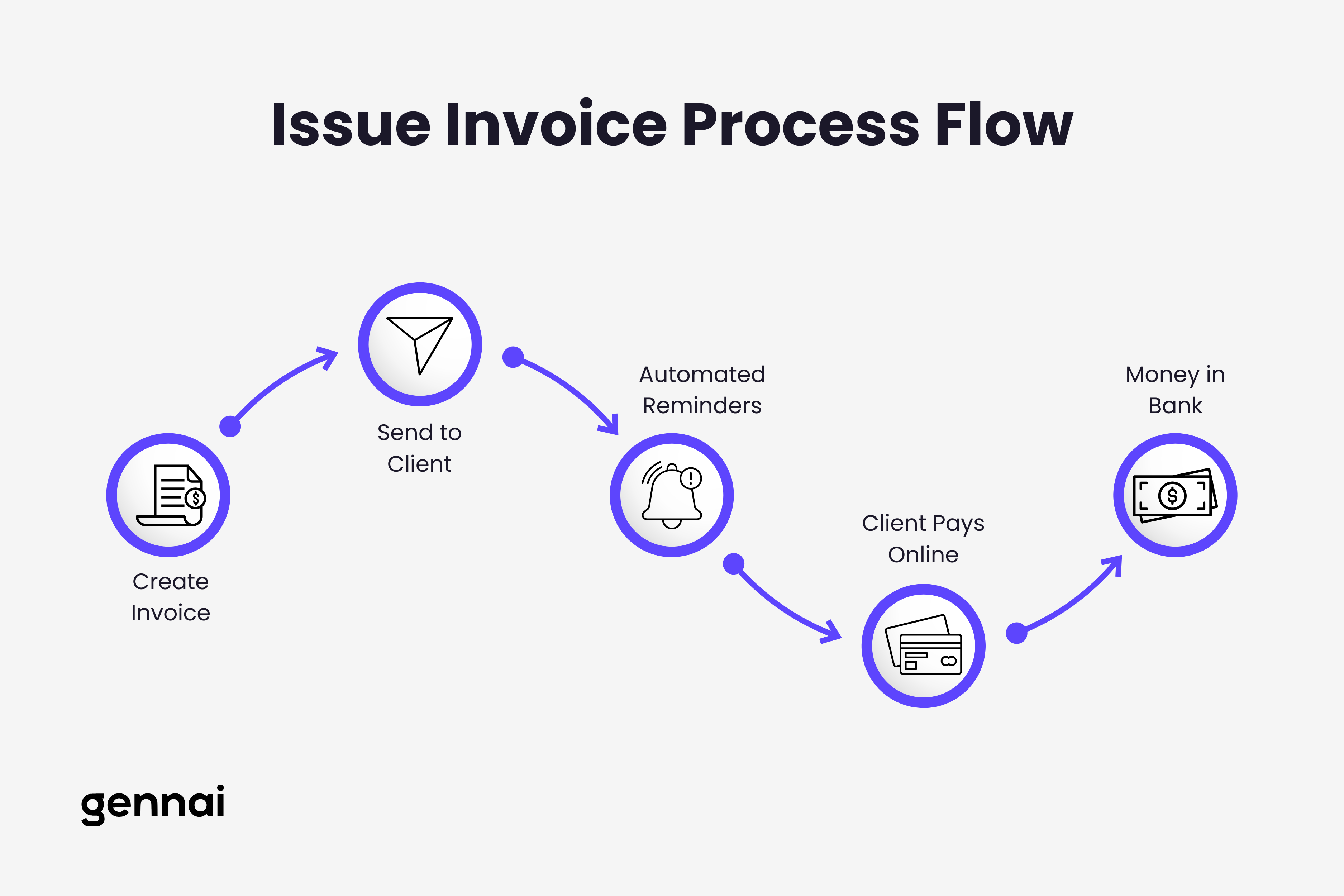
The first half of freelance invoice management is sending professional bills to clients and getting paid quickly. This section covers the critical features you need in invoicing software plus the best tools for different freelancer situations.
Why Issue Invoice Software Matters for Freelancers
Creating and sending invoices seems straightforward until you experience the real problems: clients who claim they never received your invoice, payments arriving weeks or months late, tracking which invoices are paid versus outstanding, following up professionally without seeming desperate, and calculating taxes and keeping accurate financial records.
The right invoicing software solves these problems systematically. Instead of chasing payments and wondering if clients even opened your email, you get real-time notifications when clients view invoices, automated payment reminders that go out without your involvement, online payment processing so clients can pay instantly, professional templates that make you look established, and automatic record-keeping for tax time.
The financial impact matters enormously. Xero's internal data confirms that payments arrive twice as fast when you accept online payments like cards or ACH transfers compared to requesting checks or bank transfers that require manual action from clients. For freelancers operating on thin margins, this difference between getting paid in 7 days versus 30 days can determine whether you make rent or overdraw your account.
Essential Features for Issue Invoice Software
Before comparing specific tools, understand what features actually matter versus what sounds impressive but never gets used.
Fast Invoice Creation: You shouldn't spend 20 minutes creating an invoice for work that took two hours. Look for software with saved templates for your common services, reusable line items that auto-populate with descriptions and rates, client information stored from previous invoices, automatic calculations for taxes and totals, and mobile apps for invoicing immediately after completing work.
Payment Processing Integration: The easier you make it for clients to pay, the faster you get paid. Essential payment options include credit and debit cards with reasonable processing fees (typically 1-3%), ACH or bank transfers for lower fees on larger amounts, digital wallets like Apple Pay or Google Pay for mobile convenience, and international payment options if you work with clients globally.
Automated Reminders: Manual payment follow-ups are awkward and time-consuming. Quality invoicing software sends automatic reminders before due dates, on due dates, and at intervals after due dates, all while maintaining professional tone and allowing you to customize messaging for different client relationships.
Time Tracking: If you bill hourly or need project profitability analysis, integrated time tracking saves hours monthly. Look for tools where tracked hours flow directly into invoices with descriptions, rates apply automatically, and time is categorized by project or client for easy analysis.
Professional Templates: First impressions matter. Your invoices should look legitimate even when you're just starting out. Quality software provides customizable templates that include your logo and branding, professional formatting that looks designed not homemade, clear payment terms and due dates, and itemized breakdowns that show exactly what clients are paying for.
Best Free Invoice Software for Issuing Bills
Free doesn't mean limited when it comes to freelance invoicing. These tools provide professional features without monthly costs, perfect for freelancers starting out or working on tight margins.
Wave - Best Free Overall
Wave offers completely free invoicing with no limits on invoices, clients, or features. The free tier includes unlimited invoice and estimate creation, customizable professional templates, automatic payment reminders, expense and receipt tracking, basic accounting and financial reports, and bank connection for automatic transaction imports.
Wave makes money through optional payment processing fees when clients pay via credit card (2.9% + $0.60 per transaction) or bank transfer (1% with minimum $1 fee). If clients prefer to pay via check or direct transfer, Wave costs you nothing.
The interface feels intuitive even if you've never used accounting software. Creating an invoice takes under two minutes: select a client, add line items from your service library, apply tax rates if applicable, and send. Clients receive professional invoices with a "Pay Now" button that processes payments instantly.
Wave suits freelancers who want professional features without monthly fees and don't mind payment processing costs when clients use those services. If you're earning less than $3,000 monthly, Wave's zero subscription cost makes it difficult to beat.
Zoho Invoice - Best Free with Client Limits
Zoho Invoice provides free invoicing for freelancers with up to 5 clients, making it viable for those working with a small number of recurring clients rather than many one-off projects.
The free tier includes unlimited invoices and estimates within the 5-client limit, time tracking with automatic invoice generation, expense tracking and vendor management, customizable invoice templates, payment reminders and online payments, and mobile apps for iOS and Android.
If you exceed 5 clients, Zoho's paid plans start at $9 monthly for 50 clients, which remains affordable compared to alternatives. Zoho Invoice suits freelancers who have steady relationships with a handful of clients and want time tracking built into their invoicing workflow.
Invoice Ninja - Best Free for Project Management
Invoice Ninja offers free invoicing for up to 20 clients with surprisingly robust features including time tracking and project management, expense tracking and vendor management, customizable invoice templates, online payments through 45+ payment gateways, and detailed analytics on your invoicing performance.
The free 20-client limit works for many early-stage freelancers who maintain relationships with fewer active clients simultaneously. If you exceed this limit, Invoice Ninja Pro costs $100 annually ($8.33 monthly) for unlimited clients.
Invoice Ninja suits freelancers who want project management capabilities alongside invoicing. If you're juggling multiple clients with various projects and need to track time against specific deliverables, Invoice Ninja provides more structure than simpler tools.
Best Paid Invoice Software Worth the Investment
While free tools work excellently for many freelancers, paid options deliver additional value through superior user experience, more robust features, or better support.
FreshBooks - Best Paid Overall
FreshBooks dominates recommendations for freelance invoice software because it balances powerful features with genuine usability. The interface feels intuitive rather than overwhelming, making it accessible even without accounting experience.
FreshBooks starts at $19 monthly for the Lite plan (5 clients), with the Plus plan at $33 monthly supporting up to 50 clients. Features include unlimited invoices and estimates, time tracking with automatic invoice generation, expense tracking and receipt scanning, project management and collaboration tools, automated late payment reminders, and phone and email customer support.
The time tracking integration particularly impresses. You can track time via desktop app, browser extension, or mobile app, and tracked hours flow directly into invoices with a single click. For freelancers billing hourly or needing profitability analysis, this seamless workflow saves hours monthly.
FreshBooks suits established freelancers earning $5,000+ monthly who want professional features without complexity. If the subscription cost represents less than 1% of your monthly revenue, the time saved and payments accelerated deliver obvious ROI.
Harvest - Best for Time Tracking
Harvest costs $12 monthly per user for unlimited invoices and projects, making it more affordable than FreshBooks while providing sophisticated time tracking and reporting capabilities.
Harvest excels at time tracking with apps across all devices, integrations with popular project management tools, detailed analytics showing where time actually goes, invoice generation directly from tracked time, and expense tracking and categorization.
The visual reports help identify which clients or projects are most profitable, which work drags on longer than estimated, and where you're spending time that doesn't generate revenue. This visibility helps freelancers make smarter business decisions about raising rates, dropping difficult clients, or refining their service offerings.
Harvest suits freelancers who bill primarily by the hour and want sophisticated analytics on time allocation and profitability. If you frequently wonder where your time goes or struggle to price projects accurately, Harvest's reporting pays for itself quickly.
QuickBooks Self-Employed - Best for Tax Preparation
QuickBooks Self-Employed costs $20 monthly and targets freelancers who need invoicing combined with tax preparation features. The software includes invoice creation and payment processing, expense tracking and categorization, automatic mileage tracking for vehicle expenses, quarterly estimated tax calculations, and Schedule C preparation at tax time.
The automatic expense categorization particularly helps freelancers who dread tax season. QuickBooks Self-Employed learns how you categorize transactions and automatically sorts future expenses, then calculates your estimated quarterly taxes based on income minus deductible expenses.
This tool suits freelancers who want invoicing and tax preparation in one place. If you currently use separate tools for billing clients and tracking deductible expenses, QuickBooks Self-Employed consolidates workflows while ensuring you're prepared for tax obligations.
PART 2: Receive Invoices from Suppliers
The second half of freelance invoice management is tracking and organizing the invoices you receive from others. Most freelancers ignore this side until tax time, then scramble to find receipts and documentation.
Why Receive Invoice Software Matters for Freelancers
When you receive invoices from suppliers, contractors, and service providers, those documents represent deductible business expenses that directly reduce your tax burden. Yet most freelancers handle received invoices chaotically: supplier invoices sitting in email inboxes across multiple accounts, receipts photographed on phones but never organized, subscription charges on credit cards without matching documentation, contractor invoices saved inconsistently across folders, and expense categories mixed together without clear deductible tracking.
This disorganization costs real money. The average freelancer misses 15-20% of legitimate tax deductions simply because they can't find documentation at tax time. For a freelancer earning $80,000 annually with $20,000 in business expenses, missing 20% of deductions ($4,000) costs roughly $1,000 in unnecessary taxes at a 25% effective rate.
Beyond tax implications, proper received invoice management helps you understand true profitability, identify expenses that can be reduced or eliminated, track vendor payment deadlines to avoid late fees, maintain documentation for audit protection, and make informed pricing decisions based on actual costs.
Essential Features for Receive Invoice Software
The best received invoice software solves different problems than issuing software. Instead of creating and sending invoices, you need to capture, organize, and analyze invoices from others. For a comprehensive breakdown of what to look for in any invoice tool, see our guide to 10 must-have features in invoice management software.
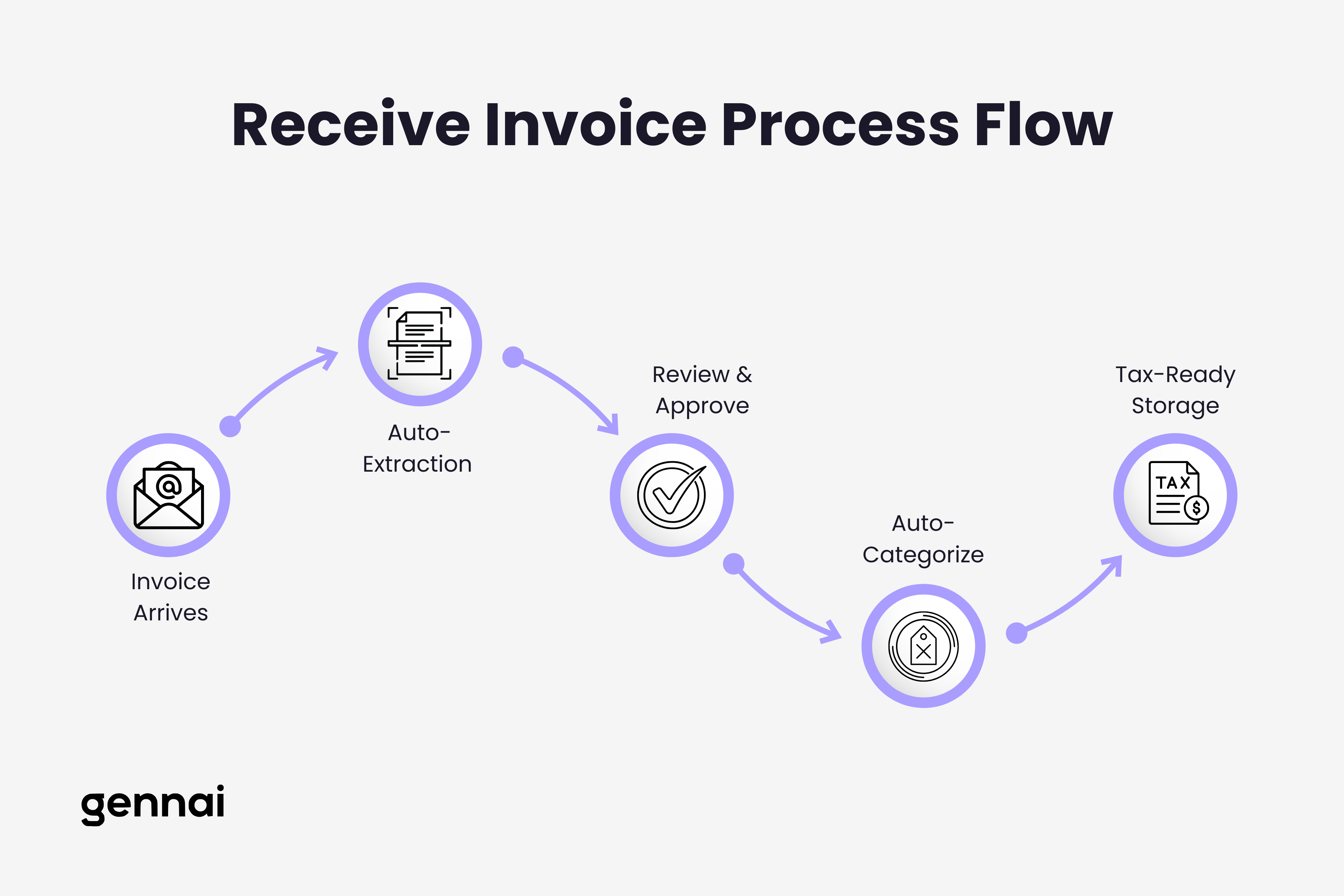
Automatic Invoice Capture: Manual data entry from received invoices wastes hours monthly. Look for tools that automatically extract invoices from email accounts (Gmail, Outlook, Exchange), capture invoice data through mobile receipt scanning, pull in invoices from credit card and bank transactions, and import invoices via file upload or cloud storage connections.
Intelligent Data Extraction: Modern invoice capture software uses OCR and AI to extract key information automatically including vendor name and contact information, invoice number and date, total amount and line item details, tax amounts and categories, and payment terms and due dates.
This automatic extraction eliminates manual typing while reducing errors. You simply review and approve the extracted data rather than entering everything yourself.
Smart Categorization: For tax purposes and profitability analysis, received invoices need proper categorization. Quality software provides automatic expense category suggestions based on vendor and description, custom category creation for your specific business needs, multi-category splitting for invoices with different expense types, and bulk categorization tools for quickly processing multiple invoices.
Search and Retrieval: When you need to find a specific invoice months later for tax preparation or warranty claims, simple search capabilities make this instant rather than painful. Essential features include full-text search across all invoice content, filtering by vendor, date range, amount, or category, tag-based organization for projects or clients, and quick preview without downloading files.
Storage and Organization: Received invoices need secure, long-term storage with easy access. Look for cloud-based storage accessible from anywhere, automatic organization by vendor, date, or category, secure sharing with accountants or tax preparers, and audit trail showing when invoices were received and processed.
Best Invoice Receiving Software for Freelancers
These tools specialize in capturing and organizing the invoices you receive from others, turning email chaos into organized documentation.
Gennai - Best for Email Invoice Extraction
Gennai automatically extracts invoices from your Gmail or Outlook accounts using AI-powered recognition, eliminating manual download and organization. The software connects directly to your email, scans for invoices and receipts, extracts key data automatically, organizes everything in a searchable dashboard, and stores originals securely in Google Drive.
Pricing starts at $12 monthly for the Starter plan (75 invoices/month, 5 email accounts), with the Growth plan at $29 monthly (250 invoices/month, 15 email accounts) for freelancers with higher volumes. For freelancers processing 50+ invoices monthly, this automation saves 3-5 hours compared to manual organization, making even the paid plans cost-effective when you factor in hourly rate savings.
The AI extraction accuracy impresses. Gennai uses advanced AI-powered OCR processing, which correctly identifies vendor names, invoice numbers, dates, amounts, and line items from various invoice formats. You review extracted data for accuracy, approve batches quickly, and access everything through a clean dashboard.
Gennai suits freelancers who receive most invoices via email and want to eliminate manual download and organization. If you're currently searching email for "invoice" at tax time or maintaining folders for different vendors, Gennai automates this entire workflow. The time saved monthly justifies the cost for established freelancers earning $60,000+ annually.
For more on why email-first invoice capture is becoming the standard approach, see our guide on why email-first invoice capture is the future of business finance.
Dext - Best for Receipt Scanning
Dext (formerly Receipt Bank) specializes in capturing receipts and invoices from multiple sources including email inbox monitoring, mobile app for photographing receipts, email forwarding to a unique Dext address, and automatic bank feed connections.
Dext pricing starts at $15 monthly for the Prepare plan with 25 invoices. This lower volume limit works for freelancers with fewer supplier relationships who primarily need receipt capture from in-person purchases.
The mobile scanning particularly impresses. You photograph a receipt immediately after a purchase, Dext extracts all relevant data, and the original image is stored securely. This eliminates the shoebox of crumpled receipts that many freelancers maintain.
Dext suits freelancers who make frequent in-person business purchases and need mobile receipt capture. If you're buying supplies, equipment, or services that generate physical receipts rather than email invoices, Dext's mobile-first approach works better than email-focused alternatives. If you're already using Xero for accounting, see our detailed Dext vs Xero comparison to understand how they work together.
Expensify - Best for Expense Reports
Expensify costs $5 monthly for the Track plan and $10 monthly for the Submit plan, targeting freelancers who work with clients requiring formal expense reports or who want detailed reimbursement tracking.
Features include SmartScan receipt capture using mobile app, automatic expense categorization and policy compliance, mileage tracking with GPS, travel booking integration for flights and hotels, and expense report generation for client reimbursements.
The automatic mileage tracking particularly helps freelancers who drive to client sites. Expensify uses GPS to track business trips automatically, calculates deductible mileage using IRS rates, and generates reports showing the full year's deductible vehicle expenses.
Expensify suits freelancers who submit expense reports to clients or need detailed vehicle expense tracking. If you frequently bill clients for out-of-pocket expenses or drive extensively for business, Expensify's specialized features justify the monthly cost.
Shoeboxed - Best for Paper Receipts
Shoeboxed offers a unique service where you mail physical receipts to their facility and they scan and digitize everything for you. Plans start at $18 monthly for 25 documents, with higher tiers for more volume.
The service includes prepaid magic envelopes for mailing receipts, human verification of scanned data for accuracy, categorization and tagging of all documents, digital storage accessible via web and mobile, and downloadable reports for tax preparation.
This human-powered approach achieves higher accuracy than automated OCR, particularly for faded receipts, handwritten notes, or unusual document formats. The downside is slower processing (2-3 business days) compared to instant app-based scanning.
Shoeboxed suits freelancers who accumulate physical receipts but dislike mobile scanning or maintain archives of paper documents needing digitization. If you have years of receipts in boxes or prefer mailing documents over app-based capture, Shoeboxed provides a practical solution.
QuickBooks Online - Best Combined Solution
QuickBooks Online starts at $35 monthly and provides both invoice issuing and receiving capabilities in one platform, though it's more complex than specialized tools.
For received invoices, QuickBooks offers automatic bank transaction imports with receipt matching, vendor bill tracking and payment scheduling, mobile receipt capture and data extraction, expense categorization for tax preparation, and integration with accountants and tax software.
The advantage of QuickBooks is consolidation: one platform for issuing client invoices, tracking received supplier invoices, managing bank accounts and credit cards, generating profit and loss statements, and preparing tax documentation. The disadvantage is complexity and learning curve compared to simpler specialized tools.
QuickBooks suits established freelancers earning $100,000+ annually who want comprehensive financial management beyond just invoice tracking. If you're ready to graduate from cobbled-together solutions to proper bookkeeping, QuickBooks provides the full suite despite higher costs and complexity.
Choosing the Right Invoice Software Combination
Most successful freelancers don't choose just one tool, they use a combination optimized for their specific needs.
For New Freelancers (Under $30k/year)
When you're just starting out, minimize costs while establishing professional systems:
Issue Invoices: Wave (free) Receive Invoices: Manual email folders + spreadsheet tracking
Wave provides completely free professional invoicing with no limits. For received invoices, simply create Gmail labels or Outlook folders for different expense categories and maintain a basic spreadsheet for tracking. This costs nothing and works adequately at low volumes.
Upgrade to specialized received invoice software like Gennai's Starter plan ($12/month for 75 invoices) once you're processing 30+ supplier invoices monthly and the time savings justify the cost.
For Growing Freelancers ($30k-$75k/year)
As your business grows, invest in better tools to save time and improve organization:
Issue Invoices: FreshBooks ($33/month) Receive Invoices: Gennai Starter ($12/month)
FreshBooks provides professional invoicing with time tracking and client management as your client roster expands. Gennai's Starter plan automatically extracts invoices from your email accounts, organizing everything with AI-powered OCR. Total monthly cost of $45 represents less than 1% of your revenue while saving 4-5 hours monthly.
For Established Freelancers ($75k-$150k/year)
At this level, comprehensive tools deliver clear ROI through time savings and better financial visibility:
Issue Invoices: FreshBooks ($33/month) Receive Invoices: Gennai Growth ($29/month)
FreshBooks remains the best invoicing solution with its combination of features and usability. Gennai's AI-powered email extraction handles high invoice volumes efficiently (up to 250 invoices/month), saving 5-7 hours monthly. Total cost of $62 monthly is negligible compared to revenue while providing complete invoice management coverage.
For High-Volume Freelancers ($150k+/year)
When earning at this level, consolidation and accounting integration become priorities:
Combined Solution: QuickBooks Online ($70/month)
QuickBooks Online provides both invoice issuing and receiving in one platform, plus full accounting capabilities, tax preparation integration, and accountant collaboration. While more complex than specialized tools, the consolidated approach simplifies financial management and provides comprehensive profit and loss visibility needed at higher revenue levels.
For a detailed framework on evaluating which invoice management approach fits your business, see our guide to choosing invoice management software.
Common Freelancer Invoice Mistakes to Avoid
Even with the right software, certain mistakes undermine your invoice management:
For Issuing Invoices
Not accepting online payments: Requiring checks or bank transfers delays payment by weeks. Processing fees of 2-3% are negligible compared to the cash flow improvement from instant payment capability.
Unclear payment terms: "Due upon receipt" is vague. Specify "Due within 15 days" or "Due by [specific date]" to set clear expectations.
Missing late payment fees: Without stated late fees, clients have no incentive to pay on time. Include language like "1.5% late fee applied to invoices unpaid after 30 days."
Not following up: Automated reminders seem pushy, but they're standard business practice. Clients appreciate the reminder and payments arrive faster with systematic follow-up.
Inconsistent invoice numbering: Random numbering looks unprofessional and makes tracking difficult. Use sequential numbering (INV-2026-001) or date-based systems (20260115-001).
For Receiving Invoices
Waiting until tax time: Organizing received invoices throughout the year takes minutes. Waiting until March creates hours of work and increases the risk of missing deductions.
Poor categorization: Lumping everything into "business expenses" misses tax optimization opportunities. Proper categorization ensures you claim all legitimate deductions.
Not keeping receipts: Many freelancers track expenses in software but don't retain the actual receipts. If audited, you need documentation, not just transaction records.
Mixing personal and business: Using the same email and bank accounts for personal and business makes expense tracking painful. Separate accounts simplify received invoice management dramatically.
No backup system: Relying solely on email or a single hard drive risks losing documentation. Cloud-based invoice storage provides redundancy and protects against data loss.
Implementation: Getting Started with Invoice Software
Choosing software is half the battle. Proper implementation ensures you actually use the tools effectively.
Setting Up Issue Invoice Software
Create your invoice template in your first week using your logo and branding, clear payment terms and late fees, bank account or payment processor details, itemized line items for your common services, and tax rates applicable to your jurisdiction.
Input your clients with complete contact information, billing addresses and email addresses, payment terms and preferred payment methods, and project or retainer information where relevant.
Set up payment processing by connecting your bank account for direct deposits, enabling credit card processing if using platforms like Wave or FreshBooks, configuring ACH transfers for lower fees on larger amounts, and testing the payment flow yourself before sending to clients.
Configure automated reminders with professional language that matches your brand voice, reminder schedule (typically 7 days before, on due date, 7 and 14 days after), and escalation for seriously overdue invoices.
Create your first invoices using saved templates to ensure consistency, double-checking amounts and line items for accuracy, and previewing the client view before sending.
Setting Up Receive Invoice Software
Connect your email accounts to services like Gennai by authorizing access to Gmail or Outlook, setting filters for automatic invoice detection, and testing with existing invoices in your inbox.
Establish your category system by creating categories matching your tax needs (Office Supplies, Software, Contractors, Travel, Equipment), setting up sub-categories for detailed tracking if desired, and reviewing IRS Schedule C categories for guidance on common freelancer deductions.
Import historical invoices by uploading past invoices from email or folders, scanning physical receipts through mobile apps, and categorizing everything to establish baseline expenses.
Create your review workflow by setting aside 30 minutes weekly to review and approve new invoices, checking automatic categorization accuracy, and flagging any items needing clarification or adjustment.
Connect with your accountant by sharing access to your invoice software, ensuring they can export reports at tax time, and confirming they're comfortable with your chosen platform.
Conclusion
Effective freelance invoice management requires handling both sides: issuing professional invoices that get paid quickly and capturing received invoices for tax deductions and profitability analysis.
The right software combination depends on your revenue level, invoice volume, and complexity needs. New freelancers benefit from free tools like Wave for issuing invoices while organizing received invoices manually. Growing freelancers should invest in specialized tools like FreshBooks for issuing and Dext or Gennai for receiving. Established freelancers earning six figures may benefit from comprehensive platforms like QuickBooks that handle both sides plus full accounting.
The mistake most freelancers make isn't choosing the wrong software, it's using no software at all. Even a basic system with free tools delivers enormous value compared to email folders and spreadsheets. Start with the simplest viable solution, then upgrade as your business grows and specific pain points emerge.
The invoice software you choose today determines whether you spend tax season searching desperately for documentation or exporting perfectly organized reports in minutes. It decides whether clients pay you in 7 days or 45. It determines whether you claim every legitimate deduction or overpay taxes by thousands.
Start with one side of the equation. If payment delays cause cash flow problems, prioritize better invoice issuing software. If you dread tax preparation, focus on received invoice capture first. Then expand to cover both sides as your business demands more sophisticated financial management.
Your time is valuable. Stop manually tracking invoices and start automating the processes that already have solved solutions.
TL;DR
- Freelancers need two invoice workflows: issuing invoices to clients AND receiving invoices from suppliers
- 29% of freelance invoices get paid late with average unpaid amounts reaching $2,847
- Best free issuing tools: Wave (unlimited), Zoho Invoice (5 clients), Invoice Ninja (20 clients)
- Best paid issuing tools: FreshBooks ($19-33/mo), Harvest ($12/mo), QuickBooks Self-Employed ($20/mo)
- Best receiving tools: Gennai ($12-29/mo for email extraction), Dext ($15/mo for receipt scanning), Expensify ($5-10/mo for expense reports)
- New freelancers: Wave (free) + manual folders
- Growing freelancers ($30-75k): FreshBooks + Gennai ($45/mo total)
- Established freelancers ($75k+): FreshBooks + Gennai Growth ($62/mo) or QuickBooks Online ($70/mo)
- Common mistakes: Not accepting online payments, waiting until tax time to organize receipts, mixing personal and business accounts
Ready to automate your invoices?
Start extracting invoices from your email automatically with Gennai. Free plan available, no credit card required.
Start FreeRelated Articles
Accounts Payable Turnover Ratio Explained
The accounts payable turnover ratio shows how fast you pay suppliers. Get the formula, a worked example, benchmarks and what your number really means.
GuideNet 30 vs Net 60: What Payment Terms Really Mean for Your Cash
Net 30 vs net 60 explained for business owners: what each term means, when the clock really starts, and how the gap hits your cash on both sides.
GuideThe Accounts Payable Process, Step by Step (for Owners)
The accounts payable process has five steps: receive, verify, approve, pay, and record each invoice. Here is how each works and where owners lose money.