
Dext vs Xero 2026: Comparison and Alternative
Dext costs $24+/user. Xero doesn't extract invoices from email. Here's what actually works for automatic invoice capture in 2026 (with pricing comparison).

The invoice management software decision often comes down to comparing tools that promise similar benefits but deliver them in fundamentally different ways. Dext and Xero represent two distinct approaches to solving invoice and financial document problems, and choosing between them requires understanding what each tool actually does versus what it claims to do.
Here's the reality that confuses most buyers: Dext and Xero aren't direct competitors. They solve different problems despite both being labeled as invoice or accounting tools. Dext excels at automating the capture and extraction of data from receipts and invoices using AI-powered OCR technology. Xero provides comprehensive cloud accounting software that handles everything from invoicing and billing to payroll and financial reporting.
Many businesses use both tools together, with Dext feeding organized financial data into Xero for full accounting workflows. But you might not need both. Some organizations find that Xero alone handles their needs adequately, while others discover that Dext fills a specific gap that Xero's native features don't address efficiently.
This comparison breaks down the actual capabilities, pricing structures, integration requirements, and ideal use cases for each platform. By understanding where each tool excels and where it falls short, you can make an informed decision about which solution fits your business operations, team size, and invoice processing volume.
For a comprehensive framework to evaluate invoice management tools, see our decision guide for choosing invoice management software. You can also explore our complete buyer's guide to invoice management software for a broader overview of the market.
Understanding What Each Tool Actually Does
Before comparing features and pricing, you need clarity on what Dext and Xero fundamentally are because their core purposes differ more than most comparison guides acknowledge.
Dext: Pre-Accounting Automation Platform
Dext operates as a pre-accounting layer that sits between your financial documents and your accounting software. Think of it as an intelligent data extraction and organization system rather than complete accounting software.
When you receive invoices via email, snap photos of receipts, or have vendors send bills, Dext captures these documents automatically. Its AI-powered OCR technology extracts key data with claimed accuracy rates of 99.9%, including supplier names, dates, amounts, tax information, line items, and payment terms. The system then categorizes expenses, matches transactions to bank feeds, and organizes everything before pushing the clean data to your accounting platform.
Dext supports multiple capture methods. You can forward invoice emails to a dedicated Dext address, use the mobile app to photograph receipts, upload PDFs directly, or connect to e-commerce platforms like Shopify, Amazon, and Stripe to automatically pull in sales and expense data. This flexibility makes it particularly valuable for businesses dealing with high volumes of paper receipts or invoice emails across multiple accounts.
The platform doesn't generate financial statements, manage payroll, or handle tax filings. Instead, it ensures that the data entering your accounting system is accurate, complete, and properly categorized. This reduces the manual data entry that typically consumes hours of accounting team time each week.
Xero: Complete Cloud Accounting Software
Xero functions as end-to-end accounting software designed to manage every aspect of your business finances. It handles accounts payable and receivable, bank reconciliation, invoicing, expense claims, payroll, inventory tracking, financial reporting, and tax preparation.
When you use Xero, you create and send invoices directly from the platform, track which invoices are paid or overdue, reconcile bank transactions automatically, manage employee payroll including tax calculations, generate financial statements like profit and loss reports and balance sheets, and handle multi-currency transactions for international business.
Xero connects directly to over 11,500 banks and financial institutions worldwide, automatically importing transactions for reconciliation. Its invoice management capabilities include customizable templates, automated payment reminders, online payment collection through integrated payment processors, and real-time status tracking showing exactly where each invoice sits in your workflow.
The platform provides unlimited user access at no additional cost, making it suitable for teams where multiple people need visibility into financial data. Accountants, bookkeepers, business owners, and finance staff can all access the same real-time information without per-seat pricing concerns.
Xero integrates with over 1,000 third-party applications through its app marketplace, including inventory management systems, CRM platforms, time tracking tools, and document management solutions like Dext. This extensive integration ecosystem allows businesses to build comprehensive financial workflows connecting multiple business tools.
Feature Comparison: Where Each Tool Excels
Understanding the practical differences in capabilities helps clarify which tool addresses your specific needs.
Invoice and Receipt Capture
Dext's Approach: Dext specializes in automated document capture with multiple submission methods. You can email invoices to your dedicated Dext address, photograph receipts using the mobile app with bulk upload capability, fetch invoices automatically from supplier portals, connect bank feeds to match documents with transactions, or integrate with e-commerce platforms for automatic data capture.
The OCR extraction works across various formats including handwritten receipts, crumpled or damaged documents, multi-page invoices with line item detail, and invoices in multiple currencies. Dext claims 99.9% accuracy in data extraction, though user reviews suggest actual accuracy varies depending on document quality and format complexity. When extraction confidence is low, the system flags items for manual review rather than processing incorrect data.
Xero's Approach: Xero includes basic receipt and bill capture through its mobile app and email forwarding, but this functionality is more limited compared to Dext's specialized capabilities. You can photograph receipts directly in the Xero mobile app, forward bills via email for processing, or upload PDF invoices through the web interface.
However, Xero's native OCR extraction is less sophisticated than Dext's AI-powered system. Many Xero users report needing to manually verify and correct extracted data more frequently, particularly with non-standard invoice formats. The system works adequately for straightforward invoices but struggles with complex multi-page documents or receipts with unusual layouts.
This is precisely why many Xero users add Dext as a complementary tool. Dext handles the complex data extraction, and Xero receives clean, organized data ready for accounting workflows.
If you're receiving most invoices via email, see our guide on why email-first invoice capture is becoming the standard for modern finance teams.
Expense Management and Tracking
Dext's Approach: Dext excels at comprehensive expense management with features designed specifically for this purpose. You can set up custom supplier rules that automatically categorize expenses based on vendor, establish tracking categories that organize costs by department or project, create approval workflows for expense claims, enable employee expense submissions through the mobile app, and generate detailed expense reports showing spending patterns.
The platform supports billable expense tracking, allowing you to flag costs that should be re-invoiced to clients. This reduces cash flow risks and streamlines the process of creating sales invoices for client reimbursements. The system also handles mileage tracking using GPS data from the mobile app, automatically calculating reimbursement amounts based on your configured rates.
Xero's Approach: Xero includes expense claim features through its Xero Me employee app, allowing staff to submit expenses for approval and reimbursement. However, the functionality is more basic compared to Dext's specialized expense management capabilities.
Xero expense management works well for straightforward reimbursement workflows but lacks the sophisticated categorization rules, automated matching, and detailed expense analytics that Dext provides. Businesses processing high volumes of employee expenses or needing detailed expense analysis often find Xero's native features insufficient on their own.
Integration with Accounting Systems
Dext's Approach: Integration is Dext's fundamental purpose. The platform connects seamlessly with major accounting software including Xero, QuickBooks Online, QuickBooks Desktop, Sage, and over 30 other accounting platforms. Data flows automatically from Dext to your accounting system with proper categorization, tracking codes, and supplier information intact.
The integration includes automatic bank matching, purchase order verification, supplier rule synchronization, and tracking category mapping. When Dext publishes an invoice to Xero, all relevant data transfers immediately, eliminating duplicate entry and ensuring consistency across systems.
Xero's Approach: Xero's integration strategy focuses on connecting with complementary tools through its extensive app marketplace. The platform offers over 1,000 integrations with business applications covering inventory management, CRM, time tracking, payroll, point-of-sale systems, and document management.
These integrations allow you to build comprehensive business workflows where data flows between multiple tools automatically. For example, time tracking data from a project management tool can flow into Xero to generate invoices, or e-commerce sales from Shopify can sync automatically for accounting and inventory management.
The breadth of Xero's integration ecosystem exceeds what Dext offers, but Dext's deep integration with accounting platforms specifically makes it more effective for the focused purpose of document management and data extraction.
Reporting and Financial Insights
Dext's Approach: Dext provides expense-focused reporting showing spending trends by category, supplier analysis identifying where money goes, document completion status tracking, and cost analysis by project or department. These reports help with expense management decisions and budget monitoring but don't generate complete financial statements.
The platform's reporting focuses on ensuring complete data capture and highlighting potential issues like missing receipts, uncategorized expenses, or documents requiring review. This helps maintain data quality before information enters your accounting system.
Xero's Approach: Xero delivers comprehensive financial reporting including profit and loss statements, balance sheets, cash flow forecasts and analysis, aged receivables and payables reports, tax summaries and compliance reports, budget versus actual comparisons, and customizable financial dashboards.
The reporting capabilities support strategic business decisions, tax compliance, audit preparation, and financial planning. You can customize reports, schedule automatic generation and distribution, compare performance across time periods, and export data for further analysis.
Xero also offers add-ons like Analytics Plus for advanced business intelligence and visual dashboards, providing deeper insights into financial performance trends and predictive modeling for future scenarios.
Pricing Structure Comparison
Understanding the cost implications requires looking beyond base subscription prices to include usage patterns, volume requirements, and potential add-on costs.
Dext Pricing Model
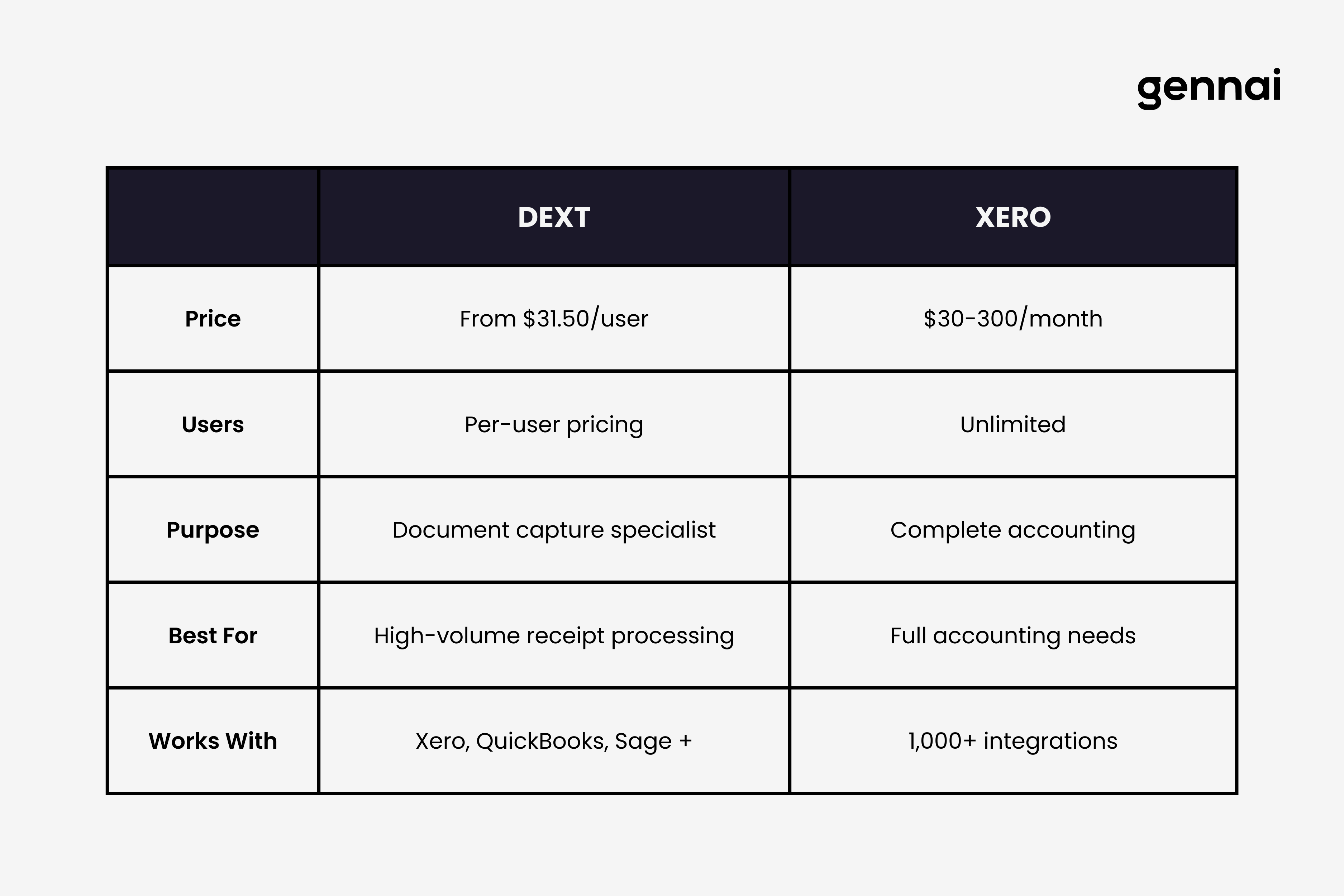
Dext structures pricing around document volume and features required. For businesses, plans typically start around $31.50 per user monthly, though exact pricing varies based on documents processed, features enabled, and contract terms.
The pricing includes a certain number of credits for bank statement extraction, line item extraction, and supplier statement reconciliation. When you exceed included credit allowances, additional credits must be purchased. This usage-based component makes costs somewhat variable depending on your actual document volume.
For accounting practices managing multiple clients, Dext offers customized pricing that scales with the number of clients supported. The more clients you add, the lower the per-client cost becomes, making it attractive for bookkeeping firms and accounting practices serving multiple businesses.
Dext provides a free trial period allowing you to test functionality with your actual documents before committing. This trial includes full feature access, letting you evaluate whether the OCR accuracy and workflow automation justify the investment for your specific document types and volume.
Xero Pricing Model
Xero offers three straightforward pricing tiers with promotional discounts for new customers. As of 2026, pricing includes:
- Early plan at $20 monthly: unlimited users and 20 invoices monthly maximum
- Growing plan at $47 monthly: unlimited invoices and bills
- Established plan at $80 monthly: adding multi-currency and advanced features
New customers typically receive promotional pricing offering 90% off the first six months, making the entry cost considerably lower initially. After the promotional period, standard pricing applies and subscriptions auto-renew monthly until canceled.
The unlimited user access across all plans represents significant value for teams. Unlike many accounting platforms charging per seat, Xero allows your entire team, accountants, and bookkeepers to access the system without additional per-user fees. This makes the total cost more predictable as your team grows.
Additional costs to consider include payment processing fees when customers pay invoices online through Xero's integrated payment options, payroll processing fees if using Xero Payroll in certain regions, add-ons like Inventory Plus or Analytics Plus for advanced features, and integration costs for third-party apps from the marketplace.
Total Cost of Ownership Considerations
When comparing costs, consider your invoice and receipt volume honestly. If you process hundreds of receipts monthly, Dext's automation might save enough staff time to justify its cost. If most transactions are digital and straightforward, Xero's basic capture features might suffice without adding Dext.
Factor in the value of staff time saved through automation. If Dext eliminates three hours weekly of manual data entry at your team's hourly rate, calculate whether that savings exceeds Dext's subscription cost. Many businesses find the ROI positive at even modest time savings.
Consider whether you need full accounting software or just better document management. If you already use accounting software like QuickBooks and only need improved invoice capture, adding Dext might cost less than switching entirely to Xero. However, if you need comprehensive accounting functionality, Xero provides more features at a competitive price point compared to alternatives.
The Integration Question: Using Dext and Xero Together
Many businesses don't choose between Dext and Xero because they're not mutually exclusive. Using both tools together creates an efficient workflow where each handles what it does best.
How the Combined Workflow Operates
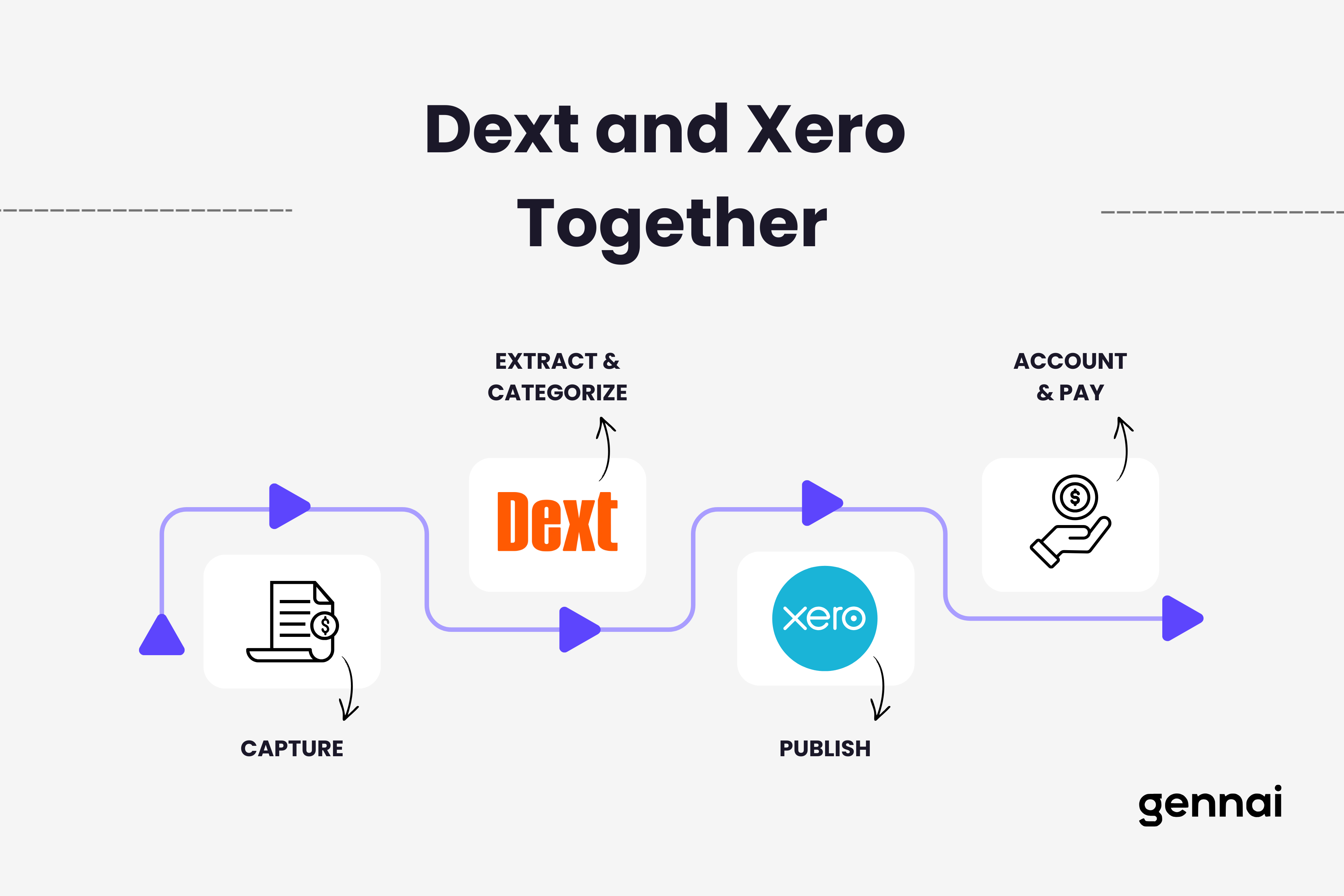
In an integrated Dext and Xero workflow, suppliers send invoices to your Dext email address or you photograph receipts using the Dext mobile app. Dext's AI extracts data automatically, categorizes expenses based on your configured rules, matches documents to bank transactions, and flags any items requiring manual review.
Once processed in Dext, you publish approved items directly to Xero. The data transfers with full categorization, supplier information, tracking codes, and attached source documents. In Xero, these transactions appear ready for final reconciliation and payment processing, eliminating duplicate entry and ensuring accuracy.
This workflow particularly benefits businesses with high receipt volumes, field staff submitting frequent expense claims, multiple invoice email addresses to monitor, complex categorization requirements, or accountants who need organized source documents for client work.
When the Integration Makes Sense
Consider using both tools together if you process over 100 receipts or invoices monthly, have employees regularly submitting expense claims, receive invoices across multiple email accounts, need sophisticated expense categorization and tracking, or work with accountants who require complete source documentation.
The combined cost of both subscriptions needs to generate enough time savings and accuracy improvements to justify the investment. For many businesses, eliminating five to ten hours weekly of manual data entry and document organization provides clear positive ROI even with both subscriptions.
When One Tool Suffices
You might not need both tools if your invoice volume is low, fewer than 50 documents monthly. Most invoices arrive in standardized digital formats that are easy to process. Your accounting needs are straightforward without complex tracking requirements. You have limited budget for software subscriptions. Your team has adequate time for manual data entry without workflow bottlenecks.
Small businesses with simple financial operations often find that Xero alone provides adequate invoice management capabilities. The basic OCR and receipt capture features handle their volume without requiring Dext's specialized automation. Conversely, businesses already committed to accounting software other than Xero might add Dext just for improved document capture without switching accounting platforms.
Ideal User Profiles: Who Should Choose Which Tool
Choose Dext If You
Dext makes sense when you already use and are satisfied with your current accounting software but struggle with document capture and data entry bottlenecks. Perhaps you use QuickBooks, Sage, or another platform and don't want to switch, but you're drowning in receipts and invoices requiring manual entry.
Dext also fits businesses with distributed teams where field staff, remote employees, or multiple departments submit expenses frequently. The mobile app and multiple capture methods make it easy for everyone to submit documents immediately rather than saving receipts for monthly batch processing.
Accounting practices and bookkeeping firms serving multiple clients benefit significantly from Dext's ability to manage documents across many businesses from a centralized platform. The client segmentation and customized rules for each business streamline the bookkeeping process substantially.
Finally, businesses processing high volumes of paper receipts, particularly in industries like construction, hospitality, retail, or field services, find Dext's mobile scanning and automated extraction invaluable. The alternative of manual entry for hundreds of receipts becomes prohibitively time-consuming.
Choose Xero If You
Xero makes sense when you need comprehensive accounting software, not just document management. If you're starting fresh without existing accounting software commitments, Xero provides everything you need in one platform at a reasonable price with unlimited users.
Small to medium businesses requiring invoicing, accounts payable and receivable, bank reconciliation, basic payroll, financial reporting, and multi-currency support find Xero delivers all these features with an intuitive interface and extensive integration options.
Teams where multiple people need access to financial data benefit from Xero's unlimited user policy. Unlike platforms charging per seat, you can give access to your entire team, external accountants, and bookkeepers without worrying about escalating costs as your team grows.
Businesses prioritizing extensive integration options appreciate Xero's marketplace with over 1,000 apps. This allows you to build comprehensive workflows connecting CRM, inventory, time tracking, payroll, and other business tools with your accounting data flowing seamlessly between systems.
Use Both Tools If You
The combination makes sense for businesses processing high invoice and receipt volumes who need sophisticated categorization and tracking, have distributed teams submitting expenses frequently, require detailed expense analytics and comprehensive financial reporting, work with external accountants needing organized source documentation, and can justify the combined subscription costs through significant time savings.
Many established businesses find that adding Dext to their existing Xero implementation eliminates the remaining manual bottlenecks in their financial workflows. The investment pays for itself quickly through reduced staff time on data entry and improved accuracy that prevents costly errors.
Common Challenges and Limitations
No software is perfect, and understanding common user complaints helps set realistic expectations.
Dext's Known Issues
User reviews consistently mention OCR accuracy varies despite 99.9% claims. Complex invoices, handwritten receipts, or unusual formats often require manual correction. The system works excellently for standard invoices but struggles with edge cases.
Some users report the mobile app lacks certain desktop features, creating friction when employees need full functionality on the go. Email forwarding for invoice capture sometimes fails to trigger automatic processing, requiring manual intervention to ensure documents don't get lost.
Customer support responsiveness receives mixed reviews, with some users reporting slow resolution times for technical issues. For businesses relying heavily on Dext for daily operations, support delays can create workflow disruptions.
The pricing structure with credits for advanced features like line item extraction can become expensive as usage scales. Businesses processing very high document volumes sometimes find costs escalating beyond initial expectations, particularly when frequently using premium features.
Xero's Known Issues
The basic invoice capture and OCR functionality lags behind specialized tools like Dext. Users frequently mention needing to manually verify extracted data, particularly from non-standard invoice formats. This creates the irony that many Xero users add Dext specifically to address this limitation.
Customer support operates primarily through email and online help resources without live phone support in many regions. Users sometimes report frustration when issues require quick resolution and email support creates delays.
The entry-level Early plan limits you to 20 invoices and 5 bills monthly, a threshold that small businesses often outgrow quickly. This forces users to upgrade to the Growing plan sooner than anticipated, increasing costs.
Bank feed connections don't support every financial institution, requiring manual transaction imports for some banks. This particularly affects businesses using smaller regional banks or credit unions not yet integrated with Xero's system.
Some advanced features require top-tier Established plan subscription or paid add-ons like Inventory Plus or Analytics Plus. Businesses discover they need these features after committing to Xero, leading to higher costs than initially budgeted.
Decision Framework: Choosing Your Approach
Making the right choice requires honest assessment of your current situation, future needs, and budget constraints.
Start With Your Document Volume
Calculate how many invoices and receipts your business processes monthly. Include supplier invoices, employee expense receipts, bills requiring payment, and any other financial documents requiring data entry into your accounting system.
If your volume exceeds 100 documents monthly and many arrive as photos or paper receipts, Dext's specialized automation likely provides clear ROI through time savings. If volume is under 50 and most documents arrive as clean digital PDFs, Xero's basic capture features might suffice.
Evaluate Your Current Accounting Setup
If you already use accounting software you're satisfied with and just need better document capture, adding Dext makes more sense than switching to Xero. The integration works with most major accounting platforms, letting you keep existing workflows while eliminating the document bottleneck.
If you're starting fresh or dissatisfied with current accounting software, Xero provides comprehensive functionality at competitive pricing. You get document capture, complete accounting, unlimited users, and extensive integrations in one subscription rather than piecing together multiple tools.
Consider Your Team Structure
For distributed teams with field staff, remote employees, or multiple departments submitting expenses, Dext's mobile-first design and multiple capture methods create a smoother experience. The mobile app makes it easy for anyone to submit documents immediately rather than accumulating receipts for batch processing.
For office-based teams where most financial work happens at desks with computer access, Xero's web interface provides everything needed without requiring mobile-specific features. The mobile app exists for occasional use but doesn't need to be the primary interaction point.
Factor in Budget and ROI
Calculate the cost of each approach against your staff time savings. If your accounting team currently spends 10 hours weekly on manual data entry and document organization, what's that worth at their hourly rate? Does Dext's subscription cost less than the value of that time saved?
For comprehensive accounting software needs, compare Xero's pricing against alternatives like QuickBooks or FreshBooks. Xero's unlimited user access often provides better value for teams compared to per-seat pricing competitors.
Remember that choosing both tools represents the highest cost but might provide the best experience if your volume and complexity justify it. The question isn't whether you can afford both but whether the combined productivity gains and accuracy improvements generate positive ROI.
For a step-by-step guide on setting up automatic invoice extraction, see our tutorial on how to extract invoices from Gmail automatically.
Conclusion
Dext and Xero aren't competing solutions but complementary tools that can work together or independently depending on your specific needs. Dext specializes in automated document capture and expense management, excelling at extracting data from invoices and receipts with minimal manual intervention. Xero provides comprehensive cloud accounting software handling everything from invoicing to financial reporting with unlimited user access and extensive integrations.
Choose Dext when you already have accounting software but struggle with document capture bottlenecks, process high volumes of paper receipts or photos, have distributed teams submitting expenses regularly, or need sophisticated expense categorization and tracking beyond basic accounting software capabilities.
Choose Xero when you need complete accounting software for a growing business, value unlimited user access for your team, require extensive integration options with other business tools, or want invoicing, accounts payable, financial reporting, and basic payroll in one platform.
Use both together when processing over 100 invoices and receipts monthly, employing field staff or remote teams submitting frequent expenses, requiring detailed expense analytics and comprehensive financial reporting, or working with external accountants who need organized source documentation.
The right answer depends entirely on your business size, invoice volume, team structure, existing software commitments, and budget constraints. Neither tool is universally better. Each excels in its domain, and understanding what you actually need determines which approach makes sense for your operations.
Start with honest assessment of your current pain points. Are you struggling with document capture and data entry, or do you need better overall accounting functionality? Does your team spend hours weekly on manual entry that automation could eliminate? Would better expense tracking and categorization improve your financial visibility?
The answers to these questions point you toward Dext alone, Xero alone, or both tools integrated to create a comprehensive invoice management and accounting workflow that saves time, improves accuracy, and gives you the financial visibility needed to make better business decisions.
TL;DR
- Dext and Xero aren't direct competitors - Dext is a pre-accounting automation tool, Xero is complete accounting software
- Dext excels at: AI-powered document capture, OCR extraction, mobile receipt scanning, expense categorization, accounting software integration
- Xero excels at: Full accounting functionality, unlimited users, 1,000+ integrations, financial reporting, bank reconciliation
- Use Dext if: You have accounting software but need better document capture, process high receipt volumes, or have distributed teams
- Use Xero if: You need comprehensive accounting software, want unlimited users, or are starting fresh without existing systems
- Use both if: Processing 100+ invoices monthly with complex categorization needs and distributed teams
- Pricing: Dext starts around $31.50/user/month; Xero ranges from $20-80/month depending on plan tier
- Key limitation: Xero's native OCR lags behind Dext, which is why many Xero users add Dext for document capture
Ready to automate your invoices?
Start extracting invoices from your email automatically with Gennai. Free plan available, no credit card required.
Start FreeRelated Articles
Accounts Payable Turnover Ratio Explained
The accounts payable turnover ratio shows how fast you pay suppliers. Get the formula, a worked example, benchmarks and what your number really means.
GuideNet 30 vs Net 60: What Payment Terms Really Mean for Your Cash
Net 30 vs net 60 explained for business owners: what each term means, when the clock really starts, and how the gap hits your cash on both sides.
GuideThe Accounts Payable Process, Step by Step (for Owners)
The accounts payable process has five steps: receive, verify, approve, pay, and record each invoice. Here is how each works and where owners lose money.