
The Real Cost of Manual Invoice Processing
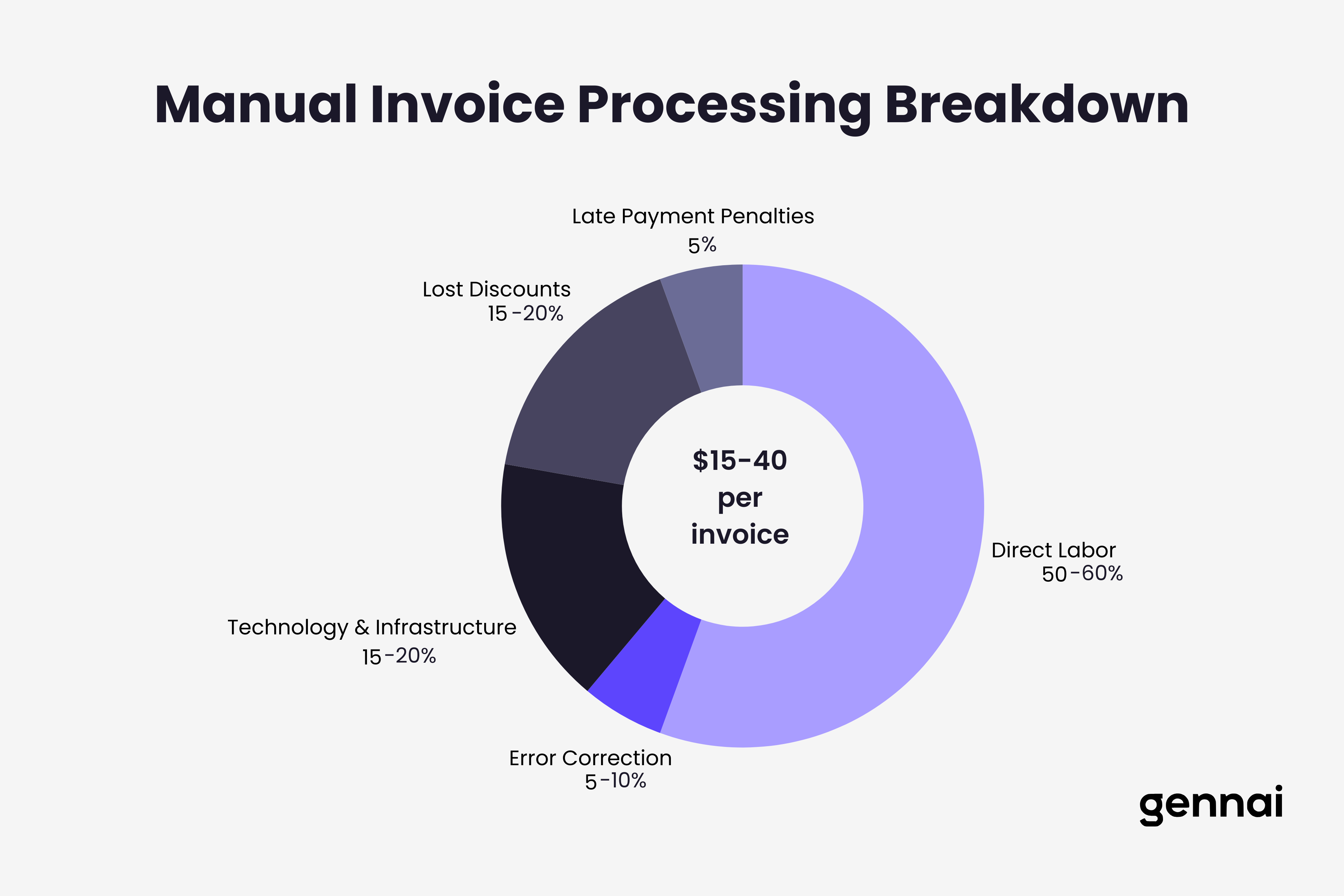
Calculate your true invoice processing costs. Manual processing costs $15-40 per invoice. See how much your business could save with automation.

Your accounts payable team processes invoices every day. Someone receives the invoice, manually enters data into your system, routes it for approval, follows up when approvals stall, corrects errors when they occur, and finally schedules payment. The process feels routine because it happens constantly, but have you calculated what this routine actually costs your business?
Most companies dramatically underestimate their invoice processing expenses because they only count obvious costs like AP staff salaries. The real cost includes error correction time consuming $53 per mistake according to industry data, late payment penalties averaging $40,000 annually for affected companies, missed early payment discounts that could reduce costs by 2% per invoice, approval bottlenecks where invoices sit for days waiting for sign-off, and opportunity costs when your finance team handles data entry instead of strategic analysis.
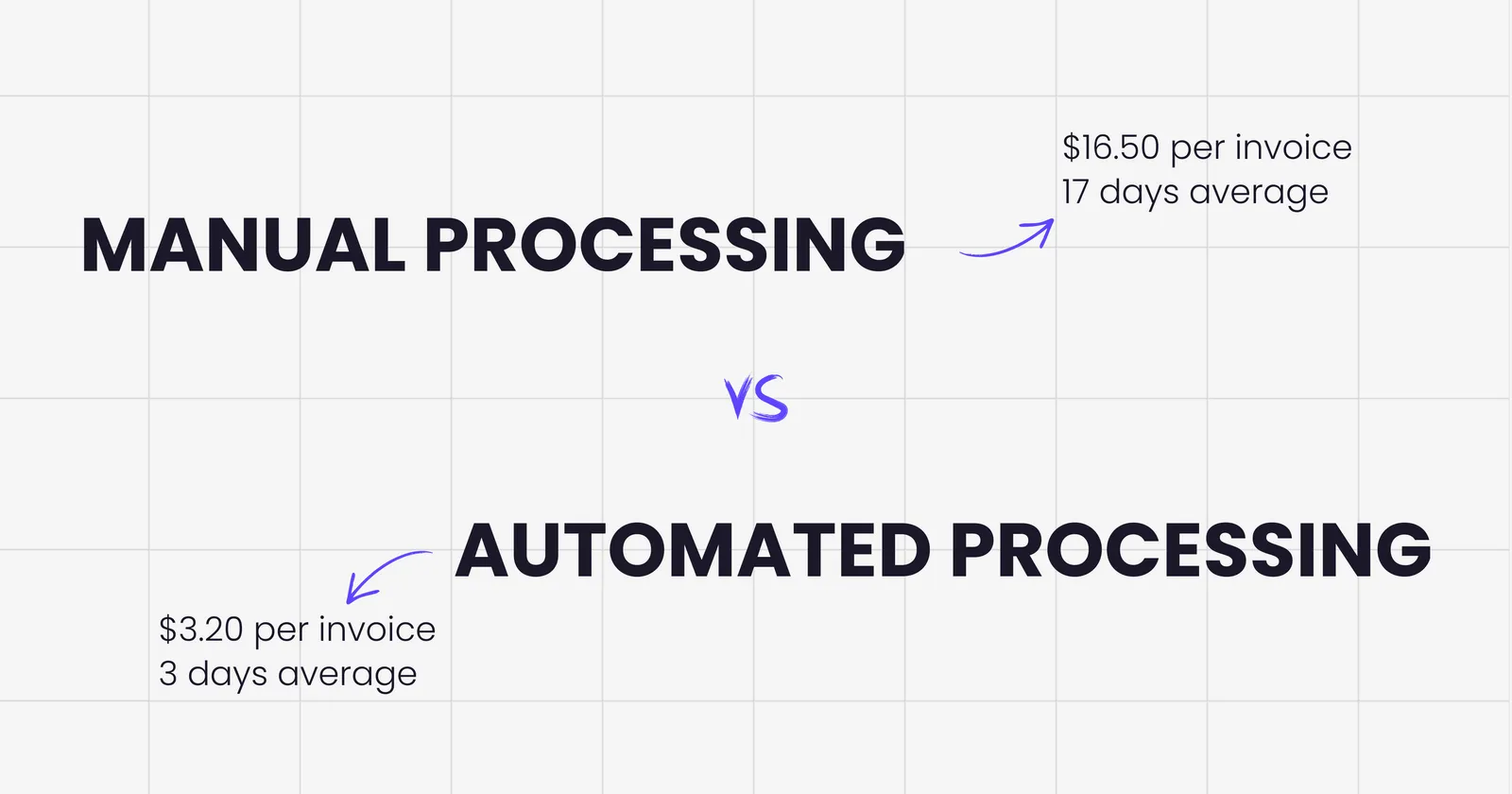
Research from multiple sources confirms that manual invoice processing costs between $15 and $40 per invoice, with the average landing around $16. Companies using automation reduce this to $2-$5 per invoice, representing savings of up to 80% for high-volume operations.
But generic industry averages don't tell you what invoice processing costs your specific business. That number depends on your invoice volume, staff time per invoice, error rates, payment terms with suppliers, and current technology stack. This guide helps you calculate your actual costs using real data from your operations, understand where hidden expenses hide in your workflow, compare your numbers against industry benchmarks, and determine potential savings from automation based on your specific situation.
For a comprehensive framework on evaluating automation solutions once you understand your costs, see our decision guide for choosing invoice management software. For a broader overview of automation options, check our complete buyer's guide to invoice management software.
Understanding the True Cost Components
Invoice processing costs extend far beyond the salary of the person entering data. Breaking down cost components reveals where money actually disappears in your accounts payable workflow.
Direct Labor Costs
Start with the most visible expense, the time your team spends handling invoices. Calculate how many people touch each invoice from receipt to payment. In most manual workflows, this includes the AP clerk who receives and enters the invoice, department staff who review and validate line items, managers who approve invoices within their authority limits, controllers or CFOs who approve larger amounts, and AP staff who follow up on pending approvals.
Now estimate time spent per invoice at each stage. Industry data suggests manual processing requires 15 to 20 minutes total per invoice, but your actual time might differ based on invoice complexity and approval workflows. A simple invoice from a regular supplier might take 10 minutes, while a complex multi-page invoice with numerous line items could consume 30 minutes or more.
Multiply time by loaded labor costs, not just base salary. Loaded costs include base salary, benefits and taxes, overhead allocation, and training time for new staff. This typically adds 30% to 40% to base salary costs. If your AP clerk earns $50,000 annually, the loaded cost approaches $70,000 when including all these factors.
For a company processing 500 invoices monthly at 15 minutes per invoice with loaded labor costs of $35 per hour, the calculation looks like this. Total monthly time equals 500 invoices times 0.25 hours equals 125 hours. Monthly labor cost equals 125 hours times $35 equals $4,375. Cost per invoice equals $4,375 divided by 500 equals $8.75 just in direct labor before adding any other expenses.
Error Correction Costs
Manual data entry creates inevitable mistakes. Studies show error rates of approximately 1.6% per invoice with manual processing, meaning roughly 16 errors for every 1,000 invoices processed. Common errors include wrong amounts entered, incorrect vendor information, duplicate payments, mismatched purchase orders, and wrong account coding.
Each error requires investigation time to identify the problem, communication with vendors or internal staff, correction in your system, potential payment reversals, and management review for significant mistakes. The Institute of Finance and Management estimates error correction costs average $53 per mistake when accounting for all these activities.
Calculate your error correction costs using this formula. Monthly invoices processed times error rate equals errors per month. Errors per month times $53 equals monthly error correction cost. For our example company processing 500 monthly invoices, this equals 500 times 0.016 equals 8 errors monthly. Eight errors times $53 equals $424 monthly in correction costs. That adds $0.85 to the cost per invoice.
But error costs extend beyond direct correction time. Mistakes strain vendor relationships, delay payments creating rush situations, reduce confidence in financial data, and consume management attention better spent elsewhere. These indirect impacts are harder to quantify but equally real.
Technology and Infrastructure
Even manual processing relies on technology, and these costs add up. Your accounts payable function likely uses email for receiving invoices, document storage either physical filing or digital, accounting software or ERP systems, office equipment like scanners and printers, paper forms and physical storage when handling paper invoices, and network infrastructure supporting all these systems.
Calculate your monthly technology allocation by taking the annual cost of each tool and dividing by 12 for monthly cost. Divide monthly cost by monthly invoice volume for per-invoice cost. For example, if your accounting software costs $12,000 annually and you process 6,000 invoices yearly, that's $2 per invoice just for the software license before considering implementation, maintenance, or upgrade costs.
Don't forget supplies that seem minor but accumulate quickly. Paper, ink, and toner for printing invoices. Envelopes and postage for physical documents. File folders and cabinets for paper storage. All these add small amounts per invoice that multiply across hundreds or thousands of monthly invoices.
Tools that automatically extract invoices from your email can eliminate much of this manual infrastructure while reducing the technology complexity your team needs to manage.
Opportunity Costs and Lost Discounts
These hidden costs often exceed direct labor expenses but rarely appear in cost calculations because they're not obvious line items in your budget.
Most vendors offer early payment discounts, typically 1% to 2% if you pay within 10 days instead of the standard 30-day terms. The Institute of Finance and Management estimates 65% of vendors offer these discounts, and the average discount is around 2%. If your manual process takes 25 days from invoice receipt to payment, you're systematically missing these opportunities.
Calculate potential lost discount value. Multiply monthly invoice total by 0.65 to estimate invoices with available discounts. Multiply that amount by 0.02 to calculate 2% savings. Compare this potential savings against your current capture rate. For a company with $100,000 in monthly invoices, this could mean 100,000 times 0.65 equals 65,000 in discount-eligible invoices. Sixty-five thousand times 0.02 equals $1,300 in monthly savings you're leaving on the table if you never capture early payment discounts.
Late payment penalties represent another hidden cost. Manual workflows create delays through lost invoices, approval bottlenecks, forgotten payments, and processing errors requiring correction. Companies report paying nearly $40,000 annually in late fees according to industry studies. Even if you avoid most late payments, occasional delays still create costs.
The biggest opportunity cost might be what your finance team isn't doing while manually processing invoices. Time spent on data entry and error correction is time not spent on cash flow analysis, vendor negotiations, process improvements, strategic financial planning, or fraud prevention. The value of these higher-level activities is hard to quantify but significantly exceeds the value of manual data entry.
Processing Time and Cycle Delays
Time itself costs money in accounts payable. Manual invoice processing typically takes 10 to 17 days from receipt to payment according to various industry studies, with some organizations experiencing delays up to 20 days for complex approval chains. Automated systems reduce this to 2 to 5 days through streamlined digital workflows.
These delays create compounding costs. Vendor relationships suffer when payments consistently arrive late. Your cash flow planning becomes less precise with unpredictable payment timing. Working capital gets tied up as invoices accumulate in the approval pipeline. Emergency rush payments incur expedited processing fees when you need to avoid service interruptions.
Consider how approval delays specifically impact your costs. Invoices sitting in email inboxes or physical in-boxes waiting for manager review. Approvers juggling multiple priorities and batch-processing approvals weekly rather than as invoices arrive. Lost or misfiled invoices requiring search time to locate. Multiple approval levels for larger amounts extending timelines. All these delays extend your invoice cycle time, reducing efficiency and increasing overall costs per invoice.
Calculate Your Actual Cost Per Invoice
Generic industry averages provide useful benchmarks, but your real cost depends on your specific operations. Use this framework to calculate your actual cost per invoice.
Step 1: Calculate Direct Labor Cost Per Invoice
Start by determining how much time your team spends on invoice processing. Track several typical invoices through your complete workflow, timing each step. Receipt and initial entry. Validation and matching to purchase orders. Approval routing and waiting time. Final processing and payment scheduling. Error investigation and correction when needed.
Calculate the loaded hourly cost for each person involved. Base annual salary divided by 2,080 hours for full-time equivalent. Add 35% for benefits, taxes, and overhead. This gives you the true hourly cost per person. For example, an AP clerk earning $50,000 annually equals $24 per hour base rate. Twenty-four dollars times 1.35 equals $32.40 loaded hourly cost.
Multiply time spent by loaded cost for each person. Sum these costs across all people involved to get total labor cost per invoice. If invoice processing requires 10 minutes from the AP clerk and 5 minutes from a manager for approval, you calculate 10 minutes divided by 60 equals 0.167 hours times $32.40 equals $5.41 for AP clerk time. Five minutes divided by 60 equals 0.083 hours times manager rate of $60 loaded equals $5 for approval time. Total direct labor equals $10.41 per invoice.
Step 2: Add Technology and Infrastructure Costs
List every tool and system used in your invoice processing workflow. Calculate annual cost for each. Include software licenses and subscriptions, email and document storage systems, scanner and printer equipment plus maintenance, office supplies like paper and ink, and physical storage space allocated to invoice filing.
Divide total annual technology costs by total annual invoice volume. This gives you the technology cost per invoice. For example, if technology costs total $25,000 annually and you process 6,000 invoices yearly, that equals $4.17 per invoice in technology costs.
Step 3: Calculate Error and Exception Handling
Estimate your error rate by reviewing a sample of processed invoices. What percentage required correction or rework? Industry averages suggest 1.6% error rates, but your actual rate might be higher or lower depending on invoice complexity, staff experience, and existing controls.
Multiply your error rate by $53 per error correction cost. This estimates your error handling cost per invoice. For example, a 1.6% error rate means 0.016 times 53 equals $0.85 per invoice in error correction costs.
Don't forget exception handling for invoices requiring special treatment even without errors. Invoices without matching purchase orders. Amounts that don't match approved quotes. New vendors requiring setup. Disputed charges requiring investigation. Estimate what percentage of invoices require exception handling and how much time each exception consumes.
Step 4: Factor in Payment Delays and Lost Discounts
Calculate your average days to payment from invoice receipt. Review your accounts payable aging reports for recent months. Take the average age of invoices when paid. If this number exceeds 10 days, you're likely missing early payment discounts on most invoices.
Estimate lost discount value. Calculate total monthly invoice amounts from vendors offering early payment terms. Multiply by average discount rate, typically 2%. This shows potential monthly savings you're not capturing. Convert to per-invoice impact by dividing by monthly invoice volume.
Add late payment penalty costs if applicable. Review any late fees or penalty charges paid in recent months. Divide by invoice volume to calculate per-invoice impact.
Step 5: Sum for Total Cost Per Invoice
Add all components calculated above. Direct labor cost per invoice. Technology and infrastructure allocation per invoice. Error correction cost per invoice. Exception handling cost per invoice. Lost discount value per invoice. Late payment penalties per invoice.
This total represents your true cost to process a single invoice manually. Compare this to industry benchmarks. Manual processing averages $15-$16 per invoice according to most studies, with a range from $10-$40 depending on company size and complexity. Top-performing companies using automation achieve costs below $3 per invoice. Where do your numbers fall in this range?
The Invoice Processing Cost Calculator
Now that you understand the components, use this calculator framework to determine your specific costs. You'll need some basic information from your accounts payable operations.
Information You Need to Gather
Before calculating, collect these data points. They don't need to be perfectly precise. Reasonable estimates work fine for identifying your cost range and potential savings.
How many invoices does your company process monthly? Count all supplier invoices requiring payment, including recurring bills, one-time purchases, and expense reimbursements.
How many full-time equivalent employees work in accounts payable? Include anyone spending significant time on invoice processing, even if they have other responsibilities. Convert part-time staff and people splitting time to FTE. For example, two people spending 50% of their time on invoices equals 1.0 FTE.
What's the average loaded salary cost for AP staff? Include base salary plus benefits, taxes, training, and overhead. If you're not sure, multiply base salary by 1.35 for a reasonable loaded cost estimate.
How many invoices require rework due to errors? Review recent months and estimate what percentage of invoices need correction. Common range is 1 to 5% depending on process maturity.
What's your average days from invoice receipt to payment? Check your AP aging reports or payment history. This shows how long invoices sit in your workflow.
Do you currently capture early payment discounts? Review recent discount capture reports if available. Estimate what percentage of available discounts you actually take.
The Calculation Framework
Using the information gathered above, calculate your costs with these formulas.
Monthly direct labor cost equals total AP FTE times loaded annual salary divided by 12 months. This gives monthly labor expense for invoice processing function.
Labor cost per invoice equals monthly labor cost divided by monthly invoice volume. This shows how much of staff time each invoice consumes on average.
Error correction cost per invoice equals error rate as decimal times $53. For example, 2% error rate equals 0.02 times 53 equals $1.06 per invoice.
Technology cost per invoice equals annual technology costs divided by annual invoice volume. Include all systems, software, supplies, and infrastructure.
Lost discount value per invoice equals total monthly invoices times 0.65 times 0.02 divided by monthly invoice volume. This assumes 65% of vendors offer discounts averaging 2%, industry standards according to IOFM data.
Total cost per invoice equals labor cost plus error cost plus technology cost plus lost discount cost. Add late fees if applicable by dividing annual late payment charges by annual invoice volume.
Example Calculation
Let's work through a complete example for a mid-sized company to see how these numbers come together.
Company profile includes 500 monthly invoices processed, 1.5 FTE dedicated to AP work, average loaded salary $70,000 annually per FTE, 2% error rate requiring rework, average 18 days from receipt to payment, and minimal early payment discount capture.
Calculate monthly labor cost: 1.5 FTE times $70,000 equals $105,000 annually. Divide by 12 months equals $8,750 monthly labor cost.
Calculate labor cost per invoice: $8,750 divided by 500 invoices equals $17.50 per invoice in labor.
Calculate error correction cost: 0.02 error rate times $53 equals $1.06 per invoice.
Calculate technology cost: Assuming $18,000 annual technology budget. Divide by 6,000 annual invoices equals $3 per invoice.
Calculate lost discount value: 500 invoices times 1,000 dollar average equals $500,000 monthly invoice value. Multiply by 0.65 times 0.02 equals $6,500 potential monthly discount savings. Divide by 500 invoices equals $13 per invoice in lost discounts.
Total cost per invoice: 17.50 labor plus 1.06 errors plus 3 technology plus 13 lost discounts equals $34.56 per invoice.
At 500 monthly invoices, this company spends $17,280 per month or $207,360 annually just on invoice processing. The lost discount opportunity alone costs $78,000 yearly in savings they could capture with faster payment processing.
Benchmarking Your Costs Against Industry Standards
Understanding how your costs compare to industry standards reveals whether you have significant optimization opportunities or are already operating relatively efficiently.
Industry Cost Benchmarks by Volume
Invoice processing costs vary significantly based on volume because fixed costs spread across more invoices as volume increases. Here's how costs typically break down.
Low volume operations processing fewer than 20,000 invoices annually. Manual processing averages $15.97 per invoice. Automated processing averages $12.98 per invoice. The smaller gap reflects less ROI potential for very low volumes, though automation still provides accuracy and speed benefits even if cost savings are modest.
Medium volume operations processing 20,000 to 100,000 invoices annually. Manual processing averages $6.10 per invoice. Automated processing averages $4.24 per invoice. Mid-size companies see clear ROI from automation as the cost gap widens.
High volume operations processing over 100,000 invoices annually. Manual processing averages $3.62 per invoice. Automated processing averages $3.18 per invoice. Even highly optimized manual processes can't match automation efficiency at scale.
These benchmarks come from Institute of Finance and Management research analyzing accounts payable operations across industries and company sizes.
Processing Time Benchmarks
Speed matters as much as cost because faster processing enables early payment discounts, improves vendor relationships, and frees staff time for higher-value work.
Manual processing timelines typically span 10 to 17 days from invoice receipt to payment. Bottom performers take 20 days or more. Top manual performers achieve 7 to 10 days with highly optimized workflows.
Automated processing timelines average 2 to 5 days from receipt to payment. Best-in-class companies using comprehensive automation achieve under 3 days consistently. The speed improvement comes from eliminating manual handoffs, routing delays, and approval bottlenecks.
Processing time directly impacts discount capture. Most early payment discounts require payment within 10 days of invoice date. If your manual process takes 15 days on average, you mathematically cannot capture these discounts even with perfect execution. Automation compresses timelines enough to make discount capture feasible.
Error Rate Benchmarks
Accuracy improves dramatically with automation because machines don't make typos or transpose numbers.
Manual data entry error rates range from 1.6 to 15% depending on invoice complexity, staff training, and verification procedures. The 1.6% figure represents careful manual entry with review. Higher rates occur when processing high volumes quickly without adequate controls.
Automated OCR extraction error rates typically achieve 90 to 99% accuracy depending on invoice quality and OCR sophistication. Modern AI-powered systems approach 99% accuracy on standard invoices. Even with OCR errors, automated systems flag low-confidence extractions for manual review rather than processing incorrect data.
The accuracy improvement reduces error correction costs substantially. Dropping from 2% to 0.2% error rates cuts correction costs by 90% while also eliminating the downstream impacts of bad data flowing into your financial systems.
Understanding Automation's ROI
Knowing your current costs enables calculating potential automation savings. Return on investment from AP automation typically materializes through three primary channels.
Direct Cost Reduction
The most obvious savings come from reduced labor requirements. Automation typically reduces processing time from 15 to 20 minutes per invoice down to 2 to 5 minutes per invoice. This represents an 80% time reduction enabling AP staff to handle 3 to 4 times more invoice volume without adding headcount.
Calculate your potential labor savings. Multiply current monthly labor cost by 0.70 for a 70% reduction estimate. For our example company spending $8,750 monthly on AP labor, automation could reduce this to $2,625 monthly, saving $6,125 per month or $73,500 annually.
Error reduction saves correction costs. If automation drops your error rate from 2% to 0.2%, you're eliminating 90% of error correction work. At $53 per error, this adds up quickly. For 500 monthly invoices, reducing errors from 10 per month to 1 per month saves $477 monthly or $5,724 annually.
Discount Capture Improvement
Faster processing enables capturing early payment discounts you currently miss. If automation reduces your cycle time from 18 days to 3 days, you can suddenly capture 10-day discounts representing 2% of invoice value.
Calculate potential discount savings. Multiply total annual invoice value by 0.65 for discount-eligible portion. Multiply that by 0.02 for typical 2% discount. This shows maximum potential savings. Current capture rate reduces this, so subtract what you already capture.
For a company processing 6 million dollars in annual invoices, potential discount value equals 6 million times 0.65 times 0.02 equals $78,000 annually. If currently capturing zero discounts, automation could unlock this full amount. Even partial improvement yields substantial savings.
The shift toward email-first invoice capture accelerates these processing timelines even further by eliminating the manual collection step entirely.
Opportunity Value Gains
When your AP team spends less time on manual data entry, they can focus on higher-value activities including vendor relationship management and negotiations, spend analysis identifying cost reduction opportunities, process improvement initiatives, fraud detection and prevention, and strategic cash flow management.
The value of these activities is harder to quantify than direct cost savings but often exceeds them. Better vendor terms from improved relationships might save 5% on annual spend. Proactive fraud prevention could avoid six-figure losses. Strategic cash flow management optimizes working capital deployment.
Estimate conservative opportunity value by assuming your AP staff can dedicate 30% of reclaimed time to these high-value activities. Calculate the potential impact of vendor negotiations, spend optimization, and improved financial visibility. Even modest improvements in these areas generate substantial returns.
Calculating Your Specific ROI
Use this framework to estimate your automation ROI.
Annual cost savings equals current annual processing cost minus projected automated processing cost. Use $3-$5 per invoice as automation benchmark. Add discount capture improvement based on your specific payment terms and invoice values.
Implementation investment includes software licensing typically 10,000 to $50,000 annually depending on invoice volume and features, implementation services usually 15,000 to 40,000 one-time for setup and training, integration work connecting to your accounting system, and change management time for staff training and process adjustment.
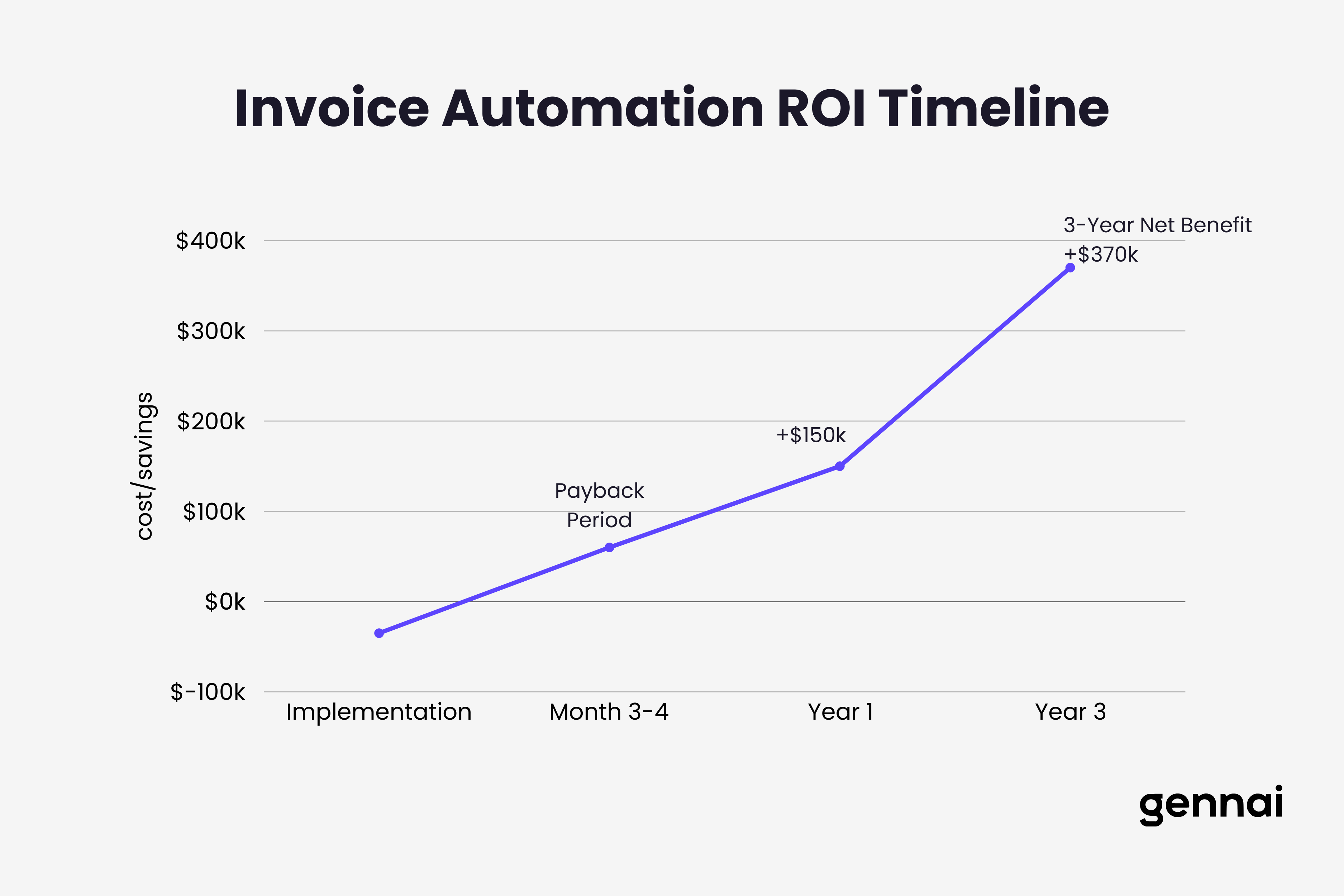
Payback period equals total implementation investment divided by annual cost savings. Industry data shows typical payback periods of 6 to 18 months for mid-sized implementations.
Three-year net benefit equals total three-year savings minus implementation cost minus annual licensing. This shows the cumulative financial benefit over a typical software evaluation timeframe.
For our example company currently spending $207,000 annually on invoice processing, automation could reduce this to approximately $45,000 annually at 3 times 500 times 12 equals 18,000 in processing costs plus 27,000 in labor for exception handling. Add 40,000 in captured discounts for total benefit of 165,000 annually.
Against implementation costs of 35,000 for software and setup plus 15,000 annual licensing, the payback period equals 35,000 divided by 150,000 equals 2.8 months. Three-year net benefit equals 450,000 savings minus 35,000 implementation minus 45,000 licensing equals $370,000.
For a step-by-step ROI framework you can take directly to your board, including worked scenarios across small, mid-market, and enterprise companies, see our CFO's guide to AP automation ROI.
Beyond the Numbers: Hidden Benefits of Automation
Financial ROI tells most of the story, but automation delivers additional benefits that don't appear directly in cost calculations yet significantly impact business operations.
Improved Vendor Relationships
Paying invoices on time or early strengthens supplier relationships. Vendors appreciate reliable payment timing and respond with better terms, priority service during shortages, flexibility during cash flow challenges, and preferred customer treatment.
These relationship benefits are hard to quantify but become crucial during supply chain disruptions or when negotiating important contracts. Vendors remember which customers pay promptly and which create payment headaches.
Better Cash Flow Visibility
Real-time visibility into pending invoices and upcoming payments improves cash flow forecasting. Manual systems with invoices scattered across email and paper make accurate forecasting nearly impossible. Automation centralizes all invoice data enabling accurate payment projections, better working capital management, and strategic timing of larger payments.
CFOs consistently cite improved financial visibility as one of automation's most valuable benefits even though it doesn't directly show up in cost savings calculations.
Audit Readiness and Compliance
Digital invoice workflows create automatic audit trails showing who received, reviewed, approved, and paid each invoice with timestamps for every action. This documentation becomes invaluable during audits, compliance reviews, or vendor disputes.
Manual paper trails require physical document retrieval and reconstruction of approval chains. Digital systems provide instant access to complete documentation reducing audit preparation time from weeks to days.
Scalability Without Headcount Growth
Perhaps automation's greatest strategic benefit is enabling invoice volume growth without proportional staffing increases. A manual AP team processing 500 invoices monthly might need additional staff if volume grows to 1,000 monthly. Automated systems handle volume increases without adding people.
This scalability matters enormously for growing companies. Automation allows your AP function to scale with business growth without becoming a constraint requiring constant hiring, training, and management attention.
Making the Business Case for Automation
Armed with accurate cost calculations and ROI projections, you can build a compelling case for invoice automation investment.
Presenting the Financial Case
Structure your proposal around clear financial metrics that resonate with decision-makers. Current annual invoice processing costs with full breakdown. Projected costs after automation implementation. Annual savings potential from labor reduction, error elimination, and discount capture. Implementation investment required including software, services, and internal time. Payback period showing how quickly investment returns. Three-year and five-year net present value demonstrating long-term benefit.
Use conservative estimates when uncertain. Underpromising and overdelivering builds credibility. If you're not sure about discount capture potential, estimate 50% of maximum opportunity rather than claiming 100% immediately.
Addressing Common Objections
Anticipate pushback and prepare responses. We can't afford the investment right now. Counter with payback period and cash flow neutral implementation options spreading costs over time. Our current process works fine. Present time and cost data showing hidden inefficiencies and opportunity costs. Automation will eliminate jobs. Position as redeployment to higher-value work rather than elimination. Change will disrupt operations. Outline phased implementation approach minimizing disruption.
Most objections stem from uncertainty about implementation complexity or concerns about change management. Address these directly with clear plans and realistic timelines.
Starting Small With Proof of Concept
If full automation seems too risky or expensive, propose a limited pilot program. Select a subset of invoices from specific vendors or departments. Implement automation for just these invoices. Measure results against current process. Use pilot data to project full-scale benefits.
Successful pilots build internal champions and demonstrate feasibility before committing to enterprise-wide rollout. The pilot also allows your team to learn and refine processes before scaling.
Email invoice extraction tools like Gennai start at $79 monthly for up to 750 invoices, positioning as an accessible automation entry point for small businesses not ready for enterprise AP systems.
Conclusion
Manual invoice processing costs far more than most companies realize. The $15-$40 per invoice that businesses spend on manual processing includes direct labor, error correction, technology infrastructure, lost discounts, and opportunity costs from staff time consumed by routine data entry rather than strategic financial work.
Calculating your specific cost per invoice reveals your actual expense and identifies optimization opportunities. Use the framework in this guide to determine your real numbers based on your invoice volume, staff time, error rates, and processing delays. Compare your results to industry benchmarks to see where you stand.
Automation typically reduces invoice processing costs to $2-$5 per invoice while accelerating payment cycles from 15 days to under 3 days. This speed improvement enables capturing early payment discounts averaging 2% that manual processes miss, strengthening vendor relationships through reliable payment timing, and freeing AP staff time for higher-value financial analysis and process improvement work.
For most companies processing over 200 invoices monthly, automation ROI is compelling with payback periods under 12 months followed by ongoing annual savings that compound over time. Even smaller operations benefit from improved accuracy, speed, and financial visibility that automation delivers. For a complete implementation playbook, see our accounts payable automation guide.
The question isn't whether manual processing costs too much. The data clearly shows it does. The question is whether your current manual costs justify the investment in automation for your specific situation. Run your numbers using this guide's framework, compare against industry benchmarks, and calculate your projected ROI.
You might discover that your business is leaving substantial savings on the table every month while your AP team drowns in manual work that technology could handle automatically. Those monthly losses multiply into six-figure annual impacts that automation could recover starting immediately.
TL;DR
- Manual invoice processing costs $15-$40 per invoice when you include labor, errors, technology, lost discounts, and opportunity costs
- Use the calculator framework to determine your specific costs: labor + errors ($53 each) + technology + lost discounts (2% × 65% of invoices)
- Industry benchmarks: manual processing takes 10-17 days; automation reduces this to 2-5 days
- Automation ROI typically shows payback in 6-12 months through 70% labor reduction, 90% error reduction, and discount capture
- Example: A company processing 500 invoices monthly could save $165,000 annually with automation
- Start small with email extraction tools starting at $79/month before committing to enterprise solutions
- Hidden benefits include better vendor relationships, cash flow visibility, audit readiness, and scalability without headcount growth
Ready to automate your invoices?
Start extracting invoices from your email automatically with Gennai. Free plan available, no credit card required.
Start FreeRelated Articles
What to do when a supplier sends the wrong invoice
A supplier sent the wrong invoice? Here is what to do: identify the error, ask for a corrected invoice or credit note, and hold payment until it is right.
GuideHow to Automate Invoice Processing in 5 Simple Steps
Learn how to automate invoice processing in 5 actionable steps: audit your workflow, connect sources, configure extraction, set approval rules, and optimize.
GuideAccounts Payable Automation: Complete Guide
Complete guide to accounts payable automation: implementation steps, ROI calculation, phased rollout, and practical advice for finance teams of any size.