
How to Choose Invoice Management Software
How to choose the right invoice management software. Decision framework covering features, ROI, integrations, and scalability for any business size.

Choosing invoice management software should be straightforward, but the reality is different. Finance teams face dozens of options, each promising to solve their invoice processing challenges. Some claim AI-powered automation, others tout seamless integrations, and many advertise features you might never use.
The decision becomes even more critical when you consider that companies implementing the right invoice management automation report payback periods of 6 to 12 months, followed by ongoing annual savings ranging from $50,000 to over $500,000 depending on invoice volume. Businesses using modern automated systems process invoices 75% faster while reducing errors by over 90% compared to manual methods.
But here's what most software comparison guides won't tell you: the "best" invoice management software doesn't exist. What exists is the right software for your specific business needs, invoice volume, team size, and existing tech stack.
This guide walks you through a practical decision framework that helps you evaluate options based on what actually matters for your organization. No fluff, no vendor bias. Just the criteria that separate software that transforms your accounts payable from software that becomes shelfware.
For a comprehensive overview of invoice management software categories and features, see our complete buyer's guide to invoice management software.
Understanding Your Current Invoice Processing Reality
Before evaluating any software, you need a clear picture of your current situation. Many finance teams skip this step and end up selecting software based on features they think they need rather than problems they actually have.
Start by documenting your current invoice processing workflow. How many invoices does your team handle monthly? Where do these invoices come from? Email attachments, vendor portals, physical mail, or a combination? How long does it take from receiving an invoice to final payment? What percentage of invoices require manual intervention due to errors or missing information?
The answers to these questions determine your software requirements. A company processing 50 invoices per month from a handful of regular suppliers has fundamentally different needs than an organization handling 2,000 invoices monthly from hundreds of vendors across multiple currencies.
Your invoice volume isn't just a number, it defines your automation needs. Companies processing fewer than 100 invoices monthly might achieve sufficient efficiency with basic email invoice extraction tools that organize invoices from multiple inboxes. Mid-sized businesses handling 500 to 2,000 invoices need more sophisticated automation with approval workflows and ERP integration. Enterprises managing 5,000+ invoices monthly require comprehensive platforms with advanced AI, multi-entity support, and extensive compliance features.
Consider your team's pain points. Are you constantly chasing down approvals? Do duplicate invoices slip through? Are late payment penalties eroding your margins? Does your current process lack visibility into what's pending, approved, or paid? Each pain point maps to specific software capabilities that become non-negotiable in your evaluation.
To understand what disorganized invoice processing actually costs your business, see our analysis of the hidden cost of lost invoices in email.
The Five Core Evaluation Criteria
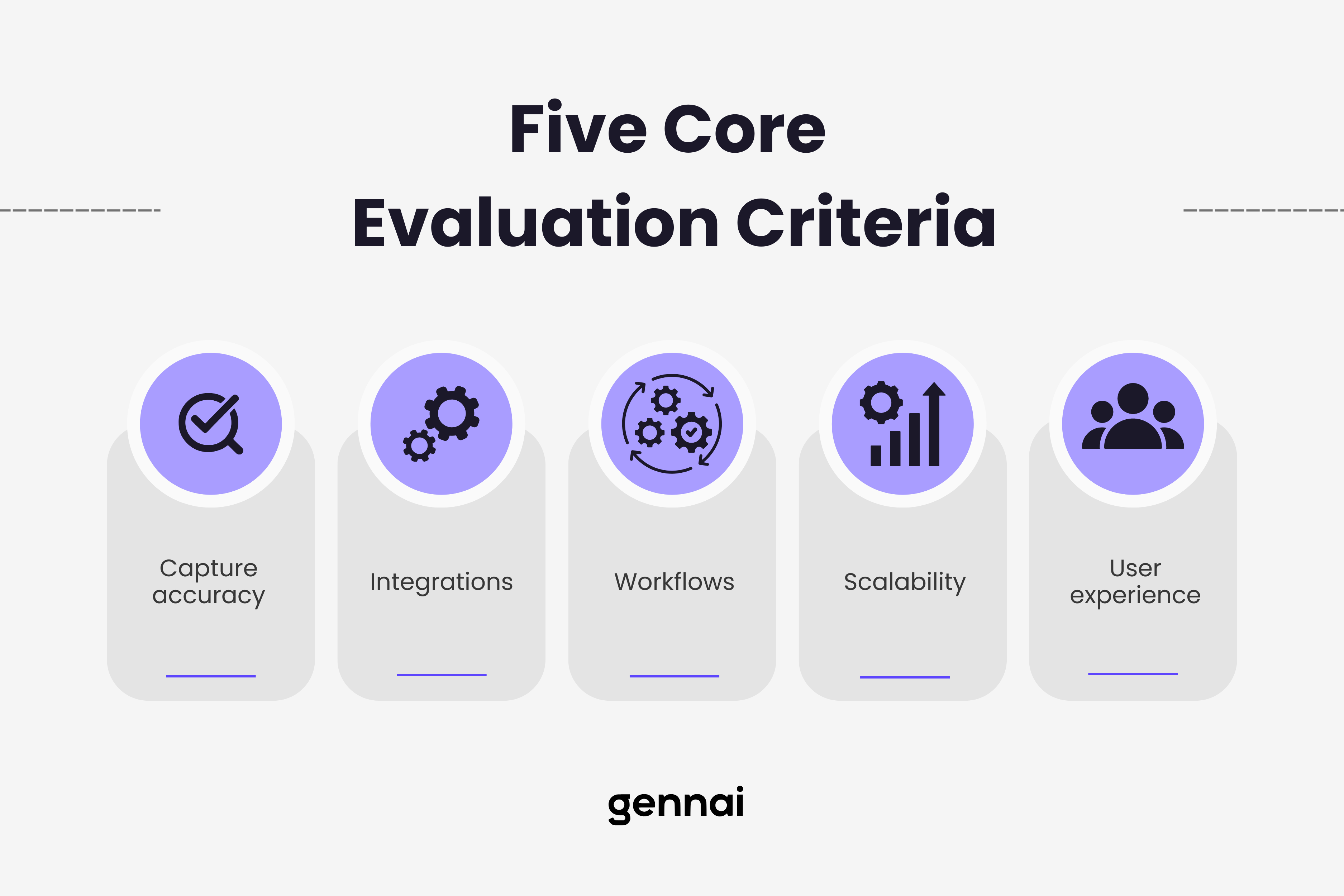
These five criteria represent the foundation of any software evaluation. For a detailed checklist of specific features to look for in each area, see our guide to 10 must-have features in invoice management software.
1. Invoice Capture and Data Extraction Accuracy
How software captures and extracts invoice data determines everything downstream. Manual data entry errors cost businesses 5 to 8% of invoice value annually, making extraction accuracy your first consideration.
Modern invoice management software uses AI-powered optical character recognition (OCR) to extract data from invoices automatically. However, accuracy varies dramatically between providers. Top-tier solutions achieve around 90% accuracy across various invoice formats, while lower-quality systems struggle with anything beyond standard templates.
Test any software with your actual invoices, not vendor-provided samples. Your suppliers likely use diverse formats, and some may send handwritten invoices, scanned PDFs with poor quality, or multi-page invoices with complex line items. The software needs to handle your real-world variety.
Pay attention to how the system handles exceptions. Even with 90% accuracy, you'll have invoices that require manual review. The best systems flag uncertain extractions for human verification rather than processing incorrect data. They also learn from corrections, improving accuracy over time.
Consider your invoice sources. If most invoices arrive via email, look for solutions that connect directly to Gmail and Outlook to automatically extract invoices from multiple inboxes. This email-first approach to invoice capture eliminates the manual download and upload step, saving hours weekly while ensuring nothing falls through the cracks.
For businesses receiving physical invoices, mobile scanning capabilities become essential. The software should allow anyone to photograph invoices with a smartphone and have data extracted immediately, maintaining the same accuracy as digital invoices.
2. Integration Capabilities with Your Existing Tech Stack
Invoice management software doesn't operate in isolation. It needs to communicate seamlessly with your accounting software, ERP system, and payment platforms. Poor integration creates data silos, forcing manual data transfer that defeats the purpose of automation.
Start with your accounting software integration. Whether you use QuickBooks, Xero, NetSuite, Sage, or another platform, the invoice management software must sync invoice data, approval status, and payment information bidirectionally. One-way integrations or systems requiring manual exports create bottlenecks and opportunities for errors.
The integration should be real-time, not batch processing that runs overnight. When an invoice is approved in your invoice management system, it should appear immediately in your accounting software with all relevant coding, cost centers, and approval trails intact. When payment is processed, both systems should update simultaneously.
Consider your payment processing needs. If you use specific payment platforms or banking systems, ensure the software integrates directly. Some businesses benefit from virtual card payments that generate rebates, while others need ACH transfers, international wire capabilities, or multiple payment options for different vendors.
For companies using procurement systems or purchase order software, three-way matching capabilities become crucial. The software should automatically match invoices to purchase orders and receiving documents, flagging discrepancies before payment. This reduces fraud risk and ensures you only pay for what you actually received.
Think about your communication tools. If your team uses Slack or Microsoft Teams, invoice approval notifications delivered directly in these platforms can accelerate approval cycles significantly compared to email notifications that get buried in crowded inboxes.
3. Approval Workflows and Control Features
Every organization has unique approval hierarchies based on invoice amount, department, vendor, or project. Your invoice management software must accommodate these workflows without forcing you to change how your business operates.
Evaluate workflow flexibility. Can you set up conditional routing based on multiple criteria? For example, invoices under $500 might auto-approve for regular vendors but require manager approval for new suppliers. Invoices over $5,000 might need CFO sign-off regardless of vendor. The software should handle these nuances without custom development.
Look for parallel and sequential approval options. Some invoices might require approval from both a department head and finance team simultaneously, while others need sequential approvals where finance only sees invoices after department approval. The system should support both models.
Mobile approval capabilities matter more than most people realize. Delays often happen because an approver is traveling or away from their desk. Software that allows approvals via smartphone app means invoices don't sit in queues for days waiting for someone to return to the office.
Audit trails are non-negotiable for compliance and fraud prevention. Every invoice should have a complete history showing who received it, when, what actions were taken, and by whom. This visibility protects against disputes and provides evidence for audits.
Consider delegation and backup approver features. When your CFO is on vacation, someone else needs temporary approval authority. The software should make delegation simple while maintaining a clear record of who actually approved each invoice.
4. Scalability and Future-Proofing
Your invoice volume today won't be your invoice volume in two years. Companies that choose invoice management software based solely on current needs often hit limitations quickly, forcing expensive migrations or workarounds.
Assess how the software handles volume increases. Some platforms charge per invoice, making costs unpredictable as your business grows. Others use seat-based pricing that scales more predictably with team size. Understand the pricing structure and project your costs at 2x and 5x your current invoice volume.
Multi-entity support becomes critical for companies planning expansion. If you might acquire other businesses or open international offices, ensure the software can handle multiple entities with separate workflows, currencies, and reporting while providing consolidated visibility when needed.
Currency and compliance support matters for global operations. Software that only handles domestic invoices won't work if you plan international expansion. Look for native multi-currency support, tax compliance for different jurisdictions, and the ability to work across time zones without confusion.
API availability indicates future flexibility. Even if you don't need custom integrations today, having API access means you can connect to future tools and build custom workflows as your needs evolve. Closed systems without APIs trap you in vendor-defined limitations.
Vendor stability and development roadmap matter. Choose software from companies actively investing in AI improvements, new integrations, and features that address emerging needs. Check release notes to see how frequently they update their platform and whether updates align with industry trends.
5. User Experience and Adoption Reality
The most powerful software fails if your team won't use it. User experience determines adoption rates, and poor adoption undermines every efficiency gain you're trying to achieve.
Interface intuitiveness matters for everyone who touches the system. Accounts payable staff should be able to process invoices without extensive training. Approvers should understand exactly what they're approving at a glance. Managers should access reports without hunting through multiple menus.
Role-based dashboards help by showing each user only what's relevant to them. AP staff see pending invoices requiring coding or review. Approvers see invoices waiting for their sign-off. CFOs see cash flow projections and spending analytics. Nobody wastes time navigating irrelevant features.
Consider your team's technical sophistication honestly. If your finance team struggles with technology, beautiful design won't help if the workflow is complex. Look for software that makes the right action obvious and makes errors difficult to commit.
Vendor support quality becomes crucial during implementation and beyond. Check what support channels are available: phone, email, chat, or just a knowledge base. Look at online reviews to see how responsive support actually is. Implementation assistance makes the difference between smooth rollout and frustrated users who revert to old processes.
Training resources should be comprehensive but digestible. Look for video tutorials, interactive walkthroughs, and documentation that addresses common questions. The best vendors offer ongoing training, not just initial onboarding, because teams evolve and features expand.
Calculating Your ROI and Budget Allocation
Price matters, but total cost of ownership tells the complete story. A cheaper solution that requires manual workarounds or causes payment delays can cost far more than premium software that automates everything.
Calculate your current invoice processing cost. If your AP team spends 15 minutes on average per invoice manually entering data, routing for approvals, and following up, that's a quantifiable cost. Multiply by your monthly invoice volume and their hourly rate. Add costs from late payment penalties, missed early payment discounts, and accounting errors that require investigation.
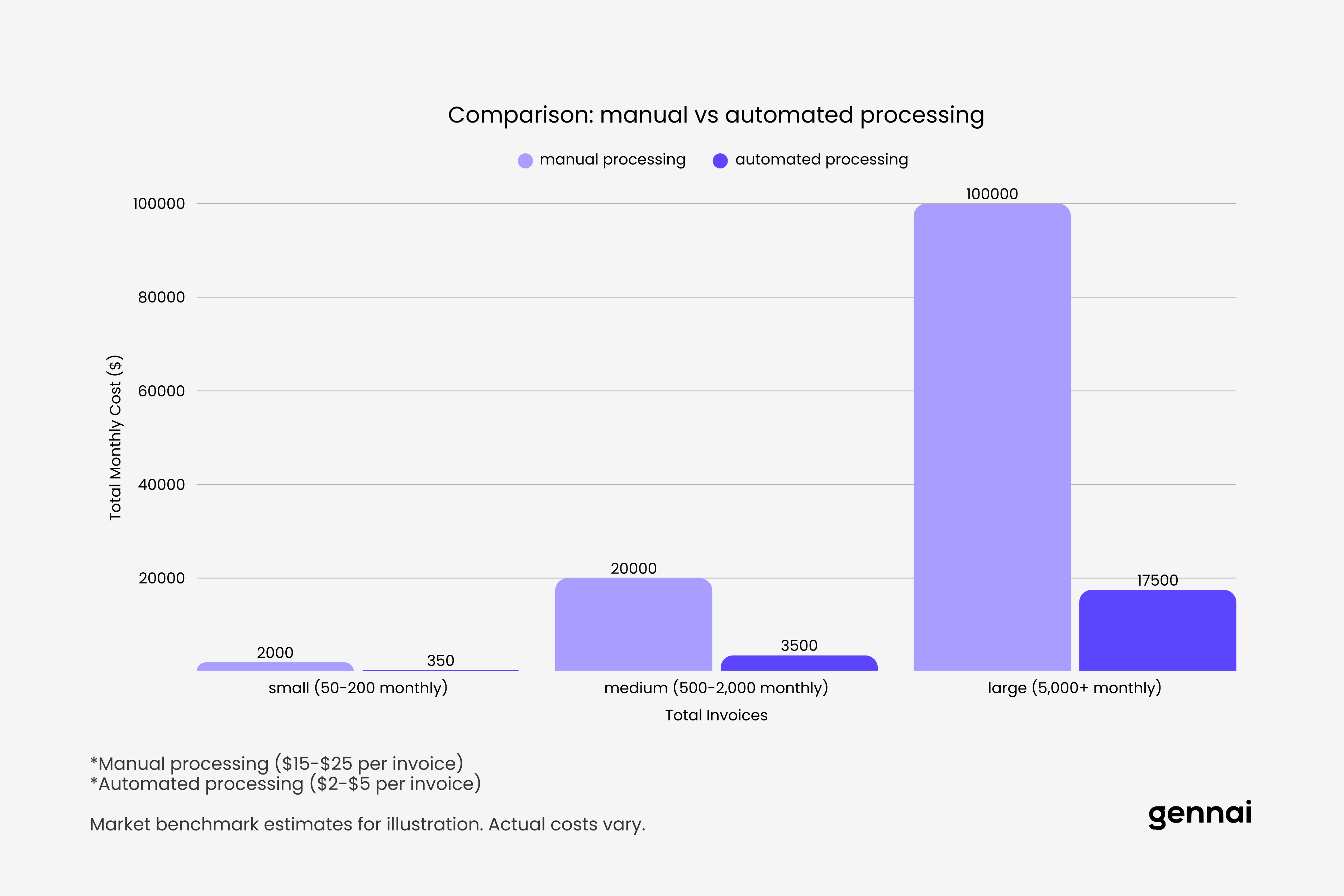
Compare this to your projected costs with automated software. Even factoring in software subscription fees, most organizations find that reducing processing time from 15 minutes per invoice to 3 minutes generates immediate positive ROI. Companies report processing cost reductions from $15 to $25 per invoice with manual methods down to $2 to $5 per invoice with automation.
Consider cash flow improvements separately from processing savings. Faster invoice processing enables you to capture early payment discounts you currently miss. It also improves visibility into cash needs, reducing the risk of cash crunches or emergency financing at unfavorable rates.
Factor in error reduction benefits. Manual processing typically results in 5 to 8% error rates requiring investigation and correction. Automated extraction with validation reduces this to under 1%. Each prevented error saves investigation time and protects vendor relationships.
Don't forget opportunity costs. When your finance team spends less time on manual data entry and invoice chasing, they can focus on strategic analysis, vendor negotiations, and process improvements that drive additional value.
For companies processing fewer than 200 invoices monthly, simple email invoice extraction tools starting around $79 monthly often provide the best ROI by eliminating manual collection without enterprise features you don't need. Mid-market businesses handling 500 to 2,000 invoices typically need full-featured platforms in the $500 to $2,000 monthly range. Enterprises processing thousands of invoices justify premium solutions with advanced AI and multi-entity support.
Implementation Considerations and Timeline Planning
Selecting software is just the beginning. Implementation quality determines whether you achieve the promised benefits or struggle with a system that never quite works right.
Plan for a realistic implementation timeline. Simple email extraction tools might be operational in days, but comprehensive systems with complex workflows and extensive integrations typically require 4 to 12 weeks for full implementation. Vendors promising instant setup for complex needs are either oversimplifying or will leave you figuring out critical details alone.
Data migration strategy needs attention upfront. How will historical invoice data transfer to the new system? Do you need it all, or just open invoices and key vendors? Migration errors create reconciliation nightmares, so allocate time for validation.
Parallel processing during transition reduces risk. Running old and new systems simultaneously for a few weeks catches problems before you're fully dependent on new software. Yes, it means temporary double work, but it prevents the disaster of discovering critical issues after you've shut down old processes.
Change management makes or breaks implementation. Your team needs to understand not just how to use the new software, but why you're changing and what benefits they'll personally experience. Resistance often comes from fear of job elimination, so be transparent about how automation will shift their work toward more valuable activities rather than replacing them.
Vendor selection of an implementation partner matters. Some vendors handle everything themselves, while others work with certified implementation partners. Ask about typical implementation timelines for companies like yours and request customer references at similar scale.
Post-implementation optimization is ongoing. Your initial setup won't be perfect. Plan to review workflows monthly for the first quarter, making adjustments based on what's actually working versus theoretical design. The best systems improve over time as you refine rules and training.
Red Flags and Deal Breakers
Certain warning signs should eliminate options from consideration, regardless of how good other aspects appear.
Vendor lock-in through proprietary formats or lack of data export capabilities is a major red flag. You should be able to extract all your data in standard formats at any time. Vendors who make leaving difficult are betting you'll tolerate poor service rather than face migration pain.
Unclear pricing or hidden fees destroy budget planning. If the vendor can't provide a clear price for your anticipated usage, including any potential overage charges, keep looking. Some platforms advertise low base prices but charge separately for every integration, user, or advanced feature, making actual costs far higher than initial quotes.
Insufficient security measures put your financial data at risk. At minimum, look for SOC 2 compliance, data encryption both in transit and at rest, and detailed access controls. If the vendor can't articulate their security practices clearly, your auditors won't be happy.
Lack of recent updates or development suggests a dying product. Check when the software was last updated significantly. Platforms that haven't added features or integrations recently might be maintained but not actively developed, meaning you'll fall behind as your needs evolve.
Consistently negative reviews about customer support indicate problems. One or two unhappy customers happens to every vendor, but patterns of unresponsive support or unresolved issues signal trouble. You're trusting this vendor with critical financial processes, so their commitment to customer success matters enormously.
Overselling capabilities that don't match reality wastes everyone's time. If claims seem too good to be true, they probably are. Vendors promising 100% accuracy or instant implementation with no effort are either lying or don't understand their own product limitations.
Making Your Final Decision
With evaluation criteria clear and options narrowed, making the final decision requires balancing multiple factors against your specific priorities.
Create a weighted scorecard based on your unique needs. If integration with your specific ERP is critical, weight that heavily. If you're drowning in email invoices from multiple accounts, prioritize email extraction capabilities. If your approval workflows are complex, emphasize workflow flexibility. Not all criteria matter equally for every organization.
Involve actual users in the decision. The software might look great to you, but if the people processing invoices daily hate the interface, adoption will suffer. Get your AP team's input on usability and your approvers' feedback on the approval experience.
Request trial periods or proof-of-concept implementations before committing. Most reputable vendors offer trials or pilot programs. Use your actual invoices, your real workflows, and your team members to test thoroughly. A week of hands-on experience reveals more than hours of demos.
Check references from similar companies. Vendors provide references who had good experiences, but asking the right questions still yields valuable insights. How long did implementation actually take? What problems came up and how responsive was support? What would they do differently? What features sounded great but they never actually use?
Consider your risk tolerance for vendor size and maturity. Established enterprise vendors offer stability but often less innovation and higher costs. Newer companies might have cutting-edge features and better pricing but carry more risk of pivoting or getting acquired. Neither choice is inherently better; it depends on your priorities.
Conclusion
Choosing invoice management software shouldn't feel overwhelming once you have a clear decision framework. Start by understanding your current reality: invoice volume, sources, team capacity, and specific pain points. This defines your actual requirements rather than theoretical nice-to-haves.
Evaluate options systematically across the five core criteria: data extraction accuracy, integration capabilities, workflow flexibility, scalability, and user experience. Calculate realistic ROI based on your current costs and projected savings. Plan for thorough implementation with proper change management and timeline expectations.
Watch for red flags that indicate poor fit: vendor lock-in, unclear pricing, weak security, stagnant development, or consistent support complaints. Use weighted scorecards aligned with your priorities, involve actual users in testing, and demand proof through trials or pilots.
Remember that the goal isn't finding perfect software, it's finding software that solves your specific problems efficiently while fitting your budget and growing with your business. The right choice for a company processing 50 invoices monthly looks very different from the right choice for an enterprise handling 5,000 invoices across multiple entities.
The best invoice management software is the one your team will actually use, that integrates cleanly with your existing systems, and that delivers measurable ROI within your first year. Everything else is noise.
Start with your requirements, not with software features. Let your specific needs guide you to the right solution rather than letting impressive demos convince you to buy capabilities you don't need. The software that transforms your accounts payable isn't the one with the longest feature list, it's the one that elegantly solves the problems you face every day.
TL;DR
- The "best" invoice management software doesn't exist - only the right software for your specific needs, volume, and tech stack
- Five core evaluation criteria: data extraction accuracy, integration capabilities, approval workflows, scalability, and user experience
- Calculate ROI realistically: manual processing costs $15-25 per invoice; automation drops this to $2-5
- Match software to volume: under 200 invoices = simple email extraction tools; 500-2,000 = mid-market platforms; 5,000+ = enterprise solutions
- Watch for red flags: vendor lock-in, hidden fees, weak security, stagnant development, poor support reviews
- Test with real invoices during trials, not vendor-provided samples
- Involve actual users in evaluation - adoption determines success
Ready to automate your invoices?
Start extracting invoices from your email automatically with Gennai. Free plan available, no credit card required.
Start FreeRelated Articles
Best Invoice Software for Freelancers (2026)
Complete guide to invoice software for freelancers. Compare best tools to issue and organize invoices from suppliers. Free and paid options reviewed.
GuideDext vs Xero 2026: Comparison and Alternative
Dext costs $24+/user. Xero doesn't extract invoices from email. Here's what actually works for automatic invoice capture in 2026 (with pricing comparison).
GuideInvoice Software: Complete Buyer's Guide 2026
Choose the right invoice management software for your business. Compare features, pricing, and types. Real advice from finance professionals. 2026 guide.