
How to Automate Invoice Processing in 5 Simple Steps
Learn how to automate invoice processing in 5 actionable steps: audit your workflow, connect sources, configure extraction, set approval rules, and optimize.

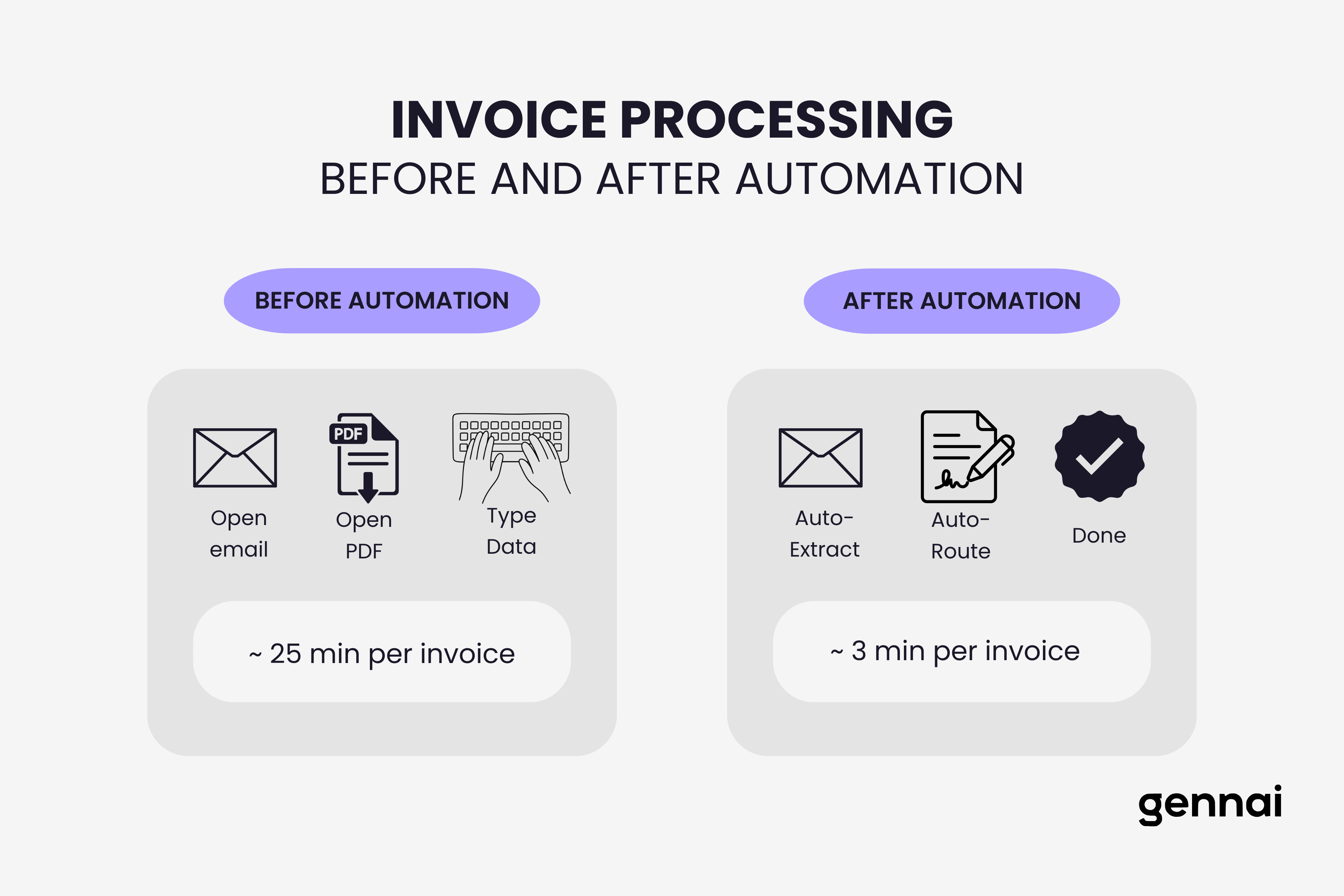
You're spending 25 minutes per invoice. Open the email, download the PDF, type the vendor name, invoice number, amount, and due date into your accounting system, chase down an approval, then file everything.
Multiply that by 200 invoices a month and you've burned an entire work week on data entry.
And it's not just the time. Manual processing costs most businesses between $10 and $15 per invoice when you factor in labor, error correction, and late payment penalties. That adds up to tens of thousands of dollars a year for even small teams.
The fix isn't complicated. Automating invoice processing doesn't require an enterprise budget or a six-month IT project. Most businesses can get started in a single afternoon and see results the same week.
Here are five steps that take you from manual chaos to automated processing. No jargon, no fluff, just what to do and in what order.
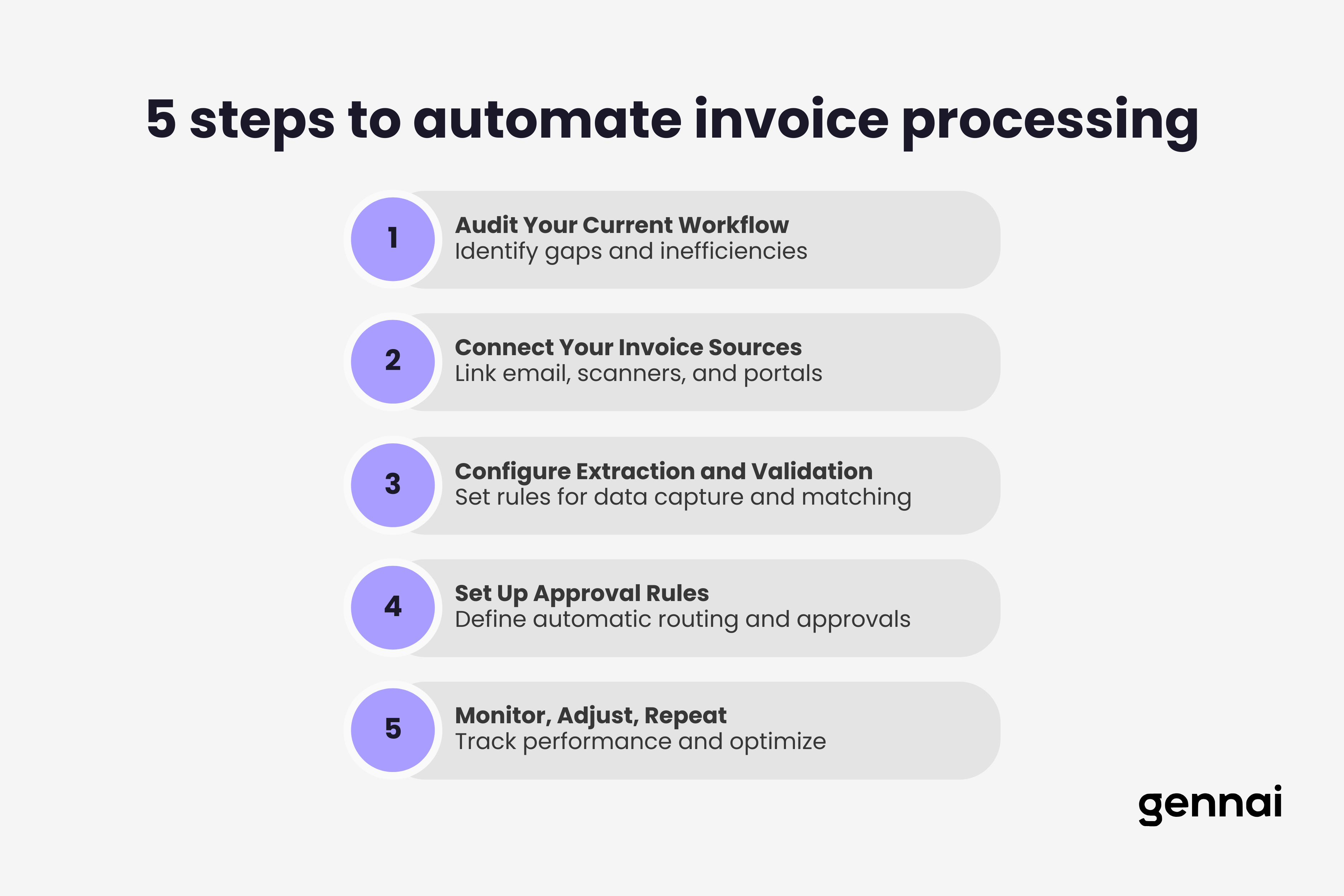
Step 1: Audit Your Current Workflow
Before you automate anything, spend 30 minutes mapping how invoices move through your business right now. Grab a pen and trace the path of a single invoice from the moment it arrives to the moment it's paid.
Ask yourself:
Where do invoices come in? Email, mail, supplier portals, a mix of all three?
Who touches them? Does one person handle everything, or do invoices bounce between team members for data entry, approval, and filing?
Where do things get stuck? Maybe approvals take three days because someone's always traveling. Maybe data entry creates a backlog every Monday morning.
What does it cost? If you're unsure, here's a rough formula: count the hours your team spends on invoice tasks per week, multiply by their hourly rate, and divide by the number of invoices processed. Most businesses land between $10 and $15 per invoice. For a detailed breakdown of where that money actually goes, check out the real cost of manual invoice processing.
Write down the biggest pain points. This list becomes your automation priority. If data entry eats the most time, that's where you start. If approvals are the bottleneck, that's your focus. Not sure where the biggest delays are? Our breakdown of the five most common AP bottlenecks can help you pinpoint them.
Step 2: Connect Your Invoice Sources
Most invoices arrive by email. According to industry data, over 60% of B2B invoices are now delivered electronically, and email is the primary channel for the majority of small and mid-size businesses.
The first automation win is connecting your email inbox to a tool that identifies and captures invoices automatically. Instead of manually scanning your inbox for attachments, the software monitors incoming emails, recognizes invoice-related messages, and pulls them into a centralized queue.
Gennai does exactly this. You connect your Gmail or Outlook account, and it starts identifying invoice emails automatically. No filters to configure, no rules to set up. The AI learns what invoice emails look like and captures them as they arrive.
If you also receive invoices through supplier portals or scanned paper, route those to a dedicated email address so they funnel into the same system. The goal is one place where all invoices land, regardless of how they arrive.
A quick tip: if your business uses multiple email accounts (common when different departments handle their own vendors), connect all of them. Invoices hiding in someone else's inbox are invoices you can't process on time. Centralization is the foundation everything else builds on.
Step 3: Configure Extraction and Validation
Once invoices are captured, the next step is extracting the data you need: vendor name, invoice number, date, line items, amounts, tax, and payment terms.
Modern AI extraction handles this without templates. You don't need to set up a different rule for every vendor format. The system reads the document, understands the layout, and pulls the relevant fields. Top AI-powered tools achieve 95 to 99% accuracy on standard invoices, and they get better over time as they process more of your documents. For a deeper look at how AI-powered OCR works under the hood, we've covered the technical side separately.
After extraction, set up basic validation checks:
Does the vendor exist in your records? Flag new vendors for review rather than auto-processing them. This simple gate prevents payments to fraudulent or incorrect accounts.
Does the invoice number match an existing entry? Catch duplicates before they become double payments. Duplicate invoices are more common than most teams realize, especially when vendors resend after not receiving timely confirmation.
Does the amount fall within expected ranges? An invoice from your office supply vendor that's suddenly 10x the usual amount deserves a second look. Setting amount thresholds per vendor catches anomalies before they slip through.
Are required fields present? Invoices missing tax IDs, payment terms, or proper line items should get flagged rather than processed incomplete.
These checks take minutes to configure and prevent the most common (and costly) AP errors.
Step 4: Set Up Approval Rules
Manual approval is where invoices go to die. Someone sends an email asking for sign-off, the approver is busy, the email gets buried, and three weeks later the vendor calls asking where their payment is.
Automated approval routing fixes this by sending invoices to the right person based on rules you define. Start simple:
Under $500: auto-approve and queue for payment.
$500 to $5,000: route to department manager.
Over $5,000: route to department manager, then finance lead.
Add escalation rules so invoices don't sit in someone's queue indefinitely. If an approver doesn't act within 48 hours, the system notifies them again or escalates to a backup approver.
Mobile notifications matter here. Approvers who can tap "approve" from their phone while waiting for coffee will clear invoices 5x faster than those who need to log into a desktop system.
Don't over-engineer this step. Start with three or four rules that cover 80% of your invoices. You can always add complexity later. The goal right now is to get invoices moving without you chasing people over email or Slack.
Step 5: Monitor, Adjust, Repeat
Automation isn't a one-time setup. The first month, pay attention to:
Exception rates. How many invoices need manual intervention? If more than 10 to 15% require human review, your extraction rules or validation thresholds need tuning.
Processing time. Track the average time from invoice receipt to payment. You should see this drop significantly in the first few weeks.
Vendor-specific issues. Certain vendors may send invoices in formats that consistently trip up extraction. Work with those vendors to standardize their format, or adjust your system's rules for their specific layout.
Review these metrics monthly. Small adjustments compound into big efficiency gains over time. A 2% improvement in straight-through processing each month means dramatically fewer manual touchpoints by the end of the quarter.
One more thing: talk to your team. The people processing invoices daily will spot issues that dashboards miss. Maybe a specific vendor always sends two-page invoices where the total is on page two and the system grabs the subtotal from page one. That kind of insight only comes from the people doing the work.
You Don't Need to Automate Everything at Once
The mistake most businesses make is trying to build the perfect system before processing a single invoice. Start with steps 1 and 2 today. Connect your email, capture your invoices automatically, and eliminate manual data entry. That alone saves hours every week.
Then layer on validation, approval routing, and optimization as you go. Each step builds on the last, and each one makes the next easier to implement.
Different industries may need to adjust these steps based on sector-specific requirements. Our industry-by-industry guide to invoice automation covers how to tailor automation for 15+ sectors.
For the full picture on planning, ROI measurement, and scaling automation across your organization, see our complete implementation guide.
Ready to stop typing invoice data by hand? Start free with Gennai and automate the most time-consuming part of your AP workflow today.
TL;DR
- Manual invoice processing takes ~25 minutes per invoice and costs $10 to $15 when you factor in labor, errors, and late payments
- Step 1: Audit your workflow by mapping how invoices move through your business and identifying the biggest time sinks
- Step 2: Connect your email to centralize invoice capture from Gmail, Outlook, or multiple accounts into one system
- Step 3: Configure AI extraction and validation to pull data automatically and catch duplicates, fraud, and anomalies
- Step 4: Set up approval rules with amount-based routing and escalation to eliminate approval bottlenecks
- Step 5: Monitor and optimize by tracking exception rates, processing time, and vendor-specific issues monthly
- Start with steps 1 and 2 today and layer on the rest over time, each step builds on the last
Ready to automate your invoices?
Start extracting invoices from your email automatically with Gennai. Free plan available, no credit card required.
Start FreeRelated Articles
Accounts Payable Turnover Ratio Explained
The accounts payable turnover ratio shows how fast you pay suppliers. Get the formula, a worked example, benchmarks and what your number really means.
GuideNet 30 vs Net 60: What Payment Terms Really Mean for Your Cash
Net 30 vs net 60 explained for business owners: what each term means, when the clock really starts, and how the gap hits your cash on both sides.
GuideThe Accounts Payable Process, Step by Step (for Owners)
The accounts payable process has five steps: receive, verify, approve, pay, and record each invoice. Here is how each works and where owners lose money.