
Accounts Payable Automation: Complete Guide
Complete guide to accounts payable automation: implementation steps, ROI calculation, phased rollout, and practical advice for finance teams of any size.

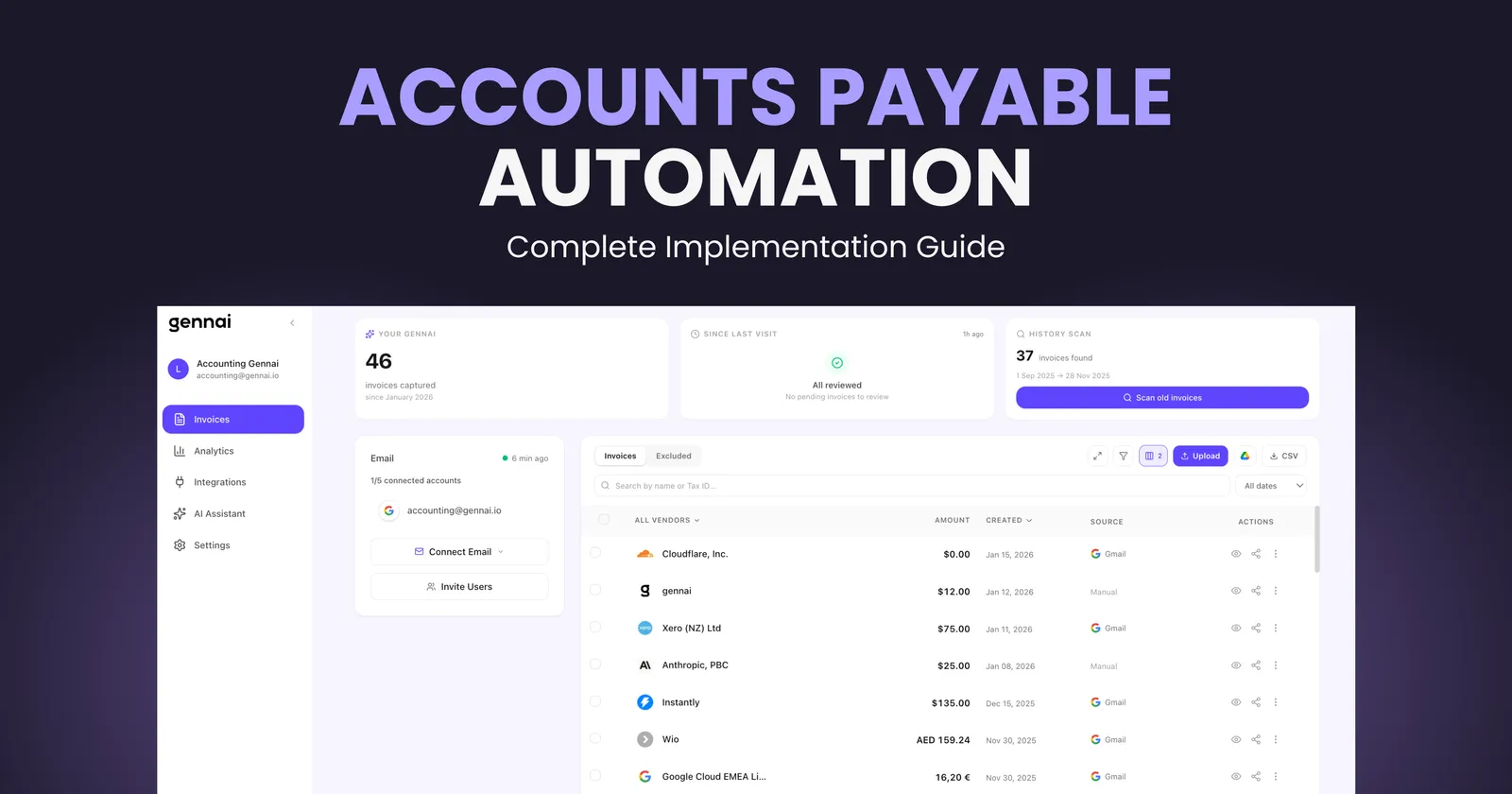
Processing a single invoice by hand costs an average of $15. That might not seem like much until you realize your finance team handles hundreds, maybe thousands, of invoices every month. At that rate, a company processing 2,000 invoices monthly spends around $360,000 a year just on manual AP work.
The global accounts payable automation market hit $6.17 billion in 2025 and is projected to reach $11.17 billion by 2030. Those numbers reflect a simple truth: businesses are done wasting time and money on processes that software handles faster, cheaper, and more accurately.
This guide walks you through everything you need to know about accounts payable automation, from understanding what it actually does to building a step-by-step implementation plan that works. Whether you're a CFO evaluating solutions, an AP manager drowning in invoices, or a small business owner wearing too many hats, you'll find practical guidance you can act on today.
What Is Accounts Payable Automation (and What It Actually Does)
Accounts payable automation replaces manual steps in the invoice-to-payment cycle with software that captures, processes, approves, and pays invoices with minimal human involvement.
In a manual AP workflow, invoices arrive by email, mail, or supplier portals. Someone opens them, types the data into an ERP or accounting system, routes the invoice for approval, follows up when approvals stall, matches invoices against purchase orders, schedules payment, and files everything. Each step introduces delay, errors, and cost.
Automated AP flips that process. Software captures invoices from any channel, extracts data using AI and OCR, validates information against your records, routes approvals based on rules you define, and triggers payments on schedule. The result is faster processing, fewer errors, and a finance team that spends time on analysis instead of data entry.
Here's what the numbers look like in practice:
Manual AP:
- Cost per invoice: $10 to $15
- Processing time: 14.6 days average
- Error rate: 1 to 3%
- Staff capacity: ~6,000 invoices per person per year
Automated AP:
- Cost per invoice: $2 to $4
- Processing time: 3 to 5 days
- Error rate: 0.1 to 0.5%
- Staff capacity: ~23,000 invoices per person per year
Best-in-class AP teams now process invoices in roughly 3.1 days at about $2.78 per invoice, compared to 17.4 days and $12.88 for teams still relying on manual methods. For a detailed breakdown of these benchmarks across seven key metrics, see manual vs automated AP: the numbers don't lie.
Why Manual AP Is Costing You More Than You Think
The $15 per invoice figure only tells part of the story. Manual AP carries hidden costs that compound over time and impact your business in ways that don't show up on a single line item. For a deeper breakdown with actual calculations, see our analysis on the real cost of manual invoice processing.
The Error Problem
About 39% of invoices contain errors according to industry research. Every error triggers a correction cycle: someone identifies the mistake, investigates, contacts the vendor, updates the records, and re-routes for approval. That correction process costs significantly more than getting it right the first time.
Duplicate payments are another hidden drain. Without automated detection, companies pay the same invoice twice more often than they'd like to admit. Recovery takes time, damages vendor trust, and ties up cash flow.
The Time Drain
Nearly half of global AP professionals spend more than five days per month processing invoices. In the US, that number jumps to 63%. That's senior finance talent spending weeks on tasks that contribute nothing strategic to the business.
Meanwhile, 53% of AP teams say invoice exceptions are their biggest operational challenge. Exceptions, like mismatched PO numbers, missing data, or unapproved vendors, require manual investigation that pulls staff away from higher-value work. For a closer look at these and other chokepoints, see our breakdown of the five AP bottlenecks slowing down finance teams.
The Cash Flow Impact
Manual processing means slow processing, and slow processing means late payments. Only 36% of invoices in the US are paid on time, with more than half arriving past their deadline. Late payments trigger penalty fees, damage supplier relationships, and eliminate any chance of capturing early payment discounts that typically range from 1 to 3%.
For a company processing $5 million in annual payables, missing early payment discounts alone could mean $50,000 to $150,000 left on the table every year.
The Core Components of AP Automation
Understanding the building blocks helps you evaluate solutions and plan your implementation. Modern AP automation systems combine several technologies working together.
Invoice Capture and Data Extraction
This is where automation starts. Software pulls invoices from email inboxes, supplier portals, scanned documents, and mobile uploads into a centralized system. AI-powered OCR reads the documents and extracts key fields: invoice number, vendor name, date, line items, amounts, tax, and payment terms.
Modern AI extraction goes beyond simple character recognition. It understands context, handles varied layouts without templates, and improves accuracy over time through machine learning. Top systems achieve 95 to 99% accuracy on standard invoices, with continuous improvement as they process more documents.
If your invoices arrive primarily through email, tools like Gennai automate the extraction step by connecting directly to Gmail and Outlook, identifying invoice emails, and pulling out structured data without any manual setup. For a detailed walkthrough of how this works, check our guide on how to automatically extract invoices from email.
Validation and Matching
Once data is extracted, the system validates it against your records. This includes two-way matching (invoice to PO) and three-way matching (invoice to PO to receiving report). Automated validation catches discrepancies, flags duplicate invoices, and confirms vendor information before anything moves to approval.
The matching process works on rules you configure. For invoices that fall within tolerance thresholds, the system approves automatically. Exceptions get routed for human review with all relevant documentation attached, so resolvers have everything they need to make decisions quickly.
Approval Workflows
Configurable routing rules send invoices to the right approvers based on criteria like amount, department, expense category, or vendor. A $500 office supply invoice might auto-approve, while a $50,000 equipment purchase routes to the department head and then the CFO.
Automated reminders and escalation rules prevent approvals from stalling. If an approver doesn't respond within a set timeframe, the system escalates to a backup approver or manager. Mobile approval capabilities let decision-makers act from anywhere, eliminating the bottleneck of waiting for someone to be at their desk. For tactical changes you can make right now, see our 5 quick wins to speed up invoice approval.
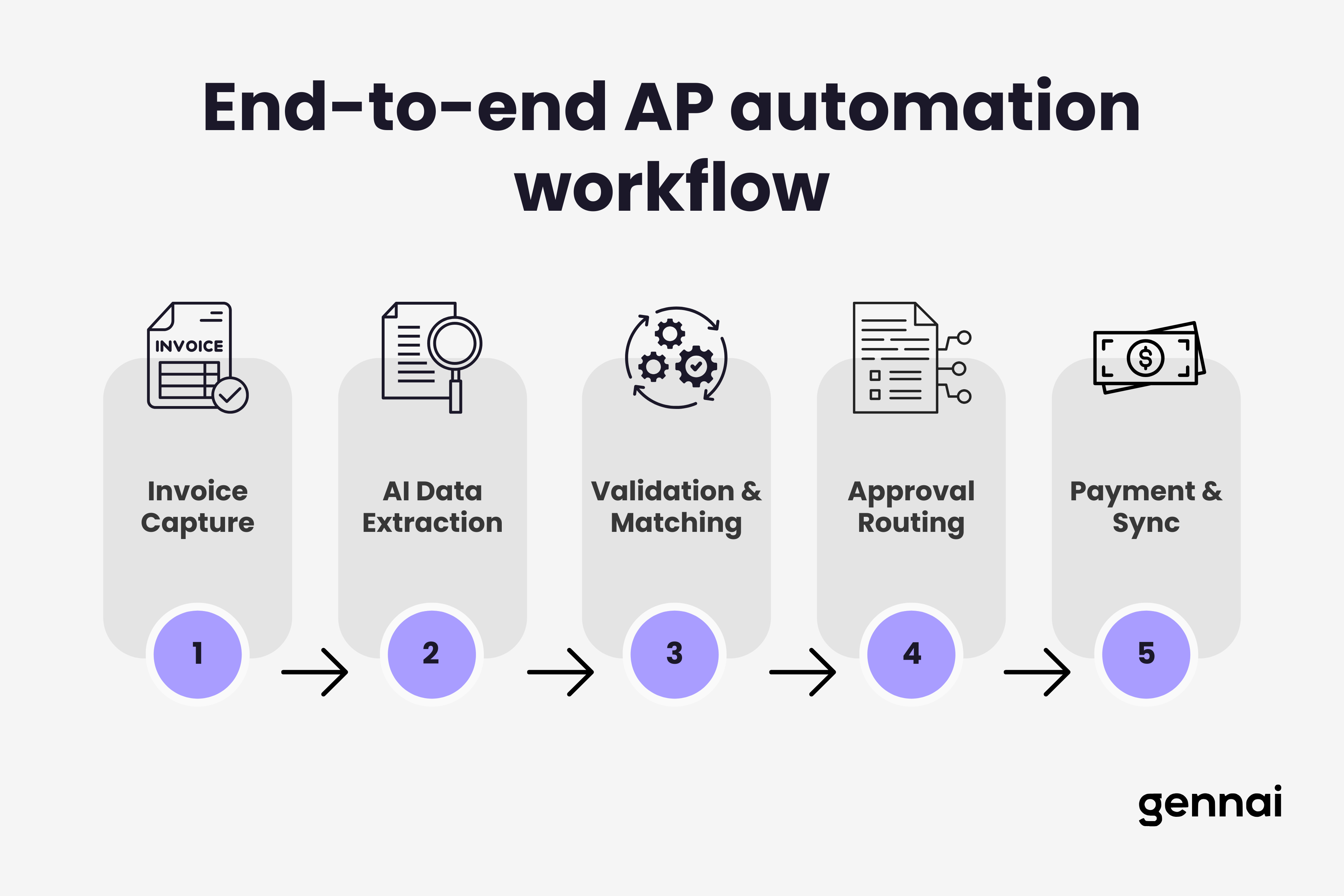
Payment Processing and Integration
The final step connects approved invoices to payment execution. Automated systems schedule payments to optimize cash flow, taking advantage of early payment discounts when beneficial and timing other payments to preserve working capital.
Integration with your accounting system or ERP keeps everything synchronized. Invoice data flows directly into your general ledger without manual entry, maintaining clean financial records and making audit trails automatic rather than assembled after the fact.
Step-by-Step Implementation Guide
Rolling out AP automation successfully takes planning. Here's a practical roadmap that covers assessment through optimization. For a condensed version, see our 5-step guide to automating invoice processing.
Step 1: Audit Your Current Process
Before selecting any tool, document your existing AP workflow in detail. Map every step from invoice receipt to payment, noting who's involved, how long each step takes, where errors occur most frequently, and what volume you process monthly.
Key metrics to establish:
- Average cost per invoice (include labor, overhead, and error correction)
- Average processing time from receipt to payment
- Current error and exception rates
- Number of invoices processed per month
- Percentage of invoices requiring manual intervention
- Early payment discount capture rate
- Late payment penalty frequency
This baseline tells you exactly where automation will deliver the most value and gives you concrete numbers to measure ROI against.
Step 2: Define Your Requirements
Not every business needs full end-to-end automation from day one. Based on your audit, identify which pain points matter most:
If data entry is your bottleneck: Prioritize solutions with strong AI extraction capabilities. Look for tools that connect to your email and capture invoices automatically. Understanding how OCR technology works helps you evaluate extraction quality across different vendors.
If approvals are your bottleneck: Focus on workflow automation with mobile capabilities and escalation rules.
If cash flow visibility is your priority: Look for solutions with strong reporting dashboards and payment timing optimization.
If integration is critical: Ensure the solution connects natively to your accounting system (QuickBooks, Xero, Sage, NetSuite, etc.) without requiring custom development.
Step 3: Select Your Solution
The AP automation market offers solutions for every company size and complexity level. Here's how to think about the main categories:
Email-first extraction tools connect to your inbox and automatically identify and extract invoice data. These work well for small to mid-size teams that receive most invoices by email. Gennai falls into this category, pulling invoices from Gmail and Outlook with AI-powered extraction and syncing data to Google Drive and accounting platforms.
Mid-market AP platforms provide end-to-end workflow automation including capture, approval routing, and payment processing. Solutions like Tipalti, Stampli, and Bill.com serve companies processing moderate to high invoice volumes.
Enterprise suites integrate AP automation into broader ERP ecosystems. SAP Concur, Oracle, and NetSuite offer comprehensive platforms for large organizations with complex multi-entity structures.
When evaluating, request demos using your actual invoices. See how the system handles your specific vendor formats, not just clean samples. Ask about implementation timelines, integration requirements, and ongoing support.
For a comprehensive comparison of software options, see our invoice management software buyer's guide.
Step 4: Plan a Phased Rollout
Implementing everything at once creates unnecessary risk. A phased approach lets you validate results and adjust before scaling.
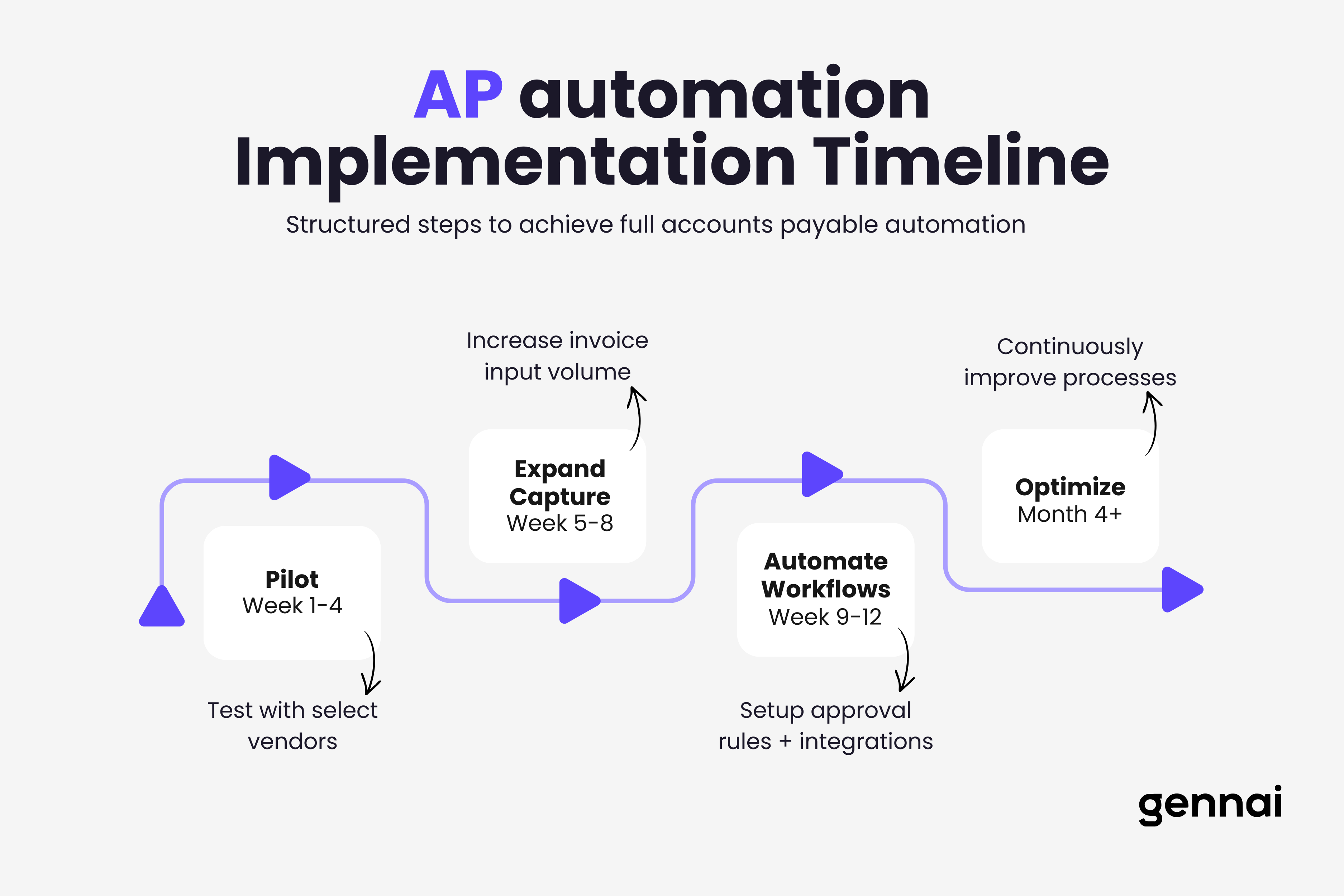
Phase 1 (Weeks 1 to 4): Pilot Start with a subset of invoices, ideally from your top 10 to 20 vendors who represent the highest volume. Connect your primary email account, configure basic extraction rules, and process these invoices through the new system alongside your existing workflow. Compare results.
Phase 2 (Weeks 5 to 8): Expand Capture Once extraction accuracy is validated, expand to all vendor invoices and additional email accounts. Set up basic approval workflows for straightforward invoices while continuing manual review for complex ones.
Phase 3 (Weeks 9 to 12): Automate Workflows Configure full approval routing, exception handling, and payment scheduling. Train all team members on the system. Begin reducing manual parallel processing.
Phase 4 (Month 4+): Optimize Analyze processing data, refine rules, and expand automation to handle more exceptions automatically. Monitor KPIs and adjust thresholds based on actual performance.
Step 5: Manage Change
Technology is only half the equation. The people using the system need to understand why the change is happening, how it benefits them personally, and what their new responsibilities look like.
Common resistance points include fear of job loss (reframe as elimination of tedious tasks, not positions), skepticism about accuracy (let pilot data speak for itself), and comfort with existing processes (show concrete time savings early).
Dedicate time to hands-on training rather than just documentation. Assign an internal champion who understands the system deeply and can help colleagues troubleshoot. Celebrate quick wins publicly to build momentum.
Measuring ROI: The Numbers That Matter
AP automation ROI is one of the most straightforward business cases in finance. Here's how to calculate yours. For a detailed CFO-ready framework with the full formula, worked scenarios across three company sizes, and a template you can take to your board, see our CFO's guide to AP automation ROI.
Direct Cost Savings
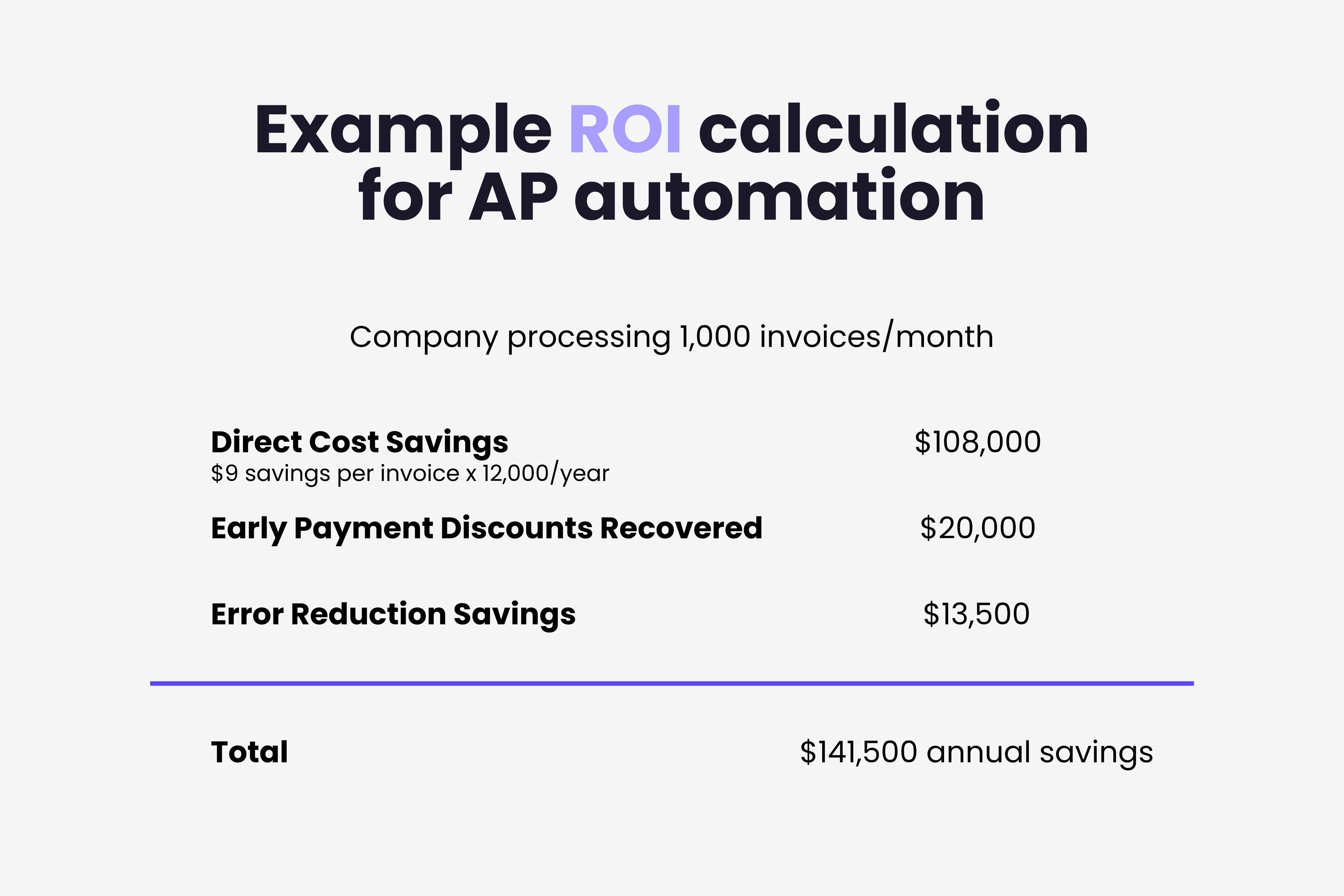
Start with your cost per invoice. If you're currently spending $12 per invoice manually and automation reduces that to $3, your savings per invoice is $9. At 1,000 invoices per month, that's $9,000 monthly or $108,000 annually.
Add in recovered early payment discounts. If automation helps you capture even 50% of available 2% discounts on $2 million in annual payables, that's another $20,000 per year.
Time Recovery
If your AP team spends 20 hours per week on manual data entry and matching, and automation eliminates 80% of that work, you're recovering 16 hours weekly. That's 832 hours annually that your team redirects to vendor negotiations, spend analysis, forecasting, and process improvement.
Error Reduction
Calculate your current error correction cost. If 5% of invoices require rework at $25 per correction, and automation drops that to 0.5%, the savings add up quickly. For 12,000 annual invoices, that's 540 fewer corrections saving $13,500 per year.
Scalability
Perhaps the most valuable benefit: automation lets you grow without proportionally growing your AP team. A fully automated AP employee processes over 23,000 invoices per year versus about 6,000 with manual methods. Hiring an additional AP clerk costs $50,000 to $70,000 annually in salary and benefits. Every time automation absorbs that growth, you avoid that expense.
AP Automation for Small Teams
If you're a team of five or fewer handling finance, you might think AP automation is only for large enterprises. It's not. In fact, smaller teams often see faster ROI because the time impact per person is more dramatic.
A solo bookkeeper processing 200 invoices per month manually might spend 40+ hours monthly on data entry alone. That's essentially a full work week every month on a task that software handles in minutes.
For small teams, the implementation path is simpler:
You don't need a six-figure budget or a dedicated implementation team. Modern cloud tools are designed to be set up in hours, not months. For a focused look at choosing tools and getting started when your team is under 10 people, see our AP automation guide for small teams.
Common Pitfalls and How to Avoid Them
Having seen many AP automation implementations, certain mistakes come up repeatedly. Here's what to watch for.
Starting too big. Trying to automate every edge case from day one leads to delayed launches and frustrated teams. Start with your 80% use case and expand.
Ignoring data quality. If your vendor master file is messy, automation will amplify the mess. Clean up vendor records, standardize naming conventions, and deduplicate entries before going live.
Skipping integration testing. Your AP tool needs to talk to your accounting system reliably. Test the data flow end-to-end with real invoices before cutting over from manual processes.
Underestimating change management. About 25% of automation projects face resistance from staff. Invest in training and communicate the "why" early and often.
Choosing based on features alone. The most feature-rich solution isn't always the best fit. A simpler tool that matches your actual needs will deliver faster ROI than an enterprise suite you'll only use 30% of.
Neglecting ongoing optimization. Automation isn't set-and-forget. Review your exception rates monthly. If certain vendors consistently trigger manual review, update your extraction rules or work with those vendors to standardize their invoice format. The best AP teams treat automation as a living system that gets refined continuously.
What's Next for AP Automation
The AP automation space continues evolving rapidly. Several trends are shaping where the technology goes from here.
AI-powered extraction keeps improving. Systems that once needed templates for each vendor format now handle unfamiliar invoices out of the box. For a deeper look at how AI reads and processes invoice data, see our complete guide to AI invoice processing.
Predictive capabilities are emerging. Rather than just processing invoices, smart systems forecast cash flow needs, suggest optimal payment timing, and flag anomalies that might indicate fraud before payments go out.
Integration is getting simpler. API-first platforms connect with accounting systems, ERPs, banks, and other finance tools without custom development. The connected finance stack is becoming a reality for companies of all sizes.
And perhaps most importantly, the barrier to entry keeps dropping. What once required six-figure budgets and months of implementation now takes hours and costs less than a typical business lunch. Tools like Gennai bring AI-powered invoice extraction to teams of any size, starting free.
Different industries face unique AP challenges. Our industry-by-industry guide to invoice automation covers sector-specific strategies from healthcare to construction.
Start Automating Today
Manual AP is a solved problem. The technology exists, it's affordable, and the ROI is clear. The only question is how quickly you want to start saving time and money.
If invoices arrive through email, which they do for most businesses, the fastest path is connecting an AI extraction tool to your inbox. Set it up once, and every invoice that comes in gets captured, read, and organized automatically.
Ready to eliminate manual invoice processing? Start with Gennai's free plan and see the difference AI extraction makes in your first week. No credit card required.
Ready to automate your invoices?
Start extracting invoices from your email automatically with Gennai. Free plan available, no credit card required.
Start FreeRelated Articles
Accounts Payable Turnover Ratio Explained
The accounts payable turnover ratio shows how fast you pay suppliers. Get the formula, a worked example, benchmarks and what your number really means.
GuideNet 30 vs Net 60: What Payment Terms Really Mean for Your Cash
Net 30 vs net 60 explained for business owners: what each term means, when the clock really starts, and how the gap hits your cash on both sides.
GuideThe Accounts Payable Process, Step by Step (for Owners)
The accounts payable process has five steps: receive, verify, approve, pay, and record each invoice. Here is how each works and where owners lose money.