
10 Things Gennai Does Better Than Traditional Tools
Ten specific Gennai features that replace manual invoice workflows: automatic inbox scanning, AI extraction, duplicate detection, accountant access, and more.

Finance teams that process invoices manually spend an average of 10 to 15 dollars per invoice in labor, errors, and delays. At 100 invoices a month, that is a recurring monthly cost of up to 1,500 dollars for work that should not exist.
The problem is not a lack of effort. It is that most invoice workflows are built on tools that were never designed for the job: email clients, shared folders, and accounting software with manual entry. Each one adds friction. Together, they add hours.
Here are ten specific things Gennai does differently, and what each one means for the time and money your team spends on invoices every month.
1. Finds invoices without anyone having to forward them
Traditional workflows depend on someone remembering to forward emails or download attachments. When that person is out sick or busy, invoices sit unprocessed. Gennai connects directly to Gmail, Outlook, and IMAP inboxes via OAuth and scans automatically every hour, with no human dependency. Teams report eliminating 2 to 4 hours of weekly invoice chasing as a direct result.
This is what email-first invoice capture looks like in practice: the system watches your inbox so your team does not have to.
2. Recovers invoices you already missed
Most automation tools only capture invoices from the moment you connect them. If you set up Gennai today, you can trigger a retroactive scan of your full inbox history and recover every invoice from the past year or longer, in minutes. One connection, and your historical records are complete. For businesses doing quarterly tax prep or year-end closes, this alone can save a full day of manual reconstruction work.
3. Extracts structured data, not just stores a file
Document capture tools like Hubdoc store the PDF and sync it to your accounting platform. Someone still reads it and types in the numbers. Gennai extracts vendor name, date, total, tax, invoice number, currency, and line items as structured fields that pre-fill a bill in Xero or QuickBooks directly. The manual entry step is removed entirely, which is where most of the 10 to 15 dollar-per-invoice cost actually lives. The article on invoice OCR explains the technical difference between storage and real extraction.
4. Handles invoices from WhatsApp and Telegram, not just email
Field teams photograph paper receipts. Suppliers in some markets use messaging apps. Gennai accepts invoice submissions via WhatsApp and Telegram, runs them through the same AI extraction pipeline, and surfaces them in the same dashboard alongside email invoices. The result: zero separate processes, zero invoices lost because they arrived in the wrong channel.
5. Catches duplicates before they reach your accounting software
Industry data shows that between 0.8% and 2% of manually processed invoices get paid twice. At 200 invoices a month with an average invoice value of 500 dollars, a 1% duplicate rate is 1,000 dollars per month in overpayments. Gennai uses content hashing to detect and flag duplicates before they reach Xero or QuickBooks, not after payment has already gone out. The article on duplicate invoice detection covers exactly how this failure mode occurs.
6. Routes and classifies invoices with AI-defined rules, not manual tagging
Manual classification means someone reviews every invoice and applies tags, categories, or routing decisions individually. At scale, this is the job that keeps getting deprioritized. Gennai's AI assistant lets you define rules once: if an invoice arrives from a specific vendor, tag it automatically; if it exceeds a threshold, flag it for approval; if it belongs to a category, route it accordingly. Every new invoice that arrives follows those rules without anyone touching it.
7. Unifies multiple inboxes without forwarding chains
Invoices arrive at main business inboxes, accounting@ addresses, individual team email accounts, and shared mailboxes. Traditional management means checking each separately, or building forwarding chains that generate duplicates and miss threads. Gennai connects all inboxes in one dashboard. Finance teams managing 5 or more email accounts typically recover 3 to 5 hours per month just from removing the multi-inbox coordination overhead.
8. Gives your accountant direct access, ending the document handoff
The standard month-end handoff costs more time than most teams account for: compiling invoice batches, emailing PDFs, answering follow-up questions about missing documents, and waiting for the accountant to finish before the books can close. Gennai's accountant access role gives your bookkeeper a direct login with read and export permissions. They pull what they need, when they need it. Businesses using this report cutting month-end close time by 30 to 50 percent.
9. Shows spending analytics before data reaches accounting
Xero and QuickBooks reports show what has already been entered. Gennai's analytics are built from extracted invoice data in real time: total spend by vendor, spend trend by month, invoice volume, and spend by custom tag. This matters because it surfaces anomalies and overspend before the accounting period closes, while there is still time to act. Traditional workflows surface the same data weeks later, after reconciliation.
10. Works on every vendor format from day one, no templates
Traditional OCR tools require template configuration per vendor. When a vendor updates their invoice layout, the template breaks and someone has to fix it. Gennai's AI model has been trained on millions of invoice formats and adapts to any layout without manual configuration. Connect your inbox, and the system handles every vendor format you receive, including new ones you have never seen before, without any setup.
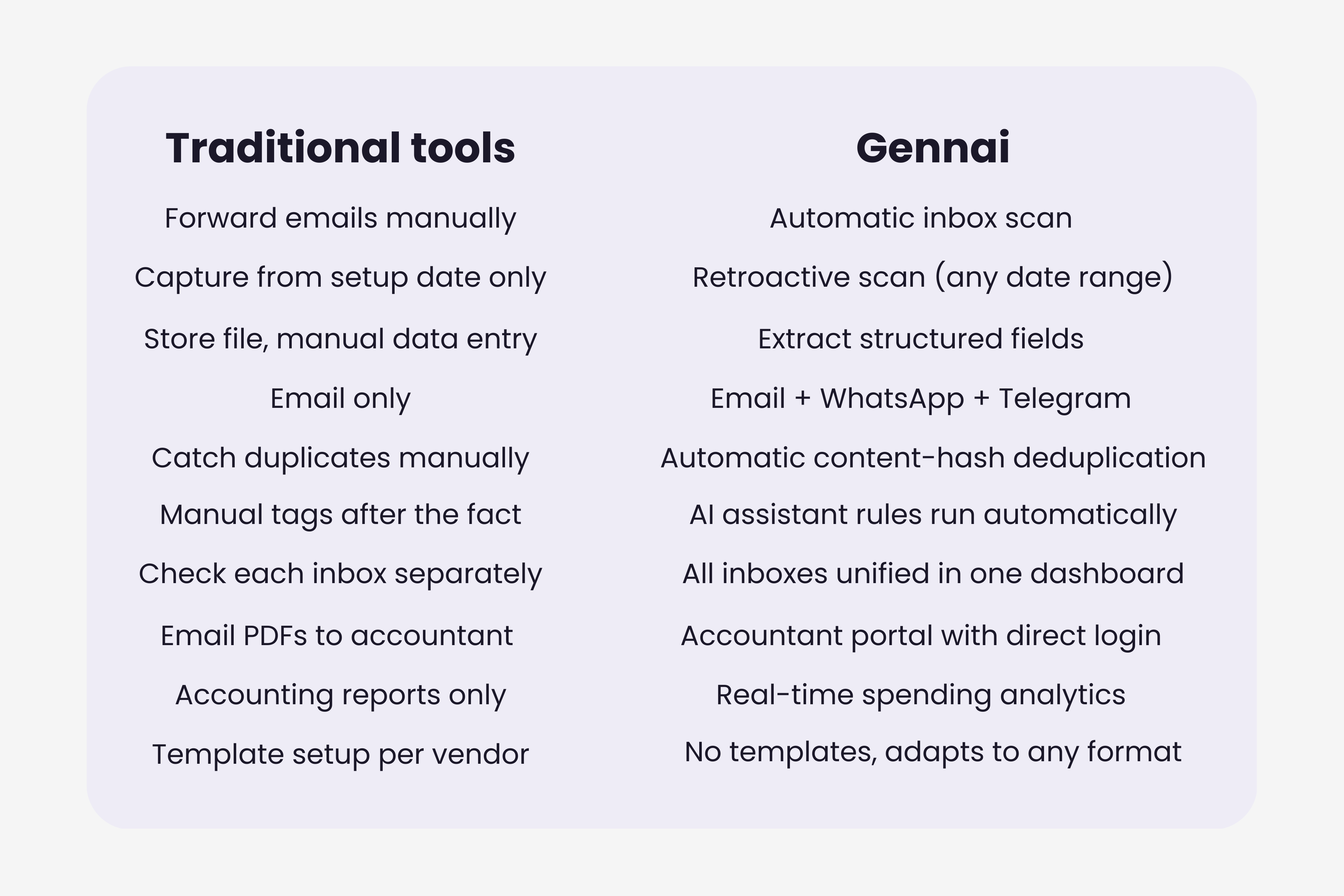
Ten improvements, one compounding outcome: a finance workflow where invoices are captured without effort, processed without error, and visible to everyone who needs them without a single email attachment. The teams that feel this most are not the ones that were doing the worst job manually. They are the ones that were doing a careful, thorough job, and finally got that time back.
For a complete walkthrough of how Gennai handles each of these in practice, the product walkthrough covers every feature end to end.
Ready to automate your invoices?
Start extracting invoices from your email automatically with Gennai. Free plan available, no credit card required.
Start FreeRelated Articles
Accounts Payable Turnover Ratio Explained
The accounts payable turnover ratio shows how fast you pay suppliers. Get the formula, a worked example, benchmarks and what your number really means.
GuideNet 30 vs Net 60: What Payment Terms Really Mean for Your Cash
Net 30 vs net 60 explained for business owners: what each term means, when the clock really starts, and how the gap hits your cash on both sides.
GuideThe Accounts Payable Process, Step by Step (for Owners)
The accounts payable process has five steps: receive, verify, approve, pay, and record each invoice. Here is how each works and where owners lose money.