
Gennai vs Xero: When to Use Each Tool
Gennai and Xero are not competitors. Xero manages your accounts, Gennai automates invoice capture from your inbox. Learn when to use each tool and when the combination makes sense.

Gennai and Xero are not really competing for the same job. Framing them as competitors misses what each tool actually does, and comparing them side by side as if they were equivalent alternatives leads to the wrong decision in either direction.
Xero is a full accounting platform. It manages your chart of accounts, bank reconciliation, payroll, financial reporting, tax, and the complete ledger of your business finances. It is the system of record for your numbers.
Gennai is an invoice capture and management tool. It connects to your email inbox, finds supplier invoices automatically, extracts the data with AI, categorizes them, reconciles them against your bank statements, and exports the bills into Xero (or QuickBooks Online or Holded). It feeds clean data into Xero so your team does not have to enter it manually.
The more useful question is not which to choose, but whether Gennai is worth adding to a Xero workflow, and when the combination makes sense versus sticking with manual entry into Xero alone. That is what this article covers.
TL;DR: Xero manages your accounts, reporting, and financial records. Gennai automates the step before that: capturing every invoice from your inbox and pushing structured data into Xero without manual entry. Most businesses on Xero benefit from adding Gennai when they process more than 10-15 invoices per month. Below that threshold, manual Xero entry is manageable. Above it, the automation pays for itself quickly.
What Each Tool Does
Xero
Xero is cloud-based accounting software used by around 4.9 million subscribers globally. Its core function is maintaining the financial ledger of a business: recording income and expenses, reconciling bank transactions, generating profit and loss statements, managing cash flow, and producing the reports needed for tax filing and business decisions.
For invoice management specifically, Xero does two distinct things. On the outgoing side, it creates and sends invoices to customers: professional PDF invoices with payment links, automatic payment reminders, and recurring invoice scheduling. On the incoming side, it records bills from suppliers: you enter the bill details, reconcile against your bank feed, and track what is owed. Xero also includes its own document capture (historically Hubdoc, now presented in Xero's plans as Smart Document Capture) for uploading or emailing receipts and bills into Xero. On the Early plan, bill entry is capped at 5 bills per month.
What Xero does not do natively is scan your email inbox for incoming invoices and extract their data automatically. Bills from suppliers need to be manually entered, uploaded through Xero's document capture, or pushed in through a connected integration.
Gennai
Gennai connects to your Gmail or Outlook inbox via OAuth with read-only access, or to an IMAP mailbox, and scans it continuously. When an invoice arrives by email, whether as a PDF attachment, an image, or inline in the message body, Gennai extracts the accounting-relevant data: supplier, invoice number, dates, currency, subtotal, tax, total and line items. Extracted data can be reviewed and corrected. Invoices can also be submitted via WhatsApp, Telegram, Slack, a forwarding address or manual upload. From the dashboard, you categorize the invoices (Gennai learns from your own accounting history), reconcile them against an uploaded bank statement, and export them into Xero as bills.
Gennai does not create invoices to send to customers, does not maintain your general ledger, does not connect directly to your bank, and does not produce financial statements. Those stay in Xero. Gennai covers the stretch before that: collecting supplier invoices, structuring the data, checking it against bank activity and handing it over ready to post.
How Gennai and Xero Work Together
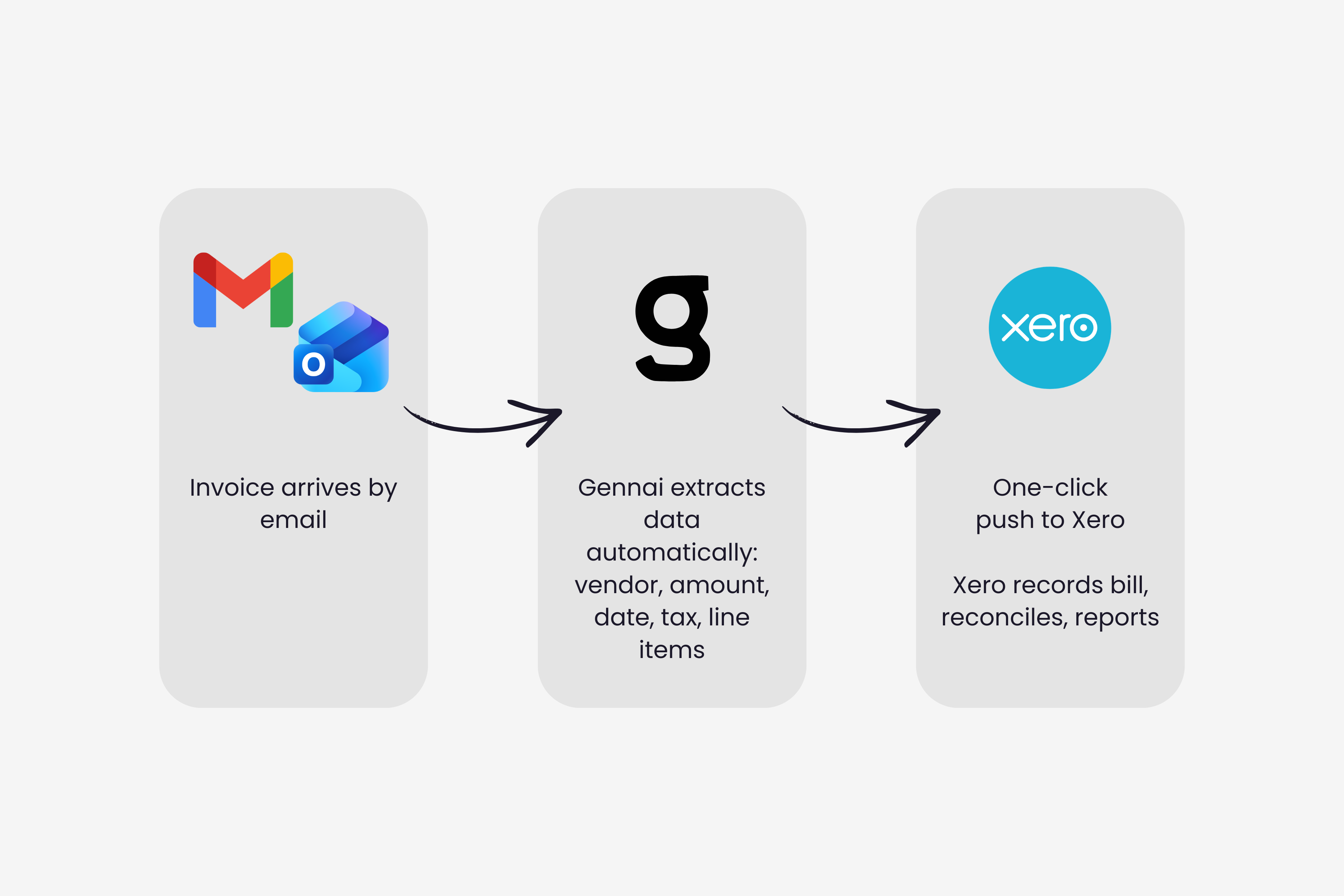
The Gennai-Xero integration works as follows. Once connected, Gennai monitors your inbox continuously and extracts invoices as they arrive. From the Gennai dashboard, you select the invoices you want to push and click export to Xero. Gennai creates the bill in Xero with all extracted fields pre-populated: vendor, amount, date, due date, tax, and line items. Your Xero account receives clean, structured data ready for reconciliation.
The practical effect is that the data entry step disappears. Instead of opening each invoice email, downloading the PDF, switching to Xero, creating a new bill, and typing in the details, the bill appears in Xero already populated. Your team reviews, approves, and reconciles. The volume of invoices you can handle without adding headcount increases significantly.
For a closer look at the technical process involved in AI invoice extraction, the article on how AI actually reads invoices covers the computer vision and language model layers that make this possible.
What Xero's document capture does vs what Gennai does: Xero's capture tool lets you forward emails or upload files, stores them and attaches them to transactions in Xero. Gennai scans connected inboxes automatically, extracts structured data with AI (not just the file), categorizes it, checks it against your bank statement, and pushes pre-filled bills into Xero. The key difference is active vs passive capture, and file storage vs structured, reconciled data.
What Each Tool Covers
This table clarifies the scope of each product to avoid confusion when evaluating whether you need one, the other, or both.
| Capability | Gennai | Xero |
|---|---|---|
| Invoice Capture & Extraction | ||
| Automatic inbox scanning (Gmail/Outlook/IMAP) | Yes | No (upload / document capture) |
| AI data extraction (no templates) | Yes | No |
| WhatsApp / Telegram / Slack submission | Yes | No |
| Retroactive inbox scan | Yes | No |
| Duplicate invoice detection | Yes | No |
| Line item extraction | Yes | Manual entry |
| Multi-currency extraction | Yes | Established plan |
| Document storage / Vault | Yes | Yes |
| Accounting & Financial Management | ||
| General ledger / chart of accounts | No | Yes |
| Bank reconciliation | Statement upload (CSV/XLSX), no bank feed | Yes (bank feeds) |
| Send invoices to customers | No | Yes |
| Bills management (AP) | Status tracking (paid, to pay, review) | Yes (ledger) |
| Invoice categorization | Yes, learns from your accounting history | Manual / rules |
| Financial reporting (P&L, balance sheet) | No | Yes |
| Cash flow forecasting | No | Yes |
| Payroll | No | Add-on |
| Integrations & Export | ||
| Push to Xero | Yes | Native |
| Push to QuickBooks | Yes | N/A |
| Push to Holded | Yes | N/A |
| Google Drive / OneDrive / Google Sheets | Yes | Yes (Drive) |
| CSV / XLSX export | Yes | Yes |
| REST API | No | Yes |
| Pricing | ||
| Free option | Yes (10 inv/mo, 2 inboxes) | Trial / introductory offer |
| Entry price | $12/mo (75 invoices) | $27/mo (Early) |
| Mid tier | $29/mo (250 invoices) | $59/mo (Growing) |
| Full tier | $79/mo (750 invoices) | $97/mo (Established) |
| Pricing model | Per invoice volume | Per organization / flat rate |
Xero Alone vs Xero with Gennai
Most businesses on Xero start by entering bills manually or using Hubdoc. This works at low volumes. The question of whether to add Gennai comes down to how much time your team is spending on that manual step, and whether the cost of the tool is less than the cost of that time.
When Xero alone is enough
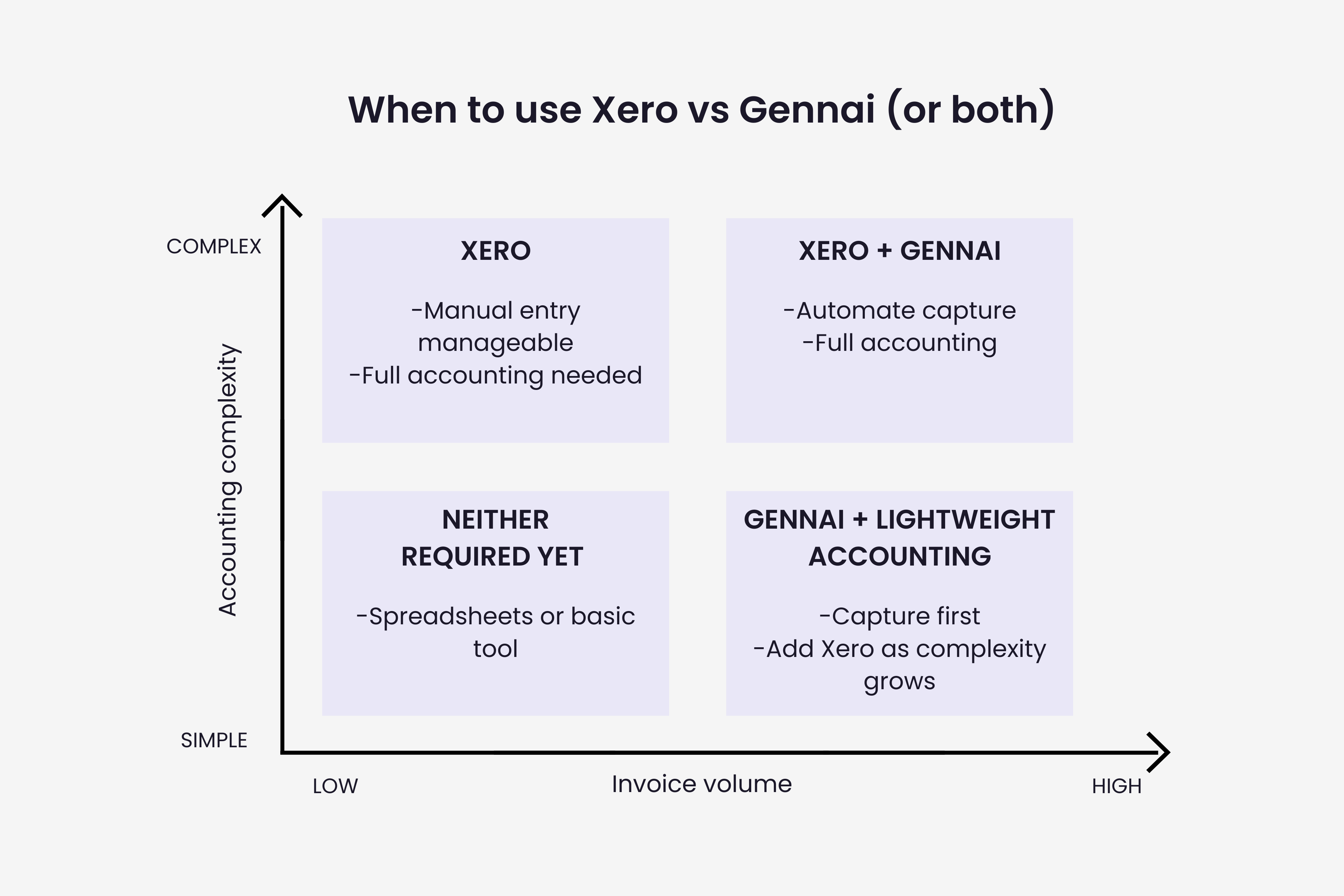
If you receive fewer than 10 to 15 supplier invoices per month, manual entry into Xero or forwarding to Hubdoc is manageable. The overhead is small, the error rate at low volume is tolerable, and adding another tool is unnecessary complexity. A freelancer billing a handful of regular clients, or a small service business with two or three recurring suppliers, likely does not need Gennai.
When Gennai adds clear value
Volume is the primary trigger. Once you are processing more than 15 to 20 invoices per month, the time cost of manual entry starts to compound. At 75 invoices per month and an average of 5 minutes per invoice for download, entry, and verification, that is over 6 hours of manual work. Gennai reduces that to a review step measured in minutes. The accounts payable automation guide covers the ROI calculation in full with worked examples across different business sizes.
Beyond volume, three other situations point toward adding Gennai. First, if invoices are arriving across multiple inboxes (a shared accounting@ address, individual team members' emails, and a main business inbox), Gennai unifies them into one dashboard without requiring anyone to forward anything. Second, if invoices are getting missed or arriving late to Xero, creating reconciliation gaps, the automatic scan removes the human dependency. Gennai can also match an uploaded bank statement against the captured invoices and flag the transactions that have no document behind them, so the gaps surface before anything reaches Xero. Third, if you are giving your accountant access to Xero and they are spending time chasing you for documents, Gennai's accountant access role gives them a direct view of all captured invoices before anything is pushed to Xero.
Can You Use Gennai Without Xero?
Yes. Gennai also integrates with QuickBooks and Holded, and exports to Google Sheets, Google Drive, OneDrive, and CSV/XLSX. Teams not on Xero can use Gennai as their invoice capture layer and connect it to whichever accounting tool they use. The Gennai dashboard also works as a standalone invoice management system: search, filter, tag, and export invoices without pushing to any accounting platform.
For businesses evaluating Xero alternatives alongside Gennai, the QuickBooks vs Xero comparison covers the differences between the two main accounting platforms in the context of invoice management.
Pricing in Context
Using both tools together is the most common scenario for growing businesses. Here is what the combined cost looks like:
| Scenario | Xero plan | Gennai plan | Combined/mo |
|---|---|---|---|
| Freelancer, low volume | Early ($27) | Free ($0) | $27 |
| Small team, 75 inv/mo | Growing ($59) | Starter ($12) | $71 |
| Growing SMB, 250 inv/mo | Growing ($59) | Growth ($29) | $88 |
| Larger team, 750 inv/mo | Established ($97) | Business ($79) | $176 |
The combined cost for the most common scenario, a growing SMB on Xero Growing plus Gennai Growth, is $88/month. Against manual invoice processing costs of $10 to $15 per invoice, the break-even point is roughly 6 to 9 invoices per month. At 250 invoices, the automation saves thousands in labor costs. The CFO's guide to AP automation ROI covers how to build this calculation for a board-ready presentation.
When to Use Each Combination
Xero only
- Low invoice volume (under 15 supplier invoices per month)
- You primarily send invoices to clients rather than receive them from suppliers
- Manual entry into Xero is manageable within your current workflow
- You are just starting out and want to keep tooling simple
Gennai + Xero
- You process more than 15-20 supplier invoices per month and want to eliminate manual entry
- Invoices arrive across multiple inboxes and you need a unified capture layer
- Your accountant is spending time chasing invoice documents before month-end
- You have missed invoices or reconciliation gaps from emails getting overlooked
- You want to check invoices against your bank statement and spot missing documents before they reach Xero, plus basic spend visibility by supplier and category
Gennai without Xero
- You use QuickBooks, Holded, or another accounting platform instead of Xero
- You want invoice capture and export to Google Sheets or Google Drive without a full accounting platform yet
- You are evaluating accounting platforms and want invoice capture sorted while you decide
Starting Point
Both tools have low-friction entry points. Xero runs introductory discounts for new subscribers. Gennai has a permanent free plan at 10 invoices per month with no credit card required. The most practical approach for a business already on Xero is to connect Gennai on the free plan, run the retroactive inbox scan to see how many invoices it finds in your last 30 days, and use that count to decide which Gennai plan, if any, makes sense.
For the full breakdown of what each Gennai plan includes and the ROI calculation at different invoice volumes, the Gennai pricing guide covers everything in detail. And for teams thinking through the full accounts payable workflow beyond just capture, the invoice system integration guide covers how invoice capture, extraction, accounting, and payment tools connect into a complete stack.