
Invoice Software: Complete Buyer's Guide 2026
Choose the right invoice management software for your business. Compare features, pricing, and types. Real advice from finance professionals. 2026 guide.

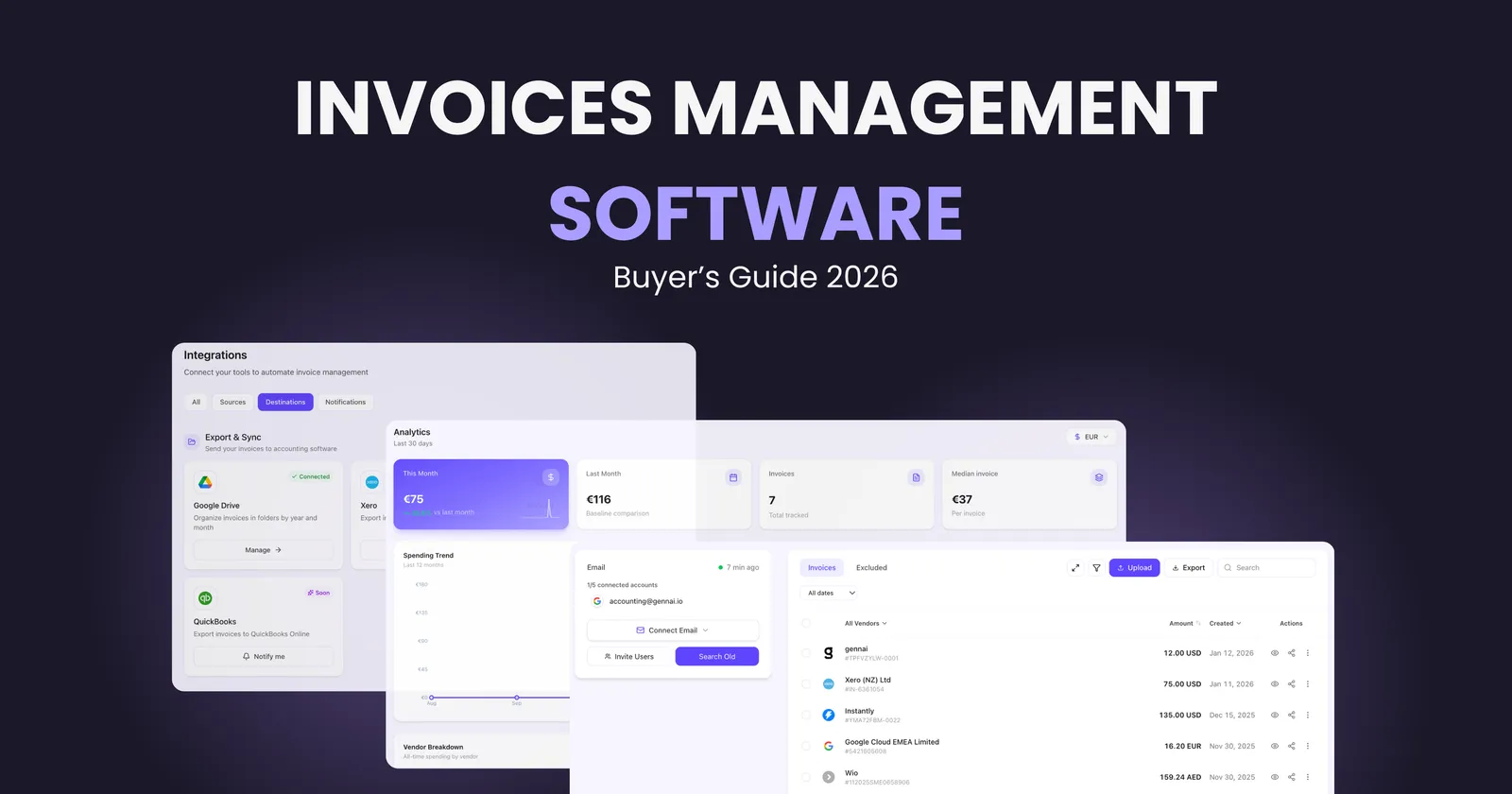
Managing invoices manually in 2026 is like driving with your eyes closed. You might eventually reach your destination, but the journey will be filled with unnecessary stress, costly mistakes, and wasted time. If you're still processing invoices through email folders and spreadsheets, you're losing money with every invoice that passes through your hands.
The difference between businesses thriving today and those struggling often comes down to one thing: how they handle invoices. Modern invoice management software can process invoices 75% faster while reducing errors by over 90% compared to manual methods. That's not a small improvement, it's a complete transformation of how finance teams operate.
This guide will walk you through everything you need to know about choosing invoice management software in 2026. No fluff, no sales pitches, just practical insights from someone who understands what it's like to deal with invoice chaos daily.
What Is Invoice Management Software?
Invoice management software automates the complete lifecycle of handling invoices from the moment they arrive until payment is reconciled. Instead of manually entering data, routing invoices for approval through endless email chains, and tracking payments in spreadsheets, the software handles all of this automatically.
Think of it as your digital finance assistant that never sleeps, never makes data entry mistakes, and never loses an invoice in someone's inbox.
The core functions include:
Automated Invoice Capture: The system receives invoices from multiple channels, whether they arrive via email, vendor portals, or paper scans. Modern solutions like Gennai can automatically extract invoices from your Gmail or Outlook inbox without any manual intervention.
Data Extraction: Using AI and OCR technology, the software reads invoice data, vendor information, line items, amounts, and payment terms, then converts everything into structured, searchable data. No more squinting at PDF files or retyping information.
Approval Workflows: Invoices route automatically to the right people based on rules you define. A small office supply invoice might get instant approval, while a major vendor payment routes through multiple stakeholders. The system tracks where each invoice sits in the approval chain.
Financial Visibility and Reporting: Real time dashboards show you exactly where your money is going, which vendors you're paying, and how quickly invoices move through your system. Modern invoice management software provides complete visibility into your accounts payable process.
Why Manual Invoice Processing Fails in 2026
The traditional approach to invoice management breaks down at scale. Here's what actually happens when businesses try to manage invoices manually:
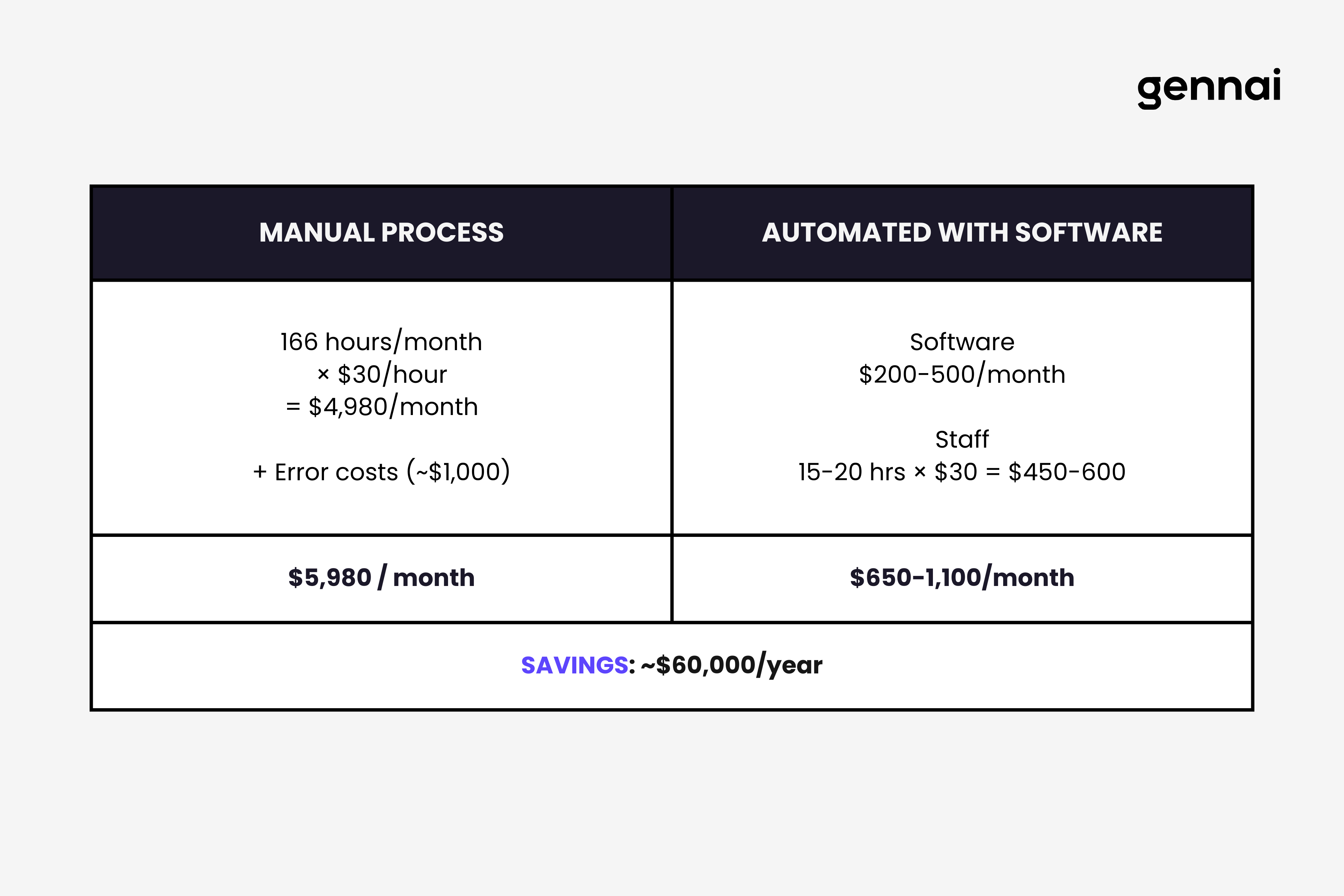
Time Drain: Processing a single invoice manually takes 15 to 20 minutes when you factor in data entry, routing for approval, following up, and reconciliation. For a business processing 500 invoices monthly, that's over 166 hours of work. Invoice management software reduces this to 2 to 3 minutes per invoice.
Error Rates: Manual data entry has an error rate of 1% to 5%. That might sound small, but errors in invoice processing cost businesses 5% to 8% of invoice value annually through duplicate payments, late fees, lost early payment discounts, and accounting mismatches.
Lost Invoices: Email inboxes are black holes for invoices. An invoice arrives, gets filed in a folder, and disappears until a vendor calls asking why they haven't been paid. Or worse, the invoice never gets processed and you face late payment penalties.
No Visibility: When invoices live in email threads and filing cabinets, no one knows what's actually happening. Which invoices are pending approval? Who's creating bottlenecks? How much do you owe vendors right now? Manual systems can't answer these questions without hours of detective work.
Slow Approval Cycles: An invoice arrives, someone forwards it to their manager, who forwards it to accounting, who has questions and sends it back. Days or weeks pass. Meanwhile, vendors wait and your relationships suffer.
Fraud Risk: Manual processes lack controls. Duplicate invoices get paid, fraudulent invoices slip through, and there's no audit trail when problems surface.
The businesses still using manual invoice processes in 2026 face a growing competitive disadvantage. While they're drowning in administrative work, their competitors using modern software are processing invoices in minutes and using that saved time to focus on strategic work that actually grows the business.
Key Features to Look for in Invoice Management Software
Not all invoice management software is created equal. When evaluating options, focus on features that solve real problems rather than getting distracted by flashy demos. Here's what actually matters. For a detailed breakdown of each essential capability, see our guide to 10 must-have features in invoice management software.
AI Powered Invoice Capture
The best systems automatically extract invoices from your email inbox the moment they arrive. You forward invoices to a dedicated email address or connect your Gmail or Outlook account, and the software handles everything else. Look for systems that can process various invoice formats, from simple PDFs to complex multi page invoices with line item details.
The AI should recognize vendor information, invoice numbers, dates, amounts, tax details, and payment terms without manual verification for at least 90% of invoices. The remaining 10% requiring human review is normal, especially for new vendors or unusual formats. For a detailed technical explanation of how these AI systems work, see our complete guide to AI invoice processing.
Intelligent Data Extraction
OCR technology has improved dramatically. Modern invoice management software uses AI powered OCR that learns from corrections and gets more accurate over time. The system should extract not just header information but complete line item details, matching them to your chart of accounts or project codes automatically.
For businesses handling invoices from recurring vendors, the software should remember how to categorize each vendor's invoices after the first few examples. The system learns that invoices from your office supply vendor always go to "Office Expenses" while software subscriptions route to "Technology Costs."
For a deep dive into how OCR converts scanned documents into structured data, see our complete guide to invoice OCR.
Customizable Approval Workflows
Your approval process should match how your business actually operates. Simple rules based workflows work for most companies like invoices under $500 get auto approved, invoices from $500 to $5,000 need manager approval, and anything over $5,000 requires multiple sign offs.
Advanced systems offer dynamic routing where invoices route based on vendor, department, project code, or budget availability. The workflow should escalate invoices that sit too long and send reminders automatically so invoices don't get stuck.
Seamless Accounting Integration
Invoice management software should sync bidirectionally with your accounting system. When an invoice gets approved, it automatically creates the appropriate entries in QuickBooks, Xero, NetSuite, or whatever platform you use. Data flows automatically between systems without manual export and import.
Look for native integrations rather than third party connectors. Native integrations are more reliable, sync faster, and cause fewer headaches when something goes wrong.
Multi Channel Invoice Receipt
Vendors send invoices in different ways. Your software should handle all of them through email forwarding, a vendor portal where suppliers can submit invoices directly, mobile app for scanning paper invoices, and API connections for vendors using electronic invoicing systems.
Flexibility in how invoices enter your system means fewer manual workarounds and less chance of invoices falling through cracks.
Three Way Matching
For businesses using purchase orders, three way matching automatically compares the purchase order, receiving documentation, and invoice to ensure everything aligns before approval. This catches errors, prevents overpayment, and stops fraudulent invoices.
The system should flag discrepancies automatically and route exceptions to the appropriate person for resolution. Perfect matches should process without human intervention.
Real Time Reporting and Analytics
Dashboards should show at a glance what's happening with your invoices such as how many invoices are pending approval, who's creating bottlenecks in the approval chain, average time from invoice receipt to payment, spending by vendor or category, invoices approaching due dates, and cash flow projections based on scheduled payments.
Advanced analytics help identify cost saving opportunities like vendors where you could negotiate better terms, duplicate payments to catch and recover, seasonal spending patterns to plan for, and early payment discounts you're missing.
Mobile Access
Finance teams don't work exclusively at desks anymore. Mobile apps should allow approvers to review and approve invoices from anywhere, accounting teams to check invoice status and respond to vendor questions, and anyone to capture paper invoices via mobile scanning.
Real mobile functionality means more than just viewing invoices on a small screen. The mobile experience should feel natural and enable people to complete their work efficiently.
Audit Trail and Compliance
Every action in the system should be logged so you can see who received the invoice, who reviewed it, what changes were made, who approved it, when it was processed, and any communications related to the invoice.
This audit trail is critical for compliance, resolving disputes with vendors, and understanding where processes break down. Look for systems that maintain these records indefinitely and make them easily searchable.
Vendor Management
Good invoice management software includes a vendor database that stores contact information, payment terms, historical spending, tax documentation, and communication history.
When a new invoice arrives from a known vendor, the system should automatically populate vendor details and flag invoices that don't match stored information, which could indicate fraud or errors.
Types of Invoice Management Software
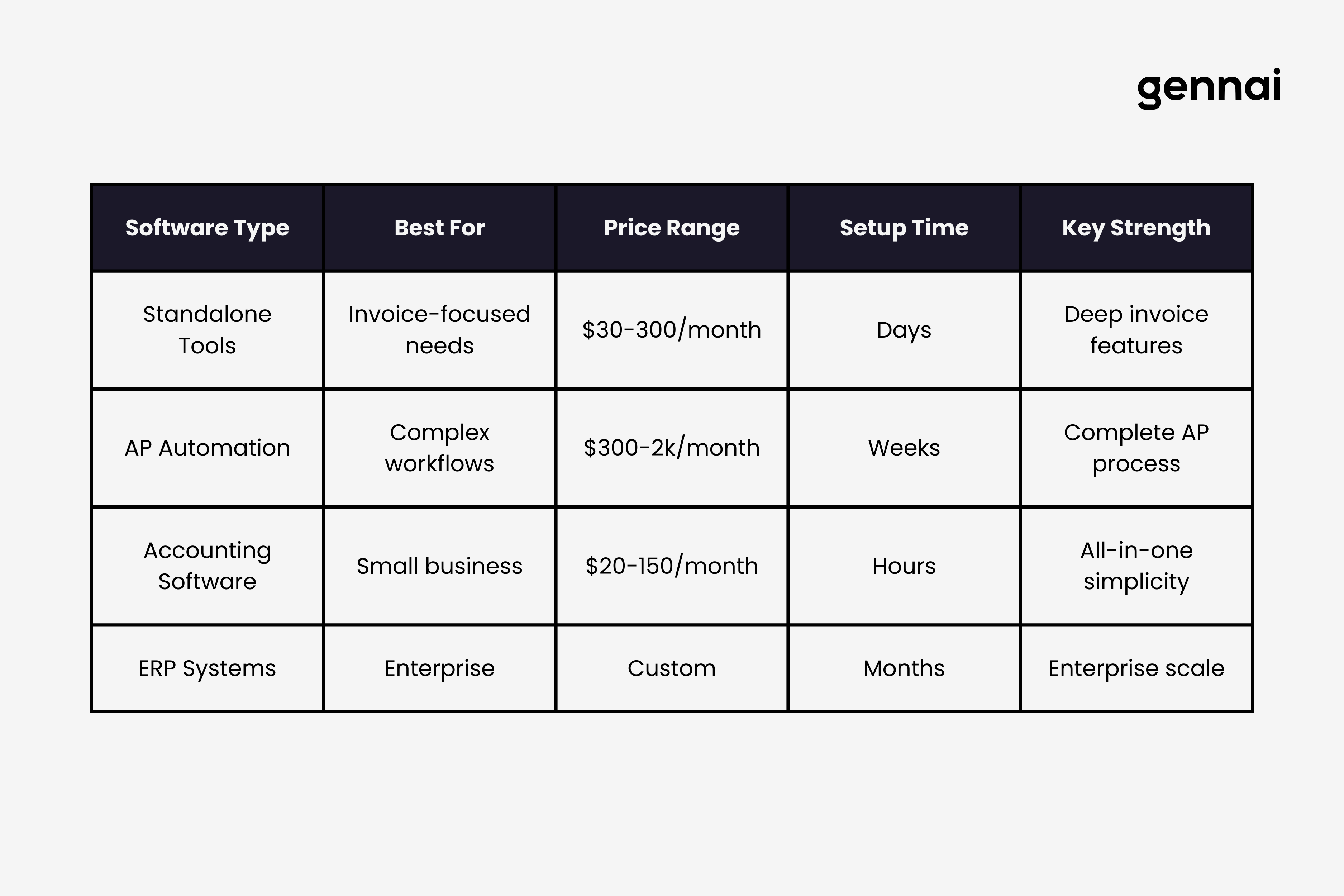
Invoice management software comes in several flavors. Understanding these categories helps you evaluate which type matches your business needs.
Standalone Invoice Processing Tools
These tools focus exclusively on invoice management. They handle invoice capture, data extraction, approval workflows, and accounting integration. Standalone tools typically offer the deepest feature set for invoice specific workflows and often provide the best user experience because they're built around one core function.
Standalone solutions work well for businesses that already have accounting software they're happy with but need better invoice processing. The trade off is that you'll need integration between your invoice tool and your accounting system.
Full Accounts Payable Automation Platforms
AP automation platforms handle the complete accounts payable process beyond just invoices. They manage vendor onboarding, purchase requisitions, purchase order creation, invoice processing, and expense management.
These comprehensive platforms suit larger organizations with complex procurement processes. If you're constantly dealing with purchase orders, vendor contracts, and detailed spending controls across departments, an AP automation platform might be worth the additional complexity.
Our complete guide to accounts payable automation covers the full AP lifecycle beyond just invoice capture.
Accounting Software with Built In Invoice Management
Most modern accounting platforms include invoice management features. QuickBooks, Xero, and similar tools offer invoice capture, basic approval workflows, and direct processing as part of their broader accounting functionality. If you're considering these options, our Dext vs Xero comparison breaks down what each platform actually delivers for invoice capture.
The invoice management features in accounting software work well for small businesses with straightforward needs. The advantage is having everything in one system. The limitation is that invoice specific features are often less sophisticated than standalone tools. For a deep dive into why cloud-based solutions have overtaken traditional desktop software for most businesses, see our analysis of cloud vs local invoice software.
Enterprise Resource Planning Systems
Large enterprises often handle invoice management through their ERP systems like SAP, Oracle, or NetSuite. These systems integrate invoice management with procurement, inventory, financial planning, and other business processes.
ERPs provide the most comprehensive solution but come with significant costs and complexity. Implementation takes months, requires consultants, and demands substantial internal resources. ERPs make sense for large organizations with complex operations across multiple entities and geographies.
How to Choose the Right Invoice Management Software for Your Business
Choosing software shouldn't feel like gambling. Here's a practical framework for making the right decision. For a more detailed evaluation methodology, see our comprehensive decision framework for choosing invoice management software.
Start with Your Current Pain Points
List the specific problems you're trying to solve. Don't start with a wishlist of features. Start with problems. Are invoices getting lost? Are approval cycles too slow? Are you missing early payment discounts? Is manual data entry consuming too much time?
Your pain points determine which features matter most. If you're drowning in paper invoices from multiple vendors, powerful OCR and multi channel capture become critical. If invoices sit in approval limbo for weeks, workflow automation moves to the top of your list.
Assess Your Invoice Volume and Complexity
Software that works brilliantly for 50 invoices per month might collapse under 500. Be realistic about your volume today and where you'll be in two years. Consider not just the number of invoices but their complexity such as how many unique vendors send you invoices, whether you use purchase orders, if you need multi currency support, whether invoices require multiple approvers, and if you process invoices across multiple entities or locations.
Higher volume and complexity justify more sophisticated and expensive software. Lower volume might mean simpler tools make more sense.
Evaluate Integration Requirements
Your invoice management software will need to work with other systems. Make a list of must have integrations with your accounting software, banking systems, and internal tools like Slack or Microsoft Teams for notifications.
Check whether the software offers native integrations or relies on third party connectors like Zapier. Native integrations are more reliable. Ask potential vendors about the depth of their integrations. Some integrations only sync basic data while others maintain full bidirectional synchronization.
Consider Your Team's Technical Sophistication
Be honest about your team's comfort with technology. Some invoice management systems require significant technical knowledge to configure and maintain. Others are designed for finance professionals with limited IT background.
If you don't have dedicated IT support, look for systems with intuitive interfaces, excellent support, and managed onboarding. Powerful software that your team can't figure out isn't powerful at all, it's just expensive.
Calculate Total Cost of Ownership
Software pricing is deliberately confusing. To compare options fairly, calculate the total cost over three years, including base subscription fees, per user charges, per invoice fees for high volume plans, implementation costs, training costs, integration development or third party connector fees, and support costs beyond basic packages.
Some vendors charge low monthly fees but add per invoice charges that multiply quickly at scale. Others have high base prices but include unlimited invoices. Run the numbers based on your actual usage patterns.
Don't forget to factor in the cost of your current process. If you're spending 166 hours monthly on manual invoice processing at an average cost of $30 per hour, that's $4,980 monthly or nearly $60,000 annually in labor costs alone, not counting errors and inefficiencies. Use our invoice processing cost calculator to calculate your specific numbers.
Test with Real Invoices During Trials
Every vendor offers demos showing perfect scenarios. That tells you nothing about how the software will perform with your actual invoices. During trial periods, use real invoices from your business. Test with your messiest, most complex invoices to see how the system handles them.
Pay attention to data extraction accuracy, how easy it is to correct errors, whether workflows route as expected, how intuitive the interface feels after using it for a week, and how long it takes to process a typical invoice from receipt to approval.
Check Customer Support Quality
When invoice processing stops working, you need help immediately. Evaluate support quality before committing by asking how quickly they respond to urgent issues, whether support is available during your business hours, if you get dedicated support contacts or deal with general queues, what training and onboarding assistance they provide, and whether there are additional costs for premium support.
Read reviews focusing specifically on support experiences. A pattern of complaints about unresponsive support is a major red flag.
Plan for Growth and Change
Choose software that can grow with you. Your needs will change. Can the software scale to higher invoice volumes without performance degradation? Does the pricing model remain reasonable at higher volumes? Can you add users easily as your team grows? Will the software support more complex workflows if your approval processes evolve?
Switching invoice management software is painful. Choose a solution that will serve you for at least three to five years rather than one you'll outgrow in 18 months.
Common Mistakes to Avoid When Buying Invoice Management Software
Learning from others' mistakes is cheaper than making your own. Here are the traps businesses fall into:
Choosing Based on Features Rather Than Outcomes
Software demos showcase impressive features. It's easy to get excited about AI this and automation that without asking whether those features solve your actual problems. A system with 50 features you'll never use is worse than one with 10 features you use daily.
Focus on outcomes. Will this software reduce the time we spend processing invoices? Will it eliminate the errors we're currently making? Will it give us visibility we lack today? If a feature doesn't tie to a measurable outcome, it doesn't matter.
Underestimating Implementation Complexity
Simple software can have complex implementations. Even straightforward invoice management tools require decisions about workflows, approval rules, vendor categorization, and accounting integrations. Factor implementation time and effort into your decision.
Ask vendors for realistic implementation timelines and what resources you'll need to commit. If they promise you'll be up and running in a day but their other customers took three months to fully implement, set your expectations accordingly.
Ignoring User Adoption
Software only works if people use it. The best invoice management system in the world fails if approvers ignore it and process invoices through email instead. Consider who will use the system daily and whether they'll actually adopt it.
Involve future users in the evaluation process. Let the accounting team test the invoice entry process. Have approvers try the mobile app. Get feedback from the people who will live with your decision.
Overlooking Hidden Costs
The advertised price is rarely the full price. Watch for per user fees that multiply quickly, per invoice charges above certain volumes, costs for essential integrations, premium support packages required for reasonable response times, and additional fees for features that should be standard.
Ask explicitly about any costs not included in the base price and get everything in writing.
Failing to Negotiate
Software pricing isn't fixed. Vendors have flexibility, especially for annual commitments or when you're comparing multiple options. Don't accept the first price quoted. Ask about discounts for annual payment, whether they'll match competitor pricing, if they can waive implementation fees, and what additional features they might include.
Choosing Software That Doesn't Match Your Industry
Some invoice management software is built for specific industries. A tool designed for e-commerce might lack features critical for construction companies. A platform built for agencies might be overkill for retail businesses.
Look for vendors with experience in your industry and ask for customer references from similar businesses.
Invoice Management Software Pricing in 2026
Pricing varies dramatically based on features, scale, and vendor positioning. Here's what to expect across different categories:
Small Business Solutions
For businesses processing 50 to 200 invoices monthly, basic plans typically cost $30 to $150 per month. These include basic invoice capture, simple approval workflows, integrations with popular accounting platforms, and standard support.
At this level, you're often paying per user or based on invoice volume. Features are limited but sufficient for straightforward needs. Freelancers and solo professionals have unique requirements balancing both sending and receiving invoices—see our dedicated guide to invoice software for freelancers for specific recommendations.
Mid Market Solutions
Businesses processing 200 to 1,000 invoices monthly typically pay $300 to $1,500 monthly depending on volume and features. Mid market solutions offer advanced OCR and AI extraction, complex approval workflows, extensive integrations, purchase order matching, detailed analytics and reporting, and priority support.
Many vendors at this level move to custom pricing based on your specific needs rather than published rates.
Enterprise Solutions
Large organizations processing thousands of invoices monthly should expect costs of $2,000 to $10,000 monthly or more. Enterprise platforms provide unlimited user access, dedicated account management, custom integrations and API access, advanced security and compliance features, multi entity and multi currency support, and white glove implementation and training.
Enterprise pricing is always custom and typically requires annual contracts with significant upfront implementation fees.
Hidden Costs to Watch For
Beyond base subscription costs, budget for implementation and setup fees from $500 to $10,000, training for your team, integration development if you need custom connections, premium support packages, and overage charges if you exceed plan limits.
How Invoice Management Software Integrates with Your Existing Systems
Integration capabilities can make or break your invoice management software experience. Here's what you need to know:
Accounting System Integration
Your invoice management software should sync seamlessly with your accounting platform. Data flows in both directions so approved invoices create entries in your accounting system automatically, vendor information stays consistent across systems, and chart of accounts and cost centers align.
Native integrations with major platforms like QuickBooks, Xero, NetSuite, and Sage work more reliably than third party connectors. Ask about sync frequency, whether syncing is real time or scheduled, what happens if syncing fails, and whether you can manually trigger syncs when needed.
Email Integration
For end to end automation, modern invoice management software like Gennai connects directly to your Gmail or Outlook inbox. This email first approach means invoices process automatically from the moment they arrive without any manual uploading or forwarding.
Not all invoice management tools offer direct email integration. This feature has become increasingly important as it eliminates the last manual step in invoice capture.
Communication Platform Integration
Modern invoice management software can integrate with Slack, Microsoft Teams, or email to notify approvers when invoices need attention, alert finance teams to exceptions, update stakeholders when invoices are processed, and provide quick status checks without logging into the system.
These integrations improve adoption because people can handle tasks without leaving their normal workflow.
Document Management Integration
If you use document management systems like Google Drive, SharePoint, or similar platforms, look for invoice management software that can store processed invoices in your existing repository, retrieve supporting documentation when needed, and maintain consistent filing structures.
This prevents creating yet another silo where documents live in isolation from the rest of your business files.
The Future of Invoice Management Software in 2026 and Beyond
Invoice management technology continues evolving rapidly. Understanding where the industry is heading helps you choose software that won't become obsolete quickly.
AI Powered Intelligence
The next generation of invoice management software uses AI not just for data extraction but for decision making. Systems can automatically categorize new vendors based on invoice content, flag unusual invoices that might indicate fraud, predict approval times and identify bottlenecks before they occur, and learn from corrections to improve accuracy continuously.
This intelligence reduces the need for manual rules and configuration. The software adapts to how you work rather than forcing you to adapt to rigid workflows.
Email First Invoice Capture
The most significant trend in invoice management is direct email integration. Rather than forwarding invoices to a separate system or manually uploading them, modern software connects directly to your Gmail or Outlook inbox, identifies invoices automatically, extracts them without any action from you, and processes them through your workflows.
This email first approach eliminates the last manual step in invoice capture. Invoices process automatically from the moment they arrive in your inbox. For businesses that receive most invoices via email, this transforms the entire experience from active management to passive oversight.
Predictive Analytics
Future invoice management systems will do more than report what happened. They'll predict what will happen with cash flow projections based on invoice due dates and payment history, vendor payment behavior to optimize timing, seasonal spending patterns to help with planning, and budget overruns before they occur.
Predictive capabilities turn invoice management software from a processing tool into a strategic financial management platform.
Real World Scenarios: Choosing the Right Software for Different Business Types
Different businesses have different needs. Here's how invoice management software selection might look for various scenarios.
Our industry-by-industry guide to invoice automation breaks down specific needs for healthcare, manufacturing, e-commerce, and more.
Small E-commerce Business
A small online retailer processing 100 invoices monthly from suppliers, shipping companies, and service providers needs basic invoice capture from email, integration with QuickBooks or Xero, simple approval workflows, and affordable pricing under $100 monthly.
The best fit might be built in features from their accounting software or a lightweight standalone tool with strong email capture. Complex enterprise features would be overkill. E-commerce businesses particularly benefit from automated email invoice extraction since most supplier invoices arrive via email.
Growing SaaS Company
A SaaS business scaling from 10 to 50 employees, processing 300 to 500 invoices monthly from cloud infrastructure providers, software vendors, contractors, and service providers, needs robust invoice capture and OCR, customizable approval workflows that scale with growth, integration with their accounting software, multi currency support for international vendors, and detailed spending analytics.
Mid market invoice management software with strong automation and scalability would serve them well. They should prioritize solutions that can grow with them rather than needing replacement in 18 months.
Accounting Firm
An accounting firm managing invoices for multiple clients needs multi entity support to keep client invoices separate, strong security and access controls, detailed audit trails for compliance, easy client portal access, and flexible pricing based on client count.
Specialized solutions built for accountants or robust mid market tools with strong multi entity capabilities would work best.
Construction Company
A construction company juggling invoices tied to multiple projects and job sites needs integration with construction management software, sophisticated PO matching for materials and equipment, job costing capabilities to track expenses by project, mobile invoice capture from field staff, and support for contractor documentation and compliance.
Industry specific invoice management software or construction focused systems with strong invoice management would be appropriate.
Large Enterprise
A corporation processing thousands of invoices monthly across multiple subsidiaries and countries needs unlimited scalability, multi currency and multi entity support, advanced security and compliance features, custom integration capabilities, dedicated support and account management, and sophisticated reporting and analytics.
Enterprise level solutions or invoice management modules within their existing systems would be the right fit. These businesses should expect custom pricing, significant implementation projects, and ongoing vendor relationships rather than simple software subscriptions.
Getting Started: Your Action Plan
You've read this entire guide. You understand what invoice management software does, what to look for, and how to evaluate options. Now it's time to act.
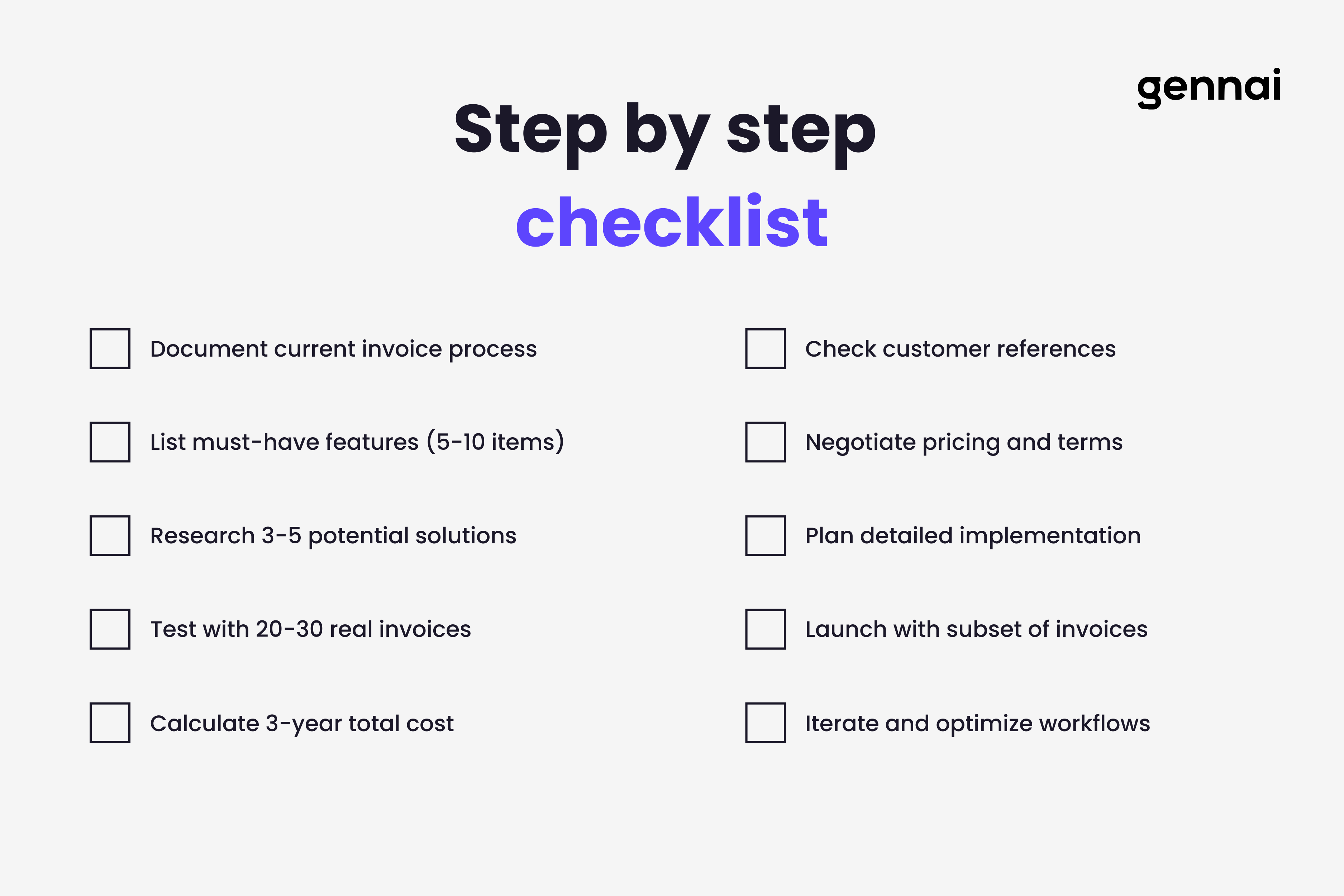
Step 1: Document Your Current State
Before talking to any vendors, document how invoice management works in your business today. How many invoices do you process monthly? How long does the average invoice take from receipt to approval? What are your most painful problems? Who's involved in the approval process? What software do you currently use that needs to integrate?
This documentation becomes your requirements list and helps you ask vendors the right questions.
Step 2: Identify Your Must Have Features
From your documented pain points, create a list of must have features. These are non negotiable requirements any solution must meet. Keep this list short, probably five to ten items. Everything else is nice to have.
Must haves might include email invoice capture, integration with your specific accounting software, approval workflows with at least three levels, or mobile access for approvers.
Step 3: Research Potential Solutions
Based on your business size and needs, identify three to five potential solutions to evaluate. Look for vendors serving businesses like yours, read reviews focusing on your must have features, and check whether they offer trials or demos.
Step 4: Test with Real Invoices
Sign up for trials of your top three options. Don't just watch demos. Actually use the software with your real invoices. Process at least 20 to 30 invoices through each system to get a feel for day to day use.
Involve the people who will actually use the software. Get feedback from your accounting team, from approvers, and from anyone who deals with invoices regularly.
Step 5: Compare Total Cost
Calculate the three year total cost for each option including all fees. Don't make price the only factor, but understand what you're really paying.
Compare this cost against what your current manual process costs in time, errors, and missed opportunities.
Step 6: Check References
Ask vendors for references from similar businesses. Talk to at least two current customers for each vendor on your short list. Ask about their experience with implementation, accuracy of data extraction, quality of support, and any unexpected surprises after they went live.
Step 7: Negotiate and Commit
Once you've selected your preferred option, negotiate on price, implementation timeline, training and support, and contract terms. Get everything in writing before signing.
Step 8: Plan Implementation
Work with your vendor to create a detailed implementation plan. Identify who needs training, what workflows need configuring, which integrations need building, and how you'll migrate historical data if needed.
Expect implementation to take longer than vendors initially suggest. Build in buffer time.
Step 9: Launch and Iterate
Start small if possible. Process a subset of invoices through the new system while maintaining your old process as backup. Once you're confident everything works, cut over completely.
Plan on iterating during the first few months. You'll discover workflow tweaks needed, approvers will request changes, and you'll find ways to optimize the process.
Conclusion
Choosing invoice management software doesn't have to be overwhelming. Focus on solving your specific problems rather than chasing features. Test thoroughly with your actual invoices. Consider the full cost over multiple years. And choose a solution that can grow with your business.
The businesses winning in 2026 aren't the ones with the fanciest software. They're the ones that chose the right software for their needs, implemented it well, and use it to eliminate the grunt work that doesn't add value. That frees their finance teams to focus on strategic work that actually moves the business forward.
Your invoices will keep arriving whether you automate or not. The question is whether you'll spend the next year doing the same manual work you did last year, or whether you'll invest a few weeks in implementing software that transforms how your business handles invoices for years to come.
TL;DR
- Invoice management software automates invoice capture, data extraction, approvals, and accounting integration
- Manual processing costs $15-40 per invoice; automation drops this to under $3
- Key features to look for: AI-powered capture, OCR extraction, customizable workflows, accounting integration
- Four types of solutions: standalone tools, AP automation platforms, accounting software add-ons, and ERPs
- Calculate total cost of ownership over three years, including hidden fees
- Test with your actual invoices during trials, not just demos
- Choose software that can grow with your business for 3-5 years
- Start by documenting your current process and identifying must-have features
Ready to automate your invoices?
Start extracting invoices from your email automatically with Gennai. Free plan available, no credit card required.
Start FreeRelated Articles
Accounts Payable Turnover Ratio Explained
The accounts payable turnover ratio shows how fast you pay suppliers. Get the formula, a worked example, benchmarks and what your number really means.
GuideNet 30 vs Net 60: What Payment Terms Really Mean for Your Cash
Net 30 vs net 60 explained for business owners: what each term means, when the clock really starts, and how the gap hits your cash on both sides.
GuideThe Accounts Payable Process, Step by Step (for Owners)
The accounts payable process has five steps: receive, verify, approve, pay, and record each invoice. Here is how each works and where owners lose money.