
Why OCR Accuracy Matters More Than Speed in 2026
Why OCR accuracy outweighs speed in invoice processing. A 4% accuracy gap creates 20x more errors. Strategies to evaluate OCR solutions in 2026.

Speed sells. It's easy to understand why finance teams get excited about processing 1,000 invoices per hour instead of 100. But when it comes to Invoice OCR (Optical Character Recognition) for invoice management, choosing speed over accuracy is like buying a sports car with faulty brakes.
The difference between 95% and 99% OCR accuracy doesn't sound dramatic. But in practice, that 4% gap means the difference between a system that works and one that creates more problems than it solves. Here's why accuracy deserves to be your top priority when evaluating invoice OCR solutions.
The Hidden Tax of OCR Errors
Fast processing times look impressive in demos. But speed becomes meaningless when your team spends hours fixing mistakes that shouldn't have happened in the first place.
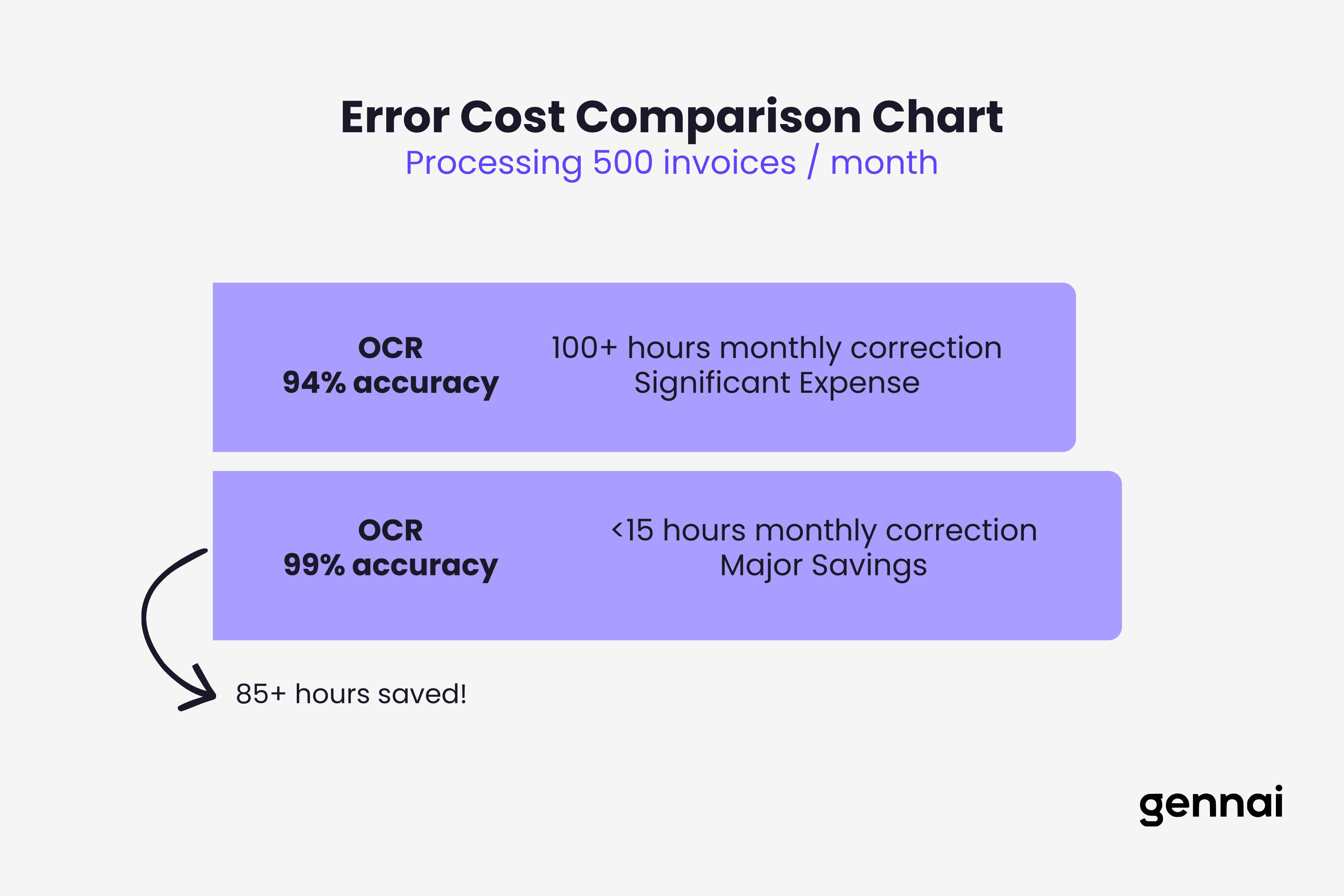
Consider a typical scenario: Your OCR system processes 500 invoices in an hour with 94% accuracy. That's 30 invoices with errors. Each error requires manual review, correction in your accounting system, and potentially follow-up with vendors. If each correction takes 10 minutes, you've just added 5 hours of manual work to what was supposed to be an automated process.
Now compare that to a system processing 400 invoices per hour at 99% accuracy. That's 4 invoices needing correction, roughly 40 minutes of cleanup. The slower system actually saves your team 4 hours and 20 minutes.
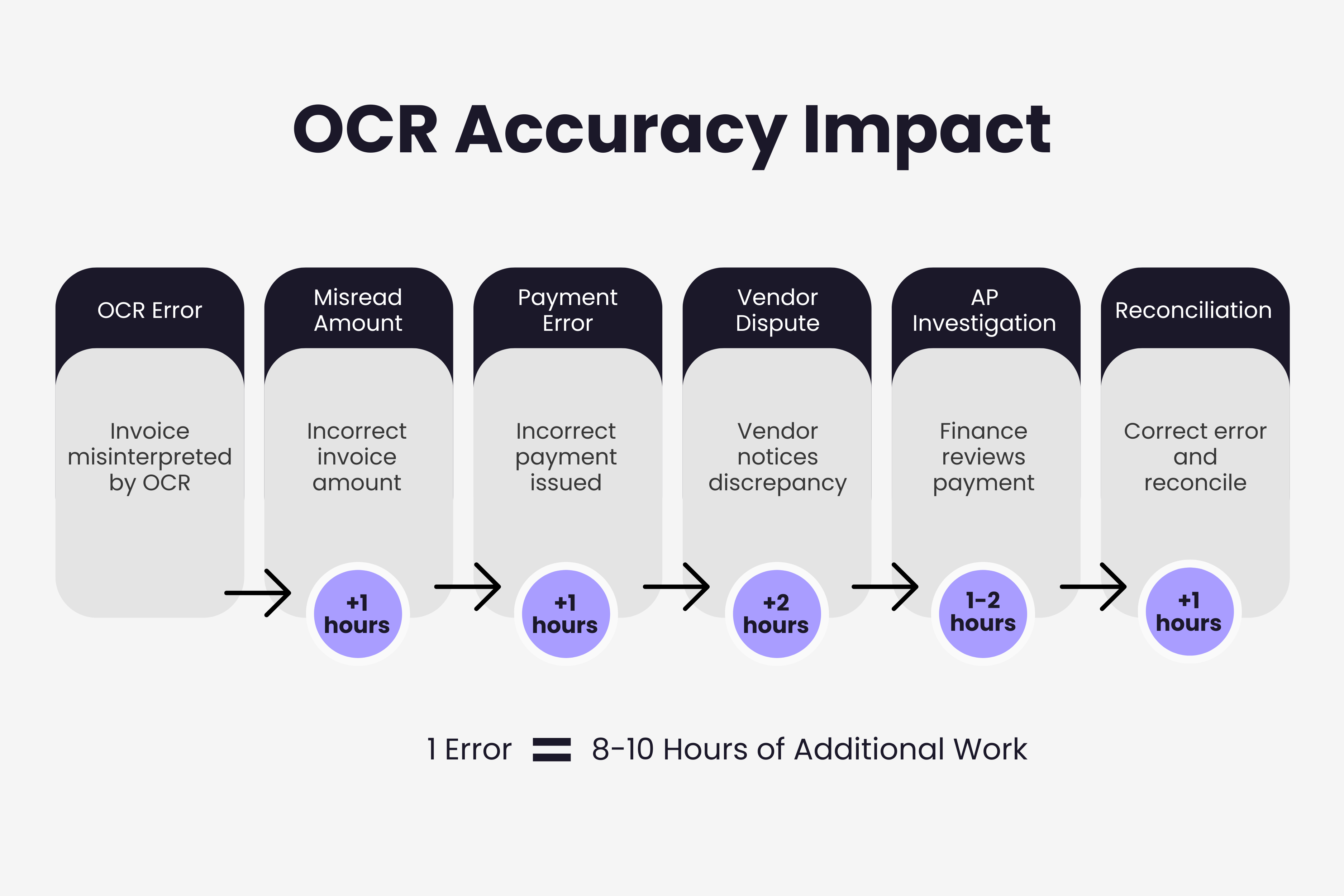
This isn't theoretical. Invoice processing errors compound across your workflow. A misread vendor name creates duplicate records. An incorrect invoice number breaks audit trails. A wrong amount triggers payment disputes. Each mistake cascades into multiple touch points, consuming time across AP, procurement, and vendor management. Understanding why AI invoice extraction fails helps identify these patterns before they become costly.
What Actually Defines OCR Accuracy
Not all accuracy metrics are created equal. Understanding what drives real-world OCR accuracy helps you evaluate solutions properly. To fully grasp the technical foundations, explore how AI actually reads invoices at the field level.
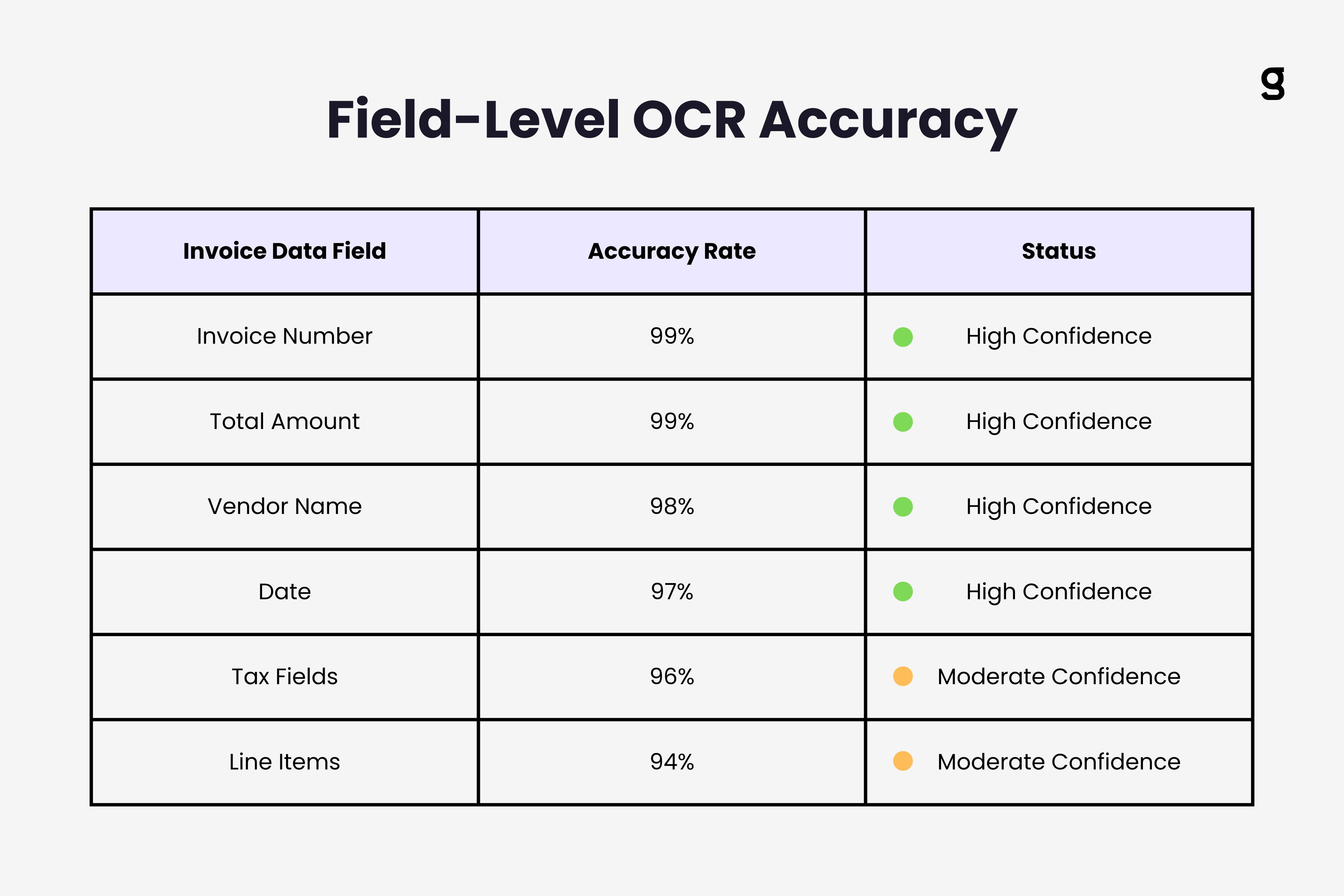
Field-level accuracy is what matters most in invoice processing. It's not enough for OCR to correctly read 98% of all characters. What counts is whether it correctly extracts the specific data fields you need: vendor name, invoice number, date, line items, amounts, tax information.
An OCR system might perfectly capture a vendor's address but misread the invoice total by transposing two digits. That single field error makes the entire extraction useless, even though 90% of the data is correct.
Consistency across document variations separates robust OCR from fragile systems. Invoices come in countless formats: PDF scans, photos, native PDFs, different layouts, multiple languages, varying quality. Accurate OCR maintains performance across all these variations, not just on clean, standardized documents.
Confidence scoring adds another dimension to accuracy. Advanced OCR systems flag fields where they're uncertain, allowing focused human review on ambiguous cases rather than blind acceptance of all extracted data. This hybrid approach often delivers better practical accuracy than fully automated systems claiming higher percentages.
Speed Can Mask Fundamental Accuracy Problems
When OCR vendors emphasize processing speed, it's worth asking what they're optimizing for. Fast processing often relies on shortcuts that sacrifice accuracy.
Some systems prioritize template-based extraction. They work brilliantly on standardized invoices from known vendors but fail on new formats. This creates an illusion of accuracy during initial testing, then degrades in production as document diversity increases.
Others optimize for simple extraction patterns, reading prominent numbers and fields in expected locations. This produces quick results but struggles with complex invoices containing multiple tax rates, discount structures, or unusual layouts.
The most concerning trade-off is minimal validation. Fast OCR systems may skip cross-field validation checks that catch logical errors. They might read an invoice total without verifying it matches the sum of line items, or accept impossible dates without question. Speed looks good in benchmarks but creates data integrity issues downstream.
Real Costs That Accurate OCR Prevents
The business case for OCR accuracy becomes clear when you calculate what errors actually cost.
Payment errors represent direct financial impact. An OCR system that misreads $1,500 as $15,000 triggers an overpayment. Even if caught during reconciliation, you've tied up capital unnecessarily and created administrative work recovering funds. If not caught, the error flows through your financial statements.
Duplicate payments often stem from OCR inaccuracy. When invoice numbers are misread or vendor names extracted inconsistently, your AP system can't properly match and detect duplicates. Finance teams typically don't discover these until month-end reconciliation, when the damage is already done.
Compliance risk escalates with inaccurate extraction. Tax authorities require precise records. Audit trails must be clean. When OCR errors corrupt your data, you're building compliance problems into your financial records. Correcting these during audits is expensive and erodes trust in your financial controls.
Lost discounts and late fees accumulate from processing delays. If your team spends time correcting OCR errors instead of processing invoices, payment deadlines slip. Missing a 2% early payment discount on a $50,000 invoice costs $1,000. Incurring a late fee adds insult to injury.
These costs are recurring. An OCR system with mediocre accuracy doesn't just create problems once. It generates continuous overhead that compounds monthly.
When Speed and Accuracy Align
This isn't an argument against processing speed. The goal is finding systems where speed comes from genuine efficiency, not from cutting corners on accuracy.
Modern AI-powered OCR achieves both by learning from corrections. When a finance team fixes misread fields, advanced systems incorporate that feedback to improve future extractions. Over time, this approach delivers faster processing specifically because accuracy improves and manual intervention decreases. This is a core principle behind how machine learning continuously improves invoice data extraction.
Proper document preprocessing also enables faster accurate extraction. Systems that automatically rotate, deskew, and enhance images before OCR can maintain accuracy while processing documents more quickly. The speed comes from better input quality, not from lowering accuracy standards.
Intelligent field detection allows faster processing on complex invoices. Instead of rigid templates, AI-based systems identify relevant data contextually, extracting accurate information from varied layouts without extensive configuration.
Evaluating OCR Accuracy in Practice
When assessing invoice OCR solutions, dig deeper than vendor-quoted accuracy rates. For a detailed comparison of leading platforms, see our guide to the best OCR software for invoices.
Request testing on your actual invoice formats. Generic accuracy statistics mean little if they don't reflect your specific document mix. The best validation comes from running your real invoices through the system.
Track field-level accuracy separately for critical fields. Overall accuracy percentages can hide weaknesses in specific areas. Separately measure accuracy for vendor names, invoice numbers, dates, and amounts. Some systems excel at certain fields while struggling with others.
Measure accuracy on edge cases. How does the system handle handwritten notes, stamps overlaying text, multi-currency invoices, or documents with poor scan quality? These scenarios reveal whether accuracy is robust or brittle.
Calculate your actual error correction costs. Time the manual effort required to fix OCR mistakes. Include not just correction time but also the downstream impacts: duplicate checks, vendor communications, payment delays. This gives you the real cost of inaccuracy to weigh against processing speed.
Key Takeaways
OCR accuracy isn't just a technical metric. It directly determines whether automation actually reduces your workload or simply shifts work from data entry to error correction.
The 4-5% difference between good and excellent OCR accuracy translates to 20-25 times more errors to fix manually. This changes automation from a genuine efficiency gain to an administrative burden.
Speed optimization that compromises accuracy creates false productivity. Your team appears to process invoices faster while actually spending more total time managing errors and exceptions.
Real OCR value comes from systems that maintain high accuracy across document variations, continuously improve through learning, and provide transparent confidence scoring on extracted data.
When evaluating invoice OCR platforms, test accuracy on your actual documents, track field-level performance for critical data, and calculate the real cost of errors in your workflow. Only then can you properly assess whether a solution delivers genuine automation or just fast mistakes.
For a broader view of how AI technologies work together beyond OCR alone, see our complete guide to AI invoice processing.
TL;DR
- OCR accuracy should be your top priority over processing speed when evaluating invoice automation solutions
- A system with 94% accuracy processing 500 invoices creates 30 errors requiring 5+ hours of manual correction, while 99% accuracy produces only 4 errors needing 40 minutes
- Field-level accuracy matters more than overall character accuracy — a single misread invoice total makes the entire extraction useless
- Speed-first OCR often relies on template-based extraction and minimal validation, which fail on diverse real-world invoice formats
- OCR errors cascade into payment disputes, duplicate payments, compliance risks, and lost early-payment discounts
- Modern AI-powered OCR achieves both speed and accuracy through machine learning, document preprocessing, and intelligent field detection
- Always evaluate OCR on your actual invoices, track field-level accuracy, and calculate real error correction costs before choosing a solution
Ready to automate your invoices?
Start extracting invoices from your email automatically with Gennai. Free plan available, no credit card required.
Start FreeRelated Articles
Accounts Payable Turnover Ratio Explained
The accounts payable turnover ratio shows how fast you pay suppliers. Get the formula, a worked example, benchmarks and what your number really means.
GuideNet 30 vs Net 60: What Payment Terms Really Mean for Your Cash
Net 30 vs net 60 explained for business owners: what each term means, when the clock really starts, and how the gap hits your cash on both sides.
GuideThe Accounts Payable Process, Step by Step (for Owners)
The accounts payable process has five steps: receive, verify, approve, pay, and record each invoice. Here is how each works and where owners lose money.