
Best Invoice OCR Software 2026: Top 7 Compared
The 7 best invoice OCR tools for 2026 compared on accuracy, pricing, and fit: Rossum, ABBYY, Nanonets, Docsumo, Textract, Klippa, and Dext.

Choosing invoice OCR software feels overwhelming when dozens of vendors all claim superior accuracy, fastest processing, and seamless integration. Every provider promises to revolutionize your accounts payable workflow, but the reality often falls short of marketing claims.
The stakes are high. Select the wrong OCR platform and your team wastes months implementing software that cannot handle your invoice formats, requires constant manual corrections, or fails to integrate properly with your accounting systems. Choose wisely and you eliminate thousands of hours of manual data entry annually while achieving accuracy that manual processing never could.
This comparison cuts through the marketing noise to evaluate seven leading OCR solutions based on real-world performance, actual pricing, integration capabilities, and user experiences. Whether you process 100 invoices monthly or 10,000, this guide helps you identify the platform that matches your specific requirements.
What Makes Great Invoice OCR Software?
Before comparing specific platforms, understanding evaluation criteria ensures you assess tools against factors that actually impact your operations.
Accuracy Across Document Variations The best OCR systems maintain high accuracy regardless of invoice format diversity. Your suppliers send invoices in countless layouts, fonts, and quality levels. Software that requires template creation for each vendor format quickly becomes unsustainable.
Modern AI-powered OCR should handle format variations automatically, maintaining 95%+ accuracy across different suppliers without manual template maintenance. For a comprehensive understanding of how OCR technology works under the hood, see our complete guide to invoice OCR. For context on how OCR technology has evolved, our guide on the evolution of OCR explores the four generations of technology enabling this flexibility.
Integration Capabilities OCR delivers maximum value when extracted data flows automatically into your existing systems. Evaluate pre-built connectors for your ERP platform, accounting software, and approval workflows. API quality matters enormously for custom integrations.
Processing Speed and Scalability Individual invoice processing time matters less than concurrent processing capacity. Can the system handle month-end spikes when hundreds of invoices arrive simultaneously? Does performance degrade under heavy load? Keep in mind that OCR accuracy matters more than raw speed when evaluating real-world performance.
Exception Handling No OCR system achieves 100% accuracy on every invoice. Quality platforms assign confidence scores to extracted fields and route low-confidence data for human review. This balance between automation and accuracy prevents incorrect data from entering your systems.
Total Cost of Ownership Pricing models vary dramatically. Some vendors charge per page, others per user, still others offer subscription tiers based on volume. Factor in implementation costs, integration expenses, and ongoing maintenance when calculating real costs.
Top 7 Invoice OCR Software Solutions
1. Rossum - Best for Template-Free Enterprise Processing
Rossum distinguishes itself through AI-powered data extraction that requires zero template creation. The system processes any invoice layout from day one, learning and improving with each document handled.
Key Strengths:
- Up to 98% accuracy across diverse invoice formats
- Self-learning AI that improves automatically over time
- Integrates with major ERP systems including SAP, NetSuite, and Dynamics
- 6x faster processing compared to manual entry
- ISO 27001 and SOC 2 Type II certified
Considerations:
- Premium pricing starting around $18,000 annually
- Initial setup complexity for custom workflows
- Best suited for enterprise volumes (1,000+ invoices monthly)
Best For: Large organizations processing high volumes of invoices from diverse supplier bases requiring minimal manual intervention.
2. ABBYY FlexiCapture - Best for Complex Document Handling
ABBYY FlexiCapture serves enterprises managing extremely complex document workflows across multiple document types beyond invoices. The platform handles structured, semi-structured, and completely unstructured documents with exceptional precision.
Key Strengths:
- Industry-leading accuracy on degraded or poor-quality scans
- Multi-language support for global operations
- Sophisticated validation rules and automated classification
- Handles high document complexity with mixed content types
- Enterprise-grade security and compliance features
Considerations:
- Significant implementation timeline and cost
- Requires dedicated IT resources for optimal configuration
- Pricing starts at $4,150 for basic licenses, enterprise volumes cost significantly more
- Best suited for high-volume enterprise operations
Best For: Global enterprises with complex compliance requirements processing diverse document types beyond standard invoices.
3. Nanonets - Best for Small Business Automation
Nanonets focuses on accessibility for small and medium businesses without extensive IT resources. The platform uses AI for automated document processing with straightforward setup and competitive pricing.
Key Strengths:
- Quick deployment with minimal technical expertise required
- Pre-trained models for common invoice formats
- Custom model training for specific use cases
- API-first design for flexible integration
- Free $200 in credits to start, then pay-as-you-go pricing
Considerations:
- May require more manual review than enterprise solutions
- Limited advanced workflow automation features
- Best suited for moderate volumes (under 5,000 monthly)
Best For: Small businesses and startups seeking affordable invoice automation without complex implementation requirements.
4. Docsumo - Best for Pre-Trained Flexibility
Docsumo provides pre-trained AI models specifically designed for financial documents including invoices, bank statements, and receipts. This approach accelerates deployment while maintaining customization options.
Key Strengths:
- Fast deployment using pre-configured templates
- Custom rule creation for business-specific requirements
- Strong API for ERP integration
- Handles diverse financial document types
- Pricing starts at $25/month with 14-day free trial
Considerations:
- Template-based approach may limit format flexibility
- Learning curve for advanced customizations
- Support responsiveness varies based on plan tier
Best For: Mid-market companies wanting quick deployment for standard invoice formats with room for customization.
5. Amazon Textract - Best for Developer-Centric Teams
Amazon Textract serves tech-savvy organizations building custom document processing workflows within AWS infrastructure. The service provides powerful OCR capabilities through APIs rather than packaged software.
Key Strengths:
- Pay-per-use pricing: $1.50 per 1,000 pages (basic OCR), specialized invoice processing at $10 per 1,000 pages
- Seamless AWS ecosystem integration
- Specialized invoice processing APIs with pre-built extractors
- Scales automatically with demand
- No upfront infrastructure investment, 3-month free tier for new users
Considerations:
- Requires development resources to implement
- No pre-built user interface for document review
- Must build exception handling and workflows separately
- AWS expertise necessary for optimization
Best For: Technology companies with development teams building custom AP automation solutions within AWS environments.
6. Klippa DocHorizon - Best for Finance-Focused Features
Klippa DocHorizon specializes in financial document processing with specific features for fraud detection, currency handling, and compliance requirements unique to finance operations.
Key Strengths:
- Built-in fraud detection and duplicate invoice prevention
- Multi-currency support for international operations
- Compliance certifications for financial services
- High accuracy on financial document formats
- Mobile SDK for receipt capture
Considerations:
- Specialized feature set may include unnecessary capabilities
- Pricing requires custom quote
- Less established than larger enterprise vendors
Best For: Finance teams prioritizing security, fraud prevention, and multi-currency processing capabilities.
7. Dext - Best for Receipt and Small Invoice Processing
Dext targets businesses processing high volumes of receipts alongside invoices, with particular strength in mobile capture and expense management workflows. When evaluating invoice management software options, Dext often appears as a strong contender for receipt-heavy operations.
Key Strengths:
- Mobile-first design with excellent smartphone scanning
- Strong integration with accounting platforms (Xero, QuickBooks, Sage)
- Automated receipt categorization
- Bulk upload capabilities
- Competitive per-user pricing starting at $31.50 monthly
Considerations:
- Optimized more for receipts than complex multi-page invoices
- Lower accuracy on non-standard invoice formats
- Limited customization for enterprise workflows
Best For: Businesses with significant receipt processing needs alongside standard invoice automation, particularly with distributed teams.
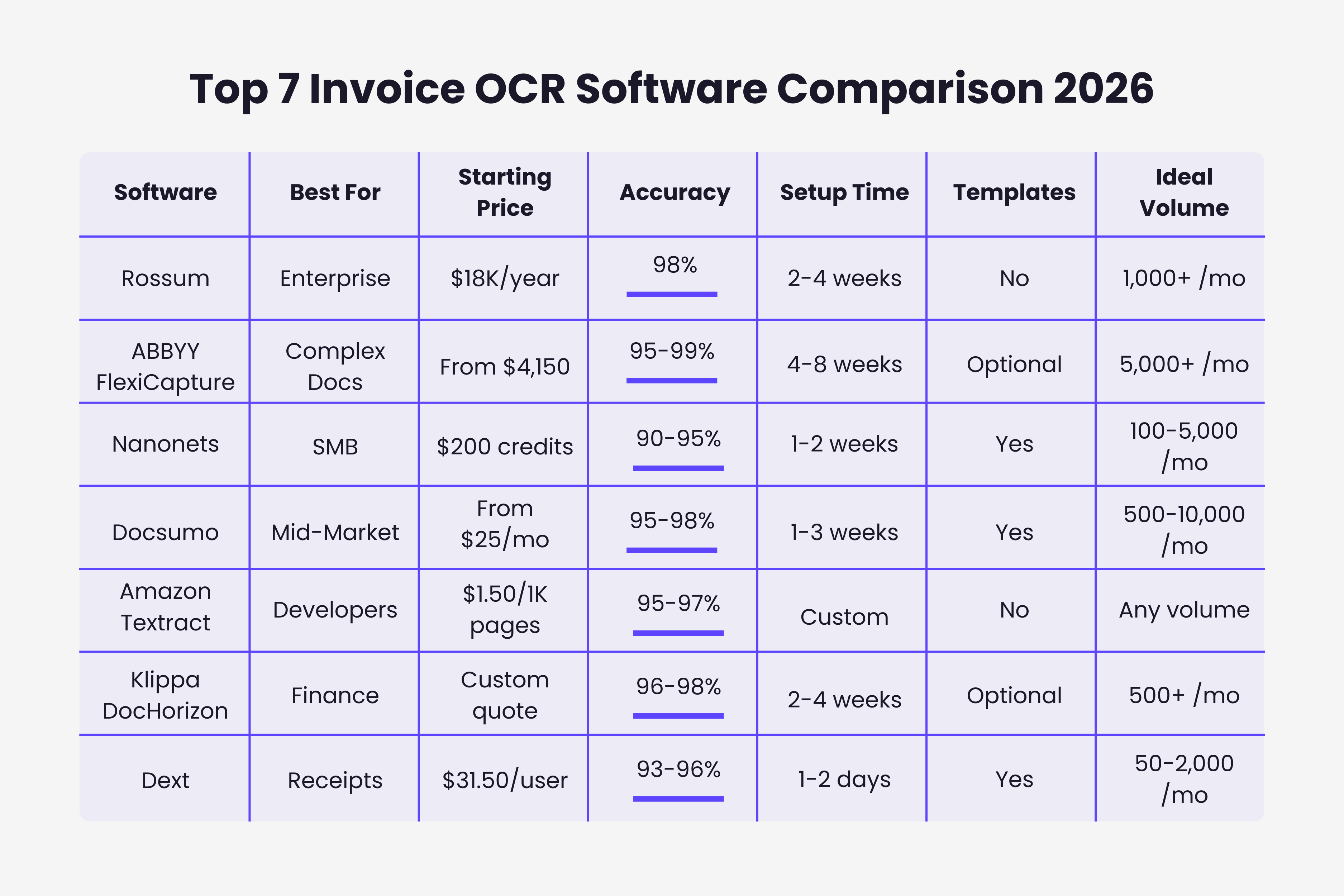
Side-by-Side Comparison
How to Choose the Right OCR Platform
Selecting OCR software requires matching capabilities to your specific situation rather than choosing the "best" tool in abstract terms.
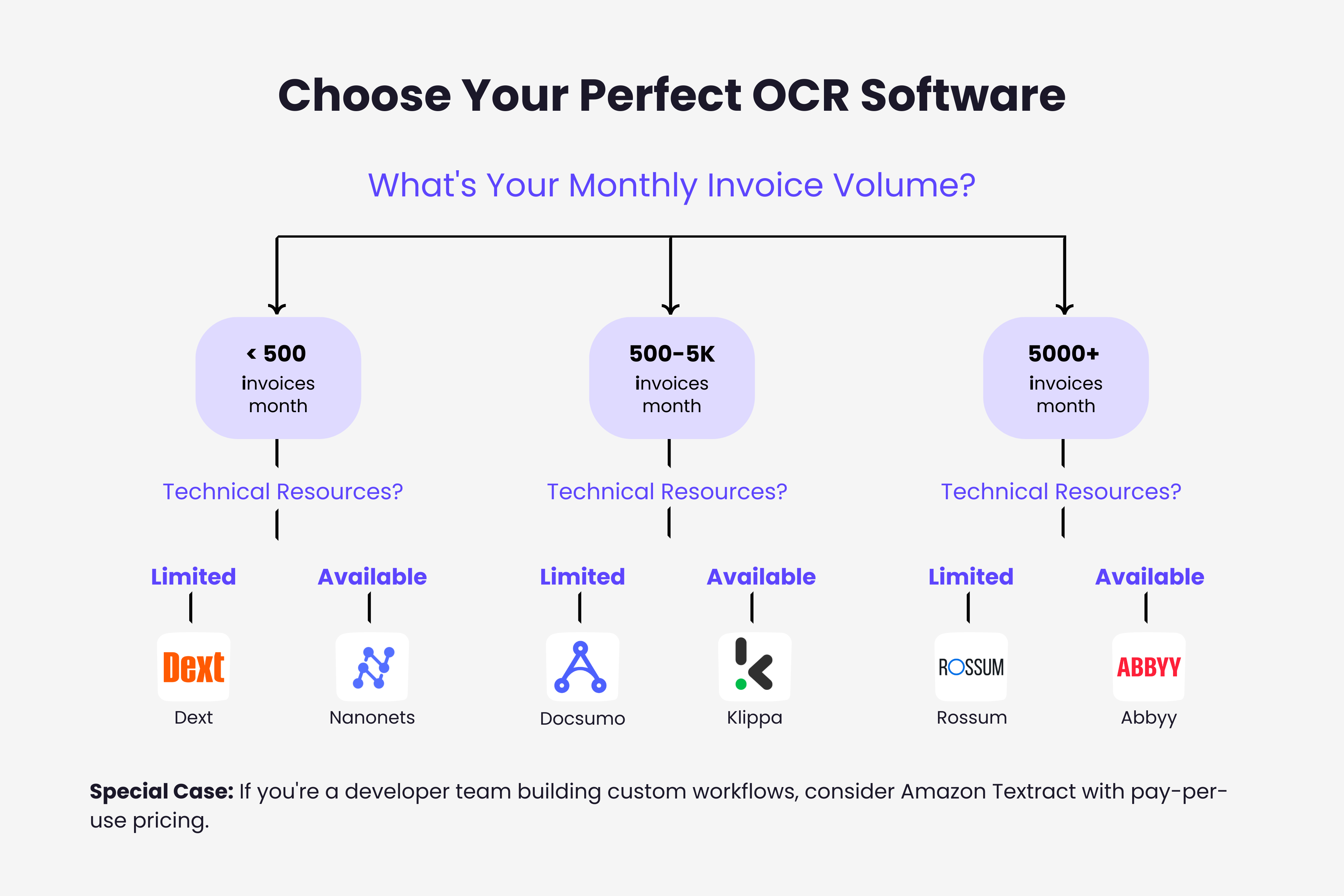
Start With Your Invoice Volume Organizations processing under 500 invoices monthly find success with tools like Nanonets or Dext that offer affordable entry points and quick deployment. Mid-volume operations (500-5,000 monthly) benefit from platforms like Docsumo that balance capability with reasonable pricing. Enterprise volumes demand robust solutions like Rossum or ABBYY despite higher costs.
Consider Your Technical Resources Teams with strong development capabilities can leverage AWS Textract to build exactly the workflow they need. Organizations preferring packaged solutions should choose platforms with intuitive interfaces and pre-built workflows requiring minimal customization.
Evaluate Format Diversity Businesses receiving invoices from hundreds of different suppliers in countless formats need template-free solutions like Rossum. Companies working with a limited set of vendors can succeed with template-based systems that require less sophisticated AI.
Factor Integration Requirements Check which accounting software your chosen OCR platform supports natively. Custom integration through APIs works well for technical teams but creates challenges for organizations without development resources.
Calculate True ROI Compare OCR costs against your current manual processing expenses. A $20,000 annual OCR investment delivers strong ROI if you currently spend $50,000+ on manual processing labor, errors, and delays. Lower volume operations need more affordable solutions to achieve positive returns.
Implementation Success Factors
Even the best OCR platform fails without proper implementation. These factors determine whether automation delivers promised benefits.
Start With a Pilot Program Process a subset of invoices through your chosen platform before full deployment. This validates accuracy claims with your actual invoice formats, reveals integration challenges early, and builds team confidence before broad rollout.
Prepare Clean Training Data If your platform requires training, provide high-quality sample invoices covering format diversity. Better training data produces higher accuracy from day one, reducing frustration during initial deployment.
Plan for Exception Handling Define clear workflows for reviewing low-confidence extractions. Assign responsibility for validating flagged invoices and establish escalation procedures for difficult cases. Automation works best when human oversight handles genuine edge cases rather than systematic errors.
Measure and Optimize Track accuracy rates, processing times, and exception frequencies. Work with your vendor to address systematic issues and tune the system for your specific invoice patterns. Continuous improvement ensures sustained value from your investment.
Making Your Decision
Invoice OCR technology has matured to the point where choosing any reputable platform delivers significant improvements over manual processing. The critical question is not whether to automate but which solution best fits your specific requirements.
For enterprises managing thousands of invoices monthly from diverse suppliers, Rossum or ABBYY FlexiCapture justify their premium pricing through superior accuracy and minimal manual intervention. These platforms handle format chaos that would overwhelm simpler systems.
Mid-market organizations find the sweet spot with Docsumo or Klippa, balancing capable AI with reasonable pricing and manageable implementation timelines. These platforms provide enterprise-grade features without enterprise-level costs.
Small businesses and startups succeed with Nanonets or Dext, accessing automation previously available only to large organizations. These tools deliver strong value at price points that make sense for moderate invoice volumes.
Development teams building custom solutions can leverage Amazon Textract to create exactly the workflow their organization needs, though this path requires significant technical capability.
The invoice OCR market continues evolving rapidly. What seemed impossible three years ago is now standard. Platforms that struggled with format diversity now handle virtually any layout. Accuracy rates that required human verification now proceed touchless. To understand the AI technology powering these platforms, read our complete guide to AI invoice processing.
For businesses still processing invoices manually, the question is not whether to adopt OCR but how quickly you can implement it and which platform will serve your needs both today and as you scale. The right choice depends on your specific situation, but the wrong choice is waiting while competitors automate and gain operational advantages.
TL;DR
- 7 leading OCR platforms compared: Rossum, ABBYY, Nanonets, Docsumo, Amazon Textract, Klippa, and Dext
- Enterprise volumes (1,000+/month): Choose Rossum ($18K/year) or ABBYY for template-free processing and 98%+ accuracy
- Mid-market (500-5,000/month): Docsumo ($25/mo) or Klippa balance features with reasonable pricing
- Small business (<500/month): Nanonets (pay-as-you-go) or Dext ($31.50/user) offer accessible entry points
- Developer teams: Amazon Textract provides API-first flexibility at $1.50-$10 per 1,000 pages
- Key evaluation criteria: Accuracy on your actual invoices, integration with your accounting software, total cost of ownership
- Start with a pilot program testing real invoices before full deployment to validate accuracy claims
Ready to automate your invoices?
Start extracting invoices from your email automatically with Gennai. Free plan available, no credit card required.
Start FreeRelated Articles
Accounts Payable Turnover Ratio Explained
The accounts payable turnover ratio shows how fast you pay suppliers. Get the formula, a worked example, benchmarks and what your number really means.
GuideNet 30 vs Net 60: What Payment Terms Really Mean for Your Cash
Net 30 vs net 60 explained for business owners: what each term means, when the clock really starts, and how the gap hits your cash on both sides.
GuideThe Accounts Payable Process, Step by Step (for Owners)
The accounts payable process has five steps: receive, verify, approve, pay, and record each invoice. Here is how each works and where owners lose money.