
QuickBooks vs Xero Invoices: Pricing & Best Fit
QuickBooks vs Xero for invoice management in 2026, compared on pricing, automation, payments, and multi-currency, with a clear pick by team size and needs.

The QuickBooks vs Xero decision matters more for invoice management than most businesses realize. While both platforms handle invoicing, they approach workflow, automation, and payment collection differently enough that your choice affects daily operations, cash flow timing, and team efficiency.
This comparison examines how each platform performs specifically for invoice-related workflows in 2026, based on current pricing, features, and real-world usage patterns. For businesses evaluating their options across different industry-specific invoice automation needs, understanding these platform differences becomes critical.
Pricing Reality Check: 2026 Costs
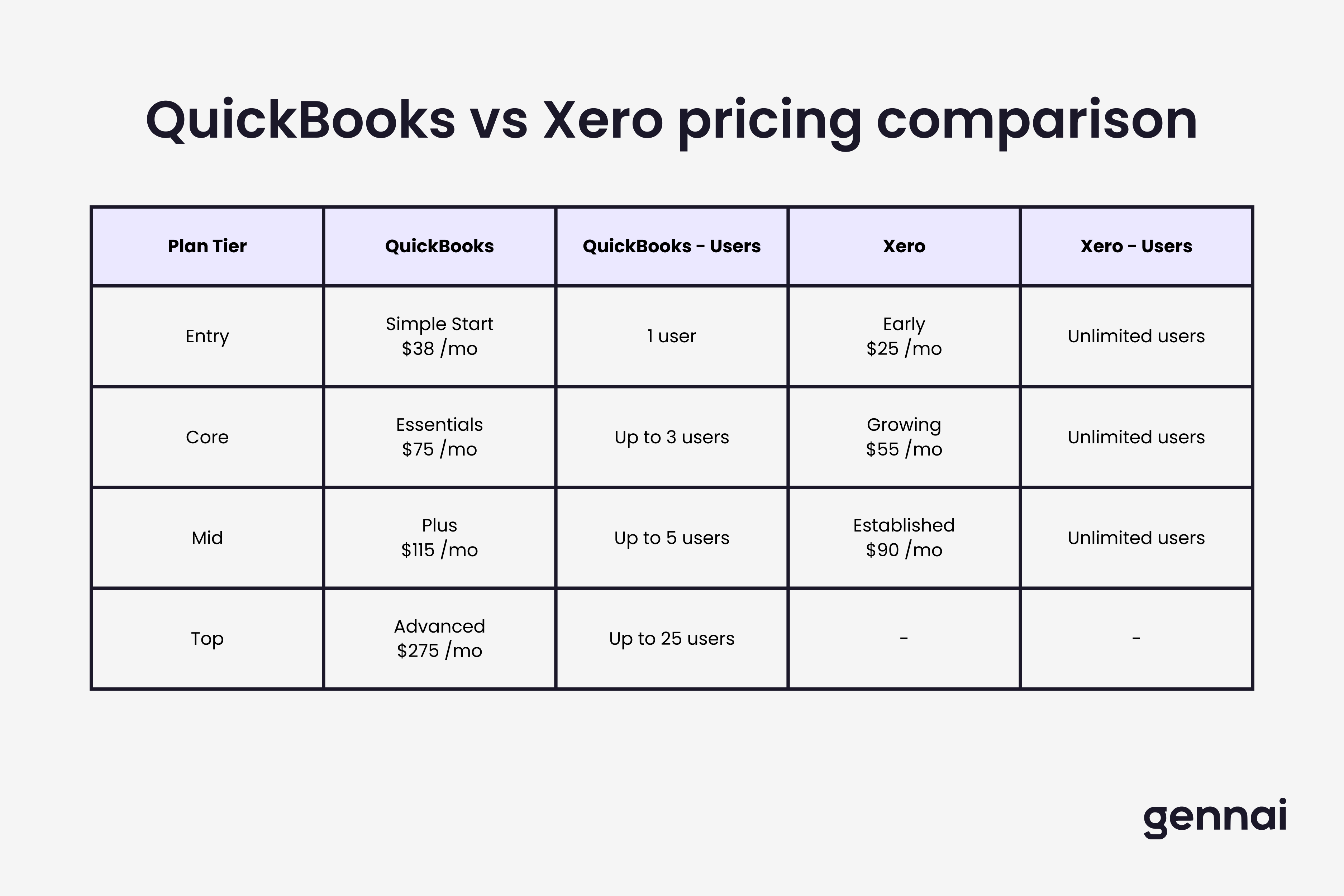
QuickBooks Online (US pricing):
- Simple Start: $38/month (1 user)
- Essentials: $65/month (3 users)
- Plus: $99/month (5 users) - most popular
- Advanced: $235/month (25 users)
Xero (US pricing):
- Early: $20/month (unlimited users, 20 invoices/month limit)
- Growing: $46/month (unlimited users, unlimited invoices)
- Established: $70/month (unlimited users, multi-currency, advanced features)
The fundamental pricing difference: QuickBooks charges per user while Xero allows unlimited users on all plans. For a team of five, QuickBooks Plus costs $99/month while Xero Growing costs $46/month. However, QuickBooks includes more built-in features while Xero often requires paid add-ons.
For businesses evaluating these platforms primarily for accounting firm use cases, our analysis of accounting firm invoice management workflows provides additional context on which platform better supports client-based invoicing scenarios.
Invoice Creation and Customization
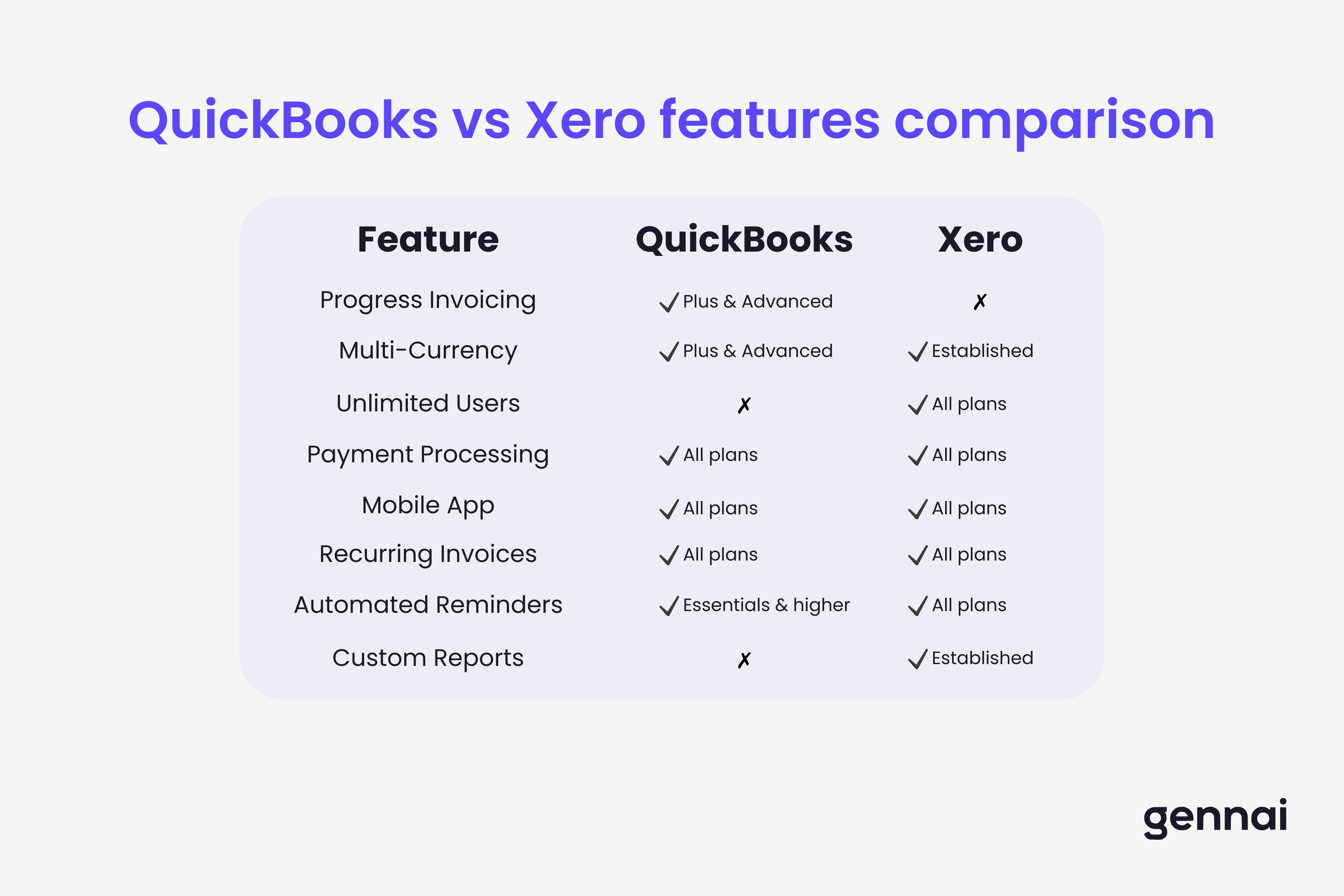
QuickBooks: Extensive invoice customization within base platform including logo, colors, fonts, and custom fields. February 2026 updates added AIA-style invoicing for construction and batch invoice creation supporting up to 1,000 transaction lines in Advanced. Progress invoicing (Plus and Advanced) splits estimates into milestone-based invoices. Intuit Assist AI drafts invoices from estimates, best for straightforward scenarios.
Xero: New invoicing experience (transitioned 2024-2025) improved template editing, inventory management, and line-item display. New template editor (beta for US) provides color, font, and payment setting customization. Handles recurring invoices efficiently and supports quote-to-invoice conversion. Lacks native progress invoicing and percentage-based billing, requiring manual calculations or third-party apps.
Key difference: QuickBooks better for project-based businesses needing progress billing. Xero better for straightforward recurring or one-time invoices.
Payment Processing Integration
QuickBooks Payments: Tightly integrated "Pay Now" buttons accepting credit cards, debit cards, ACH, Apple Pay, PayPal, and Venmo. Processing fees: 2.9% + $0.25 per card transaction, 1% per ACH (up to $10 maximum). Automatic payment reconciliation updates books without manual intervention. Fraud protection covers up to $25,000/year ($10,000/dispute) on card payments. Early 2026 data shows invoices with integrated payments get paid 4x faster than paper invoices.
Xero Payments: Integrates with multiple processors (Stripe, PayPal, GoCardless) rather than proprietary system. Advantage: flexibility to choose processor and negotiate rates. Disadvantage: less seamless integration requiring manual setup. Automatic reconciliation depends on third-party integration quality. Recent updates improved SMS invoicing, with median payment times 30% faster for SMS invoices (with payment service) vs email-only.
Key difference: QuickBooks provides seamless all-in-one solution. Xero offers flexibility but requires more setup.
Automation Capabilities
QuickBooks: Intuit Assist AI learns categorization patterns and auto-matches transactions. Features include recurring invoice scheduling, payment reminders for overdue invoices, automatic payment reconciliation, smart transaction categorization that improves over time, and cash flow forecasting based on invoice patterns. January 2026 updates enabled Advanced subscribers to upload 1,000 transaction lines simultaneously, making high-volume processing 37% faster.
Xero: Bank feed reconciliation, automated invoice reminders, and recurring scheduling. Suggests matches between bank transactions and invoices for one-click reconciliation. Automated capabilities include recurring invoices, payment reminders, bank rules for auto-categorization, automatic currency conversion (Established plan), and real-time cash flow tracking. Automation relies on user-configured rules rather than AI learning, providing more control but requiring more setup.
For businesses comparing sophisticated automation, understanding broader AI-powered invoice processing capabilities helps set realistic expectations for platform-native automation.
Key difference: QuickBooks learns your patterns automatically. Xero requires manual rule configuration but offers more precise control.
Mobile and Multi-Currency
Mobile Apps:
QuickBooks: Full desktop functionality with all customization options. Comprehensive but sometimes cluttered.
Xero: Optimized for speed with fewer taps. Less customization but faster for routine tasks.
Multi-Currency:
QuickBooks: Available in Plus and Advanced. Auto exchange rates, invoices in customer currency, tracks gains/losses. Must enable at setup, cannot disable later without new company file.
Xero: Exclusive to Established plan ($70/month). Daily exchange rate updates, 160+ currencies, separate bank accounts per currency. Can toggle on/off, handles inter-currency transfers more intuitively.
For international operations, Xero's multi-currency is generally more robust and flexible, though it requires the highest-priced plan.
The Decision Framework
Choose QuickBooks if you:
- Need progress invoicing or percentage-based billing
- Want comprehensive built-in payment processing with fraud protection
- Prefer AI automation that learns your patterns
- Have a small team (1-5 users) where per-user pricing makes sense
- Value tight integration between invoicing, payments, and accounting
Choose Xero if you:
- Have a larger team where unlimited users create significant savings
- Operate internationally and need robust multi-currency
- Prefer flexibility in payment processor choice
- Want simpler interface for team members
- Need strong third-party app integration (1,000+ apps vs 300+)
- Value real-time collaborative access across many users
What neither handles well:
- High-volume invoice processing (hundreds of vendor invoices requiring data extraction)
- Client-vendor invoice separation (accounting firms managing dual streams)
- Complex multi-stage approval workflows
For these limitations, solutions like Gennai fill gaps by providing AI-powered invoice extraction that integrates with both QuickBooks and Xero, automatically capturing invoice data and routing it appropriately.
Understanding when to integrate invoice automation with existing accounting platforms helps businesses avoid platform limitations.
Conclusion
QuickBooks and Xero both handle core invoicing well but optimize for different business models. QuickBooks provides more comprehensive built-in functionality at higher per-user cost. Xero offers better value for larger teams and international operations while requiring more add-ons for advanced features.
The "better" platform depends on your specific scenario: team size, international needs, payment preferences, and workflow complexity. Make the decision by honestly assessing which limitations you can work with and which you cannot.
What matters more than platform choice: actually using the automation features available. Businesses leveraging automated reminders, recurring invoices, and integrated payments see dramatically faster payment cycles regardless of whether they choose QuickBooks or Xero.
Ready to automate your invoices?
Start extracting invoices from your email automatically with Gennai. Free plan available, no credit card required.
Start FreeRelated Articles
Accounts Payable Turnover Ratio Explained
The accounts payable turnover ratio shows how fast you pay suppliers. Get the formula, a worked example, benchmarks and what your number really means.
GuideNet 30 vs Net 60: What Payment Terms Really Mean for Your Cash
Net 30 vs net 60 explained for business owners: what each term means, when the clock really starts, and how the gap hits your cash on both sides.
GuideThe Accounts Payable Process, Step by Step (for Owners)
The accounts payable process has five steps: receive, verify, approve, pay, and record each invoice. Here is how each works and where owners lose money.