
Invoice Management for Accounting Firms: Complete Workflow
Complete workflow guide for accounting firms managing client and internal invoices. Practical systems for separation, automation, and billable expense tracking in 2026.

Accounting firms face a unique invoice management challenge that most businesses don't encounter: they must simultaneously process their own firm expenses while managing invoice workflows for dozens or hundreds of clients. This dual responsibility creates complexity that generic invoice systems can't handle.
The stakes are high. Mixing client invoices with firm expenses creates billing errors, missed billable opportunities, and compliance headaches. Yet most accounting practices still rely on manual processes that make separation nearly impossible at scale.
This guide provides a complete workflow for managing both streams effectively, drawing from industry-specific invoice automation strategies that work specifically for professional service firms.
The Dual Invoice Challenge
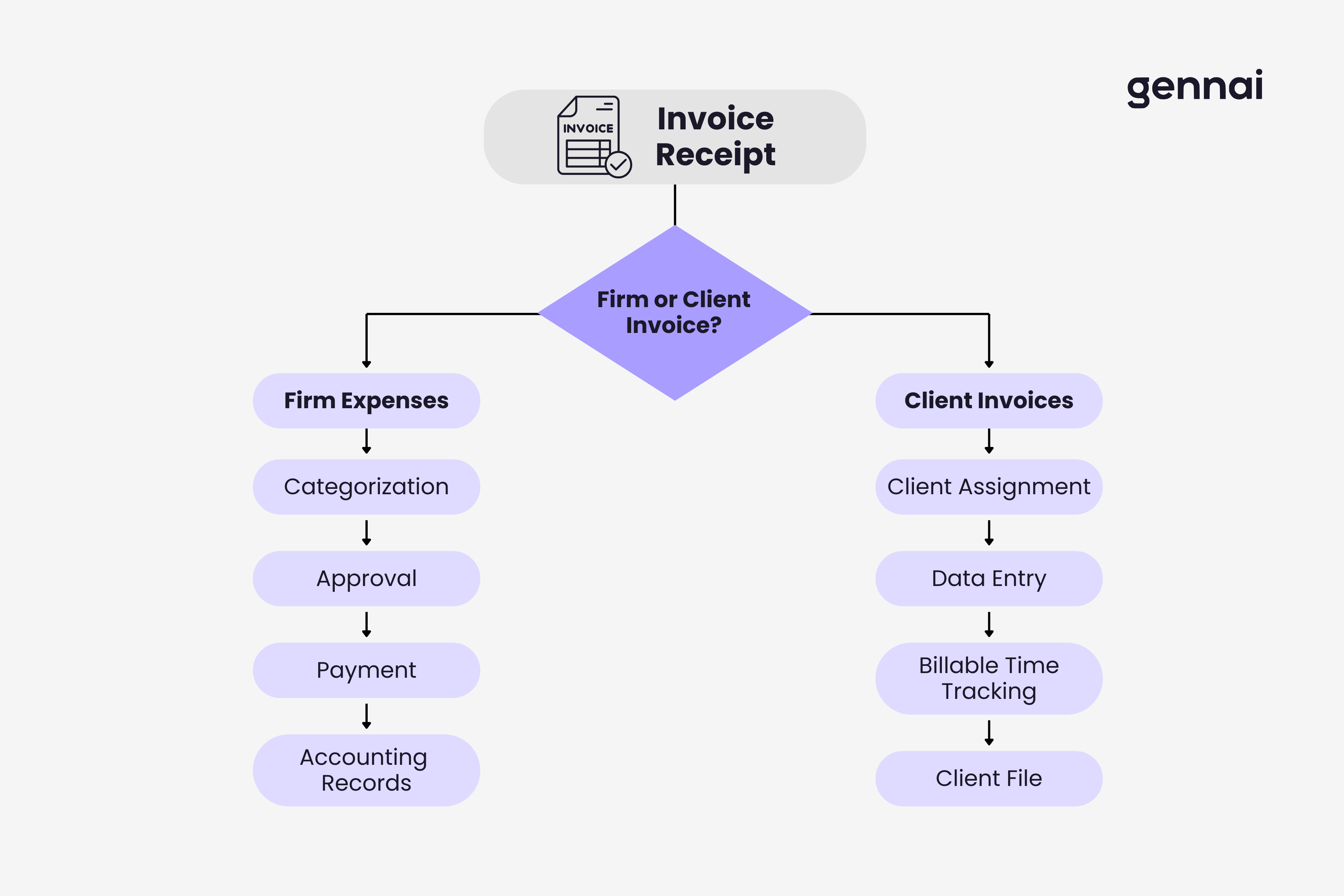
Accounting firms process two completely different invoice categories that require distinct workflows:
Firm invoices: Your own business expenses like software subscriptions, office supplies, professional liability insurance, continuing education, and contractor payments.
Client invoices: Documents your clients forward for data entry, bookkeeping services, or advisory review. These might include their vendor bills, receipts, or subscription charges.
The fundamental problem: these streams have opposite treatment requirements. Firm invoices need expense categorization and payment processing. Client invoices need data extraction, client file association, and often billable hour tracking for the work performed.
What Happens When Streams Mix
Blended invoice processing creates predictable problems. Accidentally categorizing a client's vendor invoice as your firm expense means you absorb their cost instead of processing it for their books. Without clear separation, accountants forget to track time spent on client invoices, leaving billable hours uncaptured. Mixing streams makes audit trails messy and creates compliance risks.
Metro Accounting Group discovered they'd miscategorized $43,000 in client vendor invoices as firm expenses over one tax year, requiring amended returns and client explanations.
Setting Up Physical and Digital Separation
The first step is establishing clear boundaries between invoice streams from the moment documents arrive.
Email and Folder Separation
Create separate email addresses: invoices@yourfirm.com for firm vendor invoices and clientdocuments@yourfirm.com for client submissions. This prevents 80% of mixing at the source.
Use hierarchical folder structure:
``
Invoices/
├── Firm/2026/Q1/
└── Clients/[Client A]/2026/
``
Modern systems handle this organization automatically. Understanding how AI invoice processing works reveals how platforms categorize and route invoices without manual folder management.
Firm Invoice Workflow: Processing Your Own Expenses
Your firm's invoices follow standard accounts payable processes with accounting-specific considerations.
Categorization and Approval
When firm invoices arrive, immediate categorization prevents backlog:
Software and subscriptions: Tax software, document management, CRM, marketing tools
Professional development: CPE courses, conference fees, association dues
Insurance: Professional liability, general liability, workers compensation
Office operations: Rent, utilities, supplies, equipment
Contractor payments: Contract bookkeepers, IT support, consultants
Approval workflows vary by firm size. Small practices (1-5 CPAs) typically require managing partner approval over $500. Medium firms (6-20 CPAs) use department head approvals. Large firms implement multi-level approval based on amount and category.
Process firm invoices on consistent weekly or biweekly schedules rather than ad-hoc. This prevents constant interruption while maintaining vendor relationships. Exception: early payment discounts warrant immediate processing.
Client Invoice Workflow: Processing Client Documents
Client invoice processing requires accuracy, file organization, and billable time capture.
Intake and Assignment
Confirm which client each invoice belongs to. This creates problems when clients forward from personal emails, multiple clients use the same vendor, or new clients aren't set up yet. Require clients to include their client ID in email subject lines to prevent 90% of assignment confusion.
Data Extraction and Billable Time
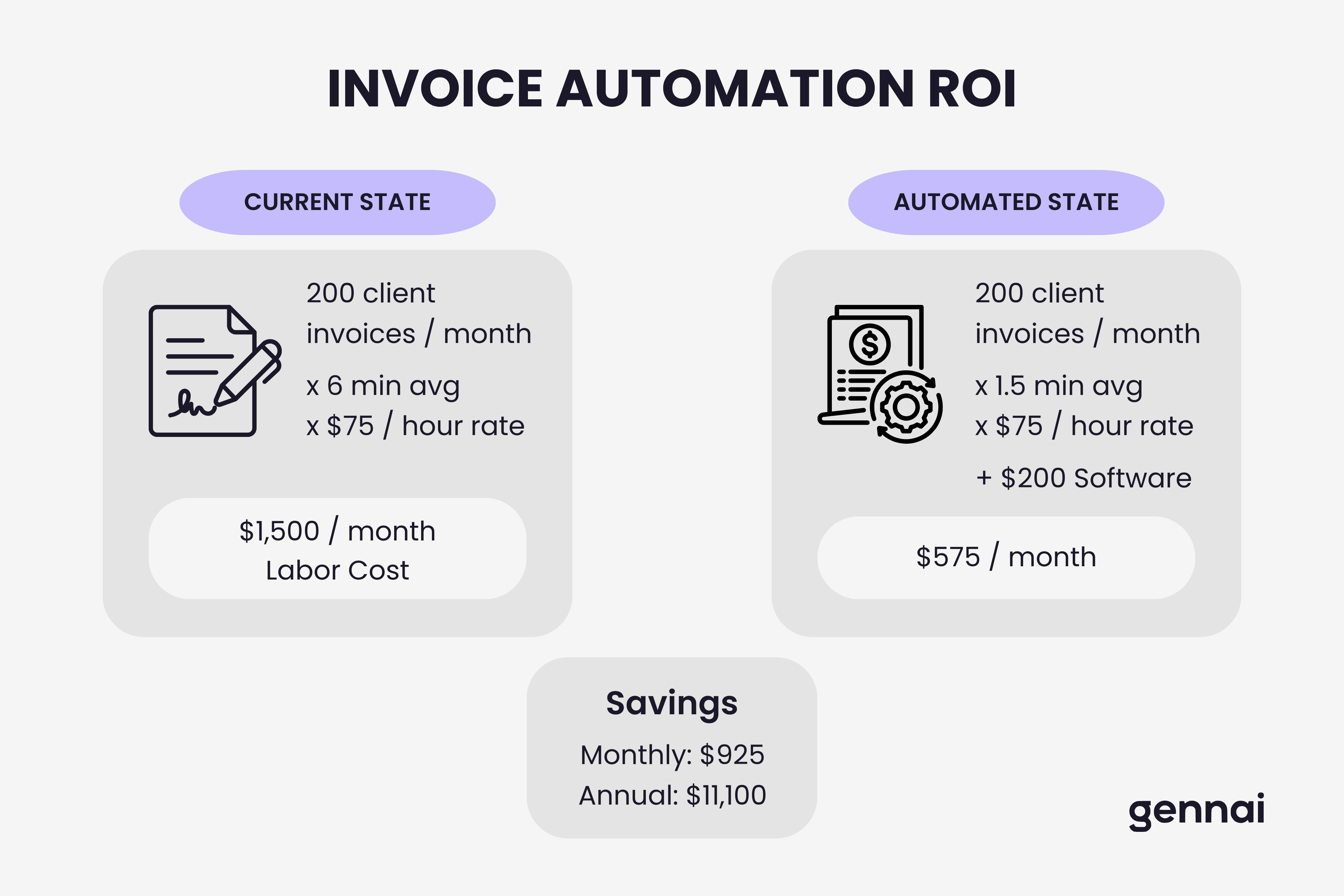
Extract invoice data for client books: invoice number, date, vendor, amount, payment terms, and tax amounts. Manual data entry averages 5-8 minutes per invoice.
Most firms leave money on the table here. Processing client invoices is billable work, but inconsistent time tracking means you don't capture it. Establish clear protocols: track data entry time per invoice (typically 0.1 hour increments), categorization work at advisory rates, and exception handling separately.
Firms processing high volumes benefit from automated invoice data extraction that reduces per-invoice time to under one minute while improving accuracy.
Cumberland CPA Group implemented strict time tracking and discovered they'd been undercharging by $340 monthly per bookkeeping client. Annual impact: $163,000 in previously unbilled time.
Store invoices by client, then by tax year, then by month or vendor. Tag with metadata: client ID, tax year, category, payment status, billable time, and processor name for quick retrieval.
Automation Strategies for Dual Streams
Manual processing works for small practices. Growth requires automation that maintains stream separation.
Modern systems connect to email accounts and automatically detect incoming invoices, route firm invoices to AP workflow, and route client invoices to client processing queues. This eliminates 30-45 minutes of daily inbox sorting.
AI-powered extraction reads invoices and captures fields automatically. For firm invoices, data flows directly into your accounting system. For client invoices, extraction routes to client files instead.
For firms evaluating platforms, comparing invoice management software capabilities helps identify which provides better automation potential for accounting practices.
Implementation Roadmap
Moving from manual chaos to organized workflow happens in three focused phases:
Phase 1 - Establish Separation (Week 1-2): Set up separate email addresses for firm and client invoices. Create folder structures. Document basic policies. Train staff on new protocols.
Phase 2 - Systematize Workflows (Week 3-4): Implement approval workflows for firm expenses. Establish payment schedules. Document client invoice processing steps. Create time tracking requirements.
Phase 3 - Add Automation (Month 2-3): With manual processes working consistently, evaluate automation ROI. Test extraction tools against your actual invoice volume. Roll out gradually while maintaining quality controls.
Understanding broader accounts payable automation implementation provides additional context for the automation phase.
How Modern Platforms Handle Accounting Firm Workflows
The dual-stream challenge has led to purpose-built solutions designed specifically for accounting practices.
Modern invoice automation platforms now include features that address the unique needs of firms managing both their own expenses and multiple client invoice streams.
Multi-Client Dashboard Management
Advanced systems allow accounting firms to manage all their clients within a single dashboard. Each client gets their own secure folder with separate access controls, eliminating the need to log in and out of multiple accounts or platforms.
For example, Gennai's accounting firm solution enables clients to grant their accountant or firm access to their invoice data directly. The firm can then view all client invoices in one centralized dashboard, organized by client folders with different access levels for staff members.
Client-to-Accountant Workflow
This approach transforms the traditional workflow:
Traditional method: Client receives invoice → forwards to accountant via email → accountant manually downloads → processes data entry → files in client folder
Modern automated method: Client's Gennai account receives invoice → automatically extracts data → accountant sees it in their firm dashboard → reviews and exports directly to client's accounting system
The firm maintains complete separation between their own invoices (in their firm account) and client invoices (visible through client access grants), solving the dual-stream problem at the platform level.
Benefits for Multi-Client Practices
Accounting firms using this approach report several advantages:
Centralized visibility: See all client invoices across your entire practice in one dashboard, eliminating the need to check multiple email addresses or client portals.
Automatic time tracking: System can log time spent reviewing each client's invoices, ensuring billable work gets captured automatically.
Seamless export: Export invoice data directly to each client's QuickBooks or Xero, or other accounting platform without manual re-entry.
Client self-service: Clients can upload their own invoices to their Gennai account, and the firm automatically sees them, reducing email back-and-forth.
Access control: Assign different staff members to different clients, ensuring junior bookkeepers only see assigned client data while partners maintain oversight across all clients.
This multi-tenant architecture specifically designed for accounting practices eliminates the manual juggling that creates most dual-stream problems.
Measuring Success
Track these core metrics: average minutes per invoice (target: under 3 for firm, under 2 for client with automation), billable capture percentage, processing cost per invoice, and quality metrics like categorization error rates.
Riverside CPA implemented structured workflows and reduced average client invoice processing time from 8 minutes to 1.5 minutes. Annual impact: 975 hours saved, equivalent to half an FTE redeployed to advisory services.
Conclusion
The accounting profession ironically suffers from disorganized invoice management more than most industries. The dual responsibility of managing firm and client invoices creates unique complexity, but that complexity is manageable with clear separation and systematic workflows.
Modern platforms built specifically for accounting firms solve the dual-stream challenge at the architecture level, providing centralized multi-client dashboards with proper access controls and automatic separation. This eliminates the manual processes that create mixing and errors.
Start with clear separation fundamentals: distinct workflows, documented procedures, and proper folder structures. Then evaluate platforms designed for accounting practices that maintain this separation automatically while scaling across dozens or hundreds of clients.
TL;DR
- Accounting firms face a dual-stream challenge: managing their own firm expenses alongside invoices from dozens or hundreds of clients
- Stream mixing causes real problems: Metro Accounting Group miscategorized $43,000 in client invoices as firm expenses in one year
- Separation starts at intake: dedicated email addresses and folder structures prevent 80% of mixing at the source
- Track billable time on client invoices: Cumberland CPA recovered $163,000 annually in previously unbilled processing time
- Automation maintains separation at scale: AI-powered platforms route firm invoices to AP and client invoices to client files automatically
- Modern platforms solve this architecturally: centralized multi-client dashboards with proper access controls eliminate manual juggling
Ready to automate your invoices?
Start extracting invoices from your email automatically with Gennai. Free plan available, no credit card required.
Start FreeRelated Articles
Accounts Payable Turnover Ratio Explained
The accounts payable turnover ratio shows how fast you pay suppliers. Get the formula, a worked example, benchmarks and what your number really means.
GuideNet 30 vs Net 60: What Payment Terms Really Mean for Your Cash
Net 30 vs net 60 explained for business owners: what each term means, when the clock really starts, and how the gap hits your cash on both sides.
GuideThe Accounts Payable Process, Step by Step (for Owners)
The accounts payable process has five steps: receive, verify, approve, pay, and record each invoice. Here is how each works and where owners lose money.