
What is Invoice OCR? A Beginner's Complete Guide
What is invoice OCR? Beginner's guide to how it automates data extraction from invoices, covering how it works, benefits, costs, and getting started.

Picture this: your accounts payable team spends hours every week typing invoice details into your accounting system. Invoice numbers, vendor names, dates, line items, amounts. Every field entered manually, one keystroke at a time. Then someone notices a typo three weeks later that requires correcting multiple entries.
There has to be a better way. That better way is invoice OCR technology, and if you have never heard of it before, you are in exactly the right place.
This guide explains invoice OCR in plain language. No technical jargon, no complex terminology. Just a clear understanding of what it is, how it works, and why businesses of all sizes are adopting this technology to transform their invoice processing.
What is Invoice OCR?
Invoice OCR stands for Invoice Optical Character Recognition. At its most basic level, OCR is technology that reads text from images and converts it into digital data that computers can understand and process.
When you scan a paper invoice or receive an invoice as a PDF, your computer sees it as just an image. A collection of pixels forming shapes that look like words and numbers to human eyes, but mean nothing to your accounting software. You cannot search that scanned invoice, edit the text, or automatically import the data into your systems.
Invoice OCR solves this problem by analyzing the image, identifying the characters (letters, numbers, symbols), and converting them into actual text data. The technology goes one step further by understanding invoice structure and automatically extracting key fields like vendor information, invoice numbers, dates, line items, and total amounts.
Think of invoice OCR as a super-fast data entry clerk that never gets tired, never makes typos, and can process hundreds of invoices in the time it takes a person to handle just one.
How Does Invoice OCR Actually Work?
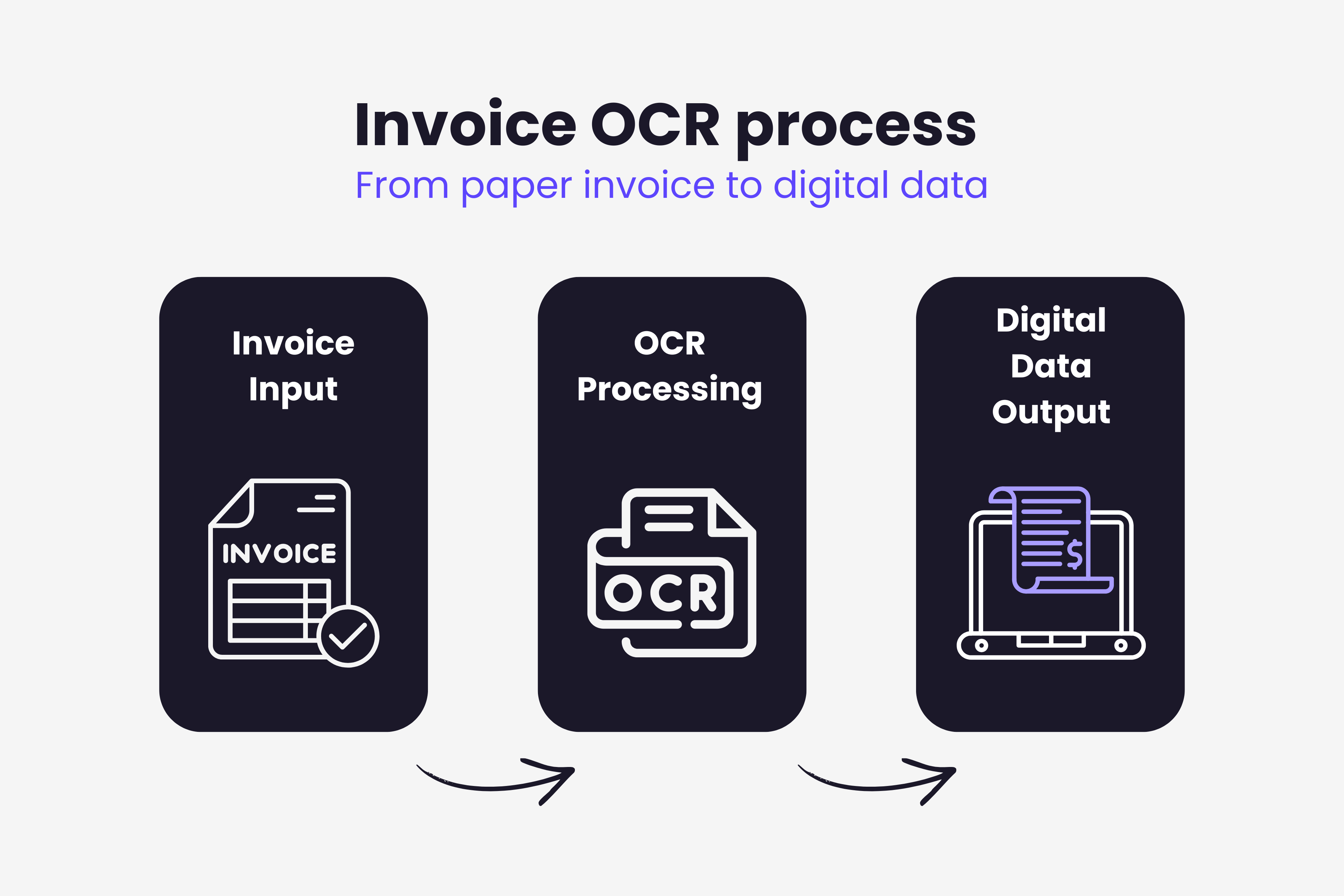
The process happens faster than you might expect. Most modern OCR systems process a typical invoice in just 3-5 seconds from upload to extracted data. Here is what happens behind the scenes:
Document Upload Invoices enter the OCR system through various channels. You might scan paper invoices directly, upload PDF files, forward invoice emails to a dedicated address, or even photograph invoices with your smartphone camera. The flexibility means you can process invoices however they arrive at your business.
Image Analysis The OCR software analyzes the uploaded document. Modern systems first clean up the image by removing shadows, correcting skewed angles, and enhancing contrast to ensure clear text recognition. This preprocessing step dramatically improves accuracy, especially for photographed or faxed invoices.
Text Recognition This is where the magic happens. The software identifies individual characters on the invoice and converts them into machine-readable text. Advanced OCR engines recognize text across different fonts, sizes, languages, and even handle moderate quality issues without missing critical data.
Smart Field Extraction Reading text is only half the battle. Invoice OCR systems use pattern recognition and context understanding to identify which text belongs to which field. The system knows that a number following "Invoice #" is the invoice number, that dates have specific formats, and that monetary amounts include decimal points and currency symbols.
Validation and Output Before finalizing, the system validates extracted data for logical consistency. Does the invoice date come before the due date? Do line items add up to the stated total? If something looks suspicious, the system flags it for human review. Validated data then flows directly into your accounting software, ERP system, or approval workflow.
For a deeper technical dive into the complete OCR processing workflow, our comprehensive guide on invoice OCR technology explores each step in detail.
Why Businesses Need Invoice OCR
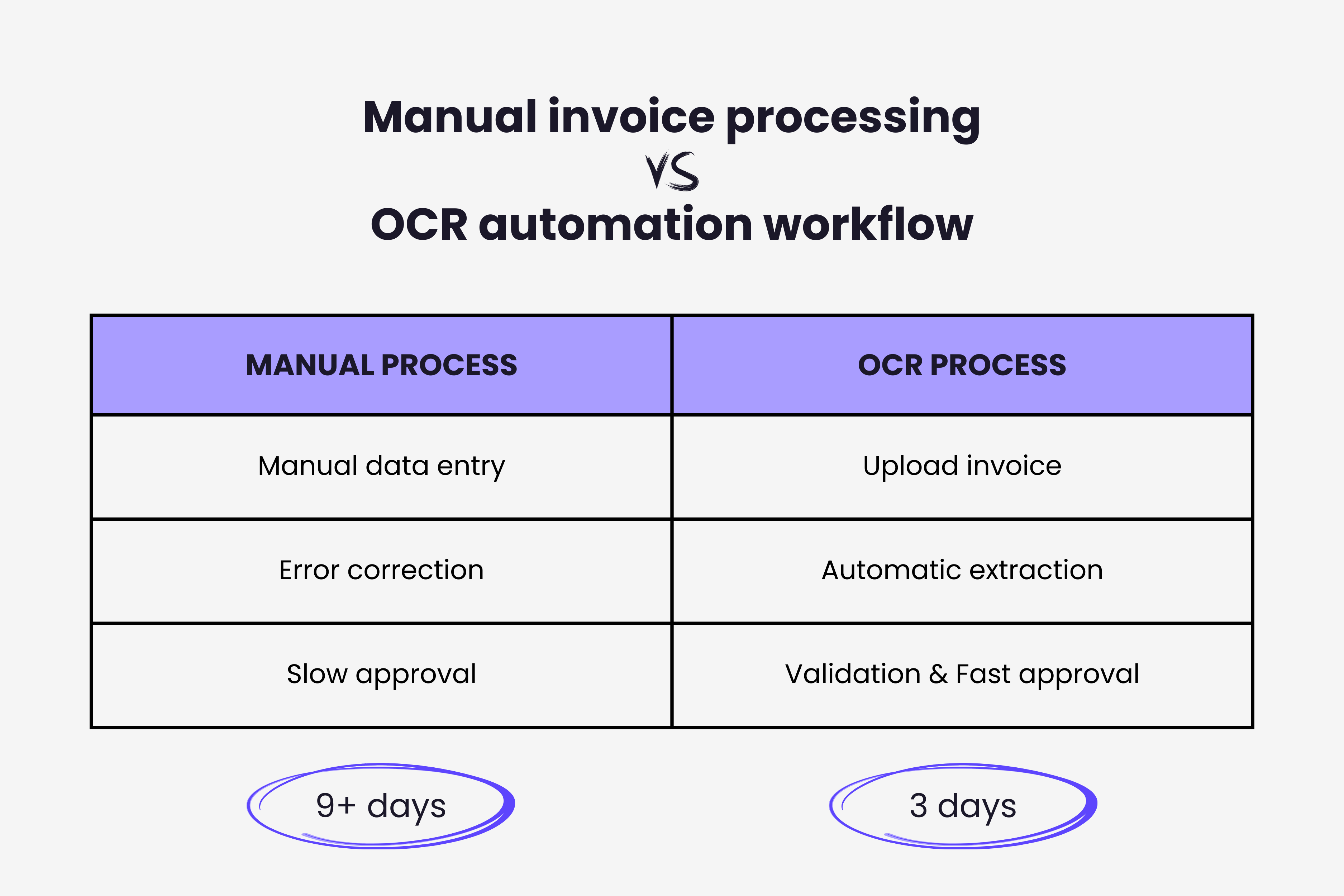
The shift from manual invoice processing to OCR automation delivers benefits that extend far beyond simple time savings.
Dramatic Time Reduction
Manual invoice processing takes an average of 9.2 days per invoice according to industry research. OCR automation reduces this to approximately 3.1 days. For high-volume operations processing hundreds or thousands of invoices monthly, this time difference represents enormous productivity gains.
Your AP team stops spending entire days on data entry and gains time for strategic work like vendor negotiations, cash flow analysis, and process improvements.
Eliminate Costly Errors
Human data entry accuracy typically ranges from 90-96% depending on factors like fatigue, distraction, and document complexity. That might sound high, but it means 4-10 errors per 100 invoices processed. For a business handling 1,000 invoices monthly, that is 40-100 errors requiring correction.
Invoice OCR systems achieve 98-99% accuracy on well-formatted invoices. More importantly, they make consistent errors that can be easily identified and corrected, rather than random human mistakes that hide in your data until they cause problems.
Significant Cost Savings
Manual invoice processing costs $12-$20 per invoice when you account for labor, error correction, and delays. OCR automation reduces this cost to $2-$5 per invoice. For a company processing 5,000 invoices annually, that translates to $50,000-$75,000 in annual savings.
Better Cash Flow Management
Fast invoice processing enables better cash flow decisions. You know exactly what you owe, when payments are due, and which invoices qualify for early payment discounts. Many suppliers offer 2-5% discounts for payment within 10 days, but you can only capture these discounts if you process invoices quickly.
OCR automation makes same-day invoice processing realistic for the first time at many organizations.
Common Invoice OCR Use Cases
Understanding where OCR delivers the most value helps businesses prioritize implementation. Here are the scenarios where invoice OCR makes the biggest impact:
High Volume Invoice Operations Companies receiving 100+ invoices monthly see immediate ROI from OCR automation. The technology scales effortlessly, processing the 1000th invoice with the same speed and accuracy as the first.
Multi-Location Businesses Organizations with multiple locations, franchises, or departments benefit enormously from centralized invoice processing. OCR systems provide a single platform where all locations submit invoices, eliminating coordination headaches and providing consolidated visibility.
Remote and Distributed Teams Cloud-based OCR platforms enable AP teams to process invoices from anywhere. Mobile apps let field staff photograph receipts immediately rather than collecting paper for batch processing later. This flexibility became essential during remote work transitions and remains valuable for hybrid work arrangements.
Businesses with Diverse Supplier Bases If you work with dozens or hundreds of different suppliers, you receive invoices in countless formats. OCR systems handle this format diversity automatically, eliminating the need to create and maintain templates for each vendor.
Organizations Seeking Audit Compliance Digital invoice archives with full search capabilities and audit trails simplify compliance requirements. Every invoice is instantly retrievable, with complete processing history showing who touched it and when. When choosing invoice management software, OCR capabilities should be a priority consideration.
Getting Started with Invoice OCR
Starting your OCR journey does not require massive upfront investment or long implementation timelines. Here is how to approach it:
Assess Current Processes Document your existing invoice workflow. How many invoices do you process monthly? How long does each one take? What error rates do you experience? These baseline metrics prove crucial for measuring ROI after implementation.
Define Requirements Consider your specific needs. Do you primarily receive paper invoices, PDFs, or emails? What accounting software do you use? Do you need mobile capture capabilities? What approval workflows exist today that automation must support?
Start Small Many OCR providers offer free trials or pilot programs. Test the technology with a subset of your invoices before committing to full implementation. This proves the concept, identifies potential issues, and builds confidence among team members. Our comparison of the best OCR software for invoices breaks down leading options by business size and budget to help you choose where to start.
Plan Integration The most effective OCR implementations integrate seamlessly with existing accounting systems and workflows. Data should flow automatically from OCR extraction into your ERP or accounting platform without manual exports and imports.
Train Your Team Even automated systems require some human oversight. Train AP staff on handling exceptions, reviewing flagged invoices, and monitoring system performance. Understanding what the system does automatically versus what needs human attention ensures smooth operations.
Common Beginner Questions About Invoice OCR
Does OCR work with handwritten invoices? Modern AI-powered OCR handles printed text with high accuracy but struggles more with handwriting. Accuracy on handwritten invoices typically ranges from 60-75% depending on handwriting legibility. Some advanced systems specifically trained on handwriting perform better, but typed invoices always yield more reliable results.
Can OCR handle invoices in different languages? Yes. Most enterprise OCR systems support multiple languages including English, Spanish, French, German, Chinese, and many others. The system automatically detects the invoice language and processes accordingly.
What happens when OCR cannot read something? Quality OCR systems assign confidence scores to extracted data. Low-confidence fields get flagged for human review rather than processing potentially incorrect information. This exception handling ensures accuracy while maintaining high automation rates.
How accurate is invoice OCR? AI-powered OCR typically achieves 98-99% accuracy on well-formatted invoices. Accuracy drops slightly for poor quality scans, unusual formats, or handwritten content, but remains far superior to manual entry.
Does my business need special equipment? No. Cloud-based OCR solutions work with standard document scanners, office printers with scanning capabilities, or even smartphone cameras. You likely already have everything you need.
Making the Move to OCR
Invoice OCR transforms tedious, error-prone manual work into automated, accurate processing that happens in seconds rather than hours. The technology has matured beyond early limitations, delivering consistent results that businesses across all industries rely on daily.
Starting with OCR does not mean abandoning your current processes overnight. Most organizations begin with a pilot program, prove the value, and gradually expand automation as comfort and confidence grow.
The accounts payable landscape continues evolving, with manual processing becoming increasingly unsustainable as business scale and complexity grow. Invoice OCR provides the foundation for modern AP operations, enabling speed, accuracy, and efficiency that manual methods simply cannot match.
For businesses ready to modernize invoice processing, OCR technology offers a clear path forward. The question is not whether to adopt it, but when to start and how to maximize the benefits for your specific operation.
Once you understand OCR basics, the next step is understanding the full AI invoice processing pipeline that surrounds OCR.
Ready to automate your invoices?
Start extracting invoices from your email automatically with Gennai. Free plan available, no credit card required.
Start FreeRelated Articles
Accounts Payable Turnover Ratio Explained
The accounts payable turnover ratio shows how fast you pay suppliers. Get the formula, a worked example, benchmarks and what your number really means.
GuideNet 30 vs Net 60: What Payment Terms Really Mean for Your Cash
Net 30 vs net 60 explained for business owners: what each term means, when the clock really starts, and how the gap hits your cash on both sides.
GuideThe Accounts Payable Process, Step by Step (for Owners)
The accounts payable process has five steps: receive, verify, approve, pay, and record each invoice. Here is how each works and where owners lose money.