
Zapier vs Make for Invoices: Cost & Best Fit (2026)
Zapier vs Make for invoice automation, compared on pricing, workflows, and error handling. See which is cheaper at your invoice volume and which to pick.

Invoice automation breaks down the moment you pick the wrong integration platform. You spend hours building workflows that should take minutes. You hit task limits that cost hundreds monthly. Or worse, your automations fail silently, and invoices pile up unprocessed while your AP team thinks everything runs automatically.
Zapier and Make (formerly Integromat) dominate the invoice automation space, but they solve different problems. Zapier delivers simplicity and speed for straightforward workflows. Make provides power and flexibility for complex scenarios. The platform you choose depends on your invoice volume, workflow complexity, and technical comfort.
This guide compares how each platform handles invoice automation specifically, helping you choose based on your actual needs rather than feature lists that sound impressive but don't matter for invoice processing.
How Invoice Automation Platforms Actually Work
Both platforms connect your invoice extraction tools to accounting software, approval systems, and other business applications. They eliminate manual data entry by automatically moving invoice information between systems when specific events occur.
The trigger-action model forms the foundation. A trigger is an event that starts the automation - a new invoice extracted, an amount exceeding a threshold, or approval granted. Actions follow triggers - creating bills in QuickBooks, sending Slack notifications, or updating spreadsheets.
A simple invoice workflow might look like: when invoice tool extracts new invoice (trigger), create bill in accounting software (action 1), post notification to Slack channel (action 2), and add invoice details to tracking spreadsheet (action 3).
Both platforms handle this basic pattern. Differences emerge when workflows grow more complex with branching logic, error handling, or data transformation requirements.
Zapier: Speed and Simplicity
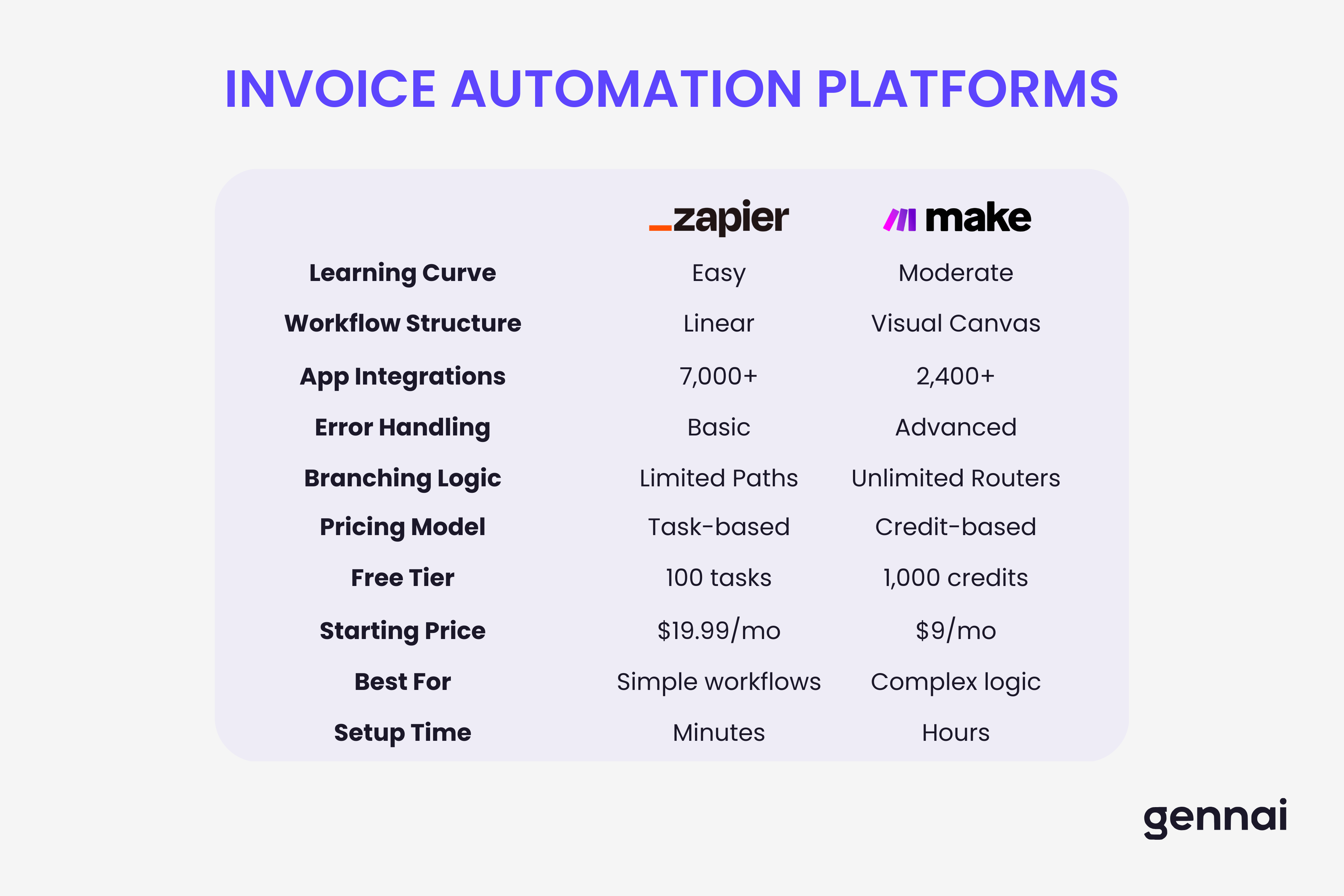
Zapier excels at getting automations running quickly. The step-by-step builder creates "Zaps" without technical knowledge. Select trigger app, choose event, connect action apps, map data fields - done in 15 minutes.
Linear workflow structure works best for single-path invoice automations. Extract invoice, create bill, send notification in sequence. Conditional branching through "Paths" adds setup complexity.
Massive app library with 7,000+ integrations connects virtually any invoice tool or accounting platform. This breadth matters when your workflow touches niche software.
Task-based pricing charges per action executed. Each step consumes one task. Free plan: 100 tasks monthly. Paid plans start at $19.99 for 750 tasks. This becomes expensive at scale - 300 invoices through a 3-step automation needs 900 tasks, requiring the $29.99+ plan.
Built-in AI features handle data formatting and transformations. Formatter tool cleans text, manipulates dates, performs calculations without additional apps.
Template marketplace provides pre-built invoice workflows. Helpful for inspiration but rarely works without customization.
Make: Power and Flexibility
Make uses a visual canvas where you build "Scenarios" by connecting modules. This flowchart approach looks intimidating initially but provides clarity for complex automations.
Visual scenario builder displays your entire automation as a flowchart. You see exactly how data flows, where decisions branch, and how errors get handled. The learning curve is steeper but pays dividends for sophisticated invoice workflows.
Unlimited branching with routers enables sophisticated logic. One trigger can simultaneously create bills, update inventory, trigger approvals, send notifications, and log transactions - each path with its own logic.
Example: Router checks invoice amount. Under $500 auto-approves. $500-$5,000 routes to managers. Over $5,000 requires CFO approval. Each path contains different steps from a single trigger.
Credit-based pricing counts differently than Zapier. Make charges for "credits" where each module execution uses one credit. Free plan: 1,000 credits monthly versus Zapier's 100 tasks. Paid plans start at $9 for 10,000 credits. Same workflow costing $29.99+ in Zapier costs $9 in Make.
Advanced error handling provides granular control. When steps fail, you decide what happens - retry automatically, alert specific people, route to manual review, or continue with fallback values. Zapier's error handling is more basic.
Iterators and aggregators handle bulk operations. Process multiple invoices in batches, split line items for individual processing, or combine data from multiple sources before creating entries.
HTTP module connects to any API even without pre-built integration. Make has 2,400 app integrations, but the HTTP module ensures you're never blocked.
Invoice Automation Use Cases
Simple Invoice-to-Accounting Sync
When invoice extraction tool captures new invoice → create bill in QuickBooks.
- Zapier: Perfect. 10-minute setup, 1 task per invoice.
- Make: Overkill for this simple workflow.
- Winner: Zapier.
Multi-Path Approval Workflows
Route invoices differently based on amount thresholds with unique approval logic per tier.
- Zapier: Complex using Paths. Multiple Zaps needed.
- Make: Natural fit with single router creating clean paths.
- Winner: Make for multi-path logic.
High-Volume Processing (500+ invoices monthly)
- Zapier: 4-step workflow = 2,000 tasks = requires higher Professional tier ($40-50+/mo depending on task selection)
- Make: 2,000 credits = $9 plan (10,000 credits)
- Winner: Make saves $372-492+ annually
Error Handling and Recovery
When vendor matching fails, flag for review with detailed notifications and queue for reprocessing.
- Zapier: Limited error options, generic notifications.
- Make: Granular error handlers with custom logic per error type.
- Winner: Make for critical error handling.
Cost Comparison for Invoice Automation
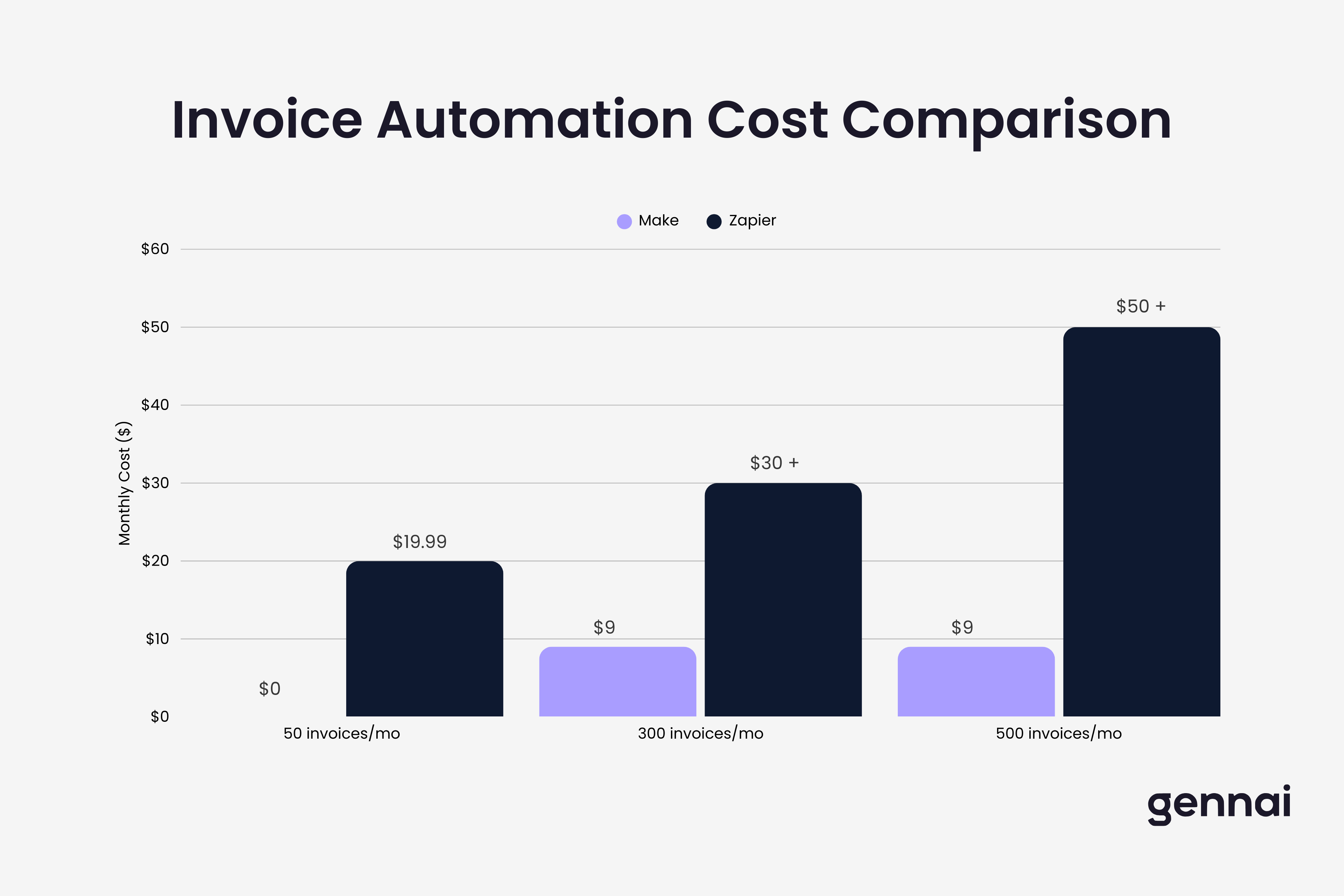
Pricing determines platform choice as much as features.
50 invoices monthly, 3-step workflow (150 tasks/credits):
- Zapier: $19.99/mo (Professional 750 tasks - minimum paid tier)
- Make: $0 (Free plan covers 150 credits)
- Annual savings: $240
300 invoices monthly, 4-step workflow (1,200 tasks/credits):
- Zapier: $30+/mo (needs 1.5K or 2K task tier on Professional plan)
- Make: $9/mo (1,200 credits within Core 10K plan)
- Annual savings: $252+ annually
500 invoices monthly, 5-step workflow (2,500 tasks/credits):
- Zapier: $50+/mo (needs 5K task tier on Professional or Team plan)
- Make: $9/mo (2,500 credits within Core 10K plan)
- Annual savings: $492+ annually
Note: Zapier's exact pricing for higher task tiers is available by selecting your tier on their pricing page. These estimates are conservative based on their starting prices.
These comparisons assume single workflows. Most businesses run multiple invoice automations, multiplying task/credit consumption and making Make's pricing advantage more pronounced.
Key cost differences: Zapier charges per user for team plans. Make includes unlimited users in all paid plans. Make's generous credit allowances reduce overage risk.
Making Your Platform Decision
Choose based on your invoice automation reality, not theoretical capabilities.
Choose Zapier when:
- Invoice workflows follow simple, linear paths without complex branching
- You process fewer than 200 invoices monthly
- Your team has zero technical capability
- You must connect to a niche invoice tool only Zapier supports
- Speed of initial setup matters more than long-term cost
Choose Make when:
- Workflows involve multi-path approval logic or complex exception handling
- You process 200+ invoices monthly where cost differences matter
- Your team includes someone comfortable with flowcharts
- You need granular error handling
- You plan to expand automation over time
Don't choose based on:
- App integration count alone - both support major invoice and accounting platforms
- "Enterprise" features unless processing 10,000+ invoices monthly
- Platform tutorials showing simple examples that don't represent real complexity
The smart approach: use both platforms' free tiers to build your actual invoice workflows with real tools and data. Process a week's invoices through each. You'll quickly discover which fits your patterns, technical comfort, and cost tolerance.
Most businesses processing significant volumes choose Make for cost and flexibility. Businesses with simple workflows and small volumes choose Zapier for speed and simplicity. The platform that handles your specific workflows efficiently at reasonable cost wins.
Ready to automate your invoices?
Start extracting invoices from your email automatically with Gennai. Free plan available, no credit card required.
Start FreeRelated Articles
Accounts Payable Turnover Ratio Explained
The accounts payable turnover ratio shows how fast you pay suppliers. Get the formula, a worked example, benchmarks and what your number really means.
GuideNet 30 vs Net 60: What Payment Terms Really Mean for Your Cash
Net 30 vs net 60 explained for business owners: what each term means, when the clock really starts, and how the gap hits your cash on both sides.
GuideThe Accounts Payable Process, Step by Step (for Owners)
The accounts payable process has five steps: receive, verify, approve, pay, and record each invoice. Here is how each works and where owners lose money.