
Invoice System Integration: Complete Guide to Connected Workflows
Complete guide to invoice system integration. Connect email, accounting, ERP, approval workflows, and payment systems for automated processing.

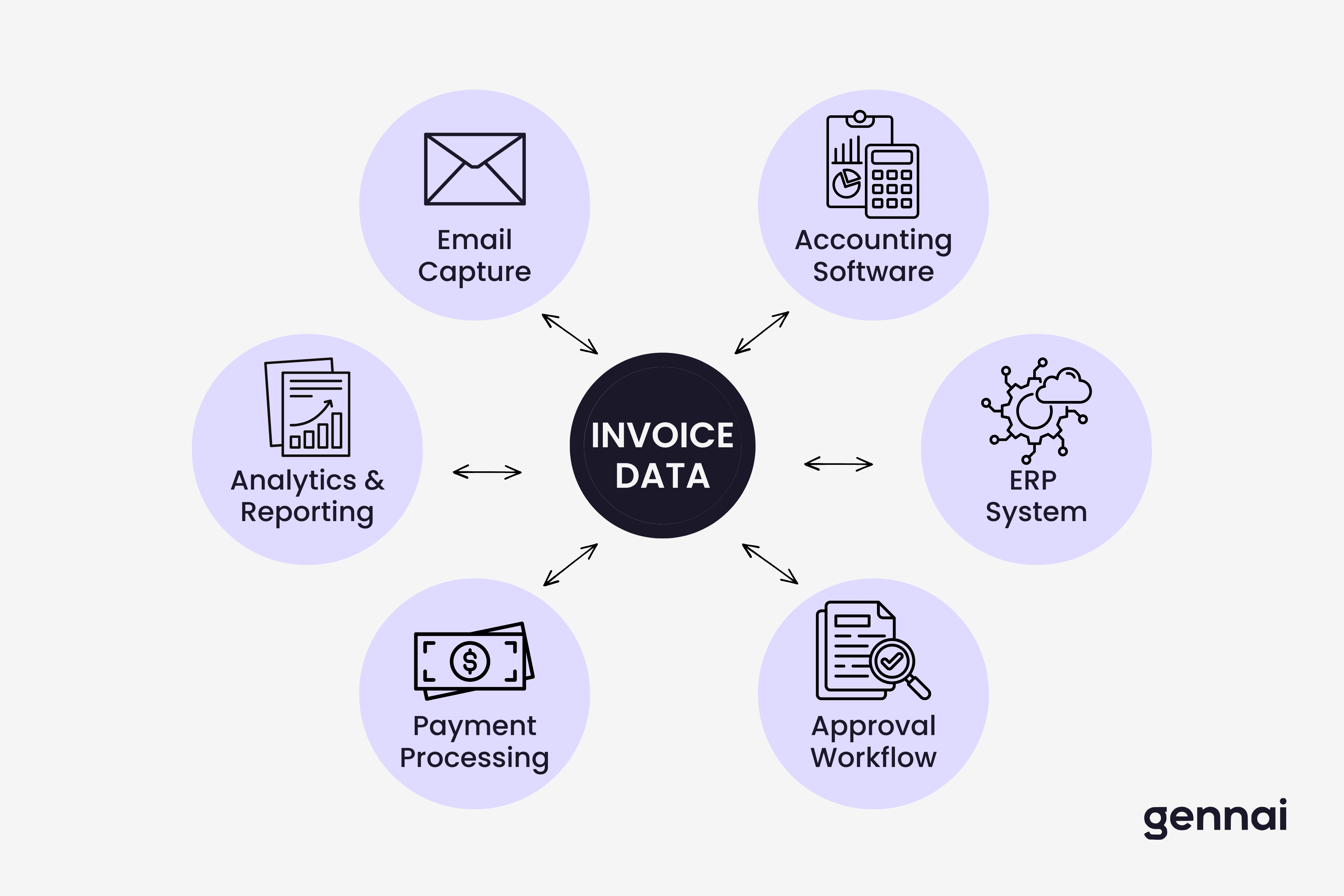
Modern businesses don't process invoices in isolation. Your invoice data flows between email inboxes, accounting platforms, ERP systems, payment processors, and approval workflows. When these systems don't connect properly, finance teams waste hours manually copying data, reconciling discrepancies, and fixing errors that automated integration would prevent.
The difference between businesses that process invoices efficiently and those drowning in manual work often comes down to one factor: system integration. This guide explains how invoice system integration works, which connections matter most for your business, and practical implementation strategies that actually deliver results.
Why Invoice System Integration Matters in 2026
Finance teams face a fundamental problem. Invoice data arrives through one channel (usually email), needs processing in another system (accounting software), requires approval through a third platform (workflow tool), and must eventually sync with your ERP for reporting and compliance.
Without integration, someone manually enters the same invoice data into multiple systems. A vendor sends an invoice to your email. An AP clerk downloads the PDF, manually types vendor name, invoice number, amount, and line items into QuickBooks. Another team member copies the same information into your approval workflow. Finally, someone reconciles everything in your ERP for financial reporting.
This manual approach creates three expensive problems:
Data entry errors multiply across systems. When humans type the same information multiple times, mistakes happen. An invoice amount of $1,234.56 becomes $12,345.60 in one system. A vendor name gets entered slightly differently in another. These small errors cascade into reconciliation headaches and payment mistakes.
Processing time increases exponentially. Manual data entry for a single invoice might take 5-10 minutes. When you process 500 invoices monthly across three systems, your team spends 125-250 hours just entering the same data repeatedly. That's one to two full-time employees doing nothing but duplicate data entry.
Real-time visibility becomes impossible. When invoice data lives in disconnected systems with manual update cycles, you never have current information. Your accounting system shows one cash position, your approval workflow shows different pending amounts, and your ERP reports yet another number. Making informed decisions requires waiting for someone to manually reconcile everything.
Integration solves these problems by connecting your systems so invoice data flows automatically from capture to payment. The invoice arrives, gets extracted once, and that data populates every downstream system without human intervention. Teams looking to establish this foundation should start by evaluating software that supports seamless data exchange between platforms rather than creating more silos.
The Connected Invoice Ecosystem: Key Integration Points
A complete invoice system integration strategy connects six critical touchpoints in your finance workflow.
Email to Invoice Capture
Invoices arrive primarily through email. Most businesses receive 60-80% of vendor invoices as email attachments, with the remainder coming through supplier portals, physical mail, or direct system connections.
The first integration point extracts invoice data from these email attachments automatically. Rather than manually downloading PDFs and typing information into accounting software, automated extraction tools connect directly to your Gmail or Outlook inbox, identify invoice emails, extract structured data using OCR and AI, and route that information to your next processing step.
This connection eliminates the manual download and data entry bottleneck. When a vendor sends an invoice, your system captures it automatically within minutes. The extracted data (vendor, amount, due date, line items) becomes available for the next integration point.
Modern extraction tools use OAuth connections to access email accounts securely. These connections work like signing into a mobile app with your Google or Microsoft account. Your finance team grants read-only access to invoice emails, and the extraction system monitors that inbox continuously for new invoices. Setting up automatic capture from your inbox takes minutes with the right tools, though the technical implementation details vary significantly between platforms.
Accounting Software Integration
Once invoice data is extracted from email, it needs to populate your accounting system. This integration creates or updates vendor records, generates bill entries with proper GL coding, and maintains transaction history for audit trails.
The most effective accounting integrations use bidirectional sync. Data flows from extraction tools into your accounting platform, and your accounting system can also push updates back. When your AP team approves an invoice in QuickBooks, that approval status syncs back to your extraction dashboard. When you code an expense to a specific GL account in Xero, that coding information updates in your invoice database.
Integration patterns vary based on your accounting platform. QuickBooks Online and Xero both offer robust REST APIs that allow real-time bidirectional sync. Desktop versions of QuickBooks require different approaches, typically using file-based imports or third-party connectors. Sage, NetSuite, and other enterprise platforms usually provide comprehensive APIs but require more complex authentication and data mapping. For a step-by-step implementation walkthrough, see our guide on how to integrate invoice software with your accounting system.
The key consideration: integration should eliminate duplicate entry while maintaining your accounting system as the source of truth for GL coding, vendor records, and financial reporting. Different accounting platforms handle automation and integration differently, and understanding these distinctions helps teams choose the right foundation for their connected workflow.
ERP System Connection
Enterprise Resource Planning systems serve as the financial backbone for larger organizations. ERP integration extends beyond basic accounting sync to connect invoice data with procurement, inventory, project management, and financial planning modules.
ERP integration typically requires more structured data mapping than standalone accounting software. Your SAP, Oracle, Microsoft Dynamics, or other ERP system expects specific data formats, validation rules, and approval hierarchies. The integration must map extracted invoice data to your ERP's vendor master, purchase order systems, cost centers, and approval workflows while respecting your organizational structure and financial controls.
Three-way matching becomes critical in ERP environments. Invoice data integrates with purchase orders and receiving documentation to verify that you only pay for goods and services actually received at agreed prices. The integration automatically matches invoice line items against PO details and delivery confirmations, flagging discrepancies for review before payment.
Implementation complexity for ERP integration varies dramatically based on your specific platform and configuration. Standard ERP deployments with minimal customization might integrate in 2-4 weeks. Heavily customized environments with complex approval matrices and multi-entity structures often require 8-12 weeks of integration development and testing. For a detailed walkthrough with practical templates and phase-by-phase guidance, see our guide on connecting invoice data to your ERP step by step.
Approval Workflow Automation
Invoice approval represents a critical control point that integration can streamline significantly. Rather than printing invoices for physical signatures or forwarding emails for approval, modern integration routes invoices through automated workflow systems based on predefined rules.
The integration connects extracted invoice data with approval platforms like ApprovalMax, Tipalti, or built-in ERP approval modules. Invoices automatically route to appropriate approvers based on amount thresholds, vendor types, cost centers, or project codes. A $500 invoice from a trusted vendor might auto-approve. A $10,000 invoice requires department manager approval. Anything over $50,000 needs CFO sign-off.
Approval status syncs bidirectionally. When a manager approves an invoice in the workflow system, that approval automatically updates in your accounting software and extraction dashboard. If someone rejects an invoice with comments, those rejection notes sync back to your AP team for vendor follow-up.
Mobile approval integration matters significantly for businesses with remote teams or traveling executives. The approval workflow connects to mobile apps, allowing approvers to review and approve invoices from anywhere. This mobile integration prevents approval delays that traditionally happened when executives were traveling or working remotely. For specific workflow templates and automation recipes across your entire invoice lifecycle, see our guide on 7 automation workflows every business needs for invoices.
Payment Processing Integration
Once invoices are approved, payment integration connects accounting data with your payment execution systems. This includes bank portals, ACH processing platforms, payment cards, and check printing services.
Payment integration reduces the manual reconciliation burden substantially. When your accounting system marks an invoice for payment, that information automatically generates payment instructions in your banking portal or payment processing platform. After payment executes, confirmation data flows back to update your accounting records and close the invoice loop.
Security considerations become paramount for payment integration. Unlike read-only connections for invoice extraction, payment integration requires write access to financial systems and potentially direct bank connections. Implementation must include strong authentication, transaction limits, segregation of duties controls, and comprehensive audit logging.
Payment integration also enables advanced features like early payment discount capture. The system can automatically identify invoices offering payment discounts, calculate whether the discount exceeds your cost of capital, and route those invoices for priority payment to capture savings.
Reporting and Analytics Connection
The final integration point connects all your invoice data to reporting and business intelligence platforms. This allows finance leadership to analyze spending patterns, vendor performance, processing efficiency, and compliance metrics across your complete invoice dataset.
Modern reporting integration often uses data warehouse approaches. Invoice data from all upstream systems syncs to a centralized analytics database, where BI tools like Tableau, Power BI, or Looker can analyze trends without impacting operational system performance.
Key metrics that reporting integration enables include processing cycle time by vendor and category, cost per invoice across different processing methods, early payment discount capture rates, duplicate invoice detection and prevention, approval bottleneck identification, and spending pattern analysis by department, project, or cost center.
This analytical capability drives continuous improvement in your invoice operations. You can identify which vendors consistently send problematic invoices, which approvers create bottlenecks, and which invoice types consume excessive processing time. For a strategic framework on building your complete connected finance technology stack, see our guide on the connected finance stack.
Integration Technologies: APIs, Webhooks, and Automation Platforms
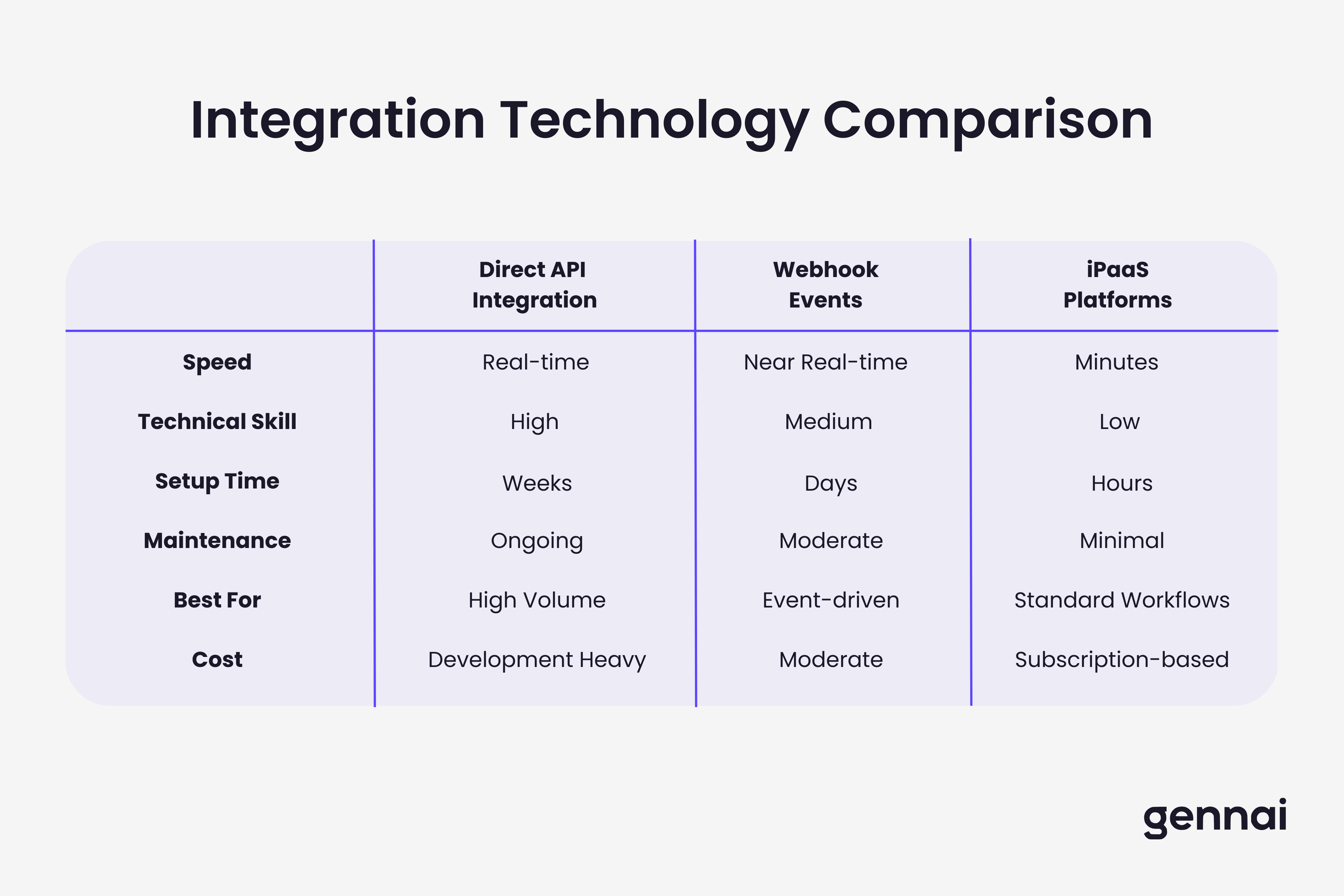
Understanding integration technologies helps you evaluate solutions and make informed implementation decisions. Three core approaches power modern invoice system integration.
Direct API Integration
Application Programming Interfaces provide the foundation for modern system integration. APIs allow different software applications to communicate directly, exchanging data in real-time through secure, structured protocols.
REST APIs dominate the invoice integration landscape. Platforms like QuickBooks Online, Xero, NetSuite, and most modern financial software expose REST APIs that allow authorized applications to create, read, update, and delete records programmatically. An invoice extraction tool can POST invoice data directly to your accounting system's API, creating a bill record without human intervention.
API integration requires authentication and authorization. OAuth 2.0 has become the standard approach, allowing users to grant specific permissions to integrated applications without sharing passwords. When you connect an invoice tool to QuickBooks, you authorize that specific application to access your accounting data with defined permission scopes.
The primary advantage of direct API integration: real-time data flow with minimal latency. When an invoice gets extracted, that data can populate your accounting system within seconds. The disadvantage: direct API integration requires development expertise and ongoing maintenance as APIs evolve. Organizations considering this approach should understand both the technical requirements and strategic advantages of prioritizing API capabilities in their software selection. For a deeper exploration of why API-first approaches are becoming essential, see our guide on API-first invoice management.
Webhook-Based Event Processing
Webhooks provide an event-driven alternative to continuous API polling. Rather than repeatedly asking "has anything changed?" a system configured with webhooks automatically notifies connected applications when specific events occur.
In invoice processing, webhooks enable near-instant updates. When a new invoice arrives in your extraction system, a webhook immediately notifies your accounting software. When an approver signs off on an invoice in your workflow tool, a webhook triggers payment processing. This event-driven architecture reduces processing delays and system load compared to polling-based approaches.
Implementation requires webhook endpoint creation. Your receiving system must expose a URL that can accept incoming webhook notifications, validate their authenticity, and process the transmitted data appropriately. Many modern platforms provide built-in webhook capabilities, but custom integrations might require development work.
iPaaS and Low-Code Integration Platforms
Integration Platform as a Service solutions like Zapier, Make (formerly Integromat), and enterprise platforms like MuleSoft provide pre-built connectors and visual workflow builders that enable integration without extensive coding.
These platforms work as middleware between your invoice systems. A typical workflow might trigger when a new invoice appears in your extraction tool, format and validate that invoice data according to your business rules, create a corresponding bill in your accounting software, post a notification to your Slack channel for review, and log the transaction in your audit spreadsheet.
iPaaS platforms dramatically reduce implementation time and cost for standard integrations. Connecting common applications like Gmail, QuickBooks, and Slack might take hours with an iPaaS platform versus weeks of custom development. However, complex business logic, high transaction volumes, or uncommon systems often require custom development despite iPaaS capabilities. Teams evaluating these platforms should compare the specific automation capabilities and limitations of Zapier vs Make to find the best fit for their workflow requirements.
Security and Compliance in Invoice Integration
Invoice data contains sensitive financial information that requires robust security throughout integration workflows. Proper security architecture protects against data breaches, fraud, and compliance violations.
Authentication and Authorization
Secure integration starts with proper authentication. OAuth 2.0 provides the standard framework for granting limited access to integrated applications. When connecting invoice tools to accounting systems, OAuth allows you to grant specific permissions (create bills, read vendor information) without sharing system passwords.
Multi-factor authentication becomes critical for any system in your invoice integration chain. If an invoice extraction tool has direct write access to your accounting platform, that connection should require MFA for the service account used for integration. This prevents unauthorized access even if credentials are compromised.
Role-based access control within integrated systems ensures users only access data and functions appropriate to their role. An AP clerk might need permission to create invoices but not approve payments. A department manager might approve invoices up to certain thresholds but not modify vendor banking information.
Data Encryption
All invoice data should transmit over encrypted connections. HTTPS/TLS protocols encrypt data in transit between integrated systems, preventing interception of sensitive financial information. This applies to API calls, webhook notifications, and any other communication between systems in your invoice integration ecosystem.
Data at rest encryption protects stored invoice information. Whether invoice data resides in your extraction tool's database, your accounting system, or data warehouse for analytics, that storage should use encryption to prevent unauthorized access if storage systems are compromised.
Audit Trails and Compliance
Comprehensive logging enables audit trails across integrated systems. Every invoice creation, modification, approval, and payment should generate time-stamped log entries showing who performed the action, when it occurred, and what changed. These audit trails prove essential for financial audits, fraud investigation, and compliance verification.
Different regulations impose specific requirements on invoice processing and data retention. GDPR in Europe mandates particular controls around personal data in invoices. SOX compliance in the US requires segregation of duties and comprehensive audit trails. Industry-specific regulations like HIPAA or PCI-DSS might impose additional controls depending on your business.
Integration architecture should support compliance requirements without creating operational barriers. This often means configurable approval workflows that enforce segregation of duties, automated retention policies that archive invoice data according to regulatory requirements, data access controls that track and limit who can view sensitive invoice information, and compliance reporting that demonstrates adherence to applicable regulations. Organizations operating in regulated environments need comprehensive frameworks that address both data protection and process controls.
Choosing the Right Integration Approach for Your Business
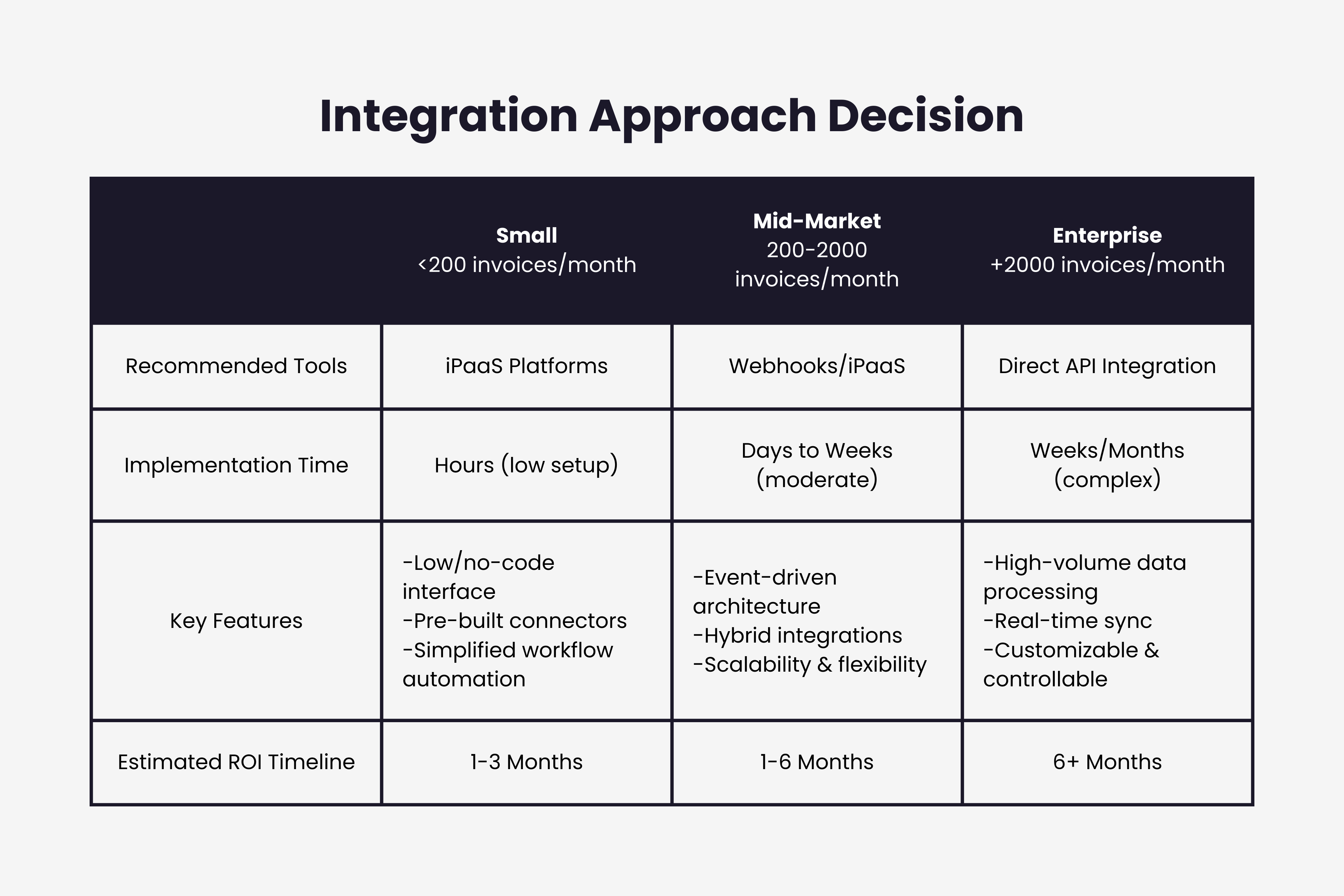
Different businesses require different integration strategies based on invoice volume, system complexity, and internal capabilities. The right approach balances automation benefits against implementation costs and ongoing maintenance requirements.
Small Business Integration (Under 200 Invoices Monthly)
Businesses processing fewer than 200 invoices per month typically benefit from simple, pre-built integration solutions. The processing volume doesn't justify complex custom integration, and finance teams often lack dedicated IT resources for ongoing maintenance.
Recommended approach: Use invoice extraction tools with native accounting integrations plus one or two strategic iPaaS workflows for specific automation needs. Tools that connect directly to email and sync with QuickBooks or Xero handle the primary integration requirement. Add automation workflows to post invoice notifications to communication channels or update tracking spreadsheets if needed.
This approach provides 80% of integration benefits at 20% of enterprise integration costs. Implementation typically takes days rather than weeks, and ongoing maintenance requires minimal technical expertise.
Mid-Market Integration (200-2,000 Invoices Monthly)
Mid-market businesses processing hundreds of invoices monthly need more sophisticated integration but still benefit from balancing custom development against platform solutions. These organizations often have basic IT capabilities but limited integration development resources.
Recommended approach: Implement robust invoice extraction with direct API integration to your accounting platform, add an iPaaS platform for secondary workflows and notifications, and consider approval workflow integration if invoice amounts or compliance requirements justify the added control layer.
This middle ground provides automated data flow for the primary invoice processing path while using low-code tools for peripheral integrations. Budget 4-8 weeks for initial implementation including testing and team training.
Enterprise Integration (2,000+ Invoices Monthly)
High-volume invoice processing and complex organizational structures require comprehensive integration architecture. Enterprise environments typically include multiple ERP systems, intricate approval hierarchies, multi-entity structures, and strict compliance requirements.
Recommended approach: Custom integration architecture connecting invoice capture tools to ERP systems via direct API integration, implementing comprehensive approval workflow platforms with built-in ERP connectivity, developing data warehouse integration for analytics and reporting, and establishing proper security controls including MFA, encryption, and audit logging throughout the integration chain.
Enterprise integration projects typically span 8-16 weeks for initial implementation and require ongoing IT resources for maintenance and enhancement. However, the processing efficiency gains and error reduction justify the investment at scale. Businesses processing thousands of invoices monthly can eliminate multiple full-time equivalent positions in manual processing.
Common Integration Challenges and Solutions
Even well-planned integration projects encounter obstacles. Understanding common challenges and proven solutions helps avoid expensive mistakes and extended implementation timelines.
Data Mapping Complexity
Different systems represent invoice data in different formats. Your extraction tool might output vendor names as free text, while your ERP requires vendor selection from a master record with specific vendor IDs. Line items might have different field structures. GL account coding might use different schemas.
Solution: Invest time upfront in thorough data mapping documentation. Create detailed specifications showing how each field in your source system maps to corresponding fields in target systems. Include transformation rules for data that requires formatting changes. For example, your mapping might specify that vendor names should match against existing vendor records and flag new vendors for review rather than creating duplicate records with slight name variations.
Implement validation layers that catch mapping errors before they propagate. If an invoice contains a GL account code that doesn't exist in your accounting system, the integration should flag this for resolution rather than failing silently or creating bad data.
System Downtime and API Limitations
Connected systems occasionally experience downtime. Your accounting platform might undergo maintenance. API rate limits might restrict how quickly you can push invoice data during high-volume periods.
Solution: Build resilience into integration workflows. Implement queuing systems that buffer invoice data when downstream systems are unavailable, allowing processing to continue when systems recover. Include retry logic that automatically attempts failed API calls after appropriate delays. Monitor API usage to stay within rate limits, and plan for burst capacity during peak processing periods.
Configure proper error notifications so your team knows when integration issues occur. A failed integration at 2 AM shouldn't go unnoticed until the AP team arrives at 9 AM to find a backlog of unprocessed invoices.
Change Management and User Adoption
Technology integration alone doesn't guarantee success. Finance teams accustomed to manual processes often resist changing to automated workflows, especially if integration changes familiar routines or requires learning new systems.
Solution: Involve end users throughout the integration planning and implementation process. AP clerks, approvers, and finance managers who will use integrated systems daily should participate in requirements gathering, testing, and training. Their input identifies workflow issues that technical teams might miss.
Provide comprehensive training before go-live, including hands-on practice with test invoices. Create quick reference guides for common tasks in the new integrated environment. Plan for a transition period where manual processes remain available as backup while teams gain confidence with automated workflows.
Measure and communicate benefits clearly. When the AP team sees concrete metrics showing they're processing invoices 75% faster with 90% fewer errors, adoption accelerates naturally.
Vendor Master Data Quality
Integration works best when underlying data is clean and consistent. However, many businesses discover that their vendor master data contains duplicates, outdated information, and inconsistent naming conventions only after beginning integration implementation.
Solution: Conduct vendor master data cleanup before implementing full integration. Identify and merge duplicate vendor records, standardize vendor naming conventions, validate vendor contact information and payment details, and establish data governance procedures to maintain quality going forward.
Some organizations discover they have three different vendor records for the same supplier, each with slightly different names and potentially different payment terms or banking information. Consolidating these records before integration prevents future processing issues and payment errors.
Measuring Integration Success: Key Performance Indicators
Successful invoice integration delivers measurable improvements in processing efficiency, accuracy, and financial visibility. Track these metrics to quantify integration value and identify opportunities for continuous improvement.
Processing Time Metrics
Time-based metrics reveal efficiency gains from integration. Measure invoice cycle time from receipt to payment approval. The industry average for manual processing ranges from 15-30 days, while integrated automated processing typically achieves 3-7 days for routine invoices.
Track touchless processing rate, which measures the percentage of invoices that move from receipt through approval to payment without human intervention. Best-in-class integrated systems achieve 60-80% touchless processing for standard invoices from established vendors.
Monitor approval cycle time specifically, as this often represents the largest bottleneck even in integrated environments. Integration that routes invoices to appropriate approvers automatically reduces approval time from days to hours in many organizations.
Accuracy and Error Metrics
Error rates demonstrate integration's impact on data quality. Measure data entry error rate comparing manual processing to automated extraction and integration. Manual invoice entry typically produces 1-3% error rates, while AI-powered extraction with proper integration reduces errors to under 0.5%.
Track exception rate showing the percentage of invoices requiring manual intervention due to extraction errors, missing vendor data, or validation failures. This metric identifies integration improvement opportunities and specific vendor or invoice format issues requiring attention.
Monitor duplicate invoice detection rate. Integration systems that maintain comprehensive invoice history across all systems can automatically flag potential duplicates before payment, preventing the costly mistake of paying the same invoice twice.
Cost Metrics
Financial metrics quantify integration ROI. Calculate cost per invoice comparing your total AP processing costs to invoice volume. Manual processing typically costs $15-40 per invoice when including labor, error correction, and lost discount capture. Integrated automated processing reduces this to $2-5 per invoice at scale.
Measure early payment discount capture rate. Integration that automatically identifies discount opportunities and routes invoices for priority payment can capture 1-2% savings on eligible invoices. For businesses processing millions in invoices annually, this represents significant bottom-line impact.
Track full-time equivalent reduction showing how many staff positions become available for higher-value work after integration eliminates manual data entry and reconciliation tasks. This metric helps justify integration investment and identifies opportunities to redeploy finance talent to strategic activities. Finance leaders can build comprehensive business cases using frameworks that translate these operational improvements into board-ready financial projections.
Implementation Roadmap: From Planning to Go-Live
Successful invoice integration follows a structured implementation approach that minimizes disruption while delivering quick wins.
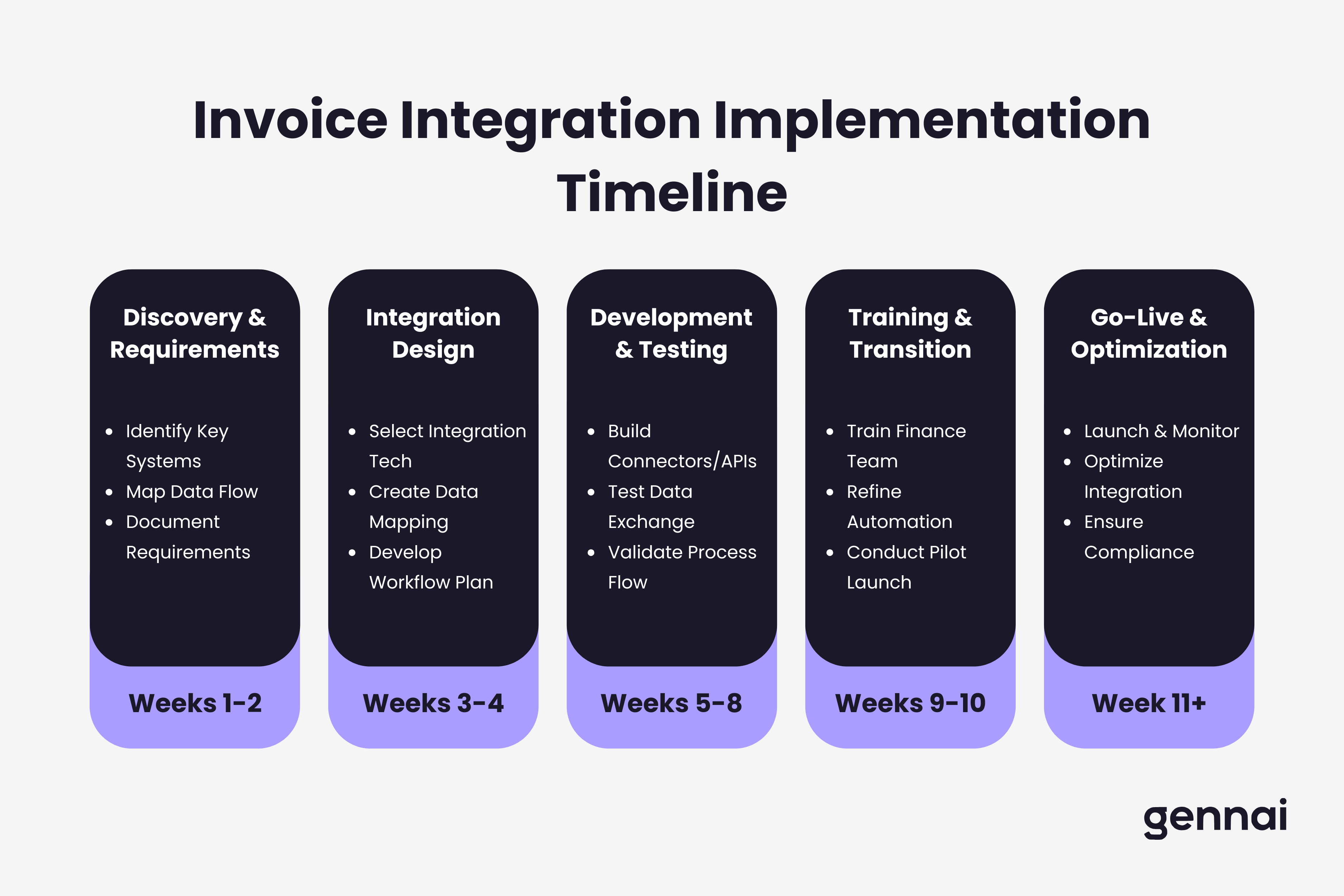
Phase 1: Discovery and Requirements (Weeks 1-2)
Begin by documenting your current invoice processing workflow in detail. Map every step from invoice receipt through payment, identifying manual touchpoints, system handoffs, and approval requirements. Interview AP staff, approvers, and accounting team members to understand pain points and workflow requirements.
Catalog your existing systems and their integration capabilities. Document your accounting platform version and available APIs, ERP systems and integration requirements, approval workflow tools or processes, payment processing platforms, and any existing automation tools or scripts.
Define success criteria specific to your organization. What processing time reduction would justify the integration investment? What error rate would you consider acceptable? How will you measure ROI? Clear success criteria guide implementation decisions and provide benchmarks for measuring results.
Phase 2: Integration Design (Weeks 3-4)
Design your integration architecture based on discovery findings. Create detailed data flow diagrams showing how invoice data will move between systems. Specify authentication approaches, data mapping rules, error handling procedures, and monitoring requirements.
Select integration tools and platforms based on your requirements and capabilities. For businesses with limited IT resources, favor platforms with pre-built connectors and visual workflow builders. Organizations with development capabilities might choose API-first approaches for maximum flexibility.
Develop a phased rollout plan that delivers value incrementally. Rather than attempting to integrate everything simultaneously, identify the highest-value integration points to implement first. Many businesses start with email-to-accounting integration before adding approval workflows and ERP connections.
Phase 3: Development and Testing (Weeks 5-8)
Build integration connections according to your design specifications. Start with development or sandbox environments rather than production systems. This allows testing and refinement without risk of corrupting live financial data.
Conduct thorough testing with representative invoice examples. Test happy path scenarios where everything works perfectly, error scenarios including invalid data and system failures, edge cases like multi-currency invoices or unusual vendor formats, and volume testing to ensure integration handles peak loads.
Include user acceptance testing with actual AP team members processing test invoices through the integrated workflow. Their feedback often reveals usability issues or workflow gaps that technical teams might miss.
Phase 4: Training and Transition (Weeks 9-10)
Train all users before go-live. Create role-specific training for AP clerks who process invoices daily, approvers who review invoices occasionally, and finance managers who monitor processing metrics. Hands-on training with test invoices proves more effective than presentation-only sessions.
Develop comprehensive documentation including quick-start guides, detailed process documentation, troubleshooting guides for common issues, and escalation procedures when problems occur.
Plan your transition approach. Some organizations prefer parallel running, where automated integration processes invoices while manual processes continue as backup. Others choose cutover, where integration goes live for all invoices on a specific date. Parallel running reduces risk but requires more effort during transition.
Phase 5: Go-Live and Optimization (Week 11+)
Launch integration with close monitoring. Watch for error patterns, processing bottlenecks, user adoption issues, and unexpected system behavior. Be prepared to make rapid adjustments based on real-world usage.
Establish regular review cycles to analyze integration performance. Weekly reviews during the first month help identify and resolve issues quickly. Monthly reviews afterward track long-term trends and continuous improvement opportunities.
Document lessons learned and create a backlog of enhancement opportunities. Integration implementation rarely achieves perfection immediately. Continuous refinement based on user feedback and performance metrics drives ongoing value.
The Future of Invoice Integration
Invoice system integration continues evolving as new technologies mature and business requirements change. Several trends will shape integration strategies over the next few years.
Real-Time Processing and Analytics
Integration latency continues decreasing. What once took hours or days now happens in minutes, and the trend toward real-time processing accelerates. Future invoice systems will provide instant visibility into cash positions, approval status, and spending patterns without batch processing delays.
Streaming analytics will enable proactive financial management. Rather than discovering a spending variance days later during month-end close, finance teams will receive immediate alerts when invoice patterns deviate from expectations. Machine learning models will predict cash flow requirements based on incoming invoice patterns and historical payment behavior.
Intelligent Automation and AI Advancement
AI capabilities in invoice processing continue improving. Current systems achieve 90-95% extraction accuracy on standard invoices. Next-generation AI will handle increasingly complex invoice formats including fully unstructured invoices, multi-language documents, and scanned low-quality images with minimal error rates.
Intelligent process automation will extend beyond data extraction. AI will automatically validate invoices against purchase orders and contracts, suggest optimal payment timing considering cash flow and discount opportunities, identify fraud patterns and anomalous invoices, and recommend process improvements based on workflow analytics.
Embedded Finance Integration
Banking and payment integration will become tighter and more seamless. Real-time payment rails like FedNow and RTP networks enable immediate invoice payment when strategically advantageous. Embedded finance capabilities will allow invoice processing systems to directly initiate payments without separate banking portals.
Virtual card integration for B2B payments will grow significantly. Rather than traditional ACH or check payments, businesses will generate single-use virtual cards for invoice payments, earning rebates while maintaining payment control and improving reconciliation.
Blockchain and Distributed Ledger Exploration
Some large enterprises are exploring blockchain technology for invoice processing and payment. Distributed ledger systems could provide immutable audit trails, streamline multi-party invoice scenarios like construction projects, and enable new payment and financing models.
However, blockchain adoption for mainstream invoice processing remains limited. The technology solves problems most businesses don't have while introducing complexity and integration challenges. Traditional database and API approaches continue serving most organizations well.
Taking Your Next Integration Steps
Invoice system integration transforms invoice processing from a manual, error-prone burden into an automated, efficient workflow that frees your finance team for higher-value work. The key to successful integration: start with clear objectives, choose tools that match your capabilities, implement in phases to manage risk, and measure results to guide continuous improvement.
For businesses just beginning invoice automation, email extraction integrated with accounting software provides the highest immediate return. This connection eliminates the most time-consuming manual data entry while establishing a foundation for more sophisticated integration later. Tools designed for this purpose connect to your inbox and sync extracted data to your accounting platform within minutes, not weeks.
Mid-sized businesses should extend integration to include approval workflows and analytics. These additions deliver better financial control, faster processing cycles, and visibility into spending patterns that inform strategic decisions.
Enterprise organizations need comprehensive integration architecture connecting invoice processing throughout their financial systems. The investment in robust integration infrastructure pays dividends through processing efficiency at scale, compliance support, and financial insights that manual approaches cannot provide.
The integration approach that works for your business depends on invoice volume, system complexity, internal capabilities, and strategic objectives. Focus on the connections that deliver the most value for your specific situation rather than attempting to integrate everything simultaneously.
Ready to implement automated invoice processing with seamless integration? Modern platforms handle email extraction, accounting sync, and team collaboration without complex configuration, allowing you to see results with your actual invoices in minutes rather than months.
Ready to automate your invoices?
Start extracting invoices from your email automatically with Gennai. Free plan available, no credit card required.
Start FreeRelated Articles
Accounts Payable Turnover Ratio Explained
The accounts payable turnover ratio shows how fast you pay suppliers. Get the formula, a worked example, benchmarks and what your number really means.
GuideNet 30 vs Net 60: What Payment Terms Really Mean for Your Cash
Net 30 vs net 60 explained for business owners: what each term means, when the clock really starts, and how the gap hits your cash on both sides.
GuideThe Accounts Payable Process, Step by Step (for Owners)
The accounts payable process has five steps: receive, verify, approve, pay, and record each invoice. Here is how each works and where owners lose money.