
How to Close Your Books Faster (Without Chasing Invoices)
Close your books in 3 days instead of 8. Learn why invoices are the biggest close bottleneck and five changes that shorten your month-end close starting this month.


If your month-end close regularly spills into day six, seven, or eight, you are not behind because your team is slow. You are behind because the data is not where it needs to be when close week starts.
According to Ledge's 2025 Month-End Close Benchmarks report, only 18% of finance teams close their books in three business days or fewer. Half of all finance teams take six or more days. The most common culprit is not reporting, it is everything that has to happen before reporting: hunting down missing invoices, reconciling accounts with incomplete data, and waiting on other departments to submit what they owe.
This guide covers why invoices are the single biggest drag on your close timeline and what you can do to make sure they are never the reason you are still working on day seven.
Why the close takes longer than it should
The month-end close is a sequenced process. Each step depends on the previous one being done. That means one missing piece of data can push the entire timeline back by a day or more.
Ledge's research asked finance teams to identify their biggest close blockers. The top answers:
56% cited dependency on other departments. Waiting on someone in sales, operations, or procurement to submit invoices, expense reports, or approvals is the most common reason closes run long.
94% of teams still use Excel for close activities. Half of those teams say spreadsheets are a key reason their close is slow, according to the same Ledge benchmarks. Manual exports, version conflicts, and formula errors compound every other problem.
Cash reconciliations consume 20 to 50 hours per month. This alone is the single most time-intensive step, and it gets worse when AP records are incomplete because invoices were not captured on time.
Missing or disorganized documentation causes roughly 40% of close delays. Receipts, contracts, and invoice backups scattered across email inboxes and local folders force teams to spend close week hunting for documents instead of reconciling them. (Stanfox, 2025)
The cascade effect is real. As Vena's 2025 State of Strategic Finance Report notes: it takes just one missing invoice or unapproved journal entry to throw off the entire close process. When AP data is incomplete, reconciliation cannot finish. When reconciliation is late, reporting is late. When reporting is late, leadership is making decisions on last month's numbers. The delay compounds at every step.
Invoices are the most predictable bottleneck
Most businesses receive supplier invoices by email. Those invoices arrive throughout the month in attachments, embedded in email bodies, across multiple inboxes, from different vendors in different formats. Someone has to find them, download them, enter the data, and get them into the accounting system before AP can be reconciled.
That process works fine when invoice volumes are low. At 20 invoices a month, manual handling is manageable. At 100, 200, or 500 invoices, it becomes the bottleneck that determines how long your close takes.
The problem is structural. Invoices arrive in real time throughout the month, but manual processing often happens in batches, usually right before close. So when close week starts, your team is not just reconciling, they are also catching up on four weeks of document processing that should have already been done.
The fix is to move invoice processing out of close week entirely. The email invoice extraction guide explains how automatic inbox scanning works in practice, but the short version is: when invoices are captured and processed as they arrive, there is nothing left to chase when close starts.
What a faster close actually looks like
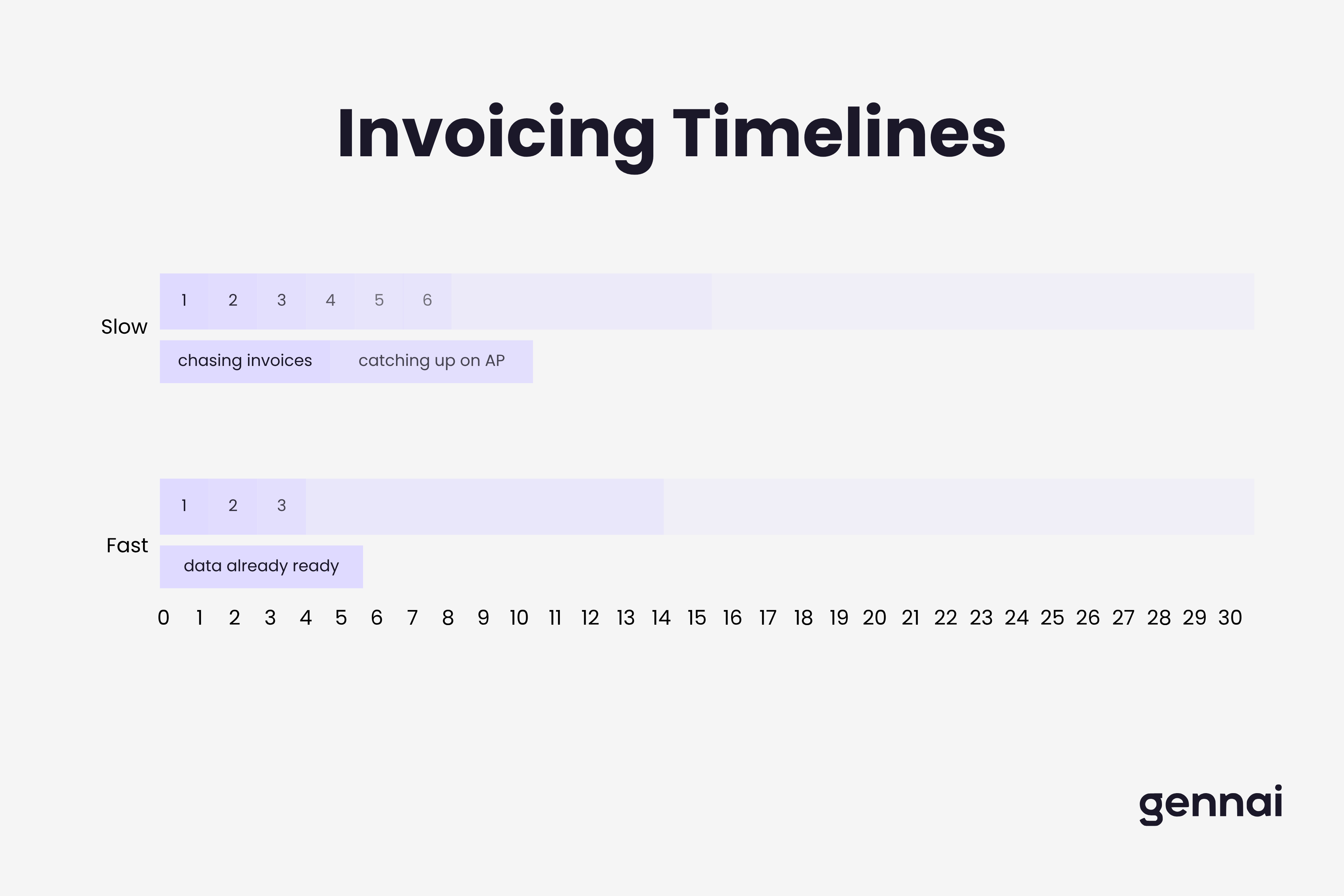
The top 10% of finance teams close their books in one to two business days. The difference between them and the 27% of teams that take more than seven days is not headcount or tools alone. It is whether the data is ready before close week starts.
Here is what separates fast-close teams from slow ones:
AP is reconciled continuously, not at month-end
Teams that close in under three days typically reconcile their accounts weekly throughout the month. Bank accounts, credit cards, and AP are matched as transactions come in, not accumulated into a backlog. By the time close week arrives, there is almost nothing left to reconcile.
Invoices are captured automatically as they arrive
When supplier invoices are captured from email in real time and synced directly to Xero, QuickBooks, or whatever platform your team uses, the AP ledger stays current. No one is manually downloading attachments. No one is doing a catch-up data entry sprint during close. The data is already there when reconciliation starts.
This is exactly the workflow Gennai automates. Connect your Gmail or Outlook inbox, and invoices are extracted and exported to your accounting platform the moment they arrive. The case study on how a rentals business used Gennai shows what this looks like in practice: three inboxes connected, twelve months of invoices recovered, and no more weekly requests to the accountant for missing documents.
Accruals are pre-staged before close starts
High-performing teams enter known recurring expenses, payroll accruals, and subscription charges before the month ends. If you know AWS charges a fixed amount monthly, book the accrual on day 28. When the month closes, that line item is already done. Zenskar's research on 200 high-performing finance teams found that pre-staging data alone shaves one to two days off the close immediately.
Documents are centralized, not scattered across inboxes
Invoice backups, receipts, and supporting documents need to be in one place for reconciliation and audit readiness. When invoices are captured automatically and stored in a structured format alongside extracted data, your team never has to search for them. The documents are already attached to the right transactions.
Five changes that shorten your close starting this month
You do not need to overhaul your entire accounting stack to close faster. These five changes address the most common delays:
1. Stop batch-processing invoices. If your team downloads and enters invoices in weekly or bi-weekly batches, AP is always behind. Switch to continuous capture. Every invoice that arrives by email should be processed the same day it arrives, ideally automatically.
2. Reconcile AP weekly, not monthly. Set a standing 30-minute weekly review where AP is matched and any discrepancies are cleared. This is the single change that has the biggest impact on close time, because there is nothing left to reconcile when close week starts.
3. Pre-stage known recurring items before month-end. Payroll, rent, subscriptions, and any fixed recurring costs can be accrued before the month closes. Create a template for recurring journal entries and post them on day 28 or 29. This removes them from the close checklist entirely.
4. Build a document collection cutoff into your process. Set a clear deadline, usually day 25, for all departments to submit invoices, expense reports, and approvals. Communicate it as a hard cutoff, not a suggestion. Finance Alliance research shows that most close delays caused by missing documentation are predictable and preventable.
5. Automate the invoice inbox. If supplier invoices arrive by email, connect your inbox to an automated capture tool. This removes the manual download and entry step entirely. Your accounting platform gets updated in real time, and your team starts close with current data instead of a backlog. The AP automation guide walks through how to set this up for teams of any size.
Getting the most out of Xero or QuickBooks at close time
Xero and QuickBooks are excellent accounting platforms, but neither of them solves the invoice ingestion problem on their own. They do not scan your email inbox. They do not pull in supplier invoices automatically. Someone still has to get the documents into the system.
This is the gap that invoice capture tools fill. Gennai sits upstream of your accounting platform. It connects to Gmail or Outlook, extracts invoice data as emails arrive, and pushes structured records directly to Xero or QuickBooks. By the time close week starts, your AP is current and your accountant is not waiting on you to send documents.
For a comparison of how Xero and Gennai fit together in practice, the Gennai vs Xero guide covers exactly when each tool handles which part of the workflow.
A faster close should also be a cleaner one
Speed without accuracy creates more work, not less. A faster close only delivers value if the underlying data is clean and audit-ready. Automated invoice capture helps with this in a concrete way: every invoice that is processed automatically has a clear audit trail, including the original email source, extraction timestamp, and data exported to your accounting platform.
Duplicate invoices, a common source of errors during high-volume periods, are flagged automatically. Documents are stored in a structured format rather than buried in someone's inbox. When an auditor asks for support on a transaction, the document is already attached to the right record.
For teams that need a deeper look at the security side of invoice data, the invoice data security guide covers what to look for in any tool that handles financial documents.
The three-day close is not a myth. The top 10% of finance teams close in one to two days. They use the same accounting platforms as everyone else. The difference is that their data is ready before close week starts. Invoices are already captured, AP is already reconciled, and recurring accruals are already posted. Close week becomes a review, not a data entry sprint.
Close week should feel like a review, not a rescue operation
If your team is regularly working late in the first week of every month, the problem is not effort. It is that the data collection that should happen throughout the month is getting compressed into the close. Invoices that arrived three weeks ago are still being entered. AP has not been touched since last close. Departments are still submitting receipts on day five.
Fixing this does not require a big implementation project. Start with one change: automate invoice capture from your inbox. When invoices stop being a backlog problem, the rest of the close gets easier to manage on a regular schedule.
If you want to see how Gennai handles the invoice side of this, see how it works or connect your inbox with a free trial and have your first invoices captured in under two minutes.
References
- Ledge. The State of Month-End Close in 2025: Finance Team Benchmarks and Insights
- CFO.com. 50% of Finance Teams Still Take Over a Week to Close the Books (April 2025)
- Vena Solutions. 2025 State of Strategic Finance Report
- Stanfox. Month-End Close Process Guide 2025
- Zenskar. How to Speed Up Your Month-End Close Process in 2026
- Resourceful Finance Pro. Month-End Close in 3 Days (December 2025)
- Finance Alliance. Month-End Close Checklist: Steps, Process and Best Practices
- Spendesk. 5 Ways to Streamline Your Month-End Close in 2026
- APQC. Benchmarking the Month-End Close
TL;DR
- Only 18% of finance teams close in 3 days or fewer — half take 6+ days, and the biggest blocker is missing invoice data
- The close is a sequenced process: one missing invoice delays reconciliation, which delays reporting, which delays decisions
- Fast-close teams reconcile AP weekly throughout the month, not in a batch during close week
- Automated invoice capture from email eliminates the most predictable bottleneck — invoices are processed as they arrive, not chased during close
- Five immediate changes: stop batch-processing, reconcile weekly, pre-stage accruals, set a document cutoff date, and automate the invoice inbox
- Xero and QuickBooks do not scan your inbox — invoice capture tools like Gennai sit upstream and feed them clean, structured data continuously
- The three-day close is achievable with the same tools most teams already have — the difference is whether the data is ready before close week starts
Ready to automate your invoices?
Start extracting invoices from your email automatically with Gennai. Free plan available, no credit card required.
Start FreeRelated Articles
Agentic AI in Accounts Payable: What It Means for Your Finance Team in 2026
What agentic AI actually means for accounts payable in 2026. Covers real deployments from Basware, Ramp, and Genpact, what changes for finance teams, and what you need in place first.
GuideHow to Stop Chasing Invoices (And Automate the Whole Thing)
Practical guide to eliminating manual invoice chasing in 2026. Covers automated AR reminders, incoming invoice capture, approval routing, and the tools that make it work.
GuideInvoice Management Best Practices: 12 for 2026
12 invoice management best practices for 2026 across capture, approval, integration, and KPIs, plus the benchmarks that separate best-in-class AP teams.