
Invoice Line Item Extraction: Why It's Harder Than It Looks
Invoice line item extraction fails where header fields succeed. Learn the five structural problems that break table extraction and how modern AI solves them.

Pull the vendor name. Get the invoice total. Those are solved problems. Every invoice processing tool on the market handles header-level fields reasonably well. The data sits in predictable locations, in the top section of the document, in consistent formats, and it rarely surprises even basic OCR systems.
Line items are a different problem entirely. They live inside tables. Those tables come in hundreds of layouts, may span multiple pages, sometimes have no visible borders, and occasionally nest sub-items under category headers that change the meaning of every row below them. A system that extracts header fields with 99% accuracy can fail repeatedly on line items from the same invoice. That gap is where most AP automation quietly falls short, and where finance teams end up doing manual work they thought they had automated.
This guide explains exactly why line item extraction is hard, where the common failure modes happen, and what good extraction actually looks like in practice.
Why Header Fields and Line Items Are Completely Different Problems
Header fields, vendor name, invoice number, date, and total, are key-value pairs. The document presents them in a label-then-value format that pattern recognition handles well. "Invoice Number: INV-2026-0412" is easy to parse because the relationship between the label and the value is explicit and linear.
Line items are relational data. The number "15.00" in a line item table means nothing on its own. It only has meaning when the system understands that it sits in the "Unit Price" column of the "Software License" row. That spatial relationship, where a value sits relative to its column header and its row neighbors, is what makes line item extraction a fundamentally harder task.
As researchers at Docupipe found in testing, simple tables with clear gridlines achieve 95-99% extraction accuracy. Complex tables with merged cells or content that spans page breaks drop below that threshold, and the failures are not random. They cluster around the same structural patterns every time.
The Five Structural Problems That Break Line Item Extraction
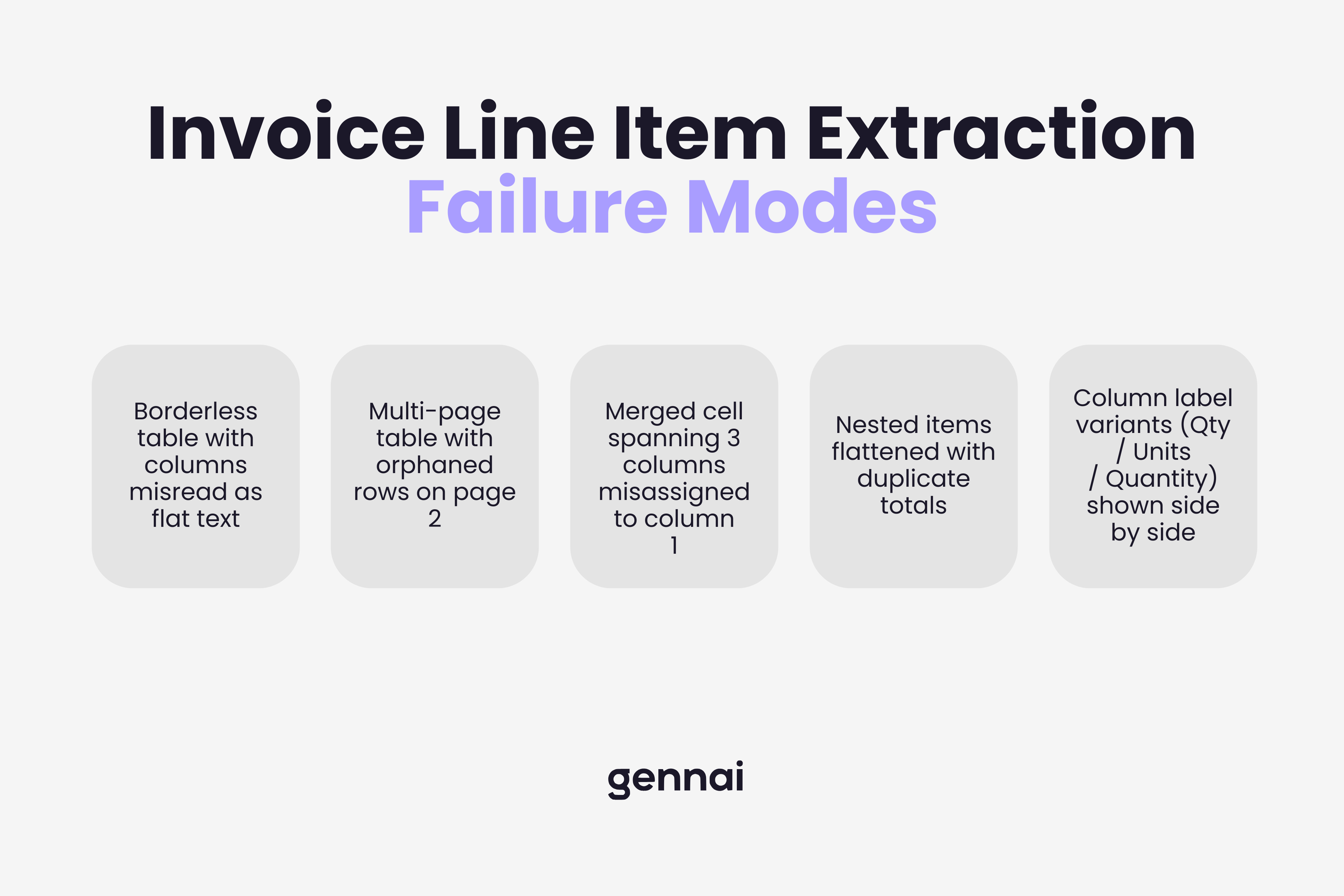
1. Borderless tables
Many vendors design their invoices without visible gridlines. The table structure exists visually through whitespace and alignment, but there are no lines for an extraction system to follow. Traditional OCR reads left-to-right, top-to-bottom without understanding structure. When the visual cues disappear, it treats the table as a block of text and loses the column relationships entirely. A unit price lands in the description field. A quantity gets merged with a product code. The data is all there, just scrambled.
2. Multi-page tables
A detailed invoice from a supplier with 40 line items will almost certainly span more than one page. Most extraction tools treat each page as a separate document. When a table continues onto page two, the system either starts a new table at the top of page two, losing the column header context from page one, or it detects the repeated header row as a duplicate and drops it. Either way, the output is fragmented. Line items from page two arrive without column assignments or in the wrong order. This is confirmed as a common failure point across vendor benchmarks, including Microsoft's own documentation on their Document Intelligence invoice model.
3. Merged and spanning cells
Vendors use merged cells for subtotals, category headers, and grouped items. A cell that spans three columns tells the system something meaningful: everything below this header belongs to the same category. Systems that do not understand spanning relationships extract the merged cell as if it belongs to a single column, then misalign every row that follows. According to Mindee's technical research on line item pipelines, this is one of the most frequent errors their segmentation models needed to correct: single segmentation candidates incorrectly detected as covering two description lines instead of one.
4. Nested line items
Some invoices, particularly from manufacturing, logistics, and professional services vendors, include sub-items indented under parent items. A parent line might read "Project Alpha Implementation" with child lines below it for "Engineering Hours", "QA Hours", and "Project Management". The total on the parent line is the sum of its children. A system that flattens this structure into a single-level list produces output where the parent total and the child subtotals are all treated as independent line items, which doubles the recorded value when the data reaches your accounting system.
5. Inconsistent column labels
There is no standard for what vendors call their columns. "Qty" and "Quantity" and "Units" all mean the same thing. "Unit Price", "Rate", "Price Each", and "UP" all mean the same thing. "Line Total", "Amount", "Ext. Price", and "Net" all mean the same thing. Template-based systems fail when a vendor changes their invoice format or when a new vendor uses terminology outside the template's vocabulary. AI extraction systems trained on diverse invoice datasets handle this variability by understanding the semantic meaning of column labels rather than matching exact strings.
Levvel Research (now Corpay) found that 60-70% of "automated" AP processes still require manual intervention, often because line item extraction failed and the output needed correction before it could reach the accounting system.
What Happens When Line Item Extraction Fails
The downstream effects of bad line item data are not abstract. They show up in specific, costly ways that AP teams recognize immediately.
Three-way matching breaks first. Matching an invoice against a purchase order at the line item level requires that both documents present the same items in comparable formats. If the extraction output scrambles column assignments, the line that reads "100 units at $12.50" on the PO cannot be matched to whatever the system extracted from the invoice. The match fails, the invoice goes to an exceptions queue, and a human has to resolve it manually. This directly connects to why understanding what happens to invoice data after extraction matters so much: errors at the line item level ripple through every downstream step.
GL coding accuracy drops next. Proper general ledger coding at the line item level, assigning different expense categories to different line items on the same invoice, is only possible if the line items arrived intact. If the extraction merged three lines into one or split a single item across two rows, the coding logic has nothing reliable to work with.
Spend analysis becomes unreliable. The value of granular invoice data is in the analysis it enables: which vendors charge what for which items, where costs are trending, which line items are candidates for renegotiation. None of that is possible if the line item data in the system is incomplete or structurally wrong. Businesses end up with header-level spend data, which tells them how much they spent with each vendor but not what they actually bought.
How Modern AI Extraction Approaches the Table Problem
The shift from template-based OCR to AI-powered extraction changes the line item problem in a fundamental way. Template systems look for specific text in specific coordinates. When the layout changes, the template breaks. AI systems learn the structural patterns that make a table a table, and they apply that understanding to documents they have never seen before.
The technical pipeline for line item extraction involves several distinct stages. First, a computer vision model identifies the table region on the page, distinguishing it from headers, footers, and free-text sections. Then a segmentation model identifies individual cells and their approximate grid positions. An OCR layer extracts the text from each cell. Finally, a reconstruction algorithm maps cells to their column headers and row associations, producing structured output where each value is correctly labeled with both its row context and its column meaning.
For borderless tables, the detection relies on text alignment patterns and whitespace geometry rather than visible lines. For multi-page tables, the system tracks column structure across page breaks, recognizing repeated headers as continuation markers rather than new tables. For nested items, the indentation level and the presence of subtotal rows signal the parent-child relationship.
This is precisely what the OCR evolution guide covers in depth: how AI-powered systems moved from rigid pattern matching to genuine structural understanding of document layouts.
In practice, one study using OCR combined with LLMs found line item recall improved from 88% with OCR-only regex-based extraction to 97% when an LLM reasoning layer was added on top of the OCR output. That nine-percentage-point gap represents roughly one in ten line items either recovered or lost, which at scale is the difference between a system that needs constant manual correction and one that runs reliably.
Source: RaftLabs engineering analysis, published July 2025.
What to Check When Evaluating Line Item Extraction Quality
When testing any extraction tool on your invoices, header field accuracy is not the right benchmark. Run your most complex invoices, not the clean single-page ones. The structural edge cases are where tools diverge most significantly.
Borderless table handling
Submit an invoice from a vendor who uses whitespace-only column separation. Check whether column assignments survive in the output or collapse into a single text block.
Multi-page continuity
Use an invoice where the line item table spans at least two pages. Verify that line items from page two arrive with correct column assignments and appear in the right sequence relative to page one items.
Nested item preservation
If your vendors use parent-child line structures, check whether the hierarchy is preserved in the output or flattened. Flattened output will show duplicate totals when the parent total and child subtotals are all treated as independent items.
Column label flexibility
Test with invoices from at least five different vendors. Column labels should map correctly regardless of whether the vendor writes "Qty", "Quantity", or "Units".
Confidence scoring
A well-designed system flags low-confidence extractions rather than silently passing incorrect data downstream. Check whether the tool surfaces uncertainty for review or presents all output with equal confidence.
Gennai uses AI extraction built on large language model technology to process invoice line items from Gmail and Outlook inboxes. The extraction handles variable vendor formats without template configuration, including the structural patterns that cause traditional OCR to fail. Extracted line items flow directly to your accounting system with field-level data intact.
The Line Between Partial and Complete Automation
Most invoice automation tools solve the easy part. Vendor name, invoice date, total amount: these fields come out clean and the demo looks convincing. The harder test is what happens with a 12-page invoice from a logistics vendor that uses nested categories, borderless tables, and column headers your system has never seen before.
That test separates tools that automate header capture from tools that actually automate invoice processing. Line item extraction is where that distinction becomes visible, and where the ROI of automation either holds or quietly evaporates into manual correction work that nobody accounted for when the system was sold.