
Invoice Data Security: Complete Compliance Guide 2026
Protect invoice data with practical GDPR, SOC 2, and ISO 27001 security controls. Complete audit framework and 2026 compliance implementation guide.

Data breaches hit record levels in 2025. The Identity Theft Resource Center tracked 3,322 data compromises in the United States, with financial services experiencing 739 incidents—more than any other sector. Among these breaches, payment data appeared in 9% of incidents, while phishing attacks accounted for 16% of all compromises.
Invoice data sits at the center of this vulnerability. Every invoice contains vendor names, bank account details, payment amounts, and transaction histories. When exposed through email attachments, insecure file shares, or poorly configured systems, this information enables payment fraud, account takeovers, and competitive intelligence gathering.
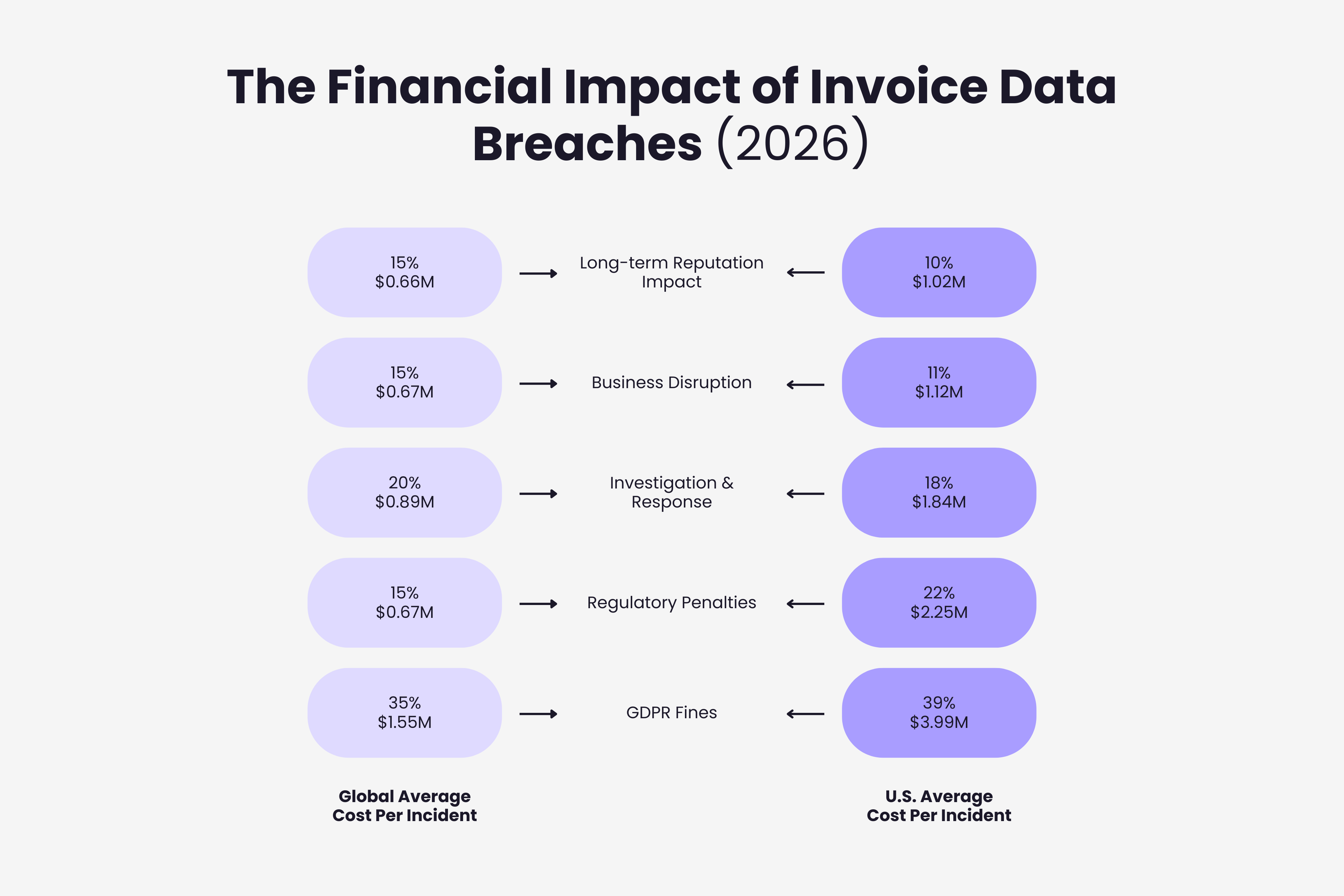
The global average cost of a data breach reached $4.44 million in 2025, down 9% from the prior year due to faster detection. However, costs in the United States rose 9% to $10.22 million per incident, driven by regulatory fines and slower containment. Financial sector breaches averaged $5.56 million. For finance leaders evaluating whether proactive security investments justify their cost, calculating AP automation ROI for your organization provides a framework for weighing these risks against operational improvements.
This guide explains practical invoice data security controls, compliance requirements that apply to your invoice processing, and how to audit your current systems against 2026 standards.
The Real Risks of Unsecured Invoice Data
Invoice security failures create measurable financial harm through multiple attack vectors.
Business email compromise schemes target invoice workflows directly. Attackers impersonate vendors, request bank account changes, and redirect legitimate payments to fraudulent accounts. FBI data shows annual losses exceeding $2.9 billion from these attacks, with invoice manipulation accounting for substantial portions of the total.
Unlike credit card numbers that can be canceled immediately, compromised bank account details require closing accounts, updating payment systems across all vendors, and managing cash flow disruptions while new accounts activate. Recovery timelines often extend weeks or months.
Competitive intelligence extracted from invoice data reveals supplier relationships, negotiated pricing, volume discounts, payment terms, and spending patterns across categories. Competitors accessing this information gain advantages in vendor negotiations and market positioning that persist long after the initial breach.
Regulatory penalties compound direct losses. Organizations processing EU resident data face GDPR enforcement totaling €5.88 billion in fines since 2018. Recent enforcement actions include a €530 million penalty for unauthorized data transfers and a €479 million fine for manipulative consent practices.
Hidden costs accumulate through forensic investigations, legal fees, breach notifications, credit monitoring for affected parties, and lawsuits from customers or vendors. Companies also face reputation damage affecting customer acquisition, vendor trust, and partnership opportunities.
GDPR Requirements for Invoice Processing
The General Data Protection Regulation establishes specific obligations for organizations processing invoice data containing EU resident information. Our guide on detailed requirements for GDPR and invoice processing covers Article 28 agreements, data subject rights, and breach notification timelines.
Invoice data qualifies as personal data under GDPR when it includes names, email addresses, phone numbers, or other information identifying natural persons. Business invoices frequently contain this data through vendor contacts, individual consultants, or small business owners.
Organizations must establish lawful bases for processing. Common bases include contract performance when invoices document services provided under agreements, legitimate interests when processing supports necessary accounts payable operations, and legal obligations when tax or financial regulations mandate invoice retention.
Data minimization requires collecting only information needed for legitimate purposes. If your invoice system captures fields serving no function in payment processing, tax compliance, or financial reporting, regular audits should document business requirements for each data field or eliminate unnecessary collection.
Storage limitation demands defined retention periods. Most jurisdictions require invoice retention for 3-7 years for tax purposes. Once retention periods expire and no other legal basis justifies storage, GDPR requires deletion or anonymization.
Security measures must address invoice data risks through encryption for transit and storage, access controls limiting visibility to authorized personnel, audit logging tracking who accesses information and when, and regular assessments identifying system vulnerabilities.
Processor agreements apply when using third-party invoice management tools. Services processing invoice data require contracts specifying processing terms, security requirements, breach notifications, and audit rights meeting Article 28 GDPR standards.
Data transfers outside the European Economic Area need legal mechanisms. For invoice data on servers in other jurisdictions or processed by international providers, organizations implement Standard Contractual Clauses, verify adequacy decisions for destination countries, or establish Binding Corporate Rules for multinational transfers.
Breach notification requires reporting certain invoice incidents to authorities within 72 hours. When breaches involving invoice information create high risk to individuals' rights, affected persons receive notification without undue delay.
SOC 2 and ISO 27001 for Invoice Security
Two compliance frameworks dominate invoice security requirements: SOC 2 in North America and ISO 27001 internationally.
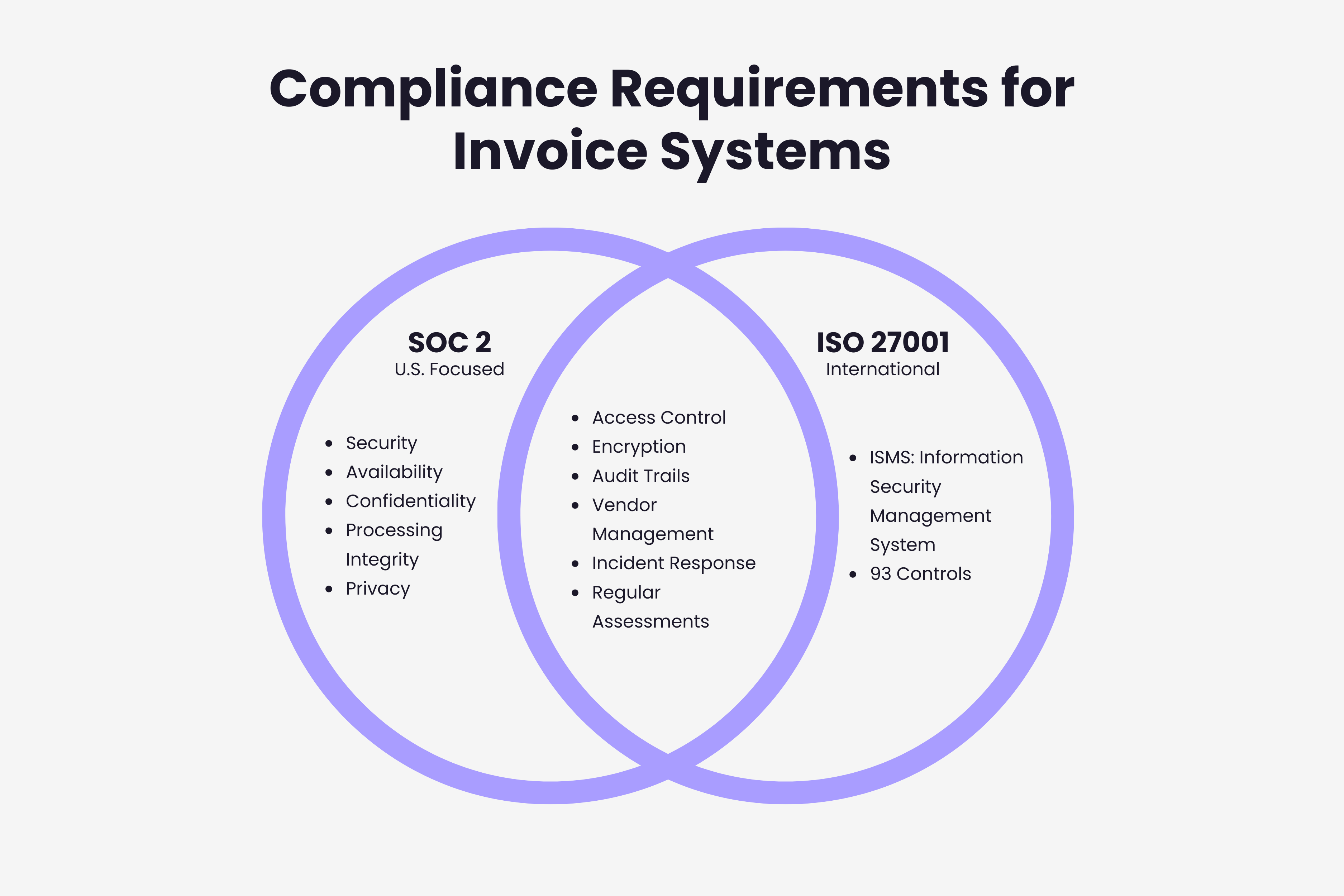
SOC 2, developed by the American Institute of Certified Public Accountants, validates service organization controls through five Trust Services Criteria. Security (mandatory) covers protection against unauthorized access. Availability ensures invoice processing systems remain operational. Processing Integrity verifies complete, accurate, authorized processing. Confidentiality protects designated sensitive information. Privacy addresses personal information according to stated policies.
SOC 2 Type I examines control design at a point in time. Type II assesses whether controls operated effectively over 6-12 months. Enterprise customers increasingly require SOC 2 Type II reports before contracts.
ISO 27001 provides international standards for information security management systems. Organizations pursuing certification establish scope covering all invoice-touching systems, conduct risk assessments identifying invoice-specific threats, implement Annex A controls addressing risks, document security policies, monitor performance, and continuously improve based on findings.
The framework includes 93 controls across fourteen domains. For invoice management, key controls include access policies limiting data viewing and modification, cryptographic protections for transit and storage, supplier security requirements for vendors processing invoices, and secure disposal for retained data.
According to industry analysis, approximately 80% overlap exists between SOC 2 and ISO 27001 requirements. Organizations often satisfy both through unified control frameworks.
For invoice security, both require documented access controls, encryption protecting transmission and storage, regular vulnerability assessments, incident response procedures, vendor security management, and comprehensive audit trails.
Essential Security Controls for Invoice Data
Practical security controls protect invoice data without enterprise budgets or extensive expertise.
Access Control
Implement role-based permissions. Accounts payable clerks need different access than controllers. Grant minimum permissions required for job functions. Quarterly reviews verify access matches current responsibilities and remove permissions when employees change roles or depart.
Multi-Factor Authentication
Enable MFA for all invoice system accounts, prioritizing administrative users and those with broad permissions. Hardware security keys offer stronger protection than SMS codes. Even if credentials are phished, MFA prevents unauthorized system access.
Encryption
Protect data in transit with TLS 1.2 or higher. Encrypt stored invoice data so unauthorized file access cannot reveal contents without decryption keys. Cloud invoice tools typically provide encryption by default; verify during selection.
Email Security
Unencrypted email attachments travel across multiple servers before reaching recipients, creating hidden security risks of email invoice management. Better approaches include secure portals for invoice uploads, platforms eliminating email transmission entirely, or tools automatically extracting invoice emails to secure systems without repeated forwarding or downloading.
Four Business Email Compromise Patterns That Target Invoices
Most invoice fraud never touches a server. It arrives as an email that looks like routine supplier correspondence. The FBI's Internet Crime Complaint Center recorded 21,442 business email compromise complaints in 2024, with $2.77 billion in reported losses, and the 2025 AFP Payments Fraud and Control Survey found that 63% of organizations faced BEC attempts or incidents in 2024, which kept it the most common route for payments fraud. These are the four patterns an accounts payable team is most likely to meet, and the control that stops each one.
| Pattern | How it works | What gives it away | Control that stops it |
|---|---|---|---|
| Supplier asks to change bank details | A message that appears to come from a known supplier asks you to pay the next invoice to a new account, often timed to land in the normal invoice cycle | Any change to payment details that arrives by email, however familiar the sender looks | Confirm every bank change by phone, using a number you already had on file, never one in the email. No change is applied on email alone |
| Compromised supplier mailbox | The attacker controls the supplier's real account, so the invoice or the change request comes from a genuine address and passes every filter | The sender is real; the signal is the request itself: a new account, a new payment schedule, sudden urgency | The same callback rule. The authenticity of the sender proves nothing about the request |
| Fabricated executive and supplier thread | The attacker impersonates both a manager and a supplier in one thread, creating pressure to settle an "overdue" invoice fast | Urgency plus several apparent senders, usually outside the normal approval path | Risk-based approvals: payments above a threshold, or to a new account, need a second reviewer who was not in the thread |
| New finance hire targeted | Recently hired AP staff do not yet know the supplier base or how managers normally communicate, so they are singled out | Unusual requests addressed to the newest person on the team | Onboarding that covers invoice fraud scenarios, and a rule that payment changes are always escalated, whoever receives them |
None of these controls depends on spotting a fake email. They work because the decision to pay is separated from the message that requested it. That separation is easier to keep when invoices enter a system that records who received what and when, instead of circulating as forwarded attachments.
Network Segmentation
Place invoice applications on segregated network segments with restricted access. This limits lateral movement if other infrastructure is compromised. Basic segmentation through VLANs provides meaningful protection.
Audit Logging
Log every invoice data access with details on who accessed what information, when access occurred, what actions were taken, and connection source. Retain logs per compliance requirements and review regularly for unusual patterns like off-hours access, unexpected locations, or bulk downloads.
Data Loss Prevention
Monitor invoice information leaving your organization. DLP detects attempts to email invoices to personal accounts, upload data to unauthorized storage, or transfer files to USB devices. Policies flag activities for review or automatically block high-risk transfers.
Backup and Recovery
Regular backups protect against ransomware encrypting systems, accidental deletion, and database corruption. Test restoration procedures to verify backups work. Store backups separately from production systems in different locations or with different credentials.
Cloud vs On-Premise Invoice Storage
Storage location affects security posture, compliance capabilities, and operational complexity. The cloud versus on-premise comparison in this guide covers shared responsibility models and cost analysis in detail.
Cloud platforms implement security controls exceeding what most organizations achieve independently. Providers invest in 24/7 monitored data centers with biometric access, redundant power, environmental protections, regular patching, automated threat detection, DDoS protection, and security operations centers.
Major cloud providers maintain SOC 2 Type II reports, ISO 27001 certification, regional data protection compliance, and industry-specific certifications. This means underlying infrastructure meets established standards, reducing compliance burden.
However, cloud storage introduces data residency considerations. Invoice data may physically reside across multiple countries. Organizations with strict localization requirements configure region selection carefully during setup.
Cloud security operates on shared responsibility. Providers secure infrastructure; you remain responsible for securing data, configuring access controls, managing permissions, and monitoring account incidents. Common misconfigurations include publicly accessible storage, overly permissive policies, or disabled encryption.
On-premise storage provides direct infrastructure control. Organizations concerned about third-party access or subject to cloud prohibition regulations choose on-premise solutions requiring substantial investment in physical security, network appliances, and security personnel.
Cost structures differ significantly. Cloud operates on subscription pricing scaling with usage. On-premise requires capital expenditure for hardware, ongoing power and cooling costs, administrator salaries, and periodic hardware refresh cycles.
For most organizations, cloud storage offers superior invoice security when properly implemented. Concentration of expertise, investment scale, and automated updates outweigh third-party control concerns.
How Long to Keep Invoice Data, and When to Delete It
Retention is decided by tax and commercial law, not by GDPR. Tax authorities set the floor: how long you must be able to produce an invoice. GDPR sets the ceiling for the personal data inside it: once no legal purpose remains, it has to go. Most companies get the first half right and never do the second.
| Jurisdiction | What the rule covers | Minimum retention | Source |
|---|---|---|---|
| United States | Records that support an income tax return | 3 years in general; 6 years if income was under-reported by more than 25%; 7 years for a bad debt or worthless securities claim; 4 years for employment tax records | IRS, How long should I keep records? |
| United Kingdom | VAT records | 6 years (HMRC can agree a shorter period in specific cases) | HMRC Compliance Handbook CH15100 |
| Spain | Invoices and accounting records | 4 years for tax purposes, the prescription period under the Ley General Tributaria; 6 years for accounting books and supporting documents under the Código de Comercio | Ley General Tributaria, Código de Comercio |
| EU and UK | Personal data inside invoices (contact names and emails, sole traders' details) | No fixed period. Data may be kept no longer than necessary for its purpose, so it is deleted or anonymised once the tax period above ends | GDPR Article 5(1)(e), storage limitation |
Design the policy around the strictest rule that applies to you, then write the deletion half:
- Deletion covers every copy: the live system, backups, the original email, and any third-party storage the invoice was synced to. A retention schedule that only purges the main database is not a retention schedule.
- Backups are the usual gap. Define how long backup sets live and confirm that expired invoice data actually leaves them.
- Log the deletion. When an erasure request arrives for an invoice you must still keep for tax, the answer is the documented legal basis for retention, not silence.
Four questions worth asking any invoice tool before you trust it with the lifecycle:
- Where is extracted data stored, and how is it encrypted in transit and at rest?
- Who can see it, and what does the access log record?
- How does it support your retention schedule, and what happens to your data if you cancel?
- Can you export everything, documents and structured data, in a standard format?
Gennai keeps this part simple: original invoice documents can be synced to your own Google Drive or OneDrive, so the files sit in storage you control; data is encrypted in transit with TLS and at rest with AES-256; and you can disconnect integrations and request export or deletion of your data at any time.
Auditing Invoice Data Access and Security
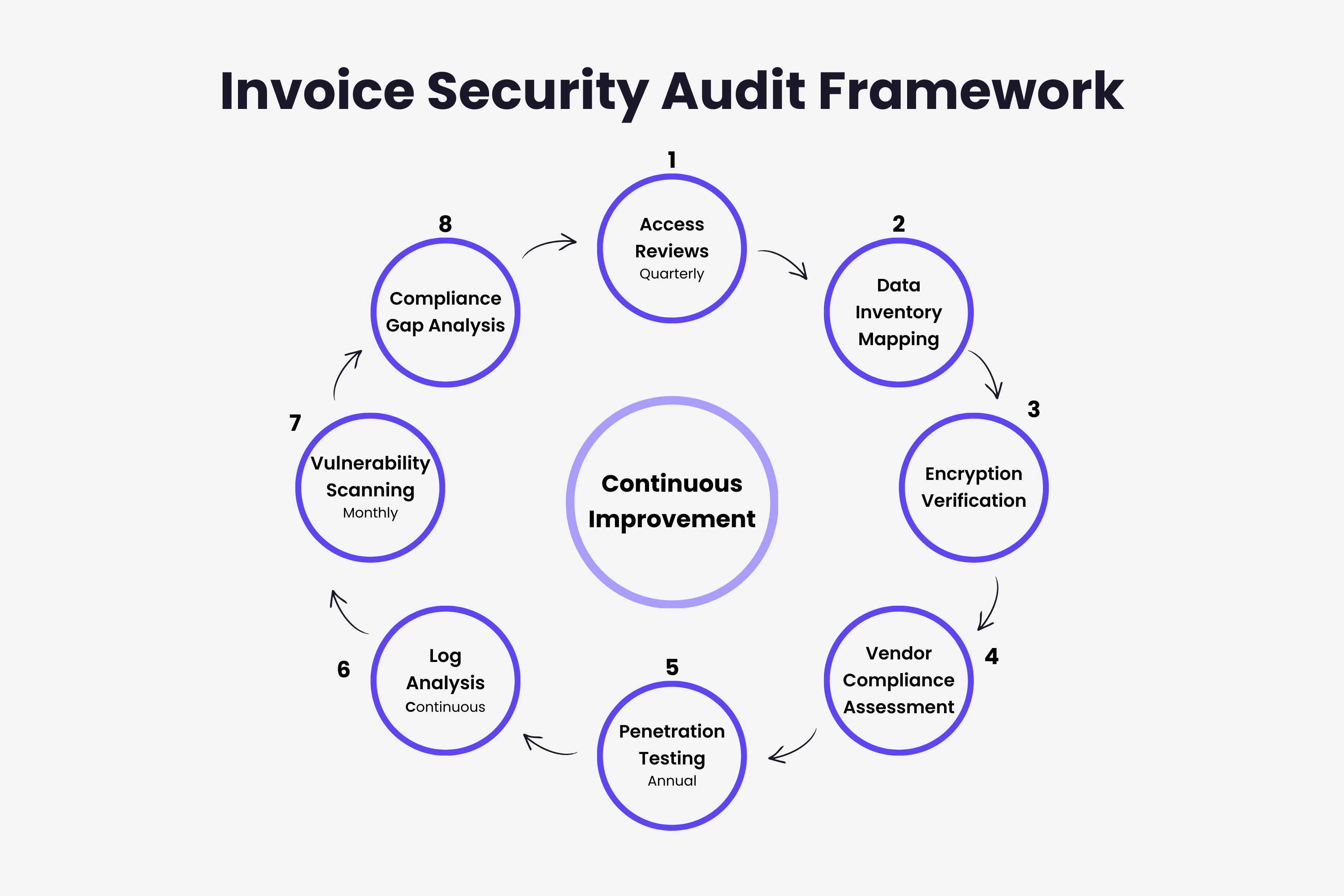
Regular audits identify vulnerabilities before breaches and provide compliance evidence. Use the audit cadence in this guide as a practical framework for systematic reviews.
Access Reviews: Export complete user lists with permissions, last use, and business justification. Confirm persons still require access based on current roles, permissions align with responsibilities, and no orphaned accounts remain after departures. Conduct quarterly reviews minimum, monthly for administrative accounts.
Data Inventory: Document where invoice information exists: production systems, accounting software, email servers, backup systems, file shares. Many organizations discover scattered invoice data during initial mapping.
Encryption Verification: Test that connections use TLS 1.2+, stored files are encrypted, keys are secured and rotated, and backups maintain encryption. Automated tools scan storage for unencrypted invoice files.
Vendor Assessment: Request annual SOC 2 reports or ISO 27001 certificates, review incident histories, verify current processing agreements, assess changed security practices. For critical vendors, consider on-site assessments or third-party penetration test results.
Penetration Testing: Engage security professionals attempting unauthorized access through social engineering, network attacks, and application vulnerabilities. Annual tests provide baseline validation, with additional testing after major changes.
Log Analysis: Implement automated monitoring for unusual access times, geographic anomalies, bulk data downloads, privilege escalation, and failed authentication attempts.
Vulnerability Scanning: Detect missing patches, configuration weaknesses, known software vulnerabilities, and insecure exposed services. Prioritize remediation by severity and exploitability.
An Audit Cadence That Holds Up
The activities above only protect anything if they happen on a schedule someone owns. This is the cadence that works for a finance team without a security department:
- Quarterly: export the user list from every system that holds invoice data (accounting software, invoice tool, mailboxes, shared drives, backups), confirm each person still needs the access they have, and close orphaned, temporary and service accounts. Do it monthly for administrator accounts.
- Monthly: review access logs for after-hours access, bulk downloads, repeated failed logins and dormant accounts that suddenly wake up. Automate the flags where the tool allows it; the review itself is still a person's job.
- Annually: request current security evidence from each vendor (a SOC 2 Type II report or an ISO 27001 certificate), reread the data processing agreement, check their incident history, and confirm your retention schedule actually deleted what it should have.
- Once, then on every change: inventory every place invoice data lives, including personal cloud storage and mobile devices. Shadow IT is where most inventories fail.
- Always: record the findings, track each remediation to closure, and keep a one-page summary for management. An audit that lives in someone's head is not evidence.
2026 Compliance Regulations
Invoice security regulations continue evolving throughout 2026.
GDPR Enforcement: Regulators demonstrated increased willingness to impose substantial penalties in 2025. Dark patterns emerged as enforcement priorities, particularly making consent withdrawal harder than acceptance. Organizations should verify equal accessibility for accepting or rejecting invoice data processing.
EU AI Act: The EU AI Act applies in stages, and the Digital Omnibus on AI (Regulation (EU) 2026/1744) pushed the high-risk obligations back: Annex III systems now have until December 2, 2027 and Annex I systems until August 2, 2028. Invoice extraction on its own is rarely a high-risk use, but AI that approves payments or decides whether an invoice is legitimate deserves a classification check now rather than at the deadline. High-risk systems require comprehensive risk assessments, ongoing monitoring and logging, human oversight for AI-driven approvals or fraud detection, and transparency explaining how AI processes data. The European Data Protection Board clarified large language models rarely achieve anonymization, meaning organizations using AI tools for invoice processing must conduct data protection impact assessments.
State Privacy Laws: As of January 2026, nineteen states enforce comprehensive privacy legislation. Maryland's Online Data Privacy Act significantly limits sensitive data collection with robust use restrictions. Indiana, Kentucky, and Rhode Island enforcement began January 1, 2026.
Data Localization: Global requirements increase. Saudi Arabia requires prior approval for cross-border transfers with strong localization expectations. India's Digital Personal Data Protection Act phases extend through 2027, with consent manager registration opening November 2026.
SOC 2 Standardization: Enterprise customers increasingly specify vendor requirements: continuous monitoring rather than point-in-time assessments, third-party penetration testing within twelve months, defined incident notification timeframes, and business continuity planning.
ISO 27001:2022 Adoption: Projected 20%+ annual increases. Updated standards introduced enhanced cloud security controls, aligned data privacy protections, cybersecurity threat intelligence requirements, and simplified coordination with other ISO standards.
Building Invoice Security into Workflows
Security works best integrated into invoice processing rather than added separately.
Receipt Workflows: When invoices arrive through email, tools connecting to Gmail and Outlook automatically detect invoice messages, extract data using secure AI processing (see our AI-powered invoice extraction comparison), store information in access-controlled systems, and remove or archive attachments reducing inbox exposure. Understanding what happens to invoice data after extraction helps organizations identify the security controls needed at each processing stage.
Approval Workflows: Automated routing ensures invoices flow only to authorized approvers based on amount thresholds, department codes, or vendor relationships. Implementing accounts payable automation creates digital trails showing who reviewed invoices, when approvals occurred, and what changes were made.
Payment Execution: Separate duties: data entry personnel cannot approve payments. Require separate authentication before fund transfers. Implement dual approval for invoices above thresholds ensuring multiple reviews for high-value transactions.
Vendor Management: New vendor additions require documented approval, verification through independent channels rather than vendor-provided contacts, regular reviews identifying duplicates or suspicious patterns, and monitoring for detail changes particularly bank accounts. Criminals commonly impersonate vendors requesting account updates to redirect payments.
Exception Handling: Invoices failing automated processing often contain variations, unusual charges, or anomalies. Exception queues need restricted access to experienced personnel who identify fraud, mandatory documentation explaining exception processing, and enhanced verification before approving.
Modern extraction tools connect to email while maintaining security by eliminating repeated forwarding or downloading. For a comprehensive look at how these tools fit into a broader finance tech stack, see our guide on invoice system integration best practices.
Common Invoice Security Mistakes
Many organizations unknowingly expose invoice data through everyday practices. For a detailed analysis of the five critical invoice security mistakes that lead to data breaches, see our dedicated guide.
Personal Email Forwarding: Remote workers sometimes email invoices to personal accounts avoiding VPN or system access issues. This scatters data across uncontrolled systems lacking encryption, logging, or retention policies. Use secure remote access, cloud-based management accessible with authentication, or virtual desktops providing access without data transfer.
Shared Credentials: Multiple people sharing login accounts prevent audit logs from identifying who accessed data or made changes. Individual accounts enable precise tracking, proper permission assignment, and immediate revocation when employees leave.
Unprotected Shared Drives: Common folders accessible to entire departments lack granular controls. Anyone with access views sensitive pricing, terms, and arrangements restricted to specific roles. Purpose-built invoice systems provide role-based access matching requirements.
Delayed Patching: Many breaches exploit publicly disclosed vulnerabilities with available patches months before attacks. Establish regular schedules for all invoice systems, test patches verifying functionality, and maintain expedited processes for critical updates.
Insufficient Vendor Due Diligence: Organizations choose invoice software primarily on features and cost without security assessment. Minimum evaluation includes current SOC 2 Type II or ISO 27001 certificates, processing agreements meeting regulations, encryption standards, incident response procedures, and update schedules. Our comprehensive framework for choosing invoice management software covers the security due diligence criteria every evaluation should include.
Implementing Invoice Security: Practical Next Steps
Start with immediate, high-impact actions.
Initial Assessment: Document where invoice data exists, who has access with what permissions, how invoices transmit between parties, what controls protect data, and which compliance requirements apply. This baseline reveals priorities.
Implement MFA: Multi-factor authentication significantly reduces unauthorized access regardless of other vulnerabilities. Enable first for administrative accounts and broad permissions, then extend to all invoice access. Choose phishing-resistant methods like hardware keys or authenticator apps over SMS.
Consolidate Processing: Move invoices from scattered email and file shares into unified platforms improving security through centralized controls, consistent encryption, comprehensive logging, and simplified monitoring. Modern extraction tools connect to email while maintaining security by eliminating repeated forwarding or downloading.
Review and Restrict Access: Remove access from users no longer needing it, adjust overly broad permissions to specific functions, and document justification for each account. Verify appropriateness quarterly.
Establish Vendor Requirements: For new relationships involving invoice processing, require SOC 2 Type II or equivalent certifications, executed processing agreements meeting standards, and evidence of encryption and controls. Schedule compliance reviews for existing vendors.
Develop Incident Procedures: Document who receives notification if invoice data is compromised, how to assess scope and impact, what regulatory notifications are required within what timeframes, and how to communicate with affected vendors and customers. Test through tabletop exercises.
Ready to secure your invoice processing? Gennai automatically extracts invoices from Gmail and Outlook using AI-powered processing. Every invoice is protected with AES-256 encryption in transit and at rest, OAuth 2.0 authentication ensures read-only access to your inbox, access is logged and role-restricted, and all processing is GDPR compliant. Start with a free plan to see how automated, secure invoice extraction works.
TL;DR
- Invoice data is a high-value target: Financial services experienced 739 breaches in 2025, with average US breach costs reaching $10.22 million per incident
- GDPR applies to invoice processing when invoices contain personal data from EU residents—requiring lawful bases, data minimization, defined retention periods, and Article 28 processor agreements
- SOC 2 and ISO 27001 share 80% of requirements: Organizations satisfy both frameworks simultaneously through unified controls covering access, encryption, audit trails, vendor management, and incident response
- Eight essential controls protect invoice data: Role-based access, MFA, TLS 1.2+ encryption, secure email workflows, network segmentation, audit logging, DLP monitoring, and tested backups
- Cloud storage typically outperforms on-premise for security—but shared responsibility means correctly configuring access controls and encryption remains your obligation
- Tax law sets the retention floor (3 to 7 years in most jurisdictions). GDPR sets the ceiling: delete or anonymise personal data once that period ends, in backups too.
- 2026 regulations tighten across all fronts: EU AI Act applies from August 2026 for AI-driven invoice processing, nineteen US states enforce privacy laws, and ISO 27001:2022 adoption grows 20%+ annually
- Security integrates into workflows: Automated receipt capture, approval routing with digital audit trails, and vendor verification reduce exposure without slowing processing
- Start with MFA and access reviews: These two high-impact controls reduce breach risk immediately regardless of other gaps in your current security posture