
SaaS Invoice Management: Handling Recurring Subscriptions
Master SaaS invoice management for recurring subscriptions. Handle billing cycles, proration, failed payments, upgrades, and subscription metrics in 2026.

SaaS companies face invoice management challenges that traditional businesses don't encounter. Your revenue model depends on recurring charges that happen automatically, failed payments requiring immediate intervention, mid-cycle upgrades needing prorated billing, and customer expectations for instant invoice access.
Getting SaaS invoicing wrong directly impacts monthly recurring revenue (MRR), churn rates, and cash flow predictability. A failed payment unnoticed for three days can become a lost customer. Incorrect proration on an upgrade triggers billing disputes that damage relationships.
This guide addresses specific invoice management requirements for SaaS businesses, from billing cycles to failed payments and renewal automation. For SaaS companies evaluating their position among different industry-specific invoice automation approaches, understanding these recurring billing nuances becomes critical.
Understanding SaaS Invoice Types
SaaS businesses generate multiple invoice types requiring different handling:
New subscription invoices: First charge when customer signs up. Often includes setup fees or first month's subscription. Requires payment before service activation.
Renewal invoices: Automatic monthly or annual charges. Generate 3-5 days before renewal date to allow payment processing time. Most critical for predictable revenue.
Upgrade/downgrade invoices: Mid-cycle plan changes requiring proration. Customer upgrades from $49/month to $99/month on day 15 — how much do they owe immediately?
Usage-based invoices: For metered billing (API calls, storage, seats). Combines base subscription with variable usage charges.
Cancellation credits: When customers cancel mid-cycle with prorated refunds. Requires clear policies in terms of service.
Each type needs distinct automation rules, payment timing, and customer communication templates.
Proration That Doesn't Create Disputes
Proration causes more SaaS billing disputes than any other factor.
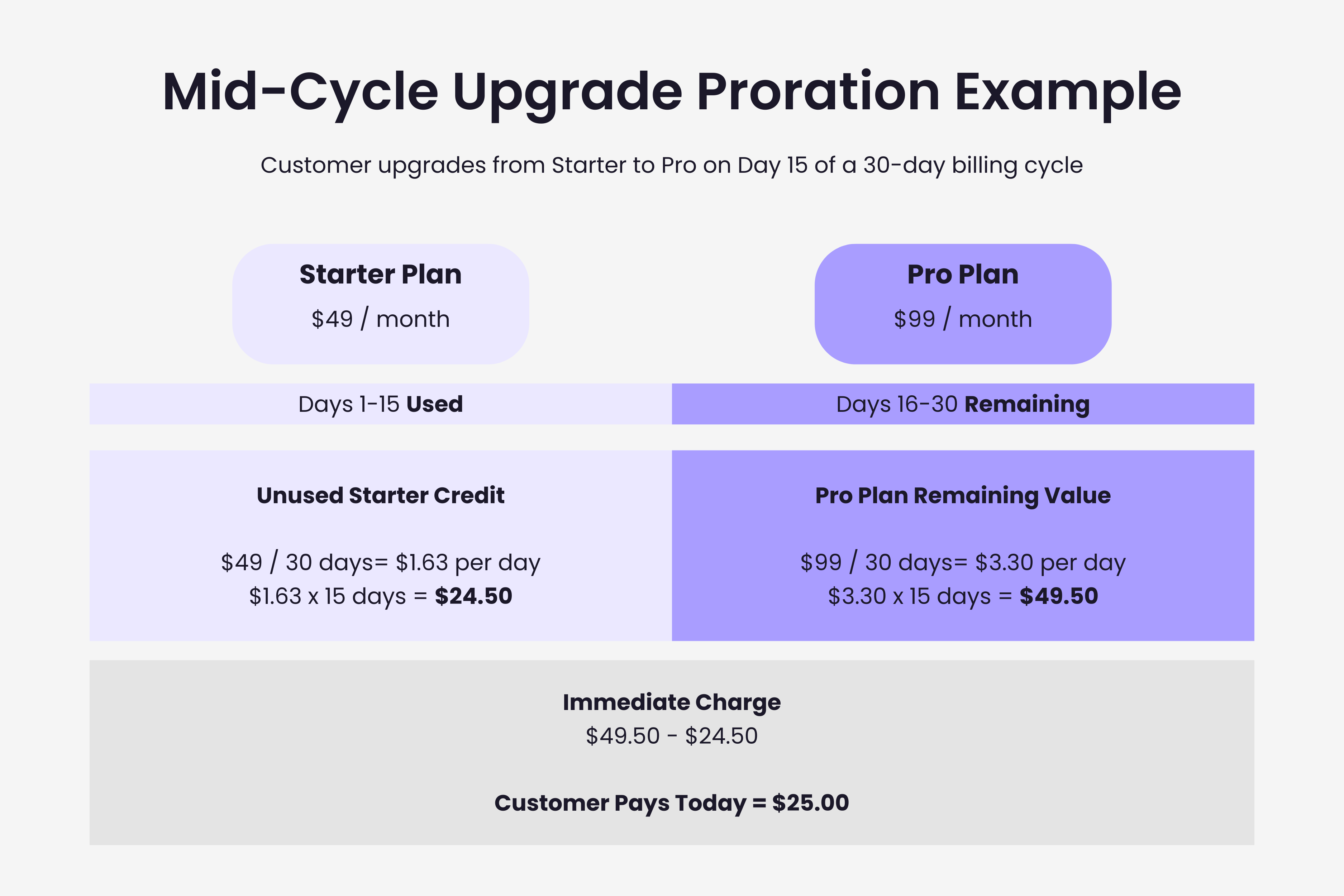
Mid-cycle upgrade example:
- Customer on $49/month plan (30-day month)
- Upgrades to $99/month on day 15
- Used 15 days of $49 plan = $24.50 already charged
- Remaining 15 days of $99 plan = $49.50
- Immediate charge: $49.50 minus $24.50 = $25.00
Disputes happen when invoices don't clearly show this calculation. Customer sees $25 charge, expects $50 upgrade difference, and contacts support confused.
Solution: Invoice line items must show the math. "Upgrade from Starter to Pro: $49.50 (15 days remaining) minus $24.50 (unused Starter credit) = $25.00"
Most SaaS billing platforms (Stripe, Chargebee, Recurly) handle proration automatically, but you must configure how credits apply and whether proration rounds up, down, or to nearest cent.
Failed Payment Management
Failed payments are inevitable. The difference between successful and struggling SaaS companies isn't whether payments fail, but how quickly they're recovered.
Why Payments Fail
Common causes:
- Expired credit cards (40-50% of failures)
- Insufficient funds (20-30%)
- Card reported lost/stolen (15-20%)
- Bank fraud prevention blocks (5-10%)
- Incorrect billing information (5%)
The Dunning Process
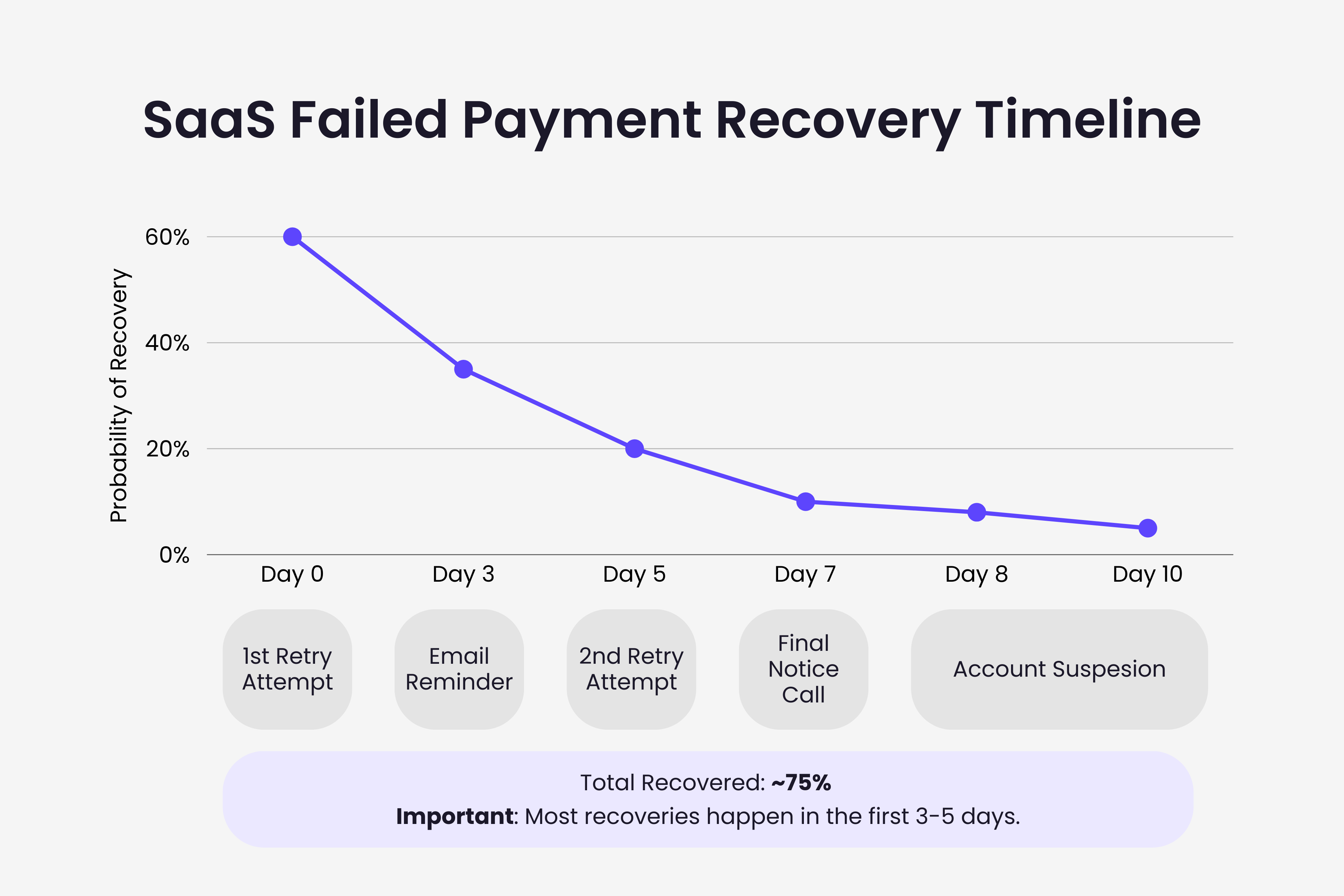
Effective dunning increases recovery rates from 30-40% to 70-80%.
Day 0: Immediate email notification. "Your payment failed. Update payment method to avoid service interruption." Include direct link to update billing.
Day 3: Second charge attempt. Follow-up email if fails. Add urgency: "Service will pause in 4 days without payment update."
Day 5: Third attempt. Include account manager contact for high-value customers.
Day 7: Final attempt. Email warns service suspension imminent. Personal phone call for high-value accounts.
Day 10: Suspend service access. Email explains reactivation process. Keep data retention for 30-60 days.
Key: automate this sequence completely. Manual dunning doesn't scale.
Smart Retry Logic
Weekend avoidance: Don't retry Saturday/Sunday. Monday retry has higher success.
Time-of-day optimization: Retry at 2am-4am local time. Banks process overnight, funds become available.
Multiple payment methods: Allow backup payment method. Auto-try backup before contacting customer.
Gradual escalation: First retry after 24 hours, second after 72 hours, third after 120 hours.
Key SaaS Metrics
SaaS invoice management directly impacts business metrics:
Monthly Recurring Revenue (MRR): Total predictable revenue from active subscriptions. New subscriptions add to MRR, cancellations subtract, upgrades/downgrades adjust.
Churn Rate: Percentage of customers canceling monthly. Industry benchmark: 5-7% monthly for B2B SaaS, 3-5% for annual contracts.
Payment Recovery Rate: Percentage of failed payments successfully recovered. Benchmark: 70-80% recovery indicates effective dunning.
Net Revenue Retention (NRR): Revenue retained from existing customers including upgrades/downgrades. Above 100% means expansion revenue exceeds churn.
Annual vs Monthly Billing
Annual billing improves cash flow and reduces churn but complicates invoice management.
Annual advantages:
- 12 months revenue upfront
- Lower churn (harder to cancel mid-year)
- Reduced payment processing fees
- Less failed payment management
Annual complications:
- Larger invoices increase payment failure risk
- Complex refunds for mid-year cancellations
- Revenue recognition requires careful accounting
- More complex upgrade/downgrade proration
Many SaaS companies offer both with annual incentive: "$49/month billed monthly or $470/year (save $118)."
Automation Essentials
Manual SaaS invoicing is impossible at scale.
Invoice Generation
Automatic renewals: System generates and sends invoices 3-5 days before renewal. Charge processes automatically on renewal date.
Usage calculation: For metered billing, system tracks usage throughout cycle and adds to base subscription automatically.
Proration automation: Upgrade/downgrade triggers instant prorated charge calculation and invoice generation.
Tax automation: Sales tax, VAT, GST calculated based on customer location with automatic regulation updates.
Payment Collection
Auto-charge on renewal: Stored payment method charged automatically. Success marks invoice paid. Failure triggers dunning.
Retry automation: Failed payments retry per dunning schedule without manual intervention.
Expiration alerts: System identifies cards expiring within 60 days, sends proactive update reminders.
For SaaS companies processing vendor invoices (software tools, contractors, infrastructure), understanding AI-powered invoice processing for inbound invoices helps separate customer billing from vendor payment workflows.
Customer Communication
Renewal reminders: 30 days before annual renewal, 7 days before monthly.
Payment confirmations: Immediate email when payment succeeds with receipt and invoice PDF.
Failed payment notifications: Immediate alert with clear next steps.
Plan change confirmations: Instant email confirming new features and next invoice amount.
Handling Edge Cases
Refunds and Cancellations
Mid-cycle cancellation: Industry standard: no refunds for monthly subscriptions (customer keeps access through billing period end), prorated refunds for annual subscriptions.
Disputed charges: Maintain audit trail showing when/how changes were made with timestamps and IP addresses.
Service outages: Define uptime SLA and credit policy in advance. Typically: credit 5% of monthly charge per hour of downtime beyond SLA.
Multi-Seat Management
Adding seats: Prorate new seat cost for remaining cycle. Next renewal includes full month charge for all seats.
Removing seats: Seat reduction typically takes effect at next renewal to prevent abuse.
Minimum requirements: If plans require minimum seats, enforce at signup and prevent reductions below minimum without plan downgrade.
Common Mistakes
Not sending invoices before charging: Customer sees unexpected charge, reports as fraud. Send invoice 3-5 days before charge attempt.
Unclear descriptions: Generic "Monthly Subscription" doesn't tell customer what they're paying for. Include plan name, billing period, and features.
No self-service portal: Forcing customers to email support for payment updates increases friction and churn.
Ignoring failure patterns: If certain segments have higher failure rates, investigate pricing misalignment or wrong target market.
Manual proration: Human error creates billing disputes. Automate completely.
Conclusion
SaaS invoice management differs fundamentally from traditional invoicing. The recurring nature demands automation, the subscription model requires sophisticated proration logic, and failed payment recovery directly impacts revenue and churn.
Successful SaaS companies treat invoicing as a core product feature, not back-office administration. Customers expect instant invoice access, transparent pricing, easy payment updates, and clear communication.
Start with automation basics: automatic invoice generation, failed payment dunning, and self-service billing. Then layer in usage-based billing, multi-currency support, and cohort analysis.
Excellence in SaaS invoicing lives in the details: clear proration explanations, proactive payment method alerts, smart retry logic, and transparent communication at every billing touchpoint.
Ready to automate your invoices?
Start extracting invoices from your email automatically with Gennai. Free plan available, no credit card required.
Start FreeRelated Articles
Accounts Payable Turnover Ratio Explained
The accounts payable turnover ratio shows how fast you pay suppliers. Get the formula, a worked example, benchmarks and what your number really means.
GuideNet 30 vs Net 60: What Payment Terms Really Mean for Your Cash
Net 30 vs net 60 explained for business owners: what each term means, when the clock really starts, and how the gap hits your cash on both sides.
GuideThe Accounts Payable Process, Step by Step (for Owners)
The accounts payable process has five steps: receive, verify, approve, pay, and record each invoice. Here is how each works and where owners lose money.