
Auto-Categorize Xero Invoices: How AI Learns Your Account Coding from Historical Data
See how Gennai auto-suggests Xero account codes by learning from your invoice history. Cut bill review time, reduce coding errors, and export pre-coded bills straight to Xero.

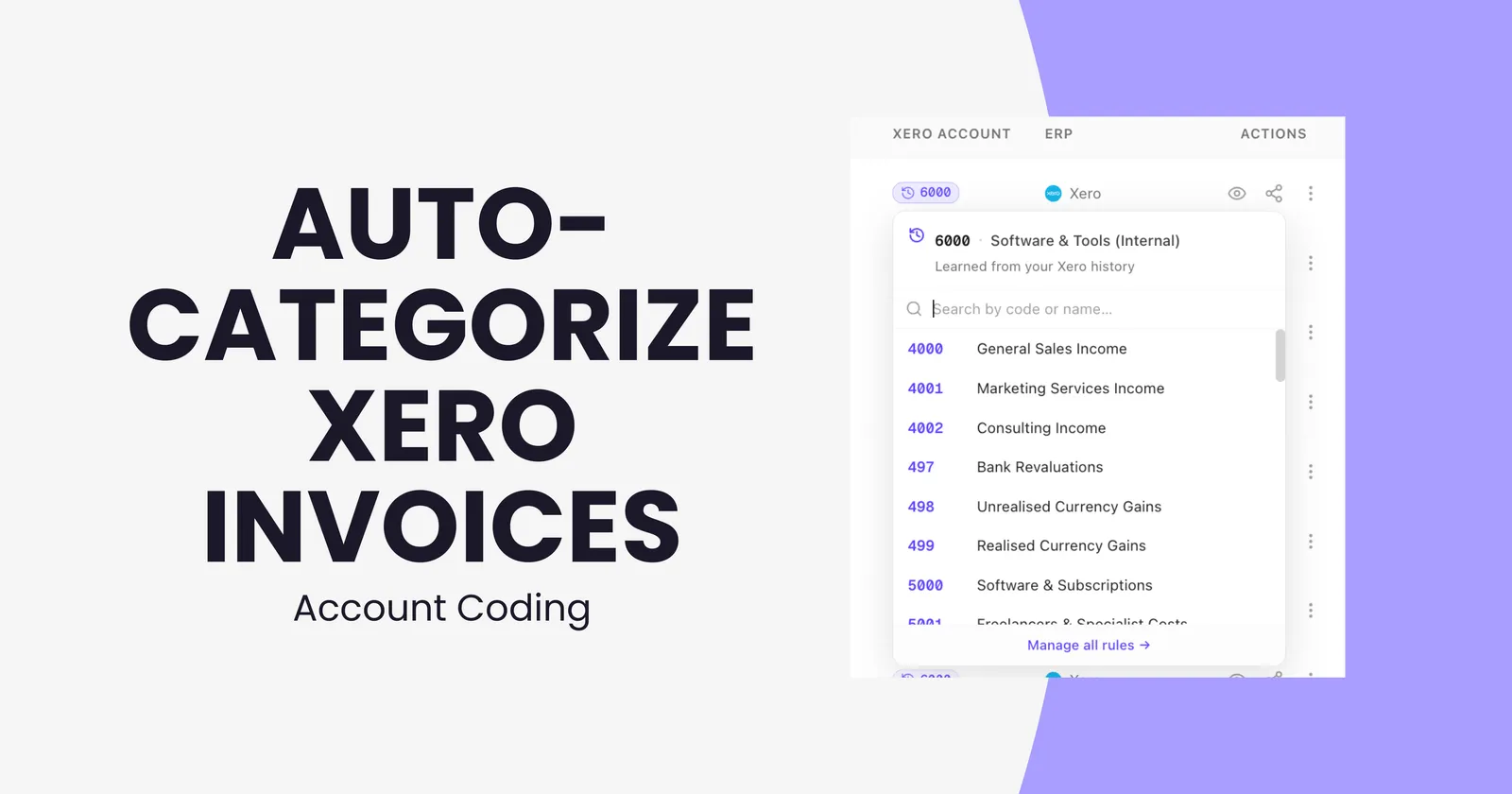
If you use Xero, you already know the pattern. An invoice arrives, you (or your bookkeeper) capture it, and then someone has to decide which account it belongs to. Software & Subscriptions? Marketing? Legal & Incorporation Fees? That single decision, repeated across hundreds of bills a month, is where most of the time inside accounts payable actually disappears.
It is also where most of the errors happen. Manual GL coding misclassifies expenses regularly. Some reports estimate that up to 20% of shipments may have incorrect GL coding, which directly distorts P&L visibility, complicates month-end close, and creates rework that nobody has time for.
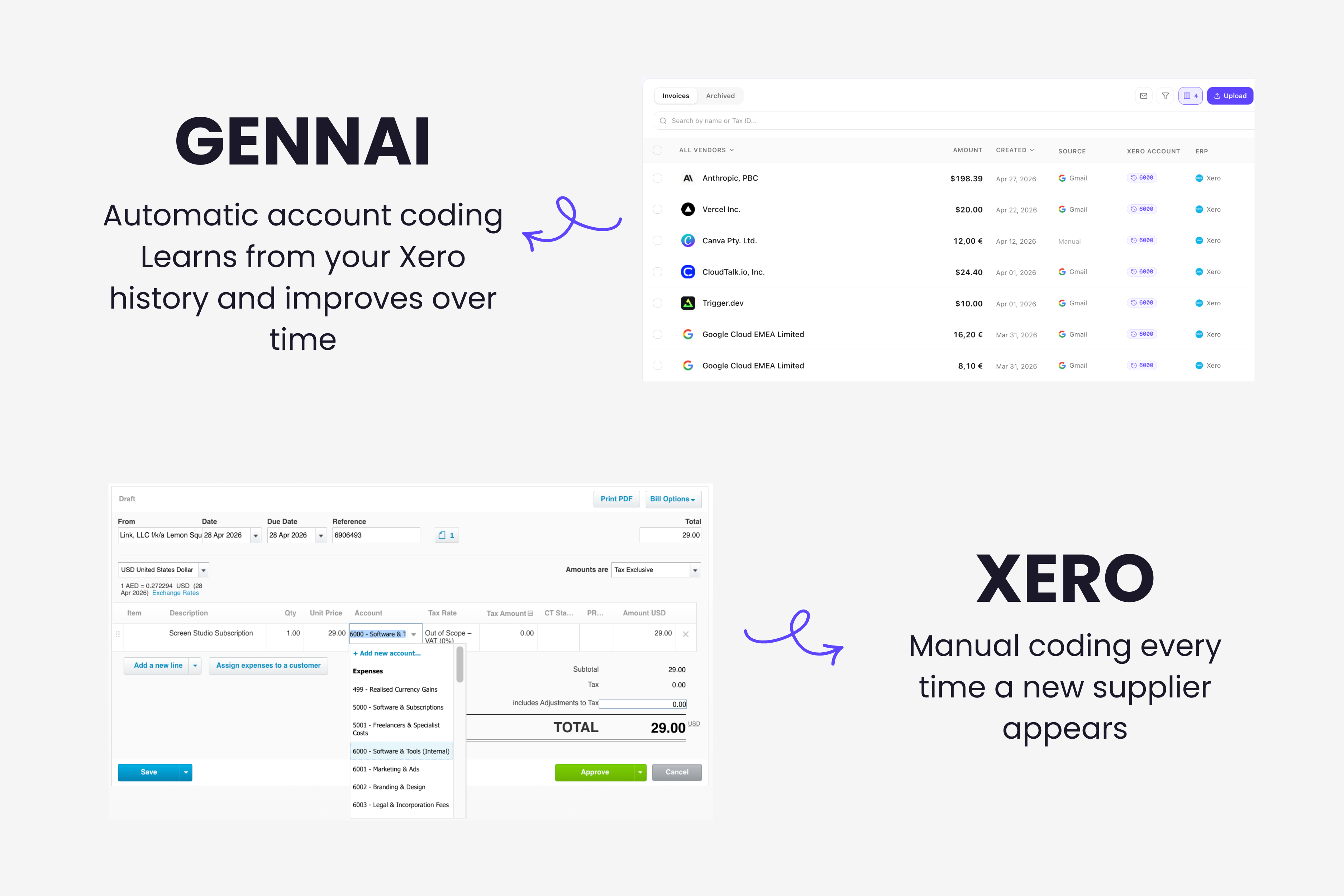
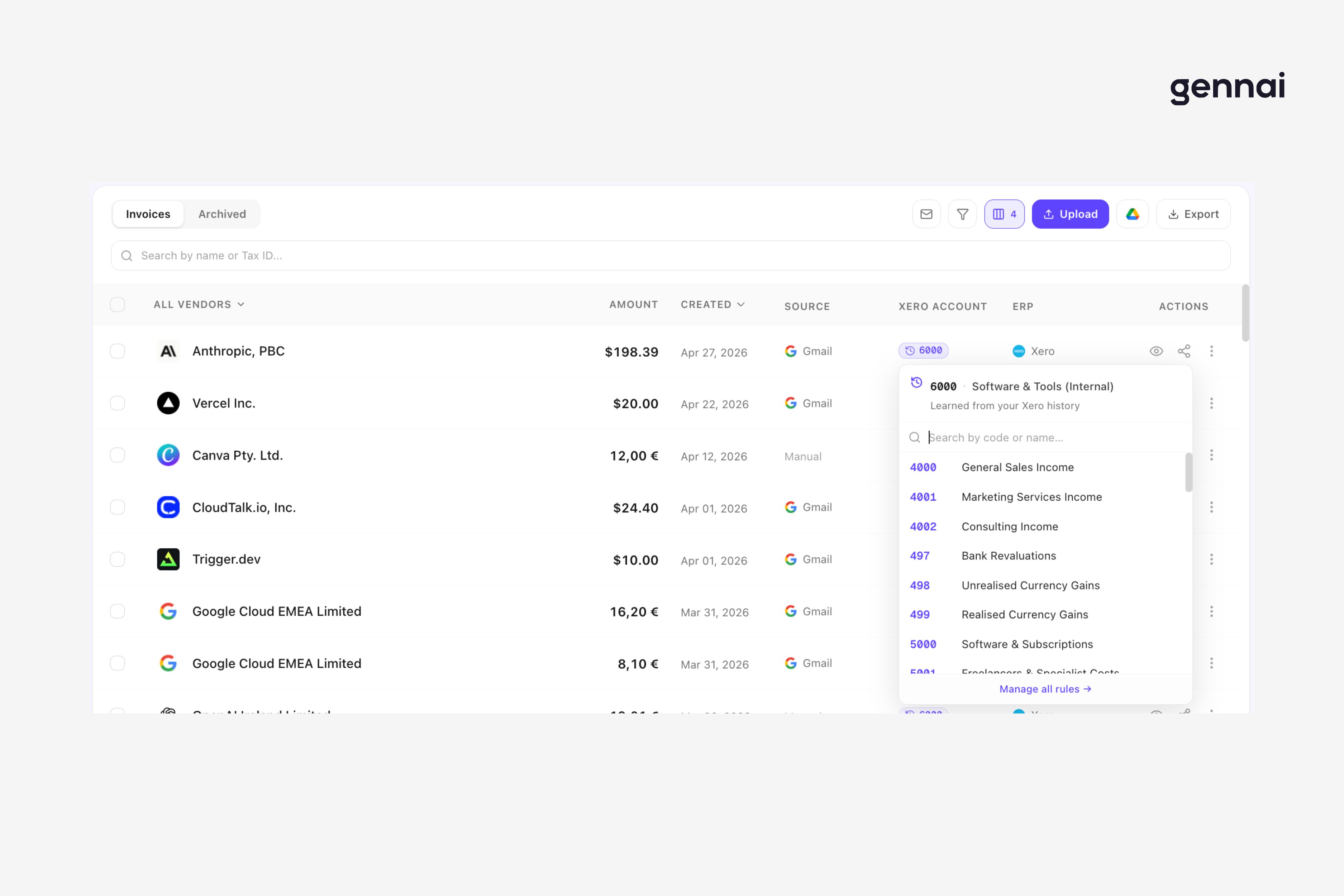
Gennai just shipped a feature that removes this step almost entirely: auto-suggested account coding for Xero. When an invoice arrives in Gennai, the system looks at your Xero history, identifies how you have coded that supplier (or similar suppliers) before, and pre-fills the Xero account on the invoice. By the time you review it, the coding is already there. You approve, export, done.
This post walks through what the feature does, how it works under the hood, and how to get the most out of it.
The hidden cost of manual account coding
Before getting into how Gennai's auto-categorization works, it is worth being clear about what problem it actually solves.
When most teams talk about "invoice automation," they mean data extraction: capturing the supplier, amount, date, tax, and line items from a PDF or email. That part of the workflow is largely solved. Modern AI extraction tools, including Gennai, achieve high accuracy on header fields without templates or manual setup.
But extraction is only half of accounts payable. The other half is classification: deciding which account in your chart of accounts each invoice belongs to. And classification is the part that has stayed manual far longer than it should have.
A few data points to anchor this:
- Making the switch to an automated AP system can reduce the amount of time spent manually coding AP invoices by using a combination of artificial intelligence and machine learning to recognize invoice types based on preset rules.
- Manual GL coding of invoices is time-consuming, diverting valuable resources from more strategic tasks. Human data entry mistakes (typos in code segments or misclassifying expense types) can skew financial statements, inflate budgets, and trigger audit exceptions.
- Without a documented GL dictionary, your team will make different judgement calls about where to post the same type of cost. One person codes a SaaS subscription to Software Licences; someone else puts it under Office Expenses. After a quarter, the category becomes meaningless for reporting.
So the problem is not just the time spent. It is that manual coding produces inconsistent data, and inconsistent data breaks every report that sits on top of it: cash flow forecasts, budget vs. actuals, vendor spend analysis, tax preparation. If you have ever tried to answer the question "how much did we spend on software last quarter" and got a different number depending on who you asked, this is why.
The fix is not to code harder. The fix is to make coding learn from itself.
What auto-suggested account coding actually does
Here is the short version. Every time Gennai processes a new invoice, it does three things in addition to extraction:
When you go to export the invoice to Xero, the account is already there. You either approve it or override it. If you override, Gennai learns from that correction and applies it to future invoices from the same supplier.
The result is that, after a few weeks of normal use, the dashboard fills up with invoices that already know where they belong. Reviewing a batch of fifty bills stops being fifty individual coding decisions and becomes a quick scan to confirm what the system already proposed.
This is the same pattern that makes other parts of accounting feel less manual over time. Bank reconciliation in Xero, for example, already uses this idea. The new feature uses machine learning to predict the contact and account code for transactions that cannot be matched to invoices or bills using an organization's bank rules, Xero's matching logic, or memorisations. Gennai applies the same principle, but at the invoice ingestion stage, before the bill ever reaches Xero.
The practical difference matters. Predicting an account at reconciliation time means you have already paid the bill and now need to classify it after the fact. Predicting at ingestion means the classification is done before the bill enters Xero, so reconciliation, reporting, and approvals all benefit from the same clean data.
How Gennai learns your chart of accounts
The mechanic behind this is intentionally simple, because simple mechanics fail in predictable ways instead of mysterious ones.
When you connect Gennai to Xero, the system pulls down two things: your chart of accounts (so it knows the full list of valid codes) and your historical bills (so it can see which suppliers have been coded to which accounts). From that, it builds a rule for each supplier you have a track record with.
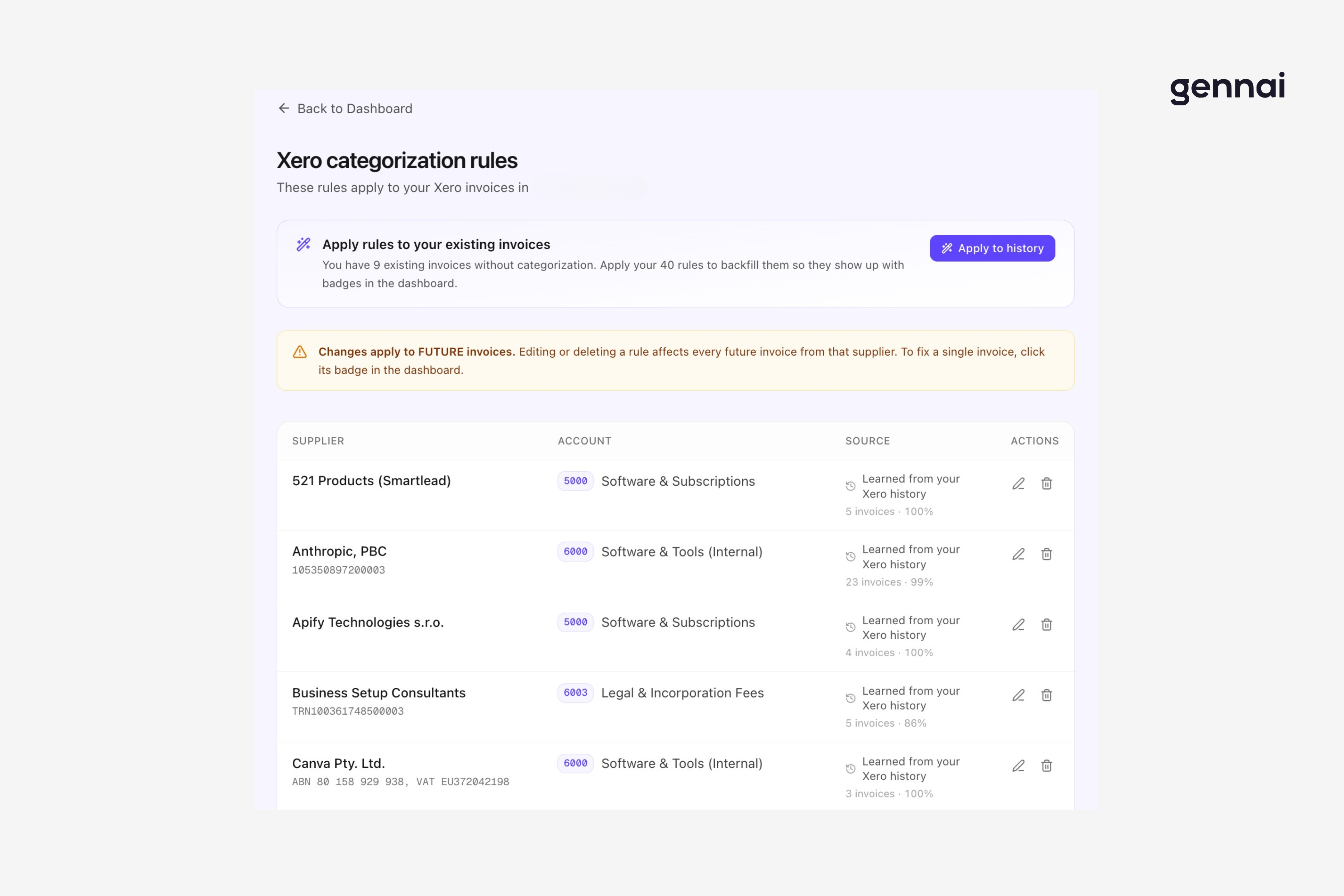
A rule looks like this in plain English: "Anthropic, PBC has 23 invoices in your Xero history. 99% of them are coded to account 6000 (Software & Tools). When a new invoice from Anthropic arrives, suggest 6000."
The 99% is not a marketing number. It is the actual confidence the system has in that mapping based on your data. If a supplier has been coded inconsistently in the past, the confidence drops, and Gennai surfaces that to you so you can clean up the rule manually instead of propagating the inconsistency forward.
There are three ways a rule gets created:
- Learned from history. This is the default. If Gennai sees enough past invoices from a supplier coded to the same account, it generates the rule automatically.
- Manually defined. You can create a rule by hand. Useful for new suppliers where you already know the right account but have no history yet.
- Learned from corrections. If you override a suggestion, Gennai records that override. After a few consistent corrections, the rule updates itself.
The "learned from history" path is what makes the system feel like it understood your business without you having to configure anything. The first time you connect, the dashboard is already populated with rules pulled from your Xero account. There is no template to fill in, no taxonomy to define, no training data to upload.
The Xero ecosystem already has strong tools that apply this learning idea. Hubdoc syncs captured transactions with Xero and uses supplier rules to automatically create transactions in Xero. Dext Prepare brings data quality checks, customisable rules and auto-categorisation, using machine learning to categorise each item based on your previous behaviour. Both are well-established options that many accounting teams rely on. Gennai sits at a different point in the workflow: it works directly at the inbox level, so the same learning principle applies the moment an invoice arrives, before any forwarding, upload, or capture step.
If you are evaluating where Gennai fits alongside Hubdoc and Dext, the Xero add-ons comparison walks through how each tool fits different stages and team setups. The short version: Gennai works at the email-capture stage, and pairs naturally with the other tools further down the workflow.
Setting it up: from connection to first auto-coded invoice
The setup flow is intentionally short. If you have already connected Xero to Gennai, this happens automatically the next time an invoice is processed. If you have not yet connected, here is what to expect.
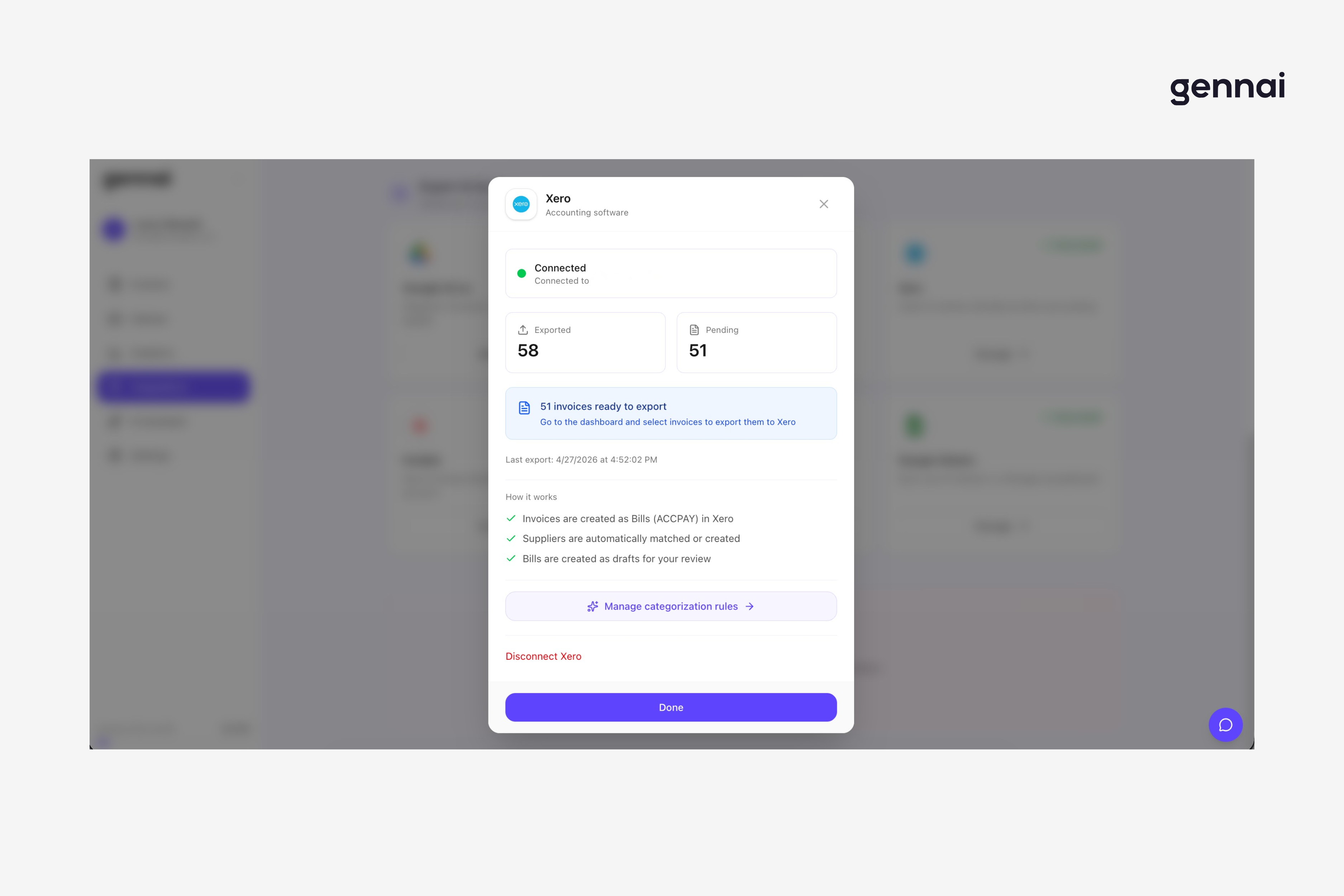
Connect Xero. From the Gennai integrations page, click on Xero, authorize the connection, and select the Xero organization you want to sync with. Permissions are scoped to invoice creation and chart of accounts read access. No payment access, no bank access.
Wait for the initial sync. Gennai pulls your chart of accounts and your historical bills. For most accounts this takes a few minutes. The dashboard then shows you a count of rules that have been generated automatically from your history, along with a confidence score per rule.
Review the proposed rules. Open the categorization rules page. You will see one row per supplier with a learned rule, the proposed account, the number of historical invoices behind it, and the confidence percentage. Scan the list. For any rule you disagree with, edit it inline.
Apply rules to existing uncategorized invoices. If you already have invoices in Gennai that arrived before the rules existed, you can backfill them in one click. The dashboard will tell you how many uncategorized invoices you have and how many rules are available to apply.
Review and export new invoices. From this point on, every new invoice that arrives is auto-coded based on the rules. You review, approve, and export to Xero as a draft bill. The whole flow takes a few seconds per invoice.
If you are setting up Gennai for the first time and want to walk through the full inbox connection step too, the Gmail extraction guide covers what to expect at each step. For Outlook users, the OAuth flow works the same way.
What happens when a rule is wrong (or missing)
No automation system is right 100% of the time, and pretending otherwise is how you end up with miscoded P&Ls. Gennai handles edge cases in three explicit ways.
New supplier, no history. If an invoice arrives from a supplier you have never coded before, Gennai does not guess. It flags the invoice as "needs categorization" and asks you to assign an account on first sight. Once you do, the rule is created and every future invoice from that supplier is auto-coded. The dashboard makes uncategorized invoices visible at a glance so they do not slip through.
Inconsistent history. If a supplier has been coded to multiple different accounts in the past (because the chart of accounts changed, or because two different people coded inconsistently), Gennai surfaces this with a lower confidence score. You can either pick the canonical account from the dashboard or split future invoices manually. The system does not silently average the inconsistency.
Mid-rule override. Sometimes a supplier you usually code to one account has a one-off invoice that belongs somewhere else, like an annual renewal that needs to hit a different cost center. You override the suggestion at export time, and that single invoice goes through with your manual code. The rule itself does not change unless you update it explicitly. The system distinguishes between "I want this one to be different" and "I want all future ones to be different."
The principle behind these three behaviors is the same: machine learning adds a second layer by predicting codes based on historical patterns, but the human stays in control of the rules themselves. Auto-categorization is meant to remove the repetitive part of coding, not the judgment part.
Why this matters for month-end close
The day-to-day benefit is obvious: less time per invoice, fewer corrections, less context-switching between Gennai and Xero. The compounding benefit shows up at month-end.
When account coding is consistent and applied at ingestion, three things change:
Reconciliation gets faster. Bills already arrive in Xero with the right account. The reconciliation step is verifying a match, not deciding a category. For teams running monthly close, this can shave hours off the process.
Reports become trustworthy without scrubbing. The "how much did we spend on software" question becomes a single Xero report, not an Excel cleanup project. This is especially valuable for businesses tracking specific expense categories for tax purposes, like R&D credits or marketing spend reporting.
Accountant handoffs simplify. If you work with an external accountant or bookkeeper, the data they receive is already coded. The conversation moves from "what is this charge" to "do we want to recategorize this," a higher-leverage discussion.
For teams that work with multiple accountants, or where the bookkeeper is part-time, this matters even more. The system preserves the institutional knowledge of how each supplier should be coded, even when the person doing the coding changes. That institutional knowledge used to live in someone's head; now it lives in the rules table.
If the bigger picture interests you, the agentic AI in accounts payable post breaks down where coding automation fits inside the broader move toward AP systems that handle full workflows, not just data entry.
Account coding and your accounting platform stack
Gennai's auto-categorization currently ships for Xero, with QuickBooks support on the same trajectory. The reason it shipped for Xero first is mechanical: Xero exposes a clean, well-documented API for both the chart of accounts and historical bills, which makes the learning loop reliable.
If you are deciding between Xero and QuickBooks for a new business, that decision is upstream of which capture tool you use. The differences between the two platforms affect everything from your reporting structure to your audit trail. The Dext vs Xero comparison and the broader integration thinking in the invoice system integration guide cover what to weigh, but the short version is that both platforms support the same auto-coding pattern and Gennai will work natively with whichever one you pick.
The pattern itself, though, is the same regardless of platform: capture upstream, code at ingestion, push clean data downstream. Every step of accounts payable that happens after this benefits from the data being correct from the start.
Practical setup tips
A few things worth doing in the first week of using auto-categorization, based on what we have seen across early users.
Audit your chart of accounts before the initial sync. If your Xero chart of accounts has duplicate or near-duplicate categories ("Software" and "Software Subscriptions" as separate accounts, for example), the rules Gennai generates will reflect that ambiguity. A quick cleanup before connection produces noticeably better suggestions.
Look at the low-confidence rules first. When you open the categorization rules page after the initial sync, sort by confidence. The 70-90% confidence rules are where you have the most leverage: those are the suppliers where past coding was inconsistent, and a single decision now prevents dozens of future inconsistencies.
Use the backfill option once. If you have invoices in Gennai that arrived before you connected Xero, the "Apply to history" function will categorize them in one pass. This gives you a clean starting point. After that, new invoices flow through with rules already in place.
Override visibly, not silently. When a one-off invoice needs a different code, override it at export rather than coding it in Xero after the fact. The first approach keeps Gennai's data and Xero's data in sync. The second creates a small drift that compounds over time.
Revisit rules quarterly. Suppliers change. Your chart of accounts evolves. A 15-minute review of the rules page every quarter keeps the system aligned with how your business actually categorizes spend today, not how it categorized spend a year ago.
What this changes about your workflow
The honest answer is: less than you might expect on day one, and more than you might expect by month three.
Day one, the dashboard looks similar. Invoices arrive, you review, you export. The difference is that the Xero account column is already filled in.
By month three, the change is structural. The team stops thinking about invoice coding as a recurring task. It becomes background work that the system handles, surfaced only when something is genuinely new or genuinely different. The hours that used to go into clicking through dropdowns go into either higher-value finance work or, more often, just into not doing AP at all.
This is what good automation should feel like. Not a flashy new screen, but the slow disappearance of a category of work you used to do.
If you want to see it in your own data, connect Xero to Gennai and let the initial sync run. The rules will generate from your history. You will know within the first batch of invoices whether the suggestions match how you actually code.
Start your free trial and bring your own chart of accounts. The setup takes a few minutes, and the rules build themselves from your existing Xero data.
Ready to automate your invoices?
Start extracting invoices from your email automatically with Gennai. Free plan available, no credit card required.
Start FreeRelated Articles
Accounts Payable Turnover Ratio Explained
The accounts payable turnover ratio shows how fast you pay suppliers. Get the formula, a worked example, benchmarks and what your number really means.
GuideNet 30 vs Net 60: What Payment Terms Really Mean for Your Cash
Net 30 vs net 60 explained for business owners: what each term means, when the clock really starts, and how the gap hits your cash on both sides.
GuideThe Accounts Payable Process, Step by Step (for Owners)
The accounts payable process has five steps: receive, verify, approve, pay, and record each invoice. Here is how each works and where owners lose money.