
How to Capture Invoices via WhatsApp and Telegram: From Photo to Accounting in 30 Seconds
Send a photo of any invoice or receipt to WhatsApp or Telegram and have it captured, extracted, and synced to your accounting tool automatically. The fastest way to digitize paper receipts.

Here is the honest truth about invoice capture: most of the time, the friction is not the data extraction. It is the moment between holding a receipt in your hand and getting it into anywhere useful. You finish lunch with a client. You buy office supplies on a Saturday. You pay a contractor in cash. You take an Uber to the airport. The receipt exists. It just exists in the wrong place: your wallet, your jacket pocket, the bottom of a bag.
Most receipt apps assume you will (a) download the app, (b) sign in, (c) open it, (d) point the camera, (e) crop the image, (f) categorize the expense, and (g) save. Seven steps for a coffee receipt. By the time you have done that for three weeks, the app is buried on screen four of your phone and the receipts are back in your jacket pocket.
There is a faster way. If you can send a WhatsApp message, you can capture an invoice. If you can forward a Telegram photo, you can log a business expense. That is what this post is about: how to use the apps you already have open all day to do the part of accounting nobody enjoys.
This is not a theoretical guide. The functionality described here is live in Gennai. You connect once, you start sending photos, and the receipts show up in your accounting system already extracted and categorized.
Why WhatsApp and Telegram are the right channels for receipt capture
WhatsApp is on track to reach roughly 3.3 billion monthly active users in 2026, and the average user opens it 20 to 25 times a day. Telegram has grown into a primary channel for tech-savvy users, founders, and entire teams in Eastern Europe, Latin America, and parts of Asia. Both apps share three properties that matter for invoice capture.
They are already open. The cognitive cost of "send a photo to your accountant bot" is close to zero, because you are not switching apps. Compared to opening a dedicated receipt app, the difference is the entire reason this works.
They handle media perfectly. Both platforms compress images intelligently, support PDFs, accept forwarded messages, and store conversation history. Anything you send to a chat is timestamped and recoverable.
They feel like sending a message, not using software. This sounds trivial. It is not. The behavioral difference between "complete a task" and "send a quick message" is the difference between a habit that sticks and one that does not.
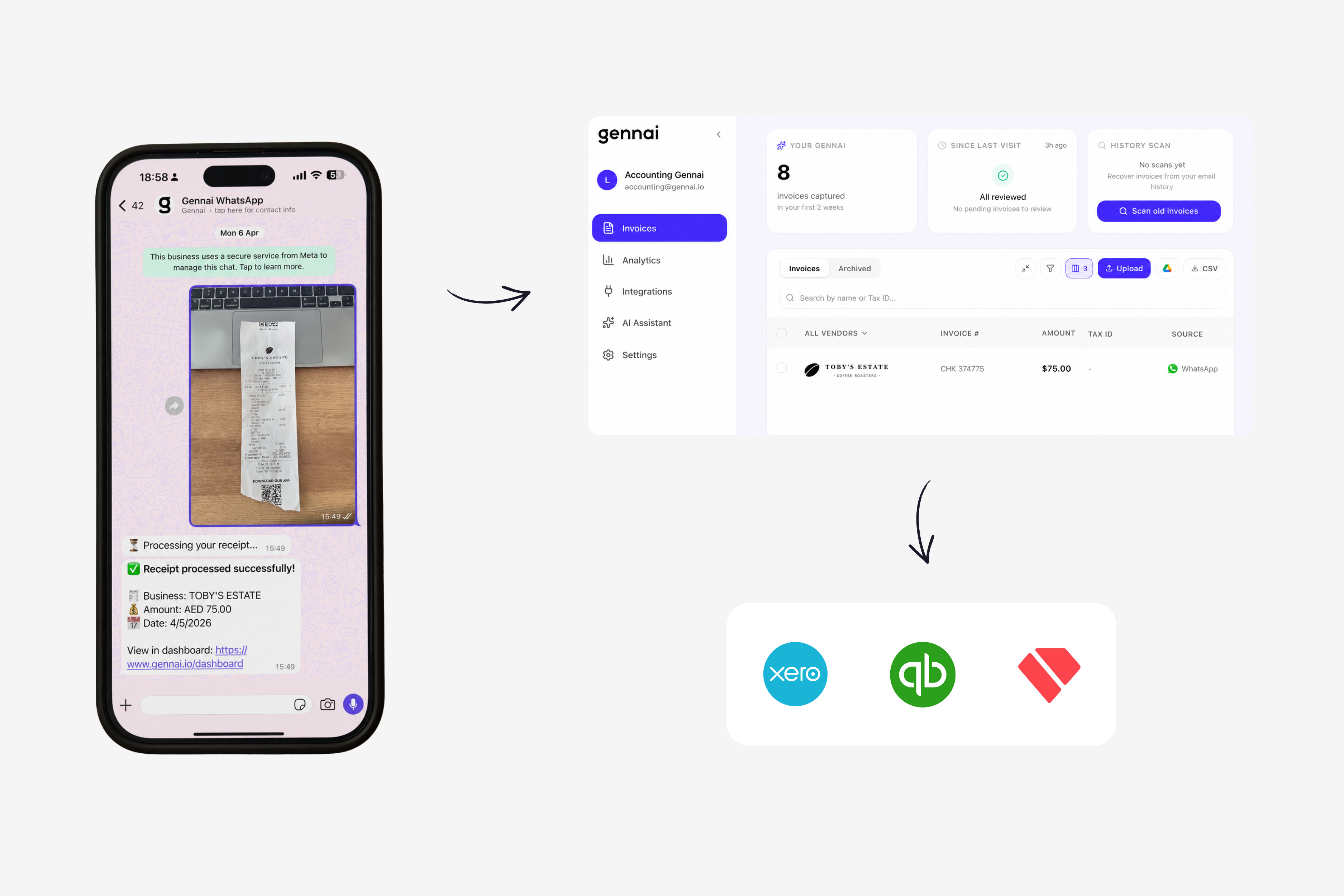
Gennai exposes a WhatsApp number and a Telegram bot. You add them to your contacts once. After that, every receipt, invoice, or expense photo you send is captured automatically and synced to your accounting platform: Xero, QuickBooks, Holded, or wherever you keep your books.
What you can actually send (and what happens to it)
The functionality is broader than "take a picture of a receipt." Here is what is supported, end to end.
Photos of paper receipts. This is the obvious one. Snap the receipt with your phone camera, send the image to the Gennai WhatsApp number or the Telegram bot. The image goes through OCR and AI extraction: vendor, date, total, taxes, line items if visible. Crooked angles, slightly blurry photos, thermal-printed receipts that have started to fade are all handled. You do not need to flatten the paper or hold the camera at a perfect 90 degrees.
PDFs of invoices. Got an invoice in a PDF on your phone? Forward it to the bot. Same extraction pipeline as the email-based capture in Gennai. PDFs work in both directions: the original PDF is preserved as the attachment in your accounting system, so the audit trail stays intact.
Forwarded images from other chats. Someone sent you an invoice in another WhatsApp conversation? Long-press, forward, send to the Gennai bot. It works the same as if you had taken the photo yourself.
Multiple receipts at once. If you have a stack of receipts at the end of the week, send them in a batch. Gennai processes them in parallel and shows up the next time you open the dashboard with a clean list of everything captured.
Once the invoice is captured, the rest of the flow is the same as everything else in Gennai. The data is extracted, the vendor is matched (or created if it is new), the account or category is suggested based on your history, and the invoice is queued for export to your accounting tool. If you want to see how the categorization side works in practice, the post on auto-categorizing Xero invoices covers how Gennai learns from your historical data so suppliers get coded correctly without manual setup.
Setting it up: the entire process is one message
Here is what "connect WhatsApp to your accounting" actually looks like, step by step.
Step 1: Add the Gennai bot to your contacts. Inside Gennai, you will find the WhatsApp number and the Telegram bot username under the integration settings. Save the WhatsApp number as a regular contact. Search the Telegram bot by its username and tap start.
Step 2: Send a verification message. Send any message (a quick "hi" works) to link the chat to your Gennai account. The bot replies with a confirmation. Behind the scenes, the chat is now bound to your workspace, which is how Gennai knows which account to deposit your receipts into.
Step 3: Send your first receipt. Take a photo of any invoice or receipt and send it. Within seconds, the bot replies with what it detected: vendor, date, amount, suggested category. If everything looks right, you do nothing else. The invoice is in your dashboard waiting to be exported (or auto-exported, depending on your settings).
Step 4 (optional): Tell teammates. If you have a co-founder, an assistant, or a finance person who also handles expenses, they can save the same number on their phone and start sending receipts too. Each user is identified by their phone number and tied to the same workspace. Permissions are configurable in Gennai if you want some people to send and others to review.
Total setup time: under two minutes if you already have a Gennai account. The first receipt you process is usually the proof point. People who try this for the first time tend to send three or four old receipts in a row just to test it, then realize it actually does work and the wallet stack from last month finally has a way out.
Where this beats every other capture method (and where it does not)
Email-based capture is great for SaaS subscriptions, online purchases, and any vendor that already invoices you digitally. WhatsApp and Telegram capture is great for everything that does not start in your inbox.
Where messaging capture wins.
Paper receipts from physical stores, restaurants, taxis, hotels, conference venues, parking. These rarely come by email and almost always require a photo at some point. Sending the photo to a chat the moment you get the receipt is dramatically faster than collecting them in a wallet and dealing with them at month-end.
Receipts from in-person business meetings where pulling out a laptop or opening a dedicated app feels awkward. Snapping a photo and sending it to a chat is socially invisible.
Quick approvals when you are away from your desk. If you are at an airport and need to log a per diem expense before you forget, you do it from the chat without context-switching.
Distributed teams where members travel and submit expenses from different countries. Email capture works for them too, but messaging is faster for one-off receipts.
Where email capture wins.
High-volume recurring SaaS invoices, online vendor payments, marketplaces (Amazon, AliExpress, Stripe), automated subscriptions. These already arrive in your inbox in a structured format. Catching them with email-based capture is more reliable and requires zero action from you. The Gmail and Outlook integrations cover this lane natively.
The right answer is usually both. Most users we see end up using email capture for the digital receipts that arrive automatically and WhatsApp or Telegram for the physical ones they pick up during the day. The two channels feed into the same dashboard, the same vendor list, the same account mapping. Nothing duplicates, nothing falls through the cracks.
If you are setting up email capture for the first time alongside this, the Gmail extraction guide walks through the OAuth connection and the inbox scanning behavior in detail. For a wider view of where messaging fits inside the broader move toward automated accounts payable, the agentic AI in accounts payable post covers the larger trend toward AP systems that handle full workflows rather than isolated tasks.
Practical patterns from people already using it
A few habits that have come up repeatedly with users who have made WhatsApp and Telegram capture stick.
Pin the Gennai chat at the top of WhatsApp. If the contact is buried under three pages of conversations, you will not use it. Pinned chats stay at the top, and the visible reminder is enough to make the habit form.
Send the receipt before you put your wallet away. The window between getting the receipt and forgetting about it is about 30 seconds. If you wait until you are at home, the friction returns. Sending it from the table, the Uber, or the hotel checkout takes the receipt off your mental list immediately.
Forward instead of screenshot. If a vendor sends you an invoice in WhatsApp directly, forward the message to the Gennai bot. Forwarding preserves the original PDF or image; screenshots lose quality and metadata.
Batch process at the end of the week. If receipts pile up, send them in one go. Gennai handles batches, and the dashboard groups them by date so reviewing is fast.
These patterns apply whether you are a solo founder, a finance team, or an accountant managing receipts on behalf of clients. The accountant use case is particularly interesting because it lets clients submit receipts via the app they already use rather than via email forwarding, which most clients forget about within a week.
Privacy, compliance, and what happens to your messages
A few questions come up consistently around messaging-based capture, and they deserve direct answers.
Does Gennai read all my WhatsApp messages? No. Gennai only receives messages you actively send to its number. It cannot see other chats, contacts, groups, or anything happening outside the bot conversation. The integration is the same one any business uses to operate a WhatsApp Business presence: messages flow only when you initiate them.
What about Telegram? Same answer. The Telegram bot only sees what is sent to it. Bots in Telegram cannot read other chats or proactively access your account.
Where are the photos and PDFs stored? Once received, files are stored in Gennai's encrypted infrastructure on Cloudflare R2 with AES-256-GCM at rest. The original WhatsApp or Telegram message is not retained beyond what is needed to confirm processing. Files are deleted on workspace deletion.
Is this GDPR compliant? Yes. Gennai operates on European infrastructure, processes data lawfully under the legitimate interests basis (with explicit consent for the bot interaction), and provides full data export and deletion controls. Personal data on receipts is treated as protected data.
What if I send something by mistake? You can delete any captured invoice from the Gennai dashboard. Deletion removes the file from Gennai's storage and detaches it from any export already pushed to your accounting system. If the invoice was already exported as a draft to Xero, QuickBooks, or Holded, you delete it from there as you would any other draft bill.
These answers matter because the convenience of messaging capture only holds up if the security is real. Anything sent through Gennai goes through the same perimeter as the rest of the platform, with the same audits and the same compliance posture.
The version of accounting that meets you where you are
Most accounting tools are built around the assumption that you will sit down at a desk, open a laptop, and process receipts with intention. That assumption fits about 5% of the time invoices actually arrive. The other 95% is real life: a meal, a meeting, a quick errand, a Friday afternoon at the airport.
Putting capture inside the apps you already check 20 times a day is not a gimmick. It is the recognition that the bottleneck in personal and small business accounting was never the math. It was the moment of getting the receipt out of your hand and into something useful.
WhatsApp and Telegram are not the only ways to capture invoices in Gennai. Email scanning still does the heavy lifting for digital receipts. The Chrome extension covers vendor portals. Manual upload is always there for edge cases. But the messaging channels are the ones that finally close the loop on the receipts that used to live in jackets and wallets.
Try Gennai, save the WhatsApp number, and send your first receipt. You will know within thirty seconds whether this works for the way you actually live.
Ready to automate your invoices?
Start extracting invoices from your email automatically with Gennai. Free plan available, no credit card required.
Start FreeRelated Articles
Accounts Payable Turnover Ratio Explained
The accounts payable turnover ratio shows how fast you pay suppliers. Get the formula, a worked example, benchmarks and what your number really means.
GuideNet 30 vs Net 60: What Payment Terms Really Mean for Your Cash
Net 30 vs net 60 explained for business owners: what each term means, when the clock really starts, and how the gap hits your cash on both sides.
GuideThe Accounts Payable Process, Step by Step (for Owners)
The accounts payable process has five steps: receive, verify, approve, pay, and record each invoice. Here is how each works and where owners lose money.