
AI Bookkeeping: Complete Guide to Automating Your Accounting (2026)
AI bookkeeping guide for 2026. Learn what AI automates, where it saves the most time, what it still cannot do, and how to get started without overcomplicating things.

Most small business owners spend around 20 hours every month on financial tasks. That works out to 240 hours a year, roughly six full work weeks, on bank reconciliations, categorizing transactions, chasing missing invoices, and getting records ready for their accountant. Time that could go toward customers, hiring, or growth.
AI bookkeeping changes that equation. Not by replacing your accountant, but by automating the repetitive data work so your financial records stay current without someone having to babysit them. According to Karbon's State of AI in Accounting 2026 Report, 92% of accounting professionals are now using AI in some form, and the firms that invest properly in it unlock an additional seven weeks of capacity per employee per year.
This guide covers what AI bookkeeping actually includes, where it saves the most time, what it still cannot do, and how to get started without overcomplicating things.
What AI bookkeeping actually means
AI bookkeeping is the use of machine learning, optical character recognition (OCR), and rule-based automation to handle the data entry, categorization, reconciliation, and document processing that traditional bookkeeping requires a human to do manually.
The key difference from traditional bookkeeping software is the learning component. Older tools automate based on fixed rules: if vendor X, post to account Y. AI tools learn from patterns. They recognize that a charge from a cloud hosting provider should go to software expenses without you configuring it every time. They flag anomalies that fall outside normal patterns. And over time, they get more accurate as they process more of your data.
In practice, AI bookkeeping covers five core workflows:
Transaction categorization. Automatically assigning bank and credit card transactions to the right expense or income category based on vendor, amount, and historical patterns.
Invoice and document capture. Extracting structured data from invoices, receipts, and bills in any format, so nothing needs to be typed manually.
Bank reconciliation. Matching bank feed entries to ledger transactions and surfacing only the exceptions that need human review.
Accounts payable processing. Receiving supplier invoices, validating data, routing for approval, and syncing to your accounting platform.
Month-end close support. Automating the reconciliation and reporting steps that traditionally consume the most time at the end of each period.
What the numbers say in 2026
The business case for AI bookkeeping has moved from theoretical to documented. A few data points worth knowing:
| Stat | Figure | Source |
|---|---|---|
| AI accounting market size (2026) | $10.87B projected | Mordor Intelligence |
| Accountants using AI in some form | 92% globally | Karbon, 2026 |
| Capacity gained per employee per year | 7 additional weeks | Karbon, 2026 |
| Median bookkeeper cost (US, in-house) | $49,210/yr ($23.66/hr) | U.S. BLS, 2024 |
| Time SMB owners spend on finance tasks | ~20 hrs/month | Out of the Box Technology |
| Reduction in manual data entry with AI | Up to 80% | Multiple industry sources |
| SMBs saving on professional fees | Avg. $5,000/yr | WiFi Talents, 2026 |
Where AI bookkeeping saves the most time
Not all bookkeeping tasks are equally automatable. Here is where the time savings are largest, ordered by impact:
Transaction categorization
This typically accounts for 25 to 35% of all bookkeeping time, according to Digital Applied's 2026 guide. AI models trained on your historical data reach 90 to 95% accuracy on recurring transaction types. The remaining 5 to 10% involving new vendors, ambiguous descriptions, or split transactions still needs human review, but that is a fraction of what you were doing before.
Invoice and document capture from email
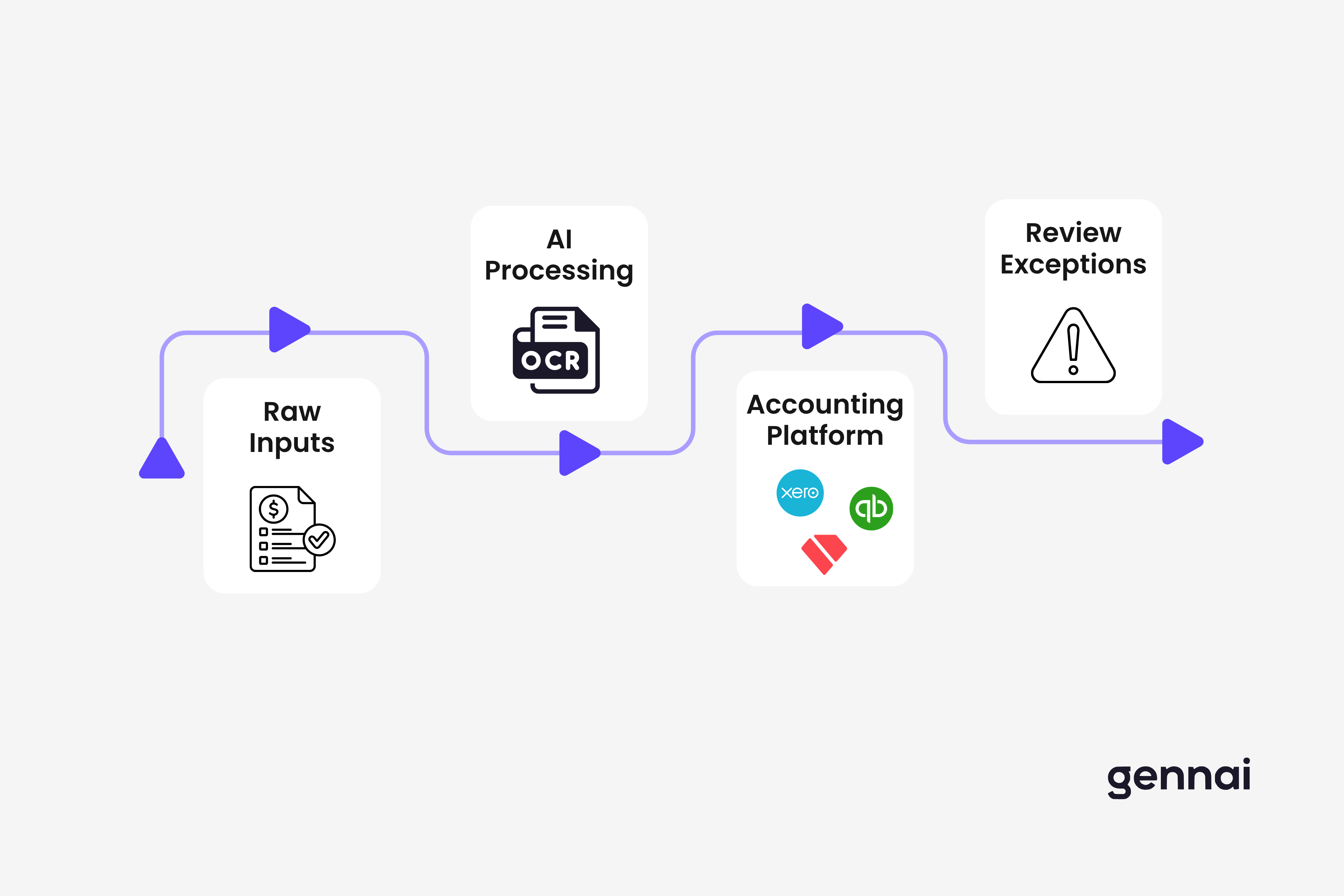
This is where tools like Gennai plug directly into the bookkeeping workflow. Instead of someone manually downloading invoice PDFs from their inbox, forwarding them to a bookkeeper, and waiting for data entry, the whole process runs automatically. Gennai connects to Gmail or Outlook, scans for invoices in real time, extracts the structured data (vendor, amount, date, due date, line items), and pushes it directly to Xero, QuickBooks, or Google Drive. The email invoice extraction process is one of the highest-leverage automation points for any business that receives supplier invoices by email, which covers most businesses.
Bank reconciliation
Reconciliation typically consumes 15 to 20% of monthly close effort. AI can auto-match high-confidence pairs, transactions where the amount, date, and vendor are clear matches, and surface only genuine discrepancies for human attention. In practice, most teams using AI-assisted reconciliation spend minutes rather than hours on this step each month.
Accounts payable processing
Receiving, validating, and approving supplier invoices is one of the most time-intensive AP workflows, especially for businesses processing high volumes. AI handles data extraction, duplicate detection, and routing. The impact is measurable: best-in-class AP teams using automation process invoices at $2.78 per invoice compared to $12.88 for those still on manual workflows, according to APQC benchmarking data cited by Parseur.
If you want to go deeper on the AP side, the accounts payable automation guide covers implementation from scratch.
What AI bookkeeping still cannot do
Knowing the limits matters as much as knowing the capabilities. Three things AI bookkeeping does not replace:
Professional judgment on complex transactions. Journal entries for acquisitions, revenue recognition decisions, depreciation policy choices. These require a qualified accountant. AI automates the data layer, not the advisory layer.
Tax filing and legal compliance sign-off. No AI platform removes legal responsibility for financial statements. A human professional still needs to review and sign off on tax filings and audited accounts.
First-time vendor review. AI learns from patterns. New vendors with no history get flagged for manual review. This is by design, as a fraud prevention measure rather than a gap.
The accountant's role shifts, it does not disappear. Intuit's 2025 Accountant Tech Survey found that 95% of accountants say technology reduces time on compliance tasks, freeing capacity for strategic advisory work. Accounting Today's 2026 AI Thought Leaders survey noted that firms adopting AI are increasing billing rates by 25 to 30% because their people move from data entry to higher-value analysis. The goal of AI bookkeeping is not fewer accountants. It is better-used accountants.
How invoice capture fits into your AI bookkeeping stack
One of the most overlooked bottlenecks in bookkeeping automation is the document ingestion layer. Businesses invest in QuickBooks or Xero, set up bank feeds, and then still have someone manually downloading invoice PDFs from email, renaming files, and uploading them to accounting software.
That gap is exactly what email-first invoice capture solves. When Gennai connects to your inbox, it handles the ingestion automatically: real-time scanning, AI extraction of key fields, duplicate detection, and direct export to your accounting platform. Your bookkeeper or accountant receives structured, clean data instead of a pile of unprocessed attachments.
For accounting firms managing multiple clients, this is especially valuable. The accounting firm invoice workflow guide covers how firms structure this across client portfolios.
The broader principle is that AI bookkeeping works best as a connected pipeline, not a set of isolated tools. Invoice capture feeds clean data into your accounting platform. Your accounting platform feeds the bank reconciliation. Reconciliation feeds the month-end close. Each automated step compounds the time savings of the one before it.
How to get started with AI bookkeeping
Most businesses do not need to overhaul everything at once. The most practical approach is to automate one workflow at a time, starting with wherever your team loses the most hours.
Step 1: Audit where your time actually goes. Track one month of bookkeeping work by task. Most businesses are surprised to find that invoice processing and data entry, not the analysis, takes the majority of hours.
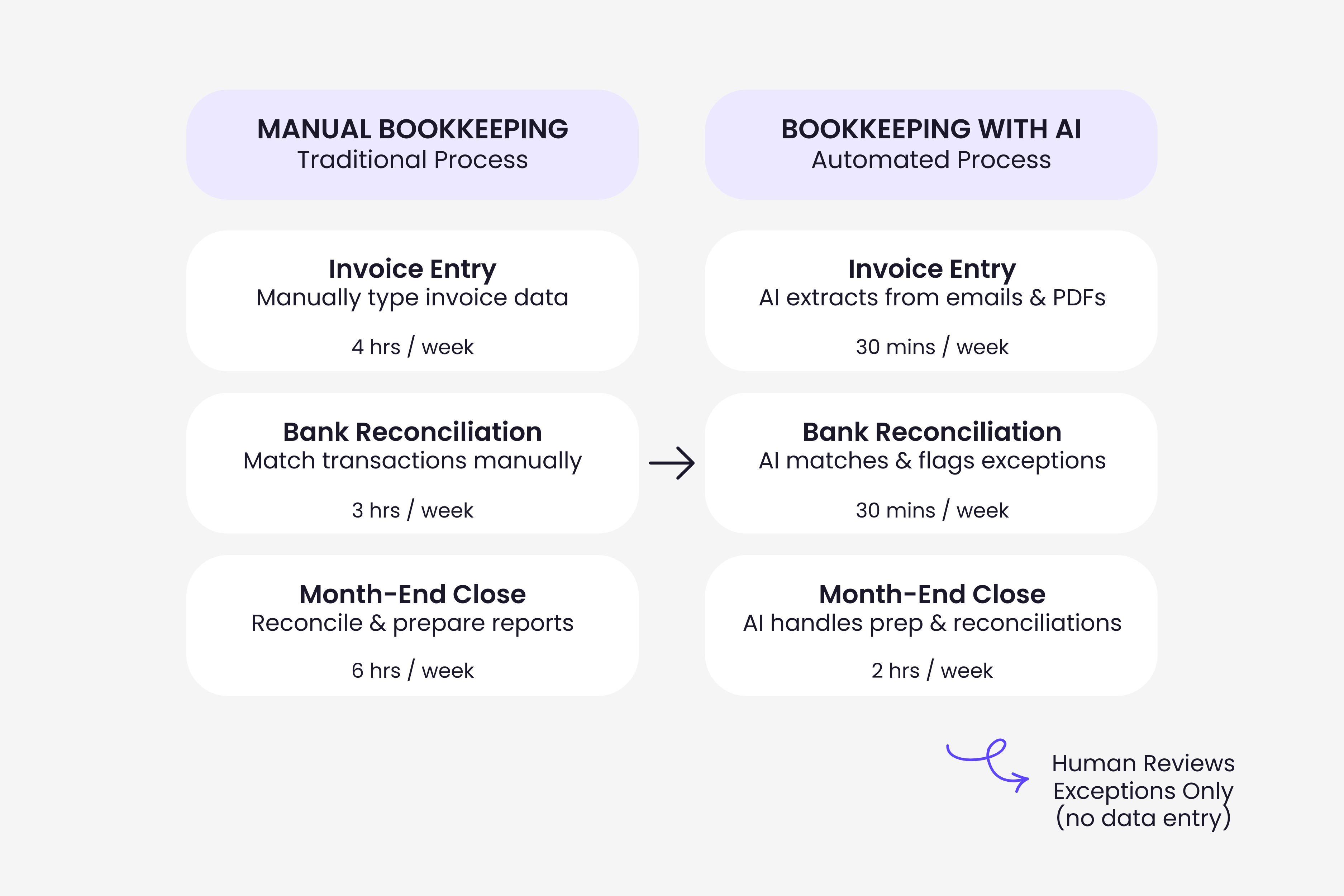
Step 2: Connect your invoice inbox first. Start with the document ingestion layer. If supplier invoices arrive by email, connect your inbox to an AI capture tool before touching anything else. This single step often eliminates 3 to 5 hours of weekly admin.
Step 3: Set up your accounting platform integrations. Make sure your AI tools push structured data directly to your accounting software. Manual exports defeat the purpose. The invoice system integration guide walks through how to connect the full pipeline.
Step 4: Enable bank feeds and auto-categorization. Most modern accounting platforms (Xero, QuickBooks) have AI-assisted categorization built in. Turn it on, review suggestions for the first few weeks, and correct any miscategorizations so the model learns your patterns.
Step 5: Review exceptions weekly, not daily. Once the automated pipeline is running, your job shifts to reviewing what the AI flagged. One weekly review session replaces daily data entry. Track the time before and after and the savings become visible within the first month.
A note on data security before you connect anything
Your accounting data and invoice documents contain sensitive financial information. Before connecting any AI tool to your inbox or accounting platform, verify that it offers encryption in transit and at rest, SOC 2 certification, GDPR compliance if you operate in Europe, and clear data retention and deletion policies.
The invoice data security guide covers what to look for when evaluating any tool that handles financial documents, including the specific security questions worth asking before you sign up.
Your books should not take six weeks of the year to maintain
That is the real cost of manual bookkeeping. Not just the money, but 240 hours that could go toward running the business. AI bookkeeping is not a future technology. Ninety-two percent of accounting professionals are already using it in some form. The difference is between firms that have layered AI onto isolated tasks and those that have connected the full pipeline.
Start with the highest-friction point in your current workflow. For most businesses, that is the inbox, the pile of supplier invoices arriving by email that someone has to manually process. Automate that first, measure the time saved, and extend to the next step from there. The compounding effect adds up faster than most teams expect.
If invoice capture is the right starting point for you, see how Gennai works or start a free trial to connect your inbox in under two minutes.
References
- Karbon HQ. The State of AI in Accounting 2026 Report
- Mordor Intelligence. AI in Accounting Market: Growth, Trends, and Forecasts 2025
- U.S. Bureau of Labor Statistics. Occupational Outlook Handbook: Bookkeeping, Accounting, and Auditing Clerks (accessed March 2026)
- Intuit QuickBooks. 2025 Accountant Technology Survey
- Accounting Today. A big year for AI in accounting (February 2026)
- Digital Applied. AI for Accounting: Automate 70% of Billable Hours (February 2026)
- Out of the Box Technology. The SMB Guide to Outsourced Bookkeeping 2026
- Parseur. AI Invoice Processing Benchmarks 2026
- WiFi Talents. AI in the Accounting Industry Statistics (2026)
- NerdWallet. Bookkeeping Prices for Small Business: What to Expect in 2025
TL;DR
- Small business owners spend ~240 hours/year on bookkeeping tasks that AI can largely automate
- 92% of accounting professionals already use AI in some form, but most have only automated isolated steps
- The five core workflows AI handles: transaction categorization, invoice capture, bank reconciliation, AP processing, and month-end close
- AI does not replace professional judgment, tax sign-off, or first-time vendor review — it automates the data layer
- Start with email invoice capture (highest leverage), then extend to categorization and reconciliation
- The compounding effect of a connected pipeline (capture + accounting + reconciliation) delivers the biggest time savings
- Firms redesigning workflows around AI are gaining 7 extra weeks of capacity per employee per year
Ready to automate your invoices?
Start extracting invoices from your email automatically with Gennai. Free plan available, no credit card required.
Start FreeRelated Articles
The Evolution of OCR: From Rule-Based to AI-Powered
Explore OCR's evolution from template matching to AI-powered deep learning. Four generations transformed invoice processing accuracy from 70% to 99%.
GuideHow AI Actually Reads Invoices: Behind the Scenes
Discover how AI actually reads invoices through computer vision, OCR, machine learning, and NLP. Technical deep dive into the 4-layer processing system.
GuideAI Invoice Processing: The Complete Technical Guide 2026
AI invoice processing cuts costs by 80% and achieves 95-99% accuracy. Complete technical guide to implementation, ROI, and choosing the right solution.