
Cloud vs Local Invoice Software (2026 Verdict)
Local invoice software is dead in 2026. Why 94% of businesses chose cloud for auto updates, remote access, security, and zero maintenance overhead.

Let's address this directly: if you're still considering local, desktop-based invoice management software in 2026, you're making a decision that will cost you time, money, and competitive advantage within months.
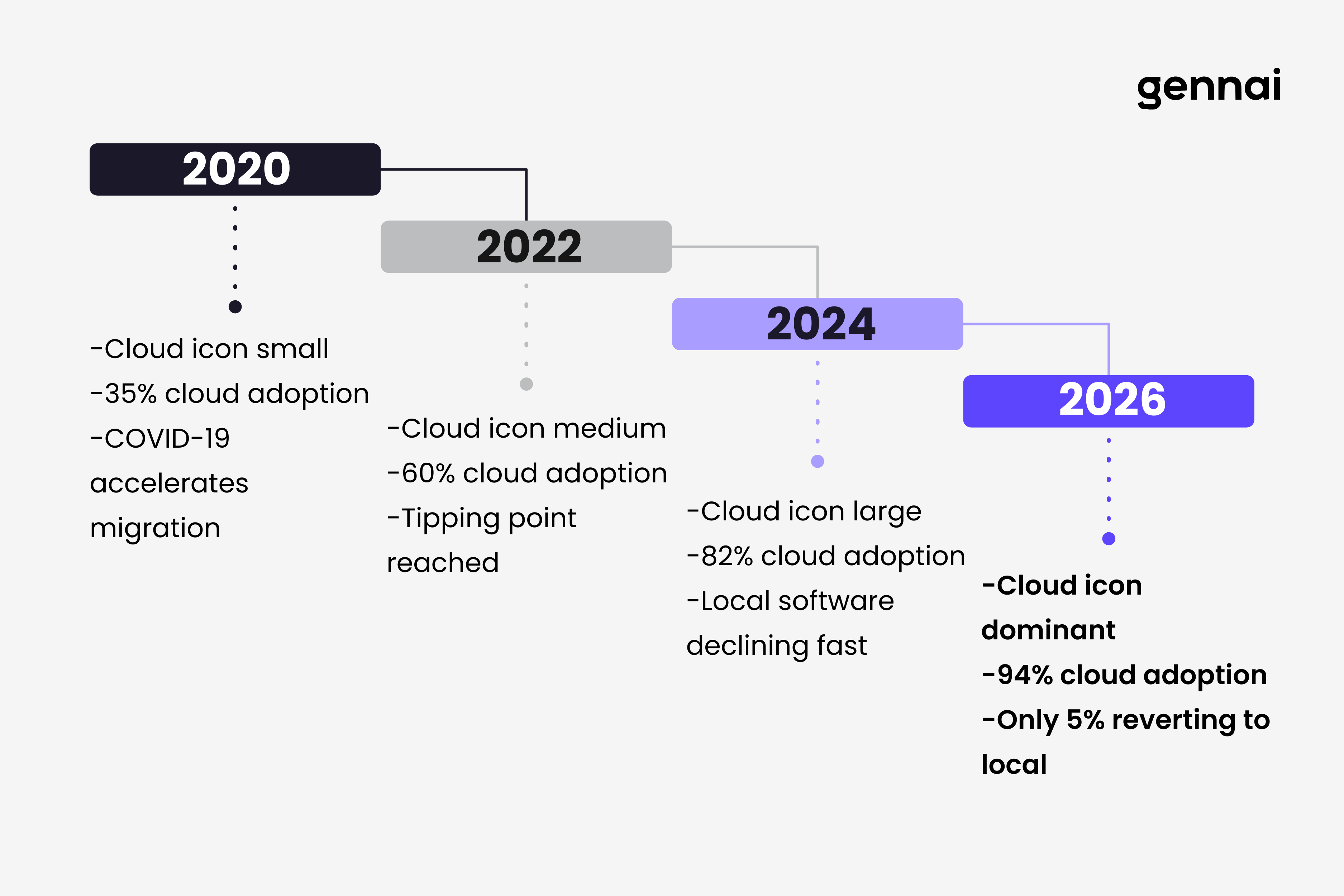
This isn't opinion. It's observable reality backed by market data. In 2026, 94% of enterprises use cloud services, with 60% of all corporate data now residing in the cloud. More tellingly, only 5% of companies that migrated to cloud services plan to revert to on-premises infrastructure. The verdict is in, and local software lost decisively.
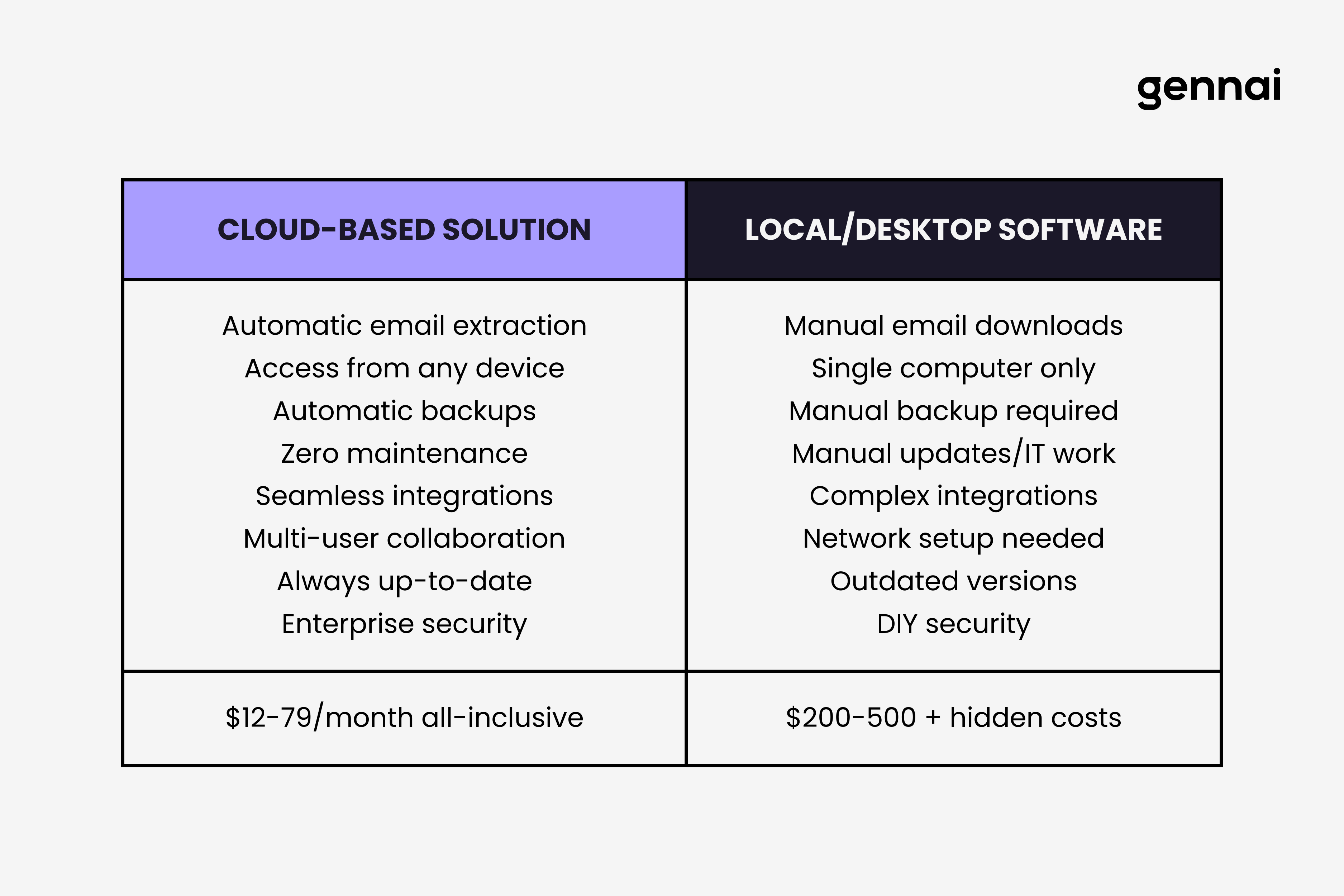
For invoice management specifically, cloud solutions offer capabilities that local software simply cannot match: automatic invoice extraction from email accounts, real-time collaboration across locations, instant access from mobile devices, automatic backups without IT involvement, seamless integration with cloud accounting platforms, and zero maintenance or update responsibilities.
Local invoice management software forces you to download invoices manually, sync data across devices using unreliable methods, handle backups yourself (and hope they work when needed), update software manually or miss critical patches, and work from a single computer unless you invest in complex network setups.
This guide explains why cloud-based invoice management represents the only viable choice in 2026, what specific advantages cloud delivers over local alternatives, and how to evaluate cloud invoice management solutions effectively. If you're clinging to local software due to misconceptions about security, cost, or complexity, this article provides the reality check you need.
For a deeper dive into why email-based invoice capture is becoming the standard, see our guide on why email-first invoice capture is the future of business finance.
The Death of Local Invoice Management Software
Local invoice management software isn't dying. It's already dead. The market has spoken through overwhelming adoption of cloud alternatives.
The Numbers Don't Lie
Cloud adoption statistics for 2026 paint an unambiguous picture. Among small and medium businesses, 63% of workloads and 62% of data now reside in the cloud. Even microbusinesses with under 10 employees show 42% cloud adoption rates, and this number rises every quarter.
For financial software specifically, including invoice management, the shift is even more dramatic. Research shows 51.6% of enterprises now use cloud-based accounting or financial software, representing a fundamental infrastructure change in how businesses handle financial data.
The telling statistic is reversion rates: only 5% of companies that migrated to cloud services plan to return to on-premises infrastructure. When 95% of cloud adopters stick with their decision, you're not seeing a trend. You're watching the complete replacement of an outdated technology model.
Why Local Software Can't Compete
Local invoice management software faces structural disadvantages that no amount of development can overcome:
Access Limitations: Local software runs on one computer. Cloud software works from any device with internet access: your office desktop, home laptop, smartphone while traveling, tablet during client meetings, or your accountant's computer at tax time. This fundamental difference eliminates entire categories of workflow friction.
Collaboration Barriers: Sharing invoice data from local software requires exporting files, emailing spreadsheets, or setting up complex network shares that break constantly. Cloud platforms provide built-in multi-user access with appropriate permissions, real-time updates visible to all team members, and easy external sharing with accountants or auditors.
Backup Responsibility: Local software makes YOU responsible for backups. You must remember to back up regularly, verify backups actually work, store backups securely off-site, and maintain backup infrastructure. Cloud platforms handle this automatically with redundant storage across multiple data centers, making data loss nearly impossible rather than a constant risk.
Update Burden: Local software requires manual updates you'll inevitably postpone. Critical security patches get delayed because updates are inconvenient. New features require downloading installers and disrupting workflow. Cloud software updates automatically in the background, ensuring you always run the latest, most secure version without any effort.
Integration Complexity: Modern invoice management connects with email, cloud storage, accounting software, and payment processors. Local software struggles with these integrations, requiring manual data movement or complex API configurations. Cloud software integrates natively with other cloud services, creating seamless workflows impossible with local alternatives.
These aren't minor inconveniences. They're fundamental architectural limitations that render local software obsolete for invoice management.
7 Reasons Cloud Invoice Management Wins
Beyond the basic impossibility of local software competing, cloud invoice management delivers specific advantages that transform how businesses handle invoices. For a detailed breakdown of what to look for in any solution, check our guide on 10 must-have features in invoice management software.
1. Automatic Email Extraction
The single most valuable feature in modern invoice management is automatic extraction from email accounts, and this capability only exists in cloud solutions.
Cloud invoice management platforms like Gennai connect directly to your Gmail, Outlook, or Exchange accounts and monitor incoming email continuously. When invoices arrive, the system automatically detects them, extracts them, processes them with AI-powered OCR, and organizes them in your dashboard without any manual action.
Local software cannot do this. At best, local solutions require you to download invoices from email manually, save them to a folder, then import them into the software. This workflow wastes 5-10 minutes per invoice and guarantees some invoices get missed when email searches fail or you forget to check specific accounts.
A business receiving 100 invoices monthly saves 8-10 hours monthly through automatic email extraction alone. At an accounting staff rate of $40 per hour, this single feature delivers $3,840-4,800 annually in labor savings, more than the annual cost of most cloud invoice management subscriptions.
2. Zero IT Maintenance
Cloud invoice management eliminates IT overhead entirely. You don't manage servers, install updates, configure backups, troubleshoot software conflicts, or maintain infrastructure.
The cloud provider handles all of this. Security patches apply automatically. Performance improvements deploy without your involvement. Storage scales automatically as invoice volume grows. Redundancy and disaster recovery operate continuously in the background.
For local software, you or your IT staff must handle all these responsibilities. Small businesses without dedicated IT often neglect critical maintenance, creating security vulnerabilities and reliability problems. The time cost alone, even if you can handle maintenance yourself, makes local software far more expensive than subscription pricing suggests.
3. Universal Access
Cloud invoice management works from anywhere on any device. This flexibility seems obvious but transforms actual workflows dramatically.
You can review and approve invoices from your phone while traveling. Your bookkeeper can process invoices from home. Your accountant can access tax documentation without requiring file transfers. Department managers can view their budget-related invoices without full system access.
Local software confines you to working from specific computers where the software is installed. This limitation seems minor until you need an invoice urgently while away from the office, want to work from home occasionally, or need to share access with team members or external accountants. Suddenly, simple tasks require elaborate workarounds or simply become impossible.
4. Automatic Cloud Backup
Cloud invoice management stores your data redundantly across multiple data centers automatically. Your invoices survive hardware failures, natural disasters, ransomware attacks, or accidental deletions without you doing anything. Modern cloud platforms also use AI-powered invoice processing to extract and organize data automatically, something local software cannot replicate.
With local software, backup is your responsibility, and most businesses handle it poorly. Hard drives fail. Backup schedules get forgotten. Restore processes never get tested until they fail when actually needed. Ransomware encrypts local files along with backups stored on the same machine.
The peace of mind from never worrying about invoice data loss is worth the cloud subscription cost alone. When your local computer dies or gets stolen, cloud-managed invoices remain perfectly intact and accessible within minutes from any other device.
5. Seamless Integrations
Modern invoice management connects with other business systems: accounting software, cloud storage, payment processors, expense reporting tools, and tax preparation platforms.
Cloud software integrates natively with other cloud services through APIs. Gennai syncs invoices automatically to Google Drive. Cloud accounting platforms import invoice data from cloud invoice management without manual exports. These integrations work reliably because both systems operate in the cloud with modern APIs designed for connectivity.
Local software struggles with integrations. Connecting to cloud services from local applications requires complex configurations that frequently break. Data sync becomes manual export-import cycles that waste time and introduce errors. The isolation of local software undermines the entire point of using specialized invoice management tools.
6. Predictable Costs
Cloud invoice management operates on clear subscription pricing: you pay a fixed monthly amount based on invoice volume or features needed. This cost is completely predictable and includes everything: software, storage, backups, updates, support, and infrastructure.
Local software appears cheaper with one-time purchase prices, but hidden costs accumulate quickly: ongoing maintenance and IT support, backup infrastructure and storage, hardware upgrades as software requirements increase, costly version upgrades every few years, and lost productivity when systems fail or data gets lost.
Research shows businesses can reduce Total Cost of Ownership by up to 40% by migrating to cloud infrastructure when all costs are properly accounted for. The subscription fee transparency of cloud software makes budgeting straightforward while local software creates unpredictable ongoing expenses.
To understand exactly what manual invoice processing costs your business, use our invoice processing cost calculator.
7. Security and Compliance
Cloud invoice management providers invest heavily in security infrastructure that individual businesses cannot match. Enterprise-grade encryption for data storage and transmission, regular third-party security audits and certifications, dedicated security teams monitoring threats continuously, automatic security patches without your involvement, and compliance certifications like SOC 2, GDPR, and industry-specific standards.
Local software places security responsibility on you. You must apply security updates promptly, configure encryption properly, protect against malware and ransomware, control physical access to computers containing data, and maintain secure backups. Most small businesses lack the expertise and resources to handle these responsibilities effectively.
The misconception that local software is more secure because data stays "in-house" ignores reality. Your local computer is far more vulnerable than professionally managed cloud data centers with redundant security layers, 24/7 monitoring, and expertise you cannot replicate internally.
Common Objections to Cloud Invoice Management (Debunked)
Despite overwhelming evidence favoring cloud solutions, some businesses still resist migration based on misconceptions.
"Cloud is Less Secure"
This is backwards. Cloud providers employ security expertise and infrastructure that individual businesses cannot match. Data breaches occur far more frequently with local systems due to inadequate security practices, unpatched software, poor backup procedures, and lack of specialized security knowledge.
Enterprise cloud platforms achieve SOC 2 certification, undergo regular third-party audits, employ dedicated security teams, and implement multiple redundant security layers. Your local computer has antivirus software you installed once and occasionally remember to update.
The statistics support this: 80% of IT professionals report that moving to cloud improved their security posture. Cloud providers defend against millions of attacks daily, developing sophisticated threat detection that no individual business can replicate.
"I Lose Control of My Data"
Cloud storage doesn't mean surrendering data ownership. You retain complete legal and practical control over your invoice data. Quality cloud providers offer data export in standard formats, allow you to delete your data completely, operate under clear data ownership terms, and provide APIs for programmatic data access.
What you actually lose is the burden of managing infrastructure. This is positive. You gain the ability to access YOUR data from anywhere, confidence that YOUR data survives hardware failures, and assurance that YOUR data is backed up properly, all while retaining ownership.
"Cloud Costs More"
Surface-level comparison of subscription fees versus one-time purchase prices is misleading. Total Cost of Ownership includes all expenses: software licensing, server or computer hardware, IT support and maintenance, backup infrastructure, update management, security measures, opportunity cost of time spent on IT issues, and cost of data loss from inadequate backup.
When properly calculated, cloud invoice management typically costs 30-40% less than local alternatives. The $50-100 monthly subscription includes everything. Local "cheap" software accumulates hidden costs continuously.
Research confirms this: 74% of CFOs report cloud investments delivered ROI within 12-18 months. The apparent savings of local software evaporate when you account for true operational costs.
"My Internet Could Go Down"
Modern cloud invoice management platforms include offline capabilities for viewing and working with previously synced data. More importantly, internet outages are far less common than local hardware failures, and when they occur, they're usually brief.
Consider the alternative: your local computer crashes, hard drive fails, or gets stolen. Without cloud backup, you lose everything. Internet returns within hours. Hardware failures can mean permanent data loss.
The reliability question actually favors cloud solutions significantly. Cloud platforms operate with 99.9% uptime guarantees backed by redundant infrastructure. Your local computer has no such guarantee and likely experiences more frequent problems.
"Migration is Too Complex"
Cloud invoice management platforms specifically designed for ease of use typically offer migration support, import tools for existing data, straightforward setup processes taking hours not weeks, and responsive customer support during transition.
The migration process typically involves connecting your email account (5 minutes), importing historical invoices (automated), and configuring categorization preferences (30 minutes). Most businesses complete functional migration in under one day.
Compare this to maintaining local software indefinitely: constant IT issues requiring troubleshooting, periodic version upgrades forcing reinstallation, backup verification and recovery testing, and security configuration management.
Migration happens once. Local software maintenance happens forever.
How to Choose Cloud Invoice Management Software
Once you accept that cloud is the only viable option, choosing the right cloud invoice management platform requires evaluating specific capabilities. For a structured decision framework, see our complete invoice management software buyer's guide.
Step 1: Prioritize Email Extraction. Automatic invoice extraction from email accounts is the single most valuable feature. Ensure the platform supports your email provider (Gmail, Outlook, Exchange), monitors multiple accounts simultaneously, processes invoices automatically in near-real-time, and handles various file formats (PDF, images).
Step 2: Verify Integration Capabilities. Check that the platform integrates with your existing tools: accounting software (QuickBooks, Xero, FreshBooks), cloud storage (Google Drive, Dropbox, OneDrive), and expense reporting or ERP systems if applicable. Native integrations save hours of manual data transfer weekly.
Step 3: Test Mobile Functionality. Download the mobile app and test actual invoice capture and review workflows. Quality platforms provide full-featured mobile apps with receipt photography and OCR, complete invoice archive access, approval and categorization capabilities, and reasonable performance even on older devices.
Step 4: Evaluate Security Credentials. Verify the provider maintains appropriate security standards: encryption for data storage and transmission, SOC 2 or equivalent certification, clear data privacy policies and GDPR compliance, and two-factor authentication options.
Step 5: Calculate True ROI. Estimate time saved through automation (typically 8-12 hours monthly for businesses processing 100+ invoices), multiply by your hourly labor cost, compare against subscription pricing, and factor in elimination of IT maintenance overhead.
If annual time savings exceed annual subscription cost, the decision is straightforward. Most businesses see ROI within 2-4 months.
Conclusion
Local invoice management software is dead because it cannot compete with fundamental advantages that cloud platforms deliver. Automatic email extraction, universal access, zero maintenance, seamless integrations, and enterprise security represent capabilities that local software architecturally cannot match.
The market has rendered its verdict: 94% of enterprises use cloud services, with only 5% considering reversion to local infrastructure. This isn't a trend. It's the complete replacement of an obsolete technology model with a superior alternative.
For invoice management specifically, cloud solutions like Gennai transform what was once a tedious manual process into an automated workflow requiring minimal human intervention. Invoices extract from email automatically, process through AI-powered OCR, categorize based on learned patterns, sync to cloud storage, and integrate with accounting platforms, all without you downloading, uploading, or manually organizing anything.
The question is no longer whether to choose cloud over local invoice management. The question is which cloud platform best fits your specific needs and workflow. Local software doesn't deserve consideration in 2026. It's a relic of a previous technology era that has been thoroughly superseded.
Stop wasting time on local software maintenance, manual email downloads, backup responsibilities, and isolated single-computer workflows. Migrate to cloud invoice management and join the 94% of businesses that made the obvious choice.
TL;DR
- Local invoice software is dead in 2026 with 94% of enterprises using cloud services and only 5% planning to revert
- Cloud-only capabilities: automatic email extraction, real-time collaboration, mobile access, automatic backups, seamless integrations
- Local software limitations: single computer access, manual backups, complex integrations, constant maintenance
- 7 key cloud advantages: email extraction (saves 8-10 hours/month), zero IT maintenance, universal access, automatic backup, seamless integrations, predictable costs, enterprise security
- Common objections debunked: cloud is MORE secure than local, you retain data ownership, total cost is 30-40% lower, 99.9% uptime beats local hardware reliability
- Choosing cloud software: prioritize email extraction, verify integrations, test mobile functionality, evaluate security, calculate ROI (most see payback in 2-4 months)
- Bottom line: Migration happens once; local software maintenance happens forever
Ready to automate your invoices?
Start extracting invoices from your email automatically with Gennai. Free plan available, no credit card required.
Start FreeRelated Articles
Invoice Management Statistics 2026: Latest Data & Trends
Manual invoice processing costs $12.88-$19.83 per invoice, 39% contain errors, and 55%+ are paid late. Complete 2026 invoice management statistics with sources.
GuideBest Invoice OCR Software 2026: Top 7 Compared
The 7 best invoice OCR tools for 2026 compared on accuracy, pricing, and fit: Rossum, ABBYY, Nanonets, Docsumo, Textract, Klippa, and Dext.
Guide10 Must-Have Invoice Management Software Features
The 10 invoice management software features that actually matter in 2026, from email extraction to OCR accuracy and accounting sync, plus red flags to avoid.