
Extract Subscription Invoices From Email Automatically (SaaS, Ads, Cloud and the Rest)
Capture every SaaS, ads, and cloud subscription invoice from your inbox. Inline emails, PDF attachments and vendor portal receipts, all extracted automatically.

Subscription invoices are the easiest to lose. They arrive as inline HTML, not always with a PDF attached, and they look like marketing emails. Here is how to capture every single one without forwarding, filtering, or babysitting your inbox.
Your accountant asks for the AWS invoice. You open Gmail, search "AWS," get back 47 marketing emails and one billing thread. The actual invoice is a link inside the email body that you have to click to download. By the time you find it, you have lost ten minutes. Multiply that across Stripe, Meta Ads, Google Workspace, Notion, Slack, Linear, Cloudflare, OpenAI, Anthropic, Vercel, and the half-dozen tools your team signed up for last quarter. The companies in your inbox are not sending you invoices the way your accountant wants them. They are sending you HTML marketing emails that happen to contain billing information.
This guide is about extracting subscription invoices from email automatically: SaaS, ad platforms, cloud infrastructure, and every other recurring vendor that bills through your inbox. We cover why subscription invoices are uniquely painful to capture manually, what an AI extraction tool actually has to do to catch them all, and how to set this up so it runs without you.
TL;DR
- Companies in 2025 used between 106 and 275 SaaS apps on average, depending on the source (BetterCloud, Vendr, Zylo). That is 100+ recurring invoices a month per business.
- Gartner estimates roughly 30% of SaaS spend is wasted on unused licenses and redundant tools. Step one to recover it is actually finding every invoice.
- SaaS invoices arrive in three shapes: PDF attachments, inline HTML in the email body, and links to a vendor portal. Most extraction tools only handle the first one.
- Gennai extracts all three. Inline invoices in the email body, PDF attachments, and follows links to the document on the vendor portal when available.
- A retroactive scan typically surfaces every SaaS, ad and cloud invoice the team forgot to send to accounting for the last year.
Why subscription invoices are the worst to capture manually
Vendor invoices used to look the same. A PDF, attached to an email, with the word "Invoice" in the subject. Filters worked. Forwarding rules worked. Manual sorting was tedious but possible.
SaaS billing broke that model. Modern subscription vendors optimize their billing emails for retention and engagement, not for your accounting workflow. Four patterns make subscription invoices structurally harder to capture than regular supplier invoices.
has:attachment misses these entirely.Add these together and the result is predictable: by the time your accountant asks for the SaaS invoices at month-end, half of them are missing. Someone spends two days hunting them down. Some never appear and the VAT is lost.
The scale: how many subscription invoices we are actually talking about
It is easy to underestimate the volume because no single tool feels important on its own. The aggregate is what hurts. The 2025 numbers from independent SaaS management research:
- BetterCloud's 2025 State of SaaS report measured an average of 106 SaaS tools per organization.
- Okta's 2025 Businesses at Work report tracked an average of 101 apps per company, with large enterprises averaging 131.
- Zylo's 2025 SaaS Management Index reported 275 SaaS apps in mid-sized companies, with about one-third operating as shadow IT.
- Gartner estimates that roughly 30% of SaaS spend is "toxic," wasted on unused licenses or redundant tools. On global SaaS spend of around $300 billion in 2025, that is about $90 billion of waste.
Even at the low end (around 100 active subscriptions), that is at least 100 recurring invoices per month landing in your team's inboxes. Add the one-off charges (annual renewals, usage spikes, ads campaign top-ups, new tools tested by individual employees) and the real number is higher. None of these invoices have a clean home in your accounting workflow unless you capture them at the source.
If you are evaluating where the spend even goes, see SaaS invoice management for recurring subscriptions for a deeper look at how recurring billing creates the underlying complexity.
What automatic subscription invoice extraction actually has to do
Capturing PDF attachments is the easy part. Any half-decent tool does that. The bar for subscription invoices is higher. A tool that is actually useful here needs to handle four layers.
Layer 1. Detect invoices without subject keywords. The tool has to read the email content (subject, sender, HTML body, attachments) and decide if it contains billing information. This decision cannot rely on the word "invoice" appearing anywhere. It is a classification problem, and AI models trained on real billing emails handle it dramatically better than keyword rules.
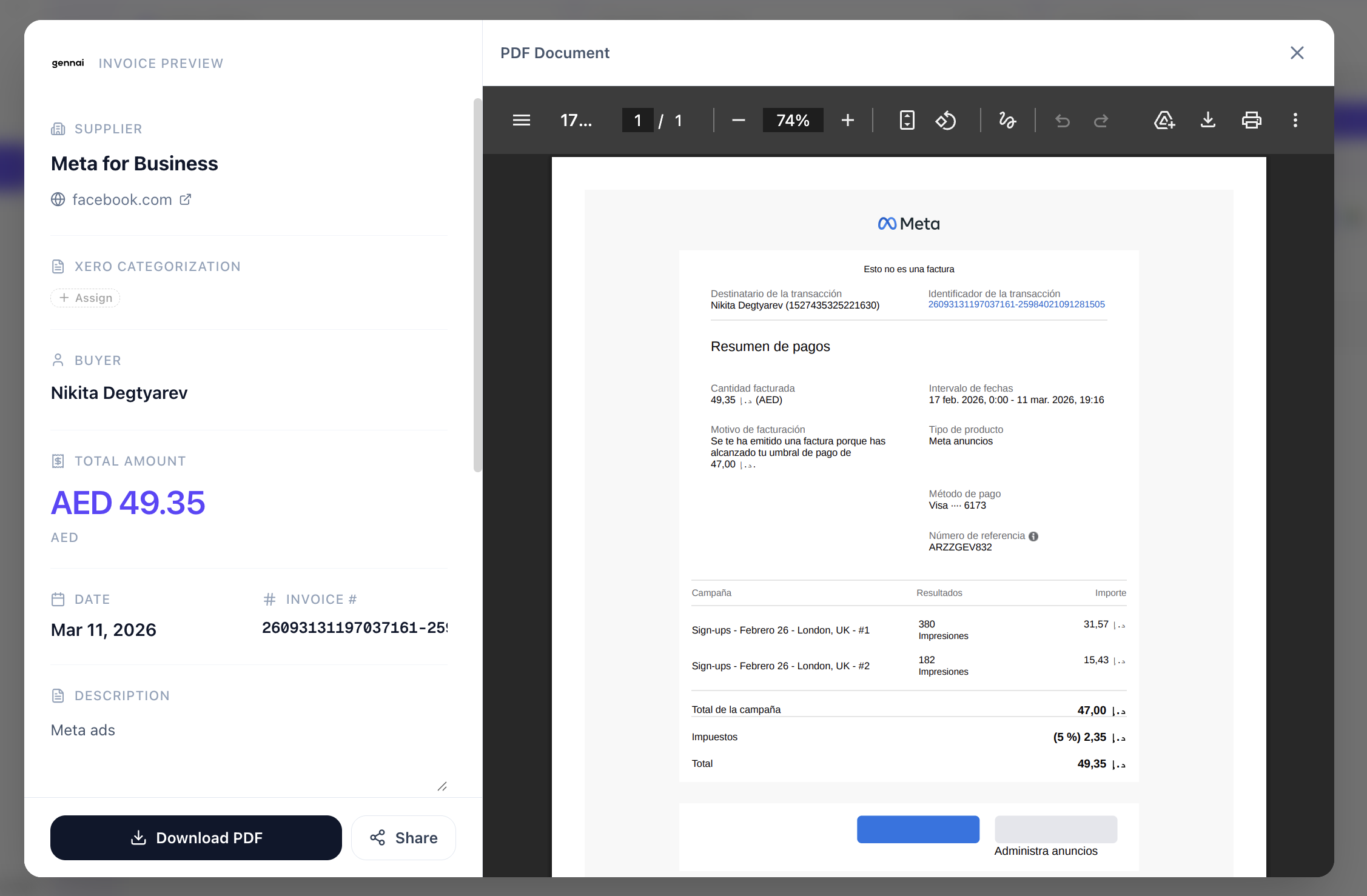
Layer 2. Parse inline HTML the same way as PDFs. When the invoice lives in the email body, the extraction needs to read the HTML, identify the structured billing block (vendor, period, amount, tax, total), and output the same fields it would output from a PDF. Gennai handles inline HTML invoices natively, with the same extraction pipeline as attachments.
Layer 3. Follow links to vendor portals when feasible. Some vendors only send the link, with the PDF behind login. Tools can store the link and surface it for one-click human download, or in some cases follow the link automatically when the URL is public. Either approach is better than the status quo, which is that the link gets ignored until someone needs the invoice for taxes.
Layer 4. Group recurring invoices by vendor and detect duplicates. When AWS sends you the same invoice twice (a common scenario, as we cover in fixing duplicate invoice detection problems), the tool should flag it before it reaches your books. When Notion charges you 12 times in a year, those 12 should appear grouped under Notion, with the monthly amount and annual total visible at a glance.
The technical detail of how the AI parsing works across formats is covered in how AI actually reads invoices.
Setup: connecting your inboxes for subscription capture
Subscription invoices land in more inboxes than regular vendor invoices, so the setup is about coverage. Three rules of thumb.
Connect every inbox where a SaaS bill might land. Founder's personal Gmail. Work Microsoft 365. The shared accounting@ or billing@ address. The marketing manager's inbox where Meta Ads receipts go. Engineers who signed up for AWS or Vercel on their work email. Gennai supports connecting multiple Gmail and Outlook accounts under one workspace, with invoices tagged by source mailbox.
Run a retroactive scan on each. The first scan is where the history shows up. Twelve months of Notion charges, eighteen months of Stripe receipts, the AWS invoices from the project that ended last year. Gennai supports scanning the full inbox history. Pick the date range that matches your accounting need (current fiscal year is the most common).
Push to your accounting tool. Each captured invoice flows to Xero, QuickBooks, or Holded as a draft bill, ready for approval. Or you export CSV and let your accountant handle the rest. For the connection setup details, see extract invoices from Gmail in 5 minutes or the Outlook equivalent in how to extract invoices from Outlook automatically.
What you get out: the categories that emerge from the scan
After a thorough retroactive scan, the captured subscription invoices tend to land in four buckets that match how your accountant will categorize them anyway:
- Cloud and infrastructure. AWS, Google Cloud, Azure, Vercel, Cloudflare, Supabase, Neon, Render. These are the ones with the largest unit values and the most opaque billing, because they include usage-based components on top of the base subscription.
- Productivity and collaboration. Notion, Linear, Slack, Google Workspace, Microsoft 365, Figma. The high-frequency, low-value tools that accumulate to a significant line item without anyone noticing.
- Marketing and ads. Meta Ads, Google Ads, LinkedIn Ads, TikTok Ads. These tend to bill in large amounts, often on credit cards, and the receipts are easy to lose because they look like campaign notifications rather than invoices.
- AI and developer tools. OpenAI, Anthropic, GitHub, Sentry, PostHog, Stripe. The fastest-growing category in most companies' books in 2025-2026, and the one where finance teams most often realize they are paying for the same kind of tool twice.
Once these are all captured and grouped by vendor, the conversation with finance shifts from "can you find the AWS invoice" to "why are we paying for two project management tools." That is the actual win.
FAQ
Does Gennai capture invoices that are not attached as PDFs?
Yes. Gennai detects invoices in the email body as inline HTML, as attached PDFs, as images, and references to vendor portals when the invoice link is in the email. The detection does not depend on the word "invoice" appearing in the subject or body.
What about invoices that only exist behind a vendor portal login (AWS, Stripe, Meta Ads)?
Gennai surfaces the notification email so you have a single place to see all pending billing references. For vendors that include a public link to the invoice PDF in the notification, the document is captured automatically. For vendors that hide the invoice behind authentication, you click through once and the captured invoice is then stored and pushed to your accounting tool.
Can Gennai distinguish a recurring subscription invoice from a one-off purchase?
Yes. When the same vendor charges you a similar amount on a regular cadence, Gennai tags it as recurring. This is the basis for grouping by vendor and surfacing monthly and annual totals automatically.
Will it pick up ad platform receipts like Meta Ads and Google Ads?
Yes. Ad platform receipts are subscription invoices in everything but the name. Gennai treats them the same as SaaS billing emails and extracts the standard fields (vendor, period, amount, tax).
How does this work for a team where invoices go to several people's inboxes?
Connect each inbox to the same Gennai workspace. Every invoice from every source mailbox lands in the same dashboard, tagged by where it came from. This is the only practical way to handle the "subscription invoices scattered across the team" problem at scale.
Connect your inboxes and find every invoice you are missing
Connect your inboxes and let Gennai find every SaaS, ads, and cloud invoice you have been missing. The retroactive scan covers your full history. The free plan covers the first batch.
Ready to automate your invoices?
Start extracting invoices from your email automatically with Gennai. Free plan available, no credit card required.
Start FreeRelated Articles
Shared inbox vs distribution list for AP: which one actually works (and when)
Shared inbox vs distribution list for AP: a shared inbox wins on ownership and tracking, but both leave invoices uncaptured. Here is when each one works.
GuideGmail filters for invoices: the complete setup guide (with copy-paste rules)
Gmail filters for invoices, explained: copy-paste search rules that auto-label every bill, plus where filters fall short and what catches the rest.
GuideHow to Extract Invoices From Outlook Automatically (2026)
Extract invoices from Outlook automatically. Connect Microsoft 365 via OAuth, scan your full inbox history, and push every bill to Xero, QuickBooks, or Holded.