
How to Extract Invoices From Outlook Automatically (2026)
Extract invoices from Outlook automatically. Connect Microsoft 365 via OAuth, scan your full inbox history, and push every bill to Xero, QuickBooks, or Holded.

If your supplier invoices land in Outlook 365 and someone on your team still drags them into folders or downloads PDFs one by one, you are paying for the same invoice twice: once to the supplier, once in lost hours. To extract invoices from Outlook automatically in 2026, you connect your mailbox to an AI capture tool through Microsoft Graph OAuth, run a retroactive scan on existing emails, and let the tool route every new invoice into your accounting system. Setup takes a few minutes per mailbox and works across personal, work, and shared inboxes.
This guide walks through the exact setup, what the OAuth flow looks like, how the historical scan works, and what to verify before you trust automation with your accounts payable inbox.
TL;DR
- Manual invoice processing costs roughly $12 to $18 per invoice fully loaded (IOFM, Aberdeen, Ardent Partners 2025).
- A retroactive Outlook scan can cover the full inbox history, surfacing months or years of bills you never indexed.
- Setup uses Microsoft Graph OAuth 2.0 with read access to mail. No password sharing, revocable at any time.
- Multi-account: connect personal, work, and shared mailboxes to the same dashboard.
- The hard part is not the connection. It is making sure the tool finds every invoice, including those without the word "invoice" in the subject.
Why Outlook 365 is the toughest inbox to clean manually
Outlook is the default mailbox for finance teams in enterprise and most accounting firms. That is also the problem. Outlook accounts accumulate years of supplier emails, recurring subscription receipts, and one-off invoices buried inside threads. The native Rules engine helps with sorting, but it does not extract structured data: vendor, tax ID, amount, due date, IBAN, line items.
Three patterns make Outlook particularly bad for manual invoice work:
has:attachment miss every one of these.Independent benchmarking from Ardent Partners 2025 reports the average AP organization takes 9.2 days to process a single invoice, with best-in-class teams down at 3.1 days. The cost per invoice in manual environments sits between $12 and $18 fully loaded according to IOFM, Aberdeen, and Ardent Partners. At 200 invoices a month that is $2,400 to $3,600 spent on data entry alone.
How automatic Outlook invoice extraction actually works
There are four moving pieces. Understanding them helps you spot tools that cut corners.
Mail.Read scope (plus offline_access for token refresh). No password is transmitted. The token can be revoked from your Microsoft 365 account settings at any time.The Gennai team has written more about the underlying mechanics in how AI actually reads invoices if you want the technical detail on the parsing layer.
Step-by-step: connect Outlook 365 to Gennai
Here is the exact sequence on Gennai. Other email-first capture tools follow a similar pattern, but specifics like supported historical depth vary.
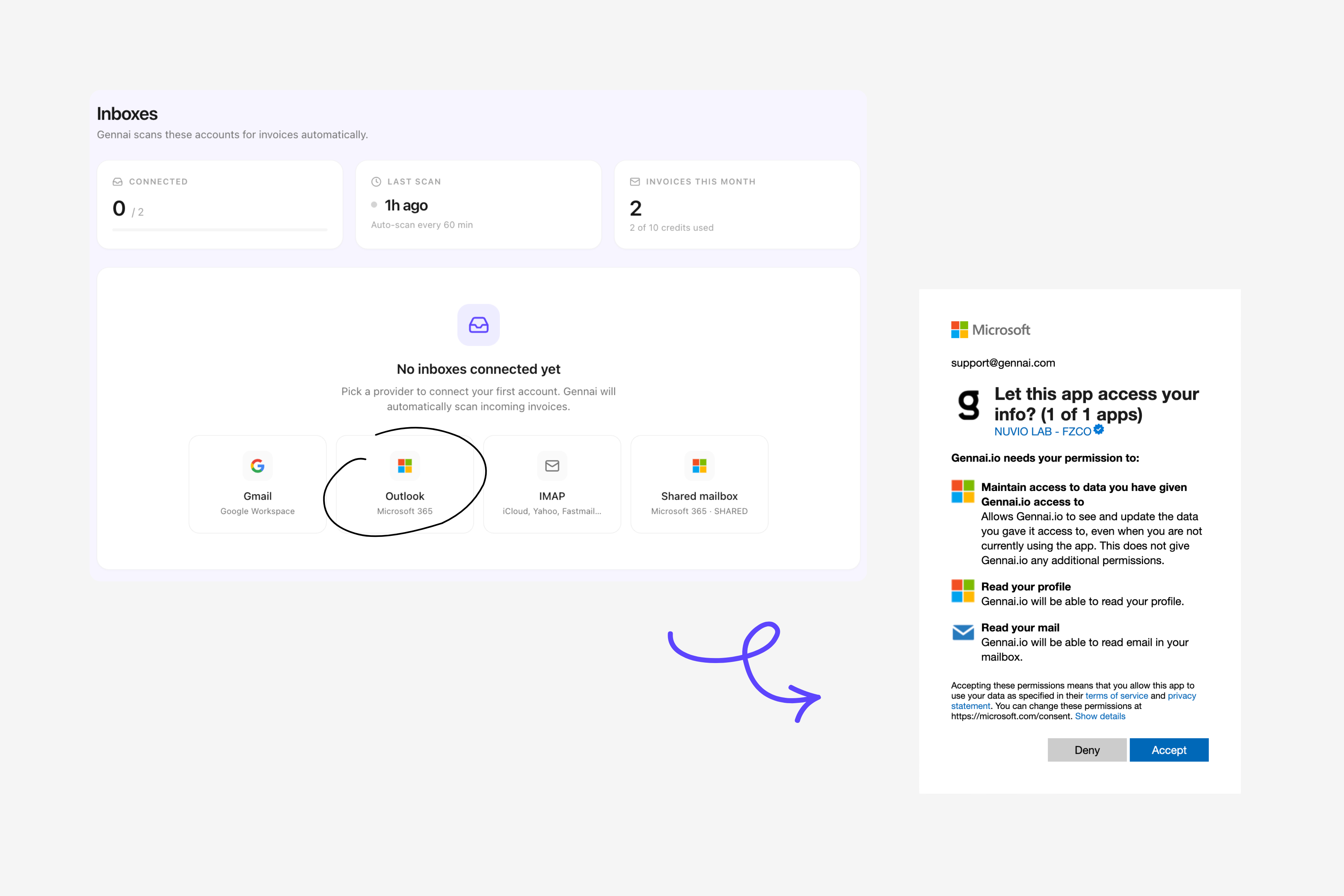
Step 1. Sign up and open the inbox connections panel. From the Gennai dashboard, click "Connect inbox" and choose Outlook. The button triggers the standard Microsoft sign-in.
Step 2. Authorize the Microsoft Graph scopes. You see the Microsoft consent screen listing the permissions: read your mail, sign you in and read your profile, maintain access to data you have given Gennai access to. The offline_access permission is what lets the tool keep refreshing the connection without asking you to log in every week.
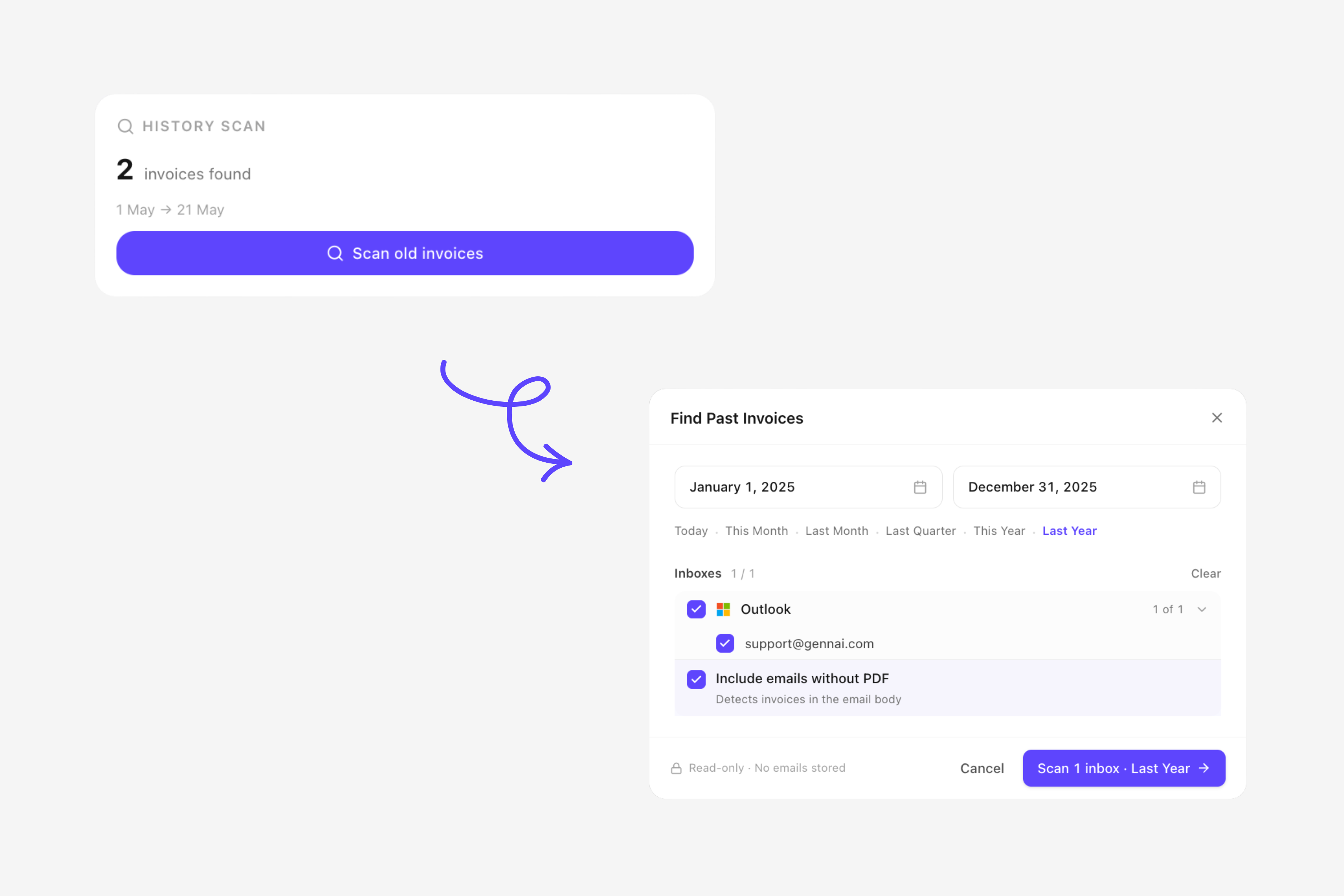
Step 3. Trigger the retroactive scan. Gennai supports scanning your full inbox history at any time. Pick the date range that makes sense for your use case, whether that is the last quarter, the current fiscal year, or every supplier email since you opened the mailbox.
Step 4. Wait for extraction. Gennai processes the inbox in the background. You do not need to keep the tab open. Scan duration depends on inbox size and Microsoft Graph rate limits.
Step 5. Review and approve. The dashboard shows every detected invoice with the extracted fields. You can edit any field, mark a document as not-an-invoice, or split a combined PDF into multiple invoices. Corrections feed back into the AI so future extractions improve.
Step 6. Connect your accounting tool. Push extracted invoices to Xero, QuickBooks, or Holded. Or export to CSV, XLSX, or Google Drive if you handle reconciliation manually.
If you have already run this with Gmail, the flow is nearly identical. The full Gmail walkthrough is documented in extract invoices from Gmail in 5 minutes, and the differences between platforms are covered in Gmail vs Outlook for invoice management.
What a retroactive Outlook scan typically surfaces
The first scan is the moment most users realize how much they were missing. On a typical Outlook 365 mailbox we see four buckets of recovered invoices:
- Recurring SaaS subscriptions the team forgot to track: Microsoft 365 itself, Adobe Creative Cloud, AWS, Slack, Linear, Notion. These accumulate to the largest single category for tech companies.
- One-off purchases buried in old threads: hardware, conference tickets, contractor invoices.
- Recurring utility and infrastructure bills: cloud hosting, telecoms, payment processor receipts.
- Personal invoices accidentally in the wrong inbox: founders forwarding receipts to themselves and forgetting to send them to AP.
A documented Gennai customer in the rentals industry connected three inboxes and recovered 12 months of invoices in one pass, eliminating the weekly back-and-forth with their accountant. The full case is in the Gennai rentals business case study.
Multi-account setup: personal, work, and shared mailboxes
This is the area where Outlook automation tools differ most. Some let you connect one mailbox per user. Gennai lets you connect multiple Outlook accounts to a single workspace.
The common configuration looks like this:
- Personal Microsoft account for founder receipts and side expenses.
- Work Microsoft 365 account for day-to-day supplier invoices.
- Shared mailbox (ap@, facturas@, billing@) where vendors send invoices to a generic address.
Each mailbox runs its own scan and contributes to the same dashboard. Invoices are tagged by source so you can filter by inbox or treat each mailbox as a separate accounting workflow.
What to verify before you trust automation with your AP inbox
Connecting is fast. Trusting the output enough to skip manual review takes a week or two of validation. Five things to check before you remove the human from the loop:
- Recall, not just accuracy. Accuracy answers "of the invoices the tool extracted, how many were correct?" Recall answers "of all the invoices in your inbox, how many did the tool find?" Most vendors publish accuracy. Almost none publish recall. Run a manual audit on one month of email and compare.
- Duplicate detection. Vendors resend invoices. The same PDF can land in three inboxes. The tool should flag duplicates before they reach your accounting system. The full mechanics are in fixing duplicate invoice detection problems.
- Multi-language handling. If you work with Spanish, French, or German suppliers, test invoices in each language. Template-based OCR breaks across languages. AI extraction handles it natively, but the validation rules around tax IDs and VAT formats still need to be language-aware. See how to process invoices in multiple languages.
- Permission and revocation flow. Make sure you understand exactly what the tool can read, and confirm the token can be revoked from
myaccount.microsoft.comwithout contacting support. - Storage and audit trail. Where are the original PDFs stored? For how long? Can you export them in bulk if you stop using the tool? GDPR Article 28 obligations apply to any processor handling your invoice data. See GDPR and invoice processing.
What Outlook automation does not replace
Two clarifications worth making upfront because they save customers from disappointment three months in.
It does not pay invoices. Capture is the first portion of the AP workflow. Approval, reconciliation, and payment are separate problems. The output of an extraction tool feeds those steps; it does not replace them.
It does not issue invoices. If you are looking for software that generates invoices for your customers and complies with VeriFactu, ViDA, or Peppol e-invoicing mandates, you need an issuer, not a capture tool. They live in different parts of the stack and the regulatory landscape is moving fast. Background on the European side is in e-invoicing mandates 2026.
Frequently asked questions
Does Gennai store my Outlook password?
No. Authorization runs through Microsoft Graph OAuth 2.0. Gennai receives a token that it uses to read mail through the API. Your password never leaves Microsoft. You can revoke access at any time from myaccount.microsoft.com under "Apps and services."
How far back does the retroactive scan go?
Gennai can scan your full inbox history. You choose the date range when you trigger the scan. The hard limit comes from Microsoft Graph and the retention policies set by your Microsoft 365 tenant.
Can I connect multiple Outlook accounts to the same workspace?
Yes. Personal Microsoft accounts, work Microsoft 365 accounts, and shared mailboxes can all live in the same Gennai workspace. Invoices are tagged by source mailbox so you can filter or route them separately.
What happens to emails that are not invoices?
They are ignored. Gennai does not move or modify non-invoice messages.
Can I disconnect Outlook later without losing my invoice data?
Yes. Disconnecting Outlook stops new scans. Every invoice already extracted stays in your Gennai dashboard, in your accounting system if you have synced, and exportable as CSV or PDF at any time.
Connect Outlook and see what you have been missing
Setup runs in a few minutes and gennai.io has a free plan to test the scan on your own inbox.
Ready to automate your invoices?
Start extracting invoices from your email automatically with Gennai. Free plan available, no credit card required.
Start FreeRelated Articles
Gmail filters for invoices: the complete setup guide (with copy-paste rules)
Gmail filters for invoices, explained: copy-paste search rules that auto-label every bill, plus where filters fall short and what catches the rest.
GuideExtract Subscription Invoices From Email Automatically (SaaS, Ads, Cloud and the Rest)
Capture every SaaS, ads, and cloud subscription invoice from your inbox. Inline emails, PDF attachments and vendor portal receipts, all extracted automatically.
GuideForward Invoices to Your Accountant Automatically (2026)
Stop forwarding invoices to your accountant one by one. How a shared accountant portal removes the email chase and gives your accountant real-time access.