
Gennai vs Tailride: Honest Comparison for 2026
Gennai vs Tailride compared feature by feature. See where they overlap, where they differ, and which invoice automation tool fits your workflow in 2026.


If you have been evaluating invoice automation tools in 2026, you have probably landed on both Gennai and Tailride. They are built around the same core idea: connect to your email, extract invoice data with AI, and sync it to your accounting software. No forwarding, no manual download, no data entry.
The honest version of this comparison is that these two tools have more in common than most roundups suggest. Both cover Gmail, Outlook, and IMAP. Both handle WhatsApp and Telegram submissions. Both extract with AI, export to Google Sheets and Google Drive, and integrate with Xero and QuickBooks. Both are CASA Tier 2 certified.
Where they genuinely differ comes down to two features Tailride has today that Gennai is building toward, plus a handful of integration and pricing differences that will matter depending on your stack. This article maps all of it out so you can make the call without having to sign up for both.
TL;DR: Gennai and Tailride share most core features as of August 2026. Tailride's current advantages are a browser extension for pulling invoices from vendor portals, PDF bank statements and more accounting integrations. Gennai has bank reconciliation built in (CSV and XLSX statements) and a browser extension on its roadmap. Gennai's current advantages are Excel invoice capture, a to-pay tray with paid status read from the document, ABA payment files, Slack capture and lower pricing per invoice ($12/mo vs $19/mo for more invoices).
What Each Tool Does
Gennai
Gennai connects to Gmail, Outlook, and IMAP accounts via OAuth and monitors them continuously for invoices. The AI extracts vendor name, date, total, tax, invoice number, currency, and line items without template configuration. You can also forward invoices or submit photos directly via WhatsApp or Telegram. Extracted data can be exported to Google Sheets, synced to Google Drive, downloaded as CSV/XLSX, or pushed directly to Xero, QuickBooks, or Holded. The dashboard unifies all inboxes in one place, supports team members and a dedicated accountant access role, and includes an audit trail.
Bank reconciliation is live: CSV or XLSX statements are matched against the invoices Gennai captured, and the gaps are reported on both sides. A browser extension for vendor portal invoice capture is in development and listed as coming soon.
Tailride
Tailride connects to Gmail, Outlook, and IMAP inboxes in the same way, plus adds a Chrome extension that navigates into vendor portals such as Amazon, Adobe, Google Ads, and Meta Ads and downloads invoices automatically. WhatsApp and Telegram submissions are both supported. The AI layer includes a custom rules engine that lets users define classification and tagging logic. Bank statement reconciliation matches uploaded statements (PDF or CSV) against collected invoices to flag missing documents. Exports go to QuickBooks, Xero, Business Central, Google Drive, and Google Sheets. There is a dedicated program for accounting firms managing 10+ client accounts from a master dashboard.
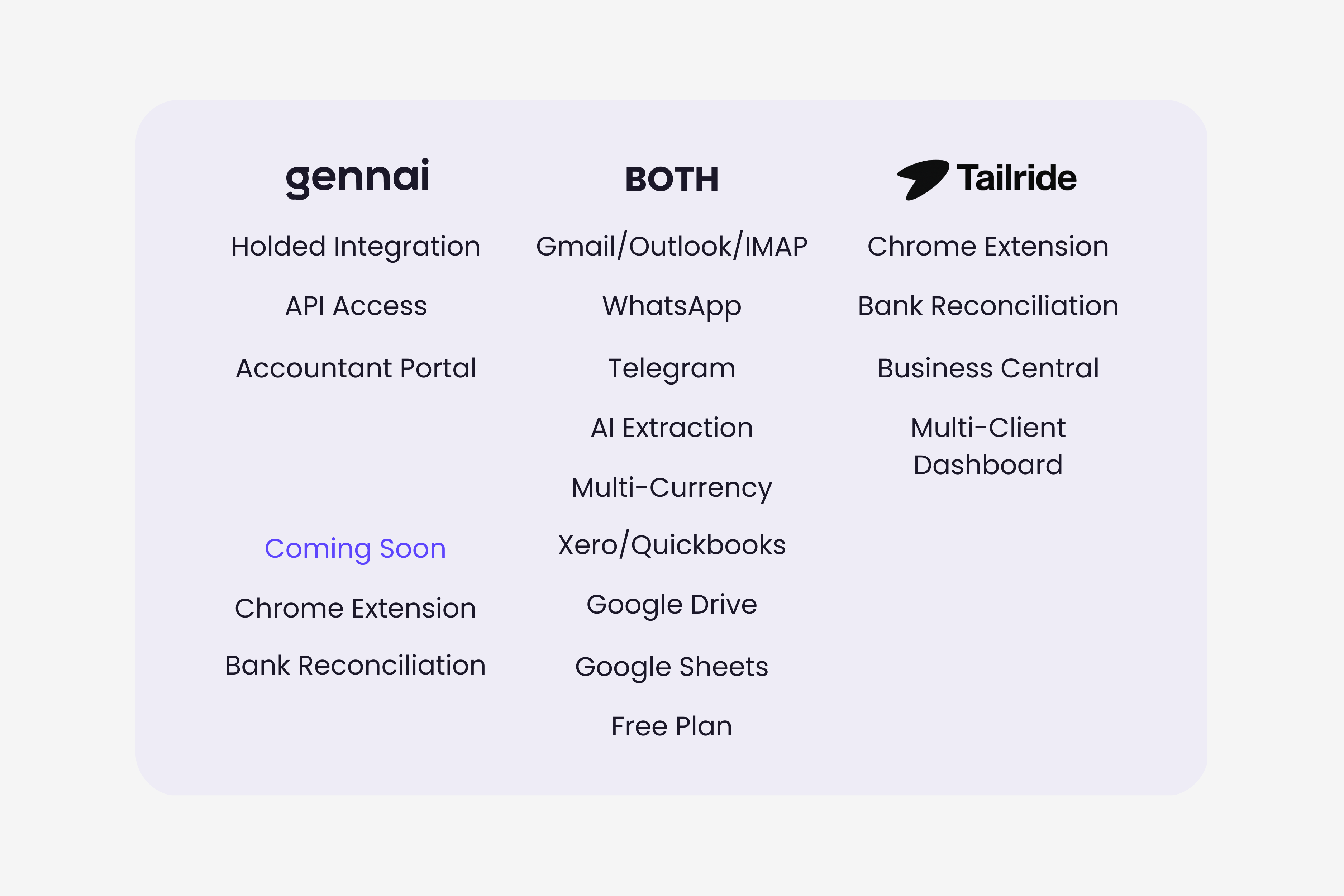
Full Feature Comparison
All data sourced from official product pages (gennai.io and tailride.so) as of March 2026. "Coming soon" reflects Gennai's publicly stated roadmap. "Not listed" means the feature does not appear in official documentation at time of writing.
| Feature | Gennai | Tailride |
|---|---|---|
| Invoice Sources | ||
| Gmail scanning | Yes | Yes |
| Outlook scanning | Yes | Yes |
| IMAP support | Yes | Yes |
| Retroactive inbox scan | Yes | Yes |
| WhatsApp submission | Yes | Yes |
| Telegram submission | Yes | Yes |
| Browser extension for vendor portals | Coming soon | Yes (21 documented portals) |
| AI & Extraction | ||
| AI extraction (no templates) | Yes | Yes |
| Custom classification rules | Yes | Yes |
| Multi-currency support | Yes | Yes |
| Line item extraction | Yes | Yes |
| Bank statement reconciliation | Yes (CSV, XLSX) | Yes (PDF, CSV) |
| Integrations & Export | ||
| Xero | Yes | Yes |
| QuickBooks | Yes | Yes |
| Holded | Yes | Yes (since May 2026) |
| Business Central | Not listed | Yes |
| Google Drive | Yes | Yes |
| Google Sheets | Yes | Yes |
| CSV / XLSX export | Yes | Yes |
| Team & Collaboration | ||
| Team members | Yes | Yes |
| Dedicated accountant access role | Yes | Yes |
| Multi-client firm dashboard | Yes | Yes |
| Audit trail | No | Yes |
| Security & Compliance | ||
| CASA Tier 2 certified | Yes | Yes |
| OAuth email connection | Yes | Yes |
| Data deletion on request | Yes | Yes |
| Pricing | ||
| Free plan | 10 invoices/mo | 10 invoices/mo |
| Entry paid plan | $12/mo (75 inv) | $19/mo (50 inv) |
| Non-expiring add-on credits | Yes | Yes |
| Annual discount | Up to 25% off | 4 months free |
Pricing
Gennai
| Plan | Monthly | Invoices/mo | Email accounts | Key inclusions |
|---|---|---|---|---|
| Free | $0 | 10 | 2 | AI extraction, WhatsApp/Telegram |
| Starter | $12 | 75 | 5 | Google Drive, Sheets, CSV/XLSX, analytics |
| Growth | $29 | 250 | 15 | Automatic export to Xero and QuickBooks, bank reconciliation |
| Business | $79 | 750 | 50 | Personalised onboarding, priority support |
Tailride
Tailride's paid plans start at $19/month for 75 invoices, scaling up to an Enterprise plan at $399/month. Annual billing gives 4 months free. Add-on credits do not expire. Accounting firms have a separate practice program priced by yearly invoice volume. Compared directly: Gennai's $12/month Starter includes 75 invoices, while Tailride's entry plan gives 75 for $19. Gennai stays cheaper per invoice at every tier.
Where Tailride Has the Edge Today
Given how much the two tools overlap, it makes sense to focus the comparison on the areas where they actually diverge today.
Chrome extension for vendor portal invoices
Tailride's Chrome extension navigates directly into vendor portals like Amazon Business, Adobe, Google Ads, and Meta Ads and downloads invoices using your own logged-in browser session, when you trigger it. Tailride cites more than 100 supported portals and documents 21, with new ones added on request.
This matters in a specific scenario: you run significant spend through platforms that do not send invoice emails. Google Ads, for example, does not email a PDF for every charge. The invoice lives inside the Google Ads billing portal. Without the extension, retrieving it requires logging in, navigating to billing, and downloading manually for every period. Tailride automates that. Same with Adobe, Meta, Amazon Business, and any other portal on their list.
For businesses where email is the primary invoice channel, this feature is irrelevant. For companies running meaningful digital ad spend or managing many SaaS subscriptions across vendor portals, it removes a real recurring time cost. Gennai has this on its roadmap. Until it ships, the gap exists.
How to assess whether you need portal coverage: go through last month's payables and split them into two lists: invoices that arrived in your inbox vs invoices you had to log into a portal to download. If your portal list is short, email-first capture covers you. If it's long, the Chrome extension is a meaningful time-saver. The article on why email-first invoice capture is becoming the standard walks through how to think about this.
Bank statement reconciliation
Tailride's reconciliation feature lets you upload a bank statement (PDF or CSV) and automatically matches it against the invoices collected. Transactions with no corresponding invoice get flagged. Currency conversion is handled automatically, so cross-currency expenses match correctly.
This is a useful tool at month-end or quarter-end, particularly for teams that want to catch missing invoices without manually cross-referencing their bank feed against their invoice list. Gennai now includes its own bank reconciliation: it imports CSV or XLSX statements from any bank, matches each transaction against captured invoices and reports the gaps on both sides. The difference today is the input format: Tailride reads PDF statements, Gennai reads CSV and XLSX. Xero and QuickBooks both have bank reconciliation built in, so for users on those platforms the gap is mostly one of convenience: Tailride surfaces it earlier in the workflow, before data leaves the extraction tool.
Where Gennai Differentiates
Holded integration
Gennai has had a native Holded integration since January 2026; Tailride added one in May 2026. For businesses in Spain or Latin America using Holded as their accounting platform, both tools now connect natively; Gennai's integration has been in production longer and handles VAT automatically. For teams evaluating how invoice software connects to accounting systems generally, the guide to integrating invoice software with your accounting system covers the different integration patterns in detail.
Dedicated accountant access role
Gennai's Growth plan includes a separate accountant access role: a permission level designed specifically for external bookkeepers. Your accountant can log in, review invoices, and export data without having access to the rest of the account settings. This is distinct from Tailride's accounting firm program, which is designed for accountants managing many client entities from one dashboard rather than a single business sharing access with one accountant.
Pricing at entry level
At $12/month for 75 invoices, Gennai's Starter plan gives more invoices for less than Tailride's entry plan ($19/month for 50 invoices). For small teams with moderate invoice volumes, this difference compounds over a year. Both tools offer non-expiring add-on credits for months where you exceed your plan limit.
Where They Are Equivalent
Before making a decision based on the differences, it is worth being explicit about how much these two tools share. The following capabilities are present in both:
Email scanning (Gmail, Outlook, IMAP)
Both connect via OAuth, support retroactive historical scanning, and monitor inboxes continuously. Neither requires forwarding invoices to an external address.
WhatsApp and Telegram
Both accept invoice photos and PDFs submitted via WhatsApp and Telegram, covering field teams, paper receipts, and any invoices that arrive outside the inbox.
AI extraction without templates
Both extract vendor name, date, total, tax, invoice number, currency, and line items using AI models that adapt to any vendor layout without requiring manual configuration per vendor.
Custom classification rules
Both let users define rules to classify and tag invoices by category, department, or any criteria that matches the accounting workflow.
Multi-currency support
Both handle invoices in multiple currencies, which is relevant for any business with international suppliers.
Xero and QuickBooks
Both integrate natively with Xero and QuickBooks. For users on either platform, this is not a differentiator.
Google Drive and Google Sheets
Both sync to Google Drive and export to Google Sheets, covering teams that use Google Workspace in their finance workflow.
Non-expiring add-on credits
Both allow purchasing additional invoice credits that do not expire, useful for businesses with variable monthly invoice volumes.
Security: CASA Tier 2 certified
Both have completed a Cloud Application Security Assessment Tier 2 through the App Defense Alliance. Both use OAuth connections and do not store email passwords. For a deeper look at what security certification means for invoice tools, the invoice data security guide covers the compliance picture in detail.
Free plan
Both offer 10 invoices per month free with no time limit, giving a genuine no-commitment entry point to test extraction quality on your actual invoice formats.
Who Each Tool Fits Best
Gennai fits well when:
- Your invoices arrive primarily by email and you do not rely on vendor portal downloads
- You receive invoices as Excel files or want ABA payment files
- You want a to-pay tray with the paid status read from each document
- You want lower entry-level pricing with more invoices per tier
Tailride fits well when:
- You have a material volume of invoices living inside vendor portals (Google Ads, Amazon, Adobe, etc.)
- You want a browser extension for vendor portals now, before Gennai's ships
- You reconcile PDF bank statements and do not want to convert them to CSV first
- You use Microsoft Business Central
- You are an accounting firm managing 10+ client entities from a single dashboard
Making the Call
The honest answer for most businesses is that both tools will handle your email-based invoice workflow well. The question of which to pick comes down to three concrete checks: whether your invoices arrive primarily by email or across vendor portals, which accounting platform you are on, and whether you need the vendor portal extension, which Tailride has today and Gennai is still building.
If you receive invoices as Excel files, want a to-pay tray or ABA payment files, or want to keep costs down, Gennai is the clearer choice right now. If vendor portal coverage or PDF statement reconciliation is a hard requirement today, Tailride covers those. If neither of those is a hard requirement, the free tiers let you test both against your actual invoices without committing.
For a broader framework on evaluating invoice tools beyond this head-to-head, the invoice management software buyer's guide covers the full decision process across features, pricing, and integration requirements. And for teams thinking through how AI extraction actually works under the hood, the guide on how AI actually reads invoices explains the technical layers that determine extraction accuracy.
Ready to automate your invoices?
Start extracting invoices from your email automatically with Gennai. Free plan available, no credit card required.
Start FreeRelated Articles
Accounts Payable Turnover Ratio Explained
The accounts payable turnover ratio shows how fast you pay suppliers. Get the formula, a worked example, benchmarks and what your number really means.
GuideNet 30 vs Net 60: What Payment Terms Really Mean for Your Cash
Net 30 vs net 60 explained for business owners: what each term means, when the clock really starts, and how the gap hits your cash on both sides.
GuideThe Accounts Payable Process, Step by Step (for Owners)
The accounts payable process has five steps: receive, verify, approve, pay, and record each invoice. Here is how each works and where owners lose money.