
12 Invoice Automation Tools Compared (2026 Guide)
12 invoice automation tools compared for 2026: email capture, AI extraction, and AP suites, with pricing, pros and cons, and the best fit for each.

The invoice automation software market has grown significantly. In 2026 the global invoice processing software market is valued at $3.17 billion and growing at 14.2% annually. That growth means more tools, more positioning overlap, and more noise when you are simply trying to figure out which product actually solves your problem.
This guide covers twelve tools across every market segment: email-first capture for SMBs, AI extraction platforms for high volume, full AP suites for mid-market teams, and enterprise-grade systems. Each entry covers pricing, key capabilities, honest trade-offs, and the use case it fits best. Gennai is included and assessed with the same framework as every other tool.
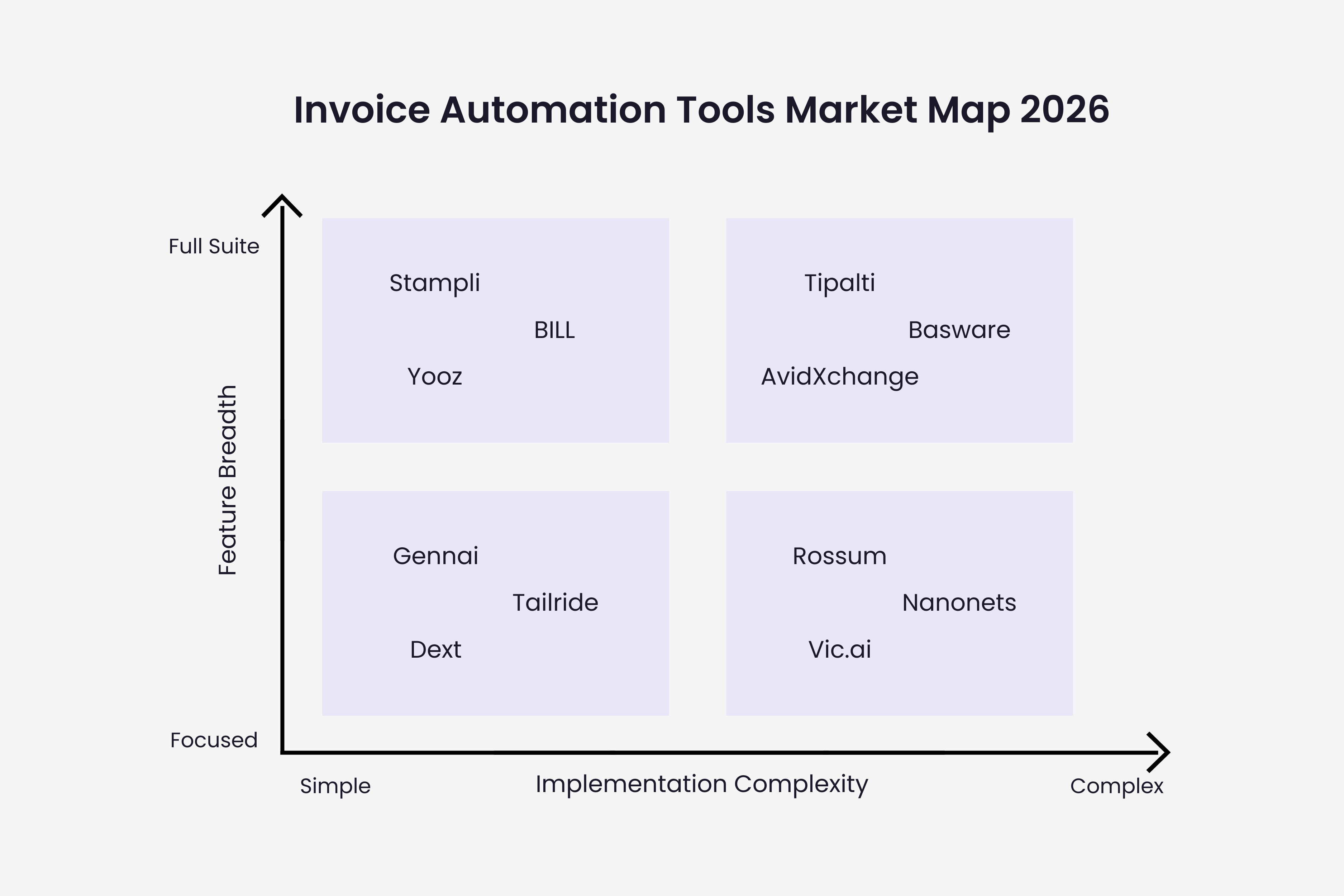
| Email-First Capture | AI Extraction | Mid-Market AP Suite | Enterprise / Global |
|---|---|---|---|
| Gennai, Tailride, Dext | Rossum, Nanonets, Vic.ai | Stampli, BILL, Yooz | Tipalti, AvidXchange, Basware |
How We Evaluated Each Tool
Every tool in this guide was assessed against the same six criteria: invoice capture method (email, upload, portal, API), AI extraction accuracy, accounting integrations available, approval workflow capabilities, pricing transparency, and implementation complexity. Pricing data was verified against each vendor's public pricing page or widely cited sources as of March 2026. Where pricing is quote-based, the ranges reflect reported market rates from independent reviews and user communities. No vendor paid for inclusion or placement in this guide.
Segment 1: Email-First Invoice Capture
These tools start from the inbox. They connect to Gmail or Outlook, automatically detect invoices in incoming email, extract the data, and push it to your accounting system. The differentiator in this segment is not feature breadth but setup friction and ongoing reliability. The right choice here saves the most time for the least implementation effort.
Gennai
Free (10 inv/mo) | $12/mo Starter | $29/mo Growth | $79/mo Business
AI invoice extraction from Gmail and Outlook, exports to Xero, QuickBooks, Holded, Google Drive
Gennai is built around a single workflow: invoices arrive in Gmail or Outlook, AI reads the attachment, extracts structured data, and the record syncs to your accounting system within minutes. There are no templates to configure and no per-vendor setup required. The extraction model handles new vendor formats automatically. Pricing is the most transparent in this segment: $12/month for 75 invoices on the Starter plan, $29/month for 250 invoices with QuickBooks and Xero integration on the Growth plan, and $79/month for 750 invoices with unlimited team members on the Business plan. A free plan covers 10 invoices per month with two email accounts. The complete product walkthrough covers the setup steps in detail.
Best for: Freelancers, SMBs and accounting firms receiving invoices primarily by email and exporting to Xero, QuickBooks, or Holded
Pros:
- Transparent, flat pricing from $12/month
- Connects Gmail + Outlook simultaneously
- Retroactive inbox scan from day one
- CASA Tier 2 certified, AES-256 encryption
- Free plan for up to 10 invoices/month
Cons:
- No built-in payment execution
- No PO matching or 3-way matching
- Approval workflows not included (relies on accounting platform)
Dext (formerly Receipt Bank)
From ~$20/mo (Prepare plan, 25 documents); pricing varies by region
Receipt and invoice capture via email, mobile app, and bank feed; strong accountant ecosystem
Dext focuses on the receipt and invoice capture problem for small businesses and their accountants. Its mobile app is the standout: photograph a receipt immediately after a purchase and the data extracts automatically. Email capture works but requires forwarding to a Dext address rather than direct inbox connection. For businesses that mix digital invoices with physical receipts, Dext handles both channels in one interface. For a detailed comparison with Gennai, see Gennai vs Dext.
Best for: Freelancers and small businesses that make frequent in-person purchases and need mobile receipt scanning alongside email invoice capture
Pros:
- Excellent mobile receipt scanning
- Strong accountant partner program
- Integrates with Xero, QuickBooks, Sage
Cons:
- Lower document limits on base plans vs price
- Less precise at line-item extraction on complex invoices
- Primarily capture-focused; limited workflow automation
Tailride
Free plan (10 inv/mo); paid plans from approx. $15-$30/mo
Email-first invoice capture with multi-channel ingestion including Chrome extension and WhatsApp
Tailride takes the email-first approach further with additional capture channels. Beyond Gmail and Outlook, it offers a Chrome extension that pulls invoices from supplier portals and supports document submission via WhatsApp, which is useful for teams with field staff photographing paper invoices. For a side-by-side comparison of how Tailride stacks up specifically against Gennai, see the Gennai vs Tailride comparison.
Best for: Small businesses and accounting firms needing inbox automation with additional capture channels beyond email
Pros:
- Multi-channel capture: email, Chrome extension, WhatsApp
- CASA Tier 2 certified
- Direct export to QuickBooks, Xero, DATEV, Business Central
Cons:
- Less established than Gennai or Dext in accounting firm ecosystem
- Chrome extension dependency adds setup steps
- Limited advanced workflow features
Segment 2: AI Extraction Platforms
These tools are extraction engines first. They achieve the highest accuracy rates on complex, high-volume invoice sets and offer API-first architectures for integration into custom workflows. They require more technical resources to implement than email-first tools but deliver more flexibility for organizations with non-standard requirements.
Rossum
Quote-based; approx. $0.75-$2/invoice + user licenses; ~$300-$1,000/mo for mid-market
AI-powered cognitive data capture platform; template-free extraction across any invoice format
Rossum's Aurora AI engine is widely cited as the most accurate extraction model for varied and complex invoice formats. It handles invoices in multiple languages, unusual layouts, and even handwritten fields with minimal configuration. The platform is API-first, meaning most deployments require developer involvement to connect Rossum to the rest of the workflow. For organizations with the technical resources to set it up properly, Rossum delivers the highest extraction accuracy in this comparison.
Best for: Companies processing high volumes of complex or multi-format invoices who have technical resources for integration setup
Pros:
- 95%+ first-pass accuracy without templates
- Handles multilingual and handwritten invoices
- Strong API; integrates with SAP, Oracle, QuickBooks
- Continuous AI learning from corrections
Cons:
- Enterprise pricing; steep for low-volume users
- Requires technical resources for initial setup
- Limited self-service; less plug-and-play than SMB tools
Nanonets
Free tier available; paid from ~$499/mo for full AP automation features
No-code AI platform for invoice OCR and workflow automation; accessible to non-technical users
Nanonets occupies a useful middle ground: AI extraction quality closer to enterprise platforms but a setup experience accessible to finance teams without developer support. The no-code model training interface lets non-technical users upload sample invoices and train the extraction model without writing any code. Workflow automation capabilities are more developed than email-first tools, with support for conditional routing and multi-step approval chains.
Best for: Mid-market teams wanting AI extraction accuracy without requiring a developer for setup and maintenance
Pros:
- No-code model training interface
- Strong workflow builder with conditional logic
- Pre-built connectors for QuickBooks, Xero, NetSuite
Cons:
- Higher price point than email-first tools
- Free tier limited to low volumes
- Less accuracy than Rossum on highly complex formats
Vic.ai
Quote-based; designed for mid-to-large enterprises
Autonomous AP platform using AI for invoice coding, approval prediction, and touchless processing
Vic.ai differentiates through autonomous invoice coding: rather than requiring a human to assign GL codes, the AI learns your historical coding patterns and applies them automatically. Over time, the system achieves progressively higher touchless processing rates as it learns your accounting logic. This approach delivers strong results for organizations with consistent coding patterns and significant historical invoice data to train from.
Best for: Organizations aiming for maximum touchless processing rates and willing to invest in AI that learns organizational coding patterns over time
Pros:
- Autonomous coding learns from historical AP data
- High touchless processing rates reported by enterprise users
- Strong ERP integrations including NetSuite, SAP, Oracle
Cons:
- Quote-based pricing with limited transparency
- Requires historical invoice data to train effectively
- Not suited for small teams or low invoice volumes
Segment 3: Mid-Market AP Suites
These platforms go beyond extraction to cover the full AP workflow: capture, validation, approval routing, and payment execution. They are the right choice when the primary pain is not just extraction but the entire invoice-to-payment cycle including multi-level approvals, collaboration, and payment processing.
Stampli
Quote-based; ~$0.75-$1.50/invoice or $50-$100/user/month; avg. $300-$1,000/mo
AP automation platform built around collaborative invoice approval; AI assistant Billy the Bot
Stampli's core differentiator is collaboration: every invoice has its own communication thread where approvers, AP staff, and vendors can ask questions and attach notes without leaving the platform. This eliminates the email chains that create approval delays and audit gaps. Billy the Bot, Stampli's AI assistant, learns your GL coding patterns and applies them automatically, reducing manual coding work progressively as the system accumulates more invoice history.
Best for: Mid-sized teams with complex approval chains who need the whole organization (not just AP) engaged in the invoice workflow
Pros:
- In-invoice commenting keeps approvals in context
- Billy the Bot learns GL coding automatically
- Fast implementation vs other mid-market tools
- Works with most major ERPs natively
Cons:
- Pricing not transparent; requires a sales call
- Limited reporting compared to broader AP suites
- Payment features less developed than Tipalti
BILL (formerly Bill.com)
$45/user/month for AP + AR; per-transaction fees for payments (ACH ~$0.49, check ~$1.49)
Cloud AP and AR automation for SMBs; strong QuickBooks and Xero integration; vendor payment network
BILL is one of the most widely used SMB AP platforms in North America, primarily due to its deep integration with QuickBooks and the strength of its accountant partner program. Its vendor payment network lets businesses pay suppliers electronically without collecting bank details every time, which reduces friction significantly for high-vendor-count operations. The per-user pricing is transparent but the per-transaction fees on payments need to be factored into total cost of ownership for higher-volume payers.
Best for: Small to mid-sized businesses that want both AP and AR automation in one platform with strong accountant ecosystem support
Pros:
- Clear per-user pricing
- Strong native QuickBooks and Xero integration
- Electronic vendor payment network reduces bank detail collection
- Accountant partner ecosystem is extensive
Cons:
- Per-transaction payment fees add up at scale
- Line-item extraction less precise on complex invoices
- Some users report OCR accuracy issues on non-standard formats
Yooz
Quote-based; designed for mid-market organizations
Purchase-to-pay AP automation focused on Lean Financial Operations; 250+ ERP integrations
Yooz positions itself around 'Lean Financial Operations', an approach that aims to eliminate process waste rather than simply digitize existing workflows. Its breadth of ERP integrations (250+) makes it compatible with most mid-market and niche accounting environments, including platforms that larger vendors do not support natively. The platform covers the full purchase-to-pay cycle, which makes it more appropriate for businesses with formal procurement processes than for those needing primarily invoice-capture automation.
Best for: Mid-sized companies needing purchase order management alongside invoice automation, with broad ERP compatibility
Pros:
- 250+ ERP integrations including many niche platforms
- Full purchase-to-pay coverage (POs to payment)
- Strong fraud detection capabilities
- Fast deployment philosophy vs legacy AP tools
Cons:
- Quote-based pricing with limited public transparency
- Setup more complex than email-first tools
- Overkill for businesses without PO management needs
Segment 4: Enterprise and Global AP Platforms
These platforms are designed for large organizations, multi-entity structures, international supplier networks, and complex compliance requirements. They are significantly more expensive and take longer to implement than tools in other segments, but they handle scale and compliance complexity that mid-market tools cannot.
Tipalti
Quote-based; significant investment; designed for companies with $10M+ in annual supplier payments
End-to-end global payables platform: invoice capture, compliance, and mass payments in 196 countries
Tipalti is the go-to platform for companies that have outgrown domestic AP tools and need to manage hundreds or thousands of international suppliers. Its combination of invoice capture, tax compliance automation (1099, W-8, VAT), and mass payment execution across 196 countries in a single system eliminates the multi-tool stack that most global companies cobble together. The implementation complexity and cost are justified when international payments are a core operational challenge. For domestic-only operations, the feature set is overkill.
Best for: Fast-growing companies and enterprises managing international suppliers across multiple countries and currencies
Pros:
- Payments in 196 countries, 120+ currencies
- Automated W-9/W-8 tax compliance
- Supplier self-service portal reduces AP admin
- Multi-entity support with consolidated reporting
Cons:
- Complex setup; steep learning curve for smaller teams
- Pricing opaque and expensive for low-volume users
- Feature richness feels like overkill without global payment needs
AvidXchange
Quote-based; targets companies processing 500+ invoices monthly
Mid-market and enterprise AP automation with a strong focus on the real estate and construction sectors
AvidXchange has built a strong position in specific verticals, particularly real estate, property management, and construction, where invoice workflows involve project-based cost coding, lien waiver tracking, and high volumes of recurring vendor payments. Outside these industries, newer platforms often deliver better user experience at comparable or lower cost. For in-scope industries, AvidXchange's domain-specific workflows are a genuine advantage.
Best for: Mid-market and enterprise companies in real estate, construction, and property management with high-volume invoice processing needs
Pros:
- Strong industry-specific workflows for real estate/construction
- Payment automation with check and ACH capabilities
- Established platform with large customer base
Cons:
- Industry focus limits appeal outside core verticals
- UI reported as less modern than newer competitors
- Integration challenges with non-standard ERP systems reported
Basware
Quote-based; enterprise contract; significant implementation investment
Enterprise-grade e-invoicing and AP automation; global supplier network; touchless processing at scale
Basware operates at a different scale from every other tool in this guide. Its AI has been trained on over 2 billion invoices processed through its network, which gives it accuracy advantages on edge-case formats that smaller platforms have not encountered. The 89% touchless processing figure cited earlier in this guide comes from Deloitte's deployment of Basware at enterprise scale. For organizations with the procurement complexity, compliance requirements, and budget to justify Basware, it delivers capabilities no other tool on this list can match. For everyone else, it is not the right starting point.
Best for: Large enterprises managing complex global supplier networks, mandatory e-invoicing compliance, and high-volume touchless processing
Pros:
- Global e-invoicing network covering 175+ countries
- AI trained on 2B+ invoices; high touchless rates
- Up to 89% touchless processing in enterprise deployments
- Spend analytics and dynamic discounting capabilities
Cons:
- Enterprise pricing and implementation complexity
- Not suited for SMBs or mid-market without enterprise IT resources
- Long onboarding timelines reported by some customers
Master Comparison Table
The table below summarizes all twelve tools across eight key criteria. For approval workflows and payment execution, entries reflect native capabilities; some tools achieve these through integrations that require additional setup.
| Tool | Segment | Email capture | AI extract | Approval workflow | Payment exec | Accounting integration | Starting price | Best fit |
|---|---|---|---|---|---|---|---|---|
| Gennai | Email-first | Yes | Yes | No | No | Xero, QBO, Holded, Drive | Free / $12/mo | SMBs, freelancers, accountants |
| Dext | Email-first | Limited | Yes | No | No | Xero, QBO, Sage | ~$20/mo | SMBs with mixed receipts |
| Tailride | Email-first | Yes | Yes | No | No | Xero, QBO, DATEV | Free / ~$15/mo | SMBs needing multi-channel |
| Rossum | AI platform | Limited | Yes | Limited | No | SAP, Oracle, QBO | ~$300/mo+ | High-volume, complex formats |
| Nanonets | AI platform | Limited | Yes | Yes | No | Xero, QBO, NetSuite | ~$499/mo | Mid-market, no-code AI |
| Vic.ai | AI platform | Limited | Yes | Yes | No | NetSuite, SAP, Oracle | Quote | Enterprises touchless |
| Stampli | AP suite | Limited | Yes | Yes | Yes | QBO, NetSuite, Sage | Quote (~$300+/mo) | Collab-focused mid-market |
| BILL | AP suite | Limited | Yes | Yes | Yes | QBO, Xero | $45/user/mo | SMBs needing AP + AR |
| Yooz | AP suite | Limited | Yes | Yes | Yes | 250+ ERPs | Quote | P2P, broad ERP compat. |
| Tipalti | Enterprise | Limited | Yes | Yes | Yes | NetSuite, QBO, Xero | Quote | Global multi-currency pmts |
| AvidXchange | Enterprise | Limited | Yes | Yes | Yes | Various ERPs | Quote | Real estate, construction |
| Basware | Enterprise | Limited | Yes | Yes | Yes | SAP, Oracle, ERPs | Quote | Large enterprise, e-invoicing |
How to Choose: Four Questions That Narrow It Down
1. Where do invoices arrive?
If 80%+ arrive as email attachments, start in the email-first segment. Gennai, Tailride, and Dext are built for this and have the lowest setup friction. If invoices come through supplier portals, EDI, or a mix of channels, move to an AI extraction platform or AP suite.
2. What is your monthly invoice volume?
Under 250 invoices per month: email-first tools or BILL provide strong ROI without over-engineering. 250 to 2,000 per month: Nanonets, Stampli, or Yooz. Over 2,000 per month with complex formats: Rossum, Vic.ai, or Tipalti. The invoice management software decision framework walks through the volume thresholds in more detail.
3. Do you need payment execution or just data extraction?
Email-first and AI extraction tools stop at structured data output. You export to your accounting system and pay from there. AP suites (BILL, Stampli, Yooz, Tipalti) include payment execution as part of the workflow, which is valuable if payment processing is itself a bottleneck.
4. Do you have international suppliers?
Domestic-only operations can use any tool in this guide effectively. Companies managing suppliers across multiple countries need either Tipalti (best-in-class for global payments) or Basware (best for global e-invoicing compliance). The cost difference is significant; only cross-border payment volume justifies it.
The Market Is Segmented for a Reason
No single tool in this guide is the right choice for every business. The email-first tools (Gennai, Tailride, Dext) are not trying to be Tipalti. Basware is not trying to compete with a $12/month SMB product. The question is which tool matches your actual invoice flow, your team's technical capacity, and your budget, not which one has the longest feature list.
For most small and mid-sized businesses receiving invoices primarily by email and exporting data to Xero or QuickBooks, the decision narrows quickly to the email-first segment. The investment is low, setup takes minutes rather than weeks, and the core problem gets solved without acquiring capabilities you will never use. The invoice management best practices for 2026 covers how to evaluate whether a tool is actually working after implementation, with the six KPIs that reflect real-world performance rather than vendor claims.
TL;DR
- The invoice automation market splits into four clear segments: email-first capture, AI extraction platforms, mid-market AP suites, and enterprise/global platforms
- Email-first tools (Gennai, Tailride, Dext) offer the lowest setup friction and cost for SMBs receiving invoices by email
- AI extraction platforms (Rossum, Nanonets, Vic.ai) deliver the highest accuracy on complex formats but require more technical resources
- AP suites (Stampli, BILL, Yooz) cover the full invoice-to-payment cycle including approvals and payment execution
- Enterprise platforms (Tipalti, AvidXchange, Basware) handle global compliance and multi-entity scale at significantly higher cost
- Start with where your invoices arrive and your monthly volume to narrow the field quickly
- The invoice management software decision framework provides a structured approach to choosing the right tool for your specific workflow
Ready to automate your invoices?
Start extracting invoices from your email automatically with Gennai. Free plan available, no credit card required.
Start FreeRelated Articles
Invoice Automation 2026: Benchmarks, Costs & Trends
The 2026 state of invoice automation: adoption data, cost per invoice benchmarks, e-invoicing mandates, and the trends shaping AP teams this year.
GuideInvoice Automation Checklist: 52 Steps to Audit
A 52-point invoice automation checklist across capture, extraction, approval, integration, and security. Use it to build a new setup or audit an existing one.
GuideInvoice Software: Complete Buyer's Guide 2026
Choose the right invoice management software for your business. Compare features, pricing, and types. Real advice from finance professionals. 2026 guide.