
Invoice Management Best Practices: 12 for 2026
12 invoice management best practices for 2026 across capture, approval, integration, and KPIs, plus the benchmarks that separate best-in-class AP teams.

Invoice management best practices in 2026 look different from those of five years ago. AI extraction is mature enough to be reliable. E-invoicing mandates have gone live in several major markets. Remote and distributed teams have made synchronous approval workflows impractical. And the benchmarks have shifted: best-in-class AP teams now process invoices at $2.78 per invoice and a 3.1-day cycle time, making the gap between top performers and average teams more visible than ever. This guide covers twelve practices organized across four layers: capture and extraction, validation and approval, integration and data, and measurement. Each practice is grounded in current data and practical to implement without an enterprise budget or a six-month IT project.
Layer 1: Capture and Extraction
Everything in invoice management starts with whether you actually receive every invoice that was sent to you. Missed invoices create late payments, damaged vendor relationships, and audit gaps. Capture is not glamorous, but it is the layer where most small teams still have unclosed holes.
1. Centralize every invoice channel into one intake point
The most common capture failure is not a technology problem. It is an inbox problem. Invoices arrive at finance@, accounting@, a founder's personal email, and sometimes directly to department managers who forget to forward them. Each separate channel is a potential missed invoice.
Best practice: designate one canonical address for all vendor invoices and notify every supplier. Connect that address, plus any legacy addresses still receiving invoices, to your extraction tool. The email invoice extraction guide covers the setup for Gmail, Outlook, and multi-account configurations. Run a retroactive scan when you first connect to surface every invoice already sitting in existing inboxes.
2. Use AI extraction, not template-based OCR
Template-based OCR tools require you to configure the layout for each vendor. When that vendor updates their invoice design, the template breaks and someone has to rebuild it. At scale, across dozens of vendors, this maintenance burden becomes a full-time job.
AI-powered extraction learns from examples and generalizes to new formats without manual intervention. Modern systems achieve 95-99% accuracy on standard fields (vendor, date, amount, invoice number) and improve as they process more invoices from a given vendor. The performance gap between AI and template-based OCR is significant enough that choosing the wrong tool will cost more in maintenance than it saves in licensing fees. See the complete AI invoice processing guide for the accuracy benchmarks by approach.
3. Validate every extracted field, not just the total
A common extraction configuration mistake: setting up validation on the invoice total but not on line items, dates, or vendor identifiers. This creates a false sense of accuracy. The total can be correct while line item descriptions are garbled, dates are misread, or the vendor name does not match your approved vendor master.
Best practice: validate at least six fields per invoice: vendor name against your vendor master, invoice date (not in the future, not older than 180 days without a reason), due date (after invoice date), subtotal + tax = total, invoice number (not a duplicate), and currency code. Flag rather than auto-reject on each validation failure. Most failures are vendor formatting issues, not fraud.
Layer 2: Validation and Approval
Approval is where most invoice management improvements stall. Teams automate extraction and then leave approval on email threads. The result: extraction now takes seconds, but invoices still sit in someone's inbox for a week waiting for sign-off. The bottleneck just moved.
4. Define approval rules before you need them
Approval routing works when the rules exist before invoices arrive. Most teams configure routing reactively, after an invoice gets stuck or sent to the wrong person. This creates gaps and inconsistencies that erode trust in the system.
Define routing rules across three dimensions: amount thresholds (who approves what dollar value), vendor category (trusted recurring vendors vs new vendors), and department (who approves expenses for which cost center). Document these rules in writing before configuring them in software. The written document is what you update when roles change, and what you hand off when someone leaves. The invoice automation checklist includes the full approval matrix template under Section D.
5. Set escalation windows, not just routing rules
Routing an invoice to the right approver is half the job. The other half is what happens when that approver does not act. Without escalation rules, a single busy or traveling approver can freeze every invoice in the queue indefinitely.
Best practice: set a 48-hour window for first-tier approvers and 72 hours for escalation to the backup. Every approver needs a named backup. Configure both in your system before anyone goes on vacation, not after the first payment delay complaint. According to DocuClipper, 29% of enterprises require six or more approvals per invoice, making escalation logic especially important in multi-tier approval chains.
6. Run duplicate detection on three fields, not one
Standard duplicate detection matches on invoice number alone. This fails in two common scenarios: a vendor who reuses invoice numbers across fiscal years, and a vendor with two entries in your system under slightly different names. Both cases result in a duplicate payment that the system passed as clean.
Best practice: match on invoice number plus vendor name plus total amount. All three must match for a duplicate flag. This catches the reused-number case and the dual-vendor-record case. Industry estimates put duplicate payment rates at 0.8% to 2% in businesses without robust triple-field matching. The guide to fixing duplicate invoice detection covers why single-field matching fails and what to configure instead.
Layer 3: Integration and Data
The value of invoice automation compounds when extracted data flows into your accounting system without manual steps. A tool that extracts correctly but requires manual export and import has eliminated one bottleneck while leaving another open.
7. Sync to your accounting platform in both directions
Many extraction tools offer one-way sync: data flows from extraction into your accounting system. This creates a reconciliation gap. When your accountant codes an invoice to a different GL account in Xero, that correction does not flow back to your extraction dashboard. You now have two records that disagree.
Best practice: use bidirectional sync where approval status, GL coding, and payment status update in both systems. This creates a single source of truth regardless of which system was used to make the change. The invoice system integration guide covers the specific integration patterns for Xero, QuickBooks, and Holded, including how to configure GL code mapping to minimize manual coding.
8. Store original PDFs linked to extracted records
Extracted data is useful for reporting and accounting. The original PDF is the legal document. Tax authorities and auditors expect to see the source document, not a database record of what it said. A finance team that stores only extracted data and deletes originals has created a compliance gap.
Best practice: store every original invoice PDF in a cloud location you control (Google Drive is the most common) organized by vendor and date, with a direct link to the corresponding record in your accounting system. Retention minimum: 7 years. For EU-based operations or businesses with EU suppliers, confirm that your storage location meets GDPR data residency requirements. The invoice data security and compliance guide covers the full retention and residency requirements.
9. Map GL codes by vendor and category, not invoice by invoice
Manual GL coding is one of the last remaining manual steps in otherwise automated AP workflows. Every invoice still requires someone to decide which account it belongs to. At 200 invoices per month, that is 200 small decisions adding up to hours.
Best practice: configure automatic GL code assignment by vendor (Vendor A always codes to account 5100), by email domain (all invoices from @aws.amazon.com code to cloud infrastructure), or by keyword in the invoice description. Most extraction tools support at least vendor-level GL mapping. Setting this up for your top 20 vendors eliminates GL coding for the majority of your invoice volume in a single afternoon of configuration work.
Layer 4: Measurement
Invoice management that is not measured does not improve. The teams with the lowest processing costs and fastest cycle times are not the ones who built the most sophisticated systems. They are the ones who tracked five or six numbers consistently and kept optimizing based on what those numbers showed.
10. Track six KPIs monthly, not thirty
AP dashboards in enterprise tools show thirty metrics. Most of them are noise. The six that actually tell you whether your process is healthy:
| KPI | Best-in-Class | Average |
|---|---|---|
| Cost per invoice | $2.78 | $12.88 |
| Cycle time (receipt to approval) | 3.1 days | 17.4 days |
| Exception rate | 9% | 22% |
| Touchless processing rate | 89% | 38% |
| Duplicate payment rate | < 0.5% | 1.5% |
| Early payment discount capture | 92% | 41% |
11. Run a quarterly process audit, not just monthly reporting
Monthly KPI tracking tells you what is happening. A quarterly process audit tells you why and whether the configuration still matches your actual workflow. Vendors change invoice formats. Team members leave. GL code mappings become outdated. Approval routes point to people who no longer have that role.
Quarterly audit checklist: review exception queue patterns (which vendors or invoice types cause the most exceptions), verify GL code mappings against current chart of accounts, confirm backup approvers are still valid, run a duplicate payment check across the past quarter, and test one end-to-end invoice flow from email receipt to accounting sync. The audit takes under two hours for most small teams and surfaces problems before they become expensive.
12. Treat early payment discounts as a measurable asset
Most businesses with net-30 or net-60 supplier terms have early payment discount offers sitting uncaptured. A 2/10 net-30 term (2% discount for payment within 10 days) represents a 36% annualized return on that cash when captured consistently. For companies with significant supplier spend, this is not a minor optimization.
Capturing early payment discounts requires two things: fast enough invoice processing to know a discount is available before the window closes, and a clear record of which vendors offer discounts and on what terms. Both are configuration problems that an automated system solves. A 10-day approval cycle makes 2/10 net-30 discounts impossible to capture. A 3-day cycle makes most of them available. The connection between cycle time and discount capture is one of the most direct ROI arguments for invoice automation.
Security and Compliance: Three Non-Negotiables
These three practices do not fit neatly into the four layers above, but they underpin all of them. Getting them wrong creates exposure that the other twelve practices cannot fix.
Segregation of duties
No single person should be able to create, approve, and pay an invoice. This is the most basic fraud prevention control in AP. In small teams where one person handles all of AP, compensating controls like secondary payment review or bank confirmation for new vendor bank details become essential.
Role-based access control
AP staff should see only the invoices in their queue. Managers should see only invoices requiring their approval. Not everyone needs read access to all vendor payment information. Configure roles explicitly in your extraction tool and accounting platform. Review access quarterly when you do the process audit.
Document retention with original files
Seven years is the safe minimum retention period for most jurisdictions. Store original PDFs, not just extracted data. For EU operations, GDPR data residency requirements apply to invoice storage. The invoice data security guide covers the full compliance picture including the 2026 e-invoicing mandate requirements for businesses with EU supplier relationships.
All 12 Practices at a Glance
| Practice | Layer | Primary benefit |
|---|---|---|
| 1. Centralize all invoice channels | Capture | Zero missed invoices |
| 2. AI extraction over templates | Capture | 95-99% accuracy, no maintenance |
| 3. Validate all fields, not just totals | Capture | Catch errors before approval |
| 4. Define approval rules upfront | Approval | Faster cycle times |
| 5. Set escalation windows | Approval | No stalled invoices |
| 6. Triple-field duplicate detection | Approval | Eliminate duplicate payments |
| 7. Bidirectional accounting sync | Integration | Single source of truth |
| 8. Store linked original PDFs | Integration | Audit readiness |
| 9. Automate GL code mapping | Integration | Eliminate manual coding |
| 10. Track six KPIs monthly | Measurement | Visibility into performance |
| 11. Quarterly process audit | Measurement | Catch configuration drift |
| 12. Capture early payment discounts | Measurement | Measurable ROI from cycle time |
Where to Start When Everything Feels Like a Priority
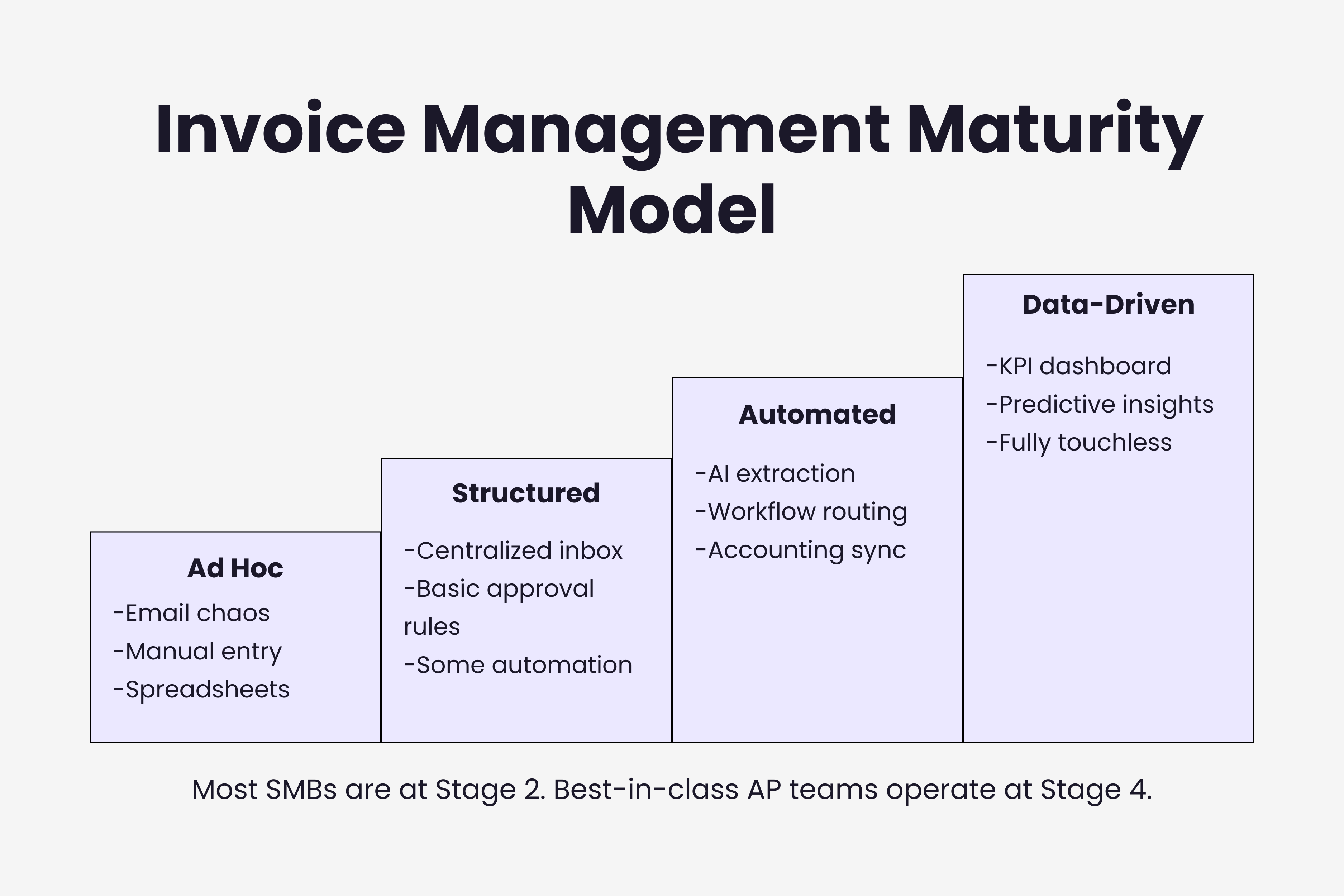
Twelve practices is a lot to look at if your current setup is still mostly manual. The sequencing matters: start with capture (practices 1-3), because no amount of sophisticated approval routing or KPI tracking helps if you are missing invoices in the first place. Once capture is solid, fix approval (practices 4-6), because that is where most cycle time lives. Integration (practices 7-9) compounds the value of everything upstream. Measurement (practices 10-12) keeps it improving.
For most small teams, practices 1, 2, 4, 5, 6, 7, and 10 represent the core set that closes 80% of the gap between current performance and best-in-class. If you want to audit your current setup against all twelve, the 52-item invoice automation checklist maps each practice to specific configuration items. If you are still at the tool-selection stage, the invoice management software decision framework walks through how to evaluate options against your actual workflow rather than a generic feature list.
Ready to automate your invoices?
Start extracting invoices from your email automatically with Gennai. Free plan available, no credit card required.
Start FreeRelated Articles
How to Stop Chasing Invoices (And Automate the Whole Thing)
Practical guide to eliminating manual invoice chasing in 2026. Covers automated AR reminders, incoming invoice capture, approval routing, and the tools that make it work.
GuideHow to Close Your Books Faster (Without Chasing Invoices)
Close your books in 3 days instead of 8. Learn why invoices are the biggest close bottleneck and five changes that shorten your month-end close starting this month.
GuideCommon Invoice Processing Questions Answered
The complete invoice processing FAQ covering costs, automation, errors, approvals, and integrations in 2026. Twenty questions answered directly with data and benchmarks.