
How to Audit Your Invoice Data Access (Security Checklist)
Practical framework for auditing invoice data access. Security checklist covering quarterly reviews, permission audits, encryption verification, and compliance documentation.

Invoice data access audits identify security vulnerabilities before they become breaches. Regular auditing reveals who can view sensitive invoice information, whether access aligns with job responsibilities, and where unauthorized access might occur.
Organizations that skip systematic invoice access reviews discover problems only after incidents occur. By then, confidential vendor pricing may have leaked, fraudulent payments processed, or compliance violations documented by regulators.
This guide provides a practical framework for auditing invoice data access, specific checks to perform, recommended audit frequencies, and documentation standards meeting compliance requirements. For the broader security framework covering GDPR, SOC 2, and ISO 27001, see our complete guide to invoice data security and compliance.
Why Invoice Data Access Audits Matter
Invoice information contains details warranting access restrictions and regular review.
Vendor bank account numbers enable payment fraud. Anyone with access to invoice data can extract banking details for legitimate vendors, then use this information for business email compromise schemes redirecting payments to fraudulent accounts.
Negotiated pricing represents competitive intelligence. Invoices document actual prices paid for goods and services. Competitors accessing this information gain advantages in vendor negotiations and can undercut pricing knowing exact cost structures.
Personal data triggers GDPR obligations. Invoices containing individual names, contact information, or sole proprietor details fall under data protection regulations requiring documented access controls and audit trails.
Excessive access increases breach impact. When too many employees can view invoice data, compromised accounts expose broader information sets. Limiting access reduces potential damage from any single account compromise.
Quarterly Access Reviews
Conduct comprehensive access reviews every quarter identifying who has invoice data permissions.
Export complete user lists from invoice management systems, accounting software, email accounts receiving invoices, file shares containing invoice documents, and backup systems storing invoice archives. Document current permissions, last access timestamps, and business justification for each account.
Verify users still require access based on current roles. Employees changing positions may retain invoice access no longer needed for new responsibilities. Departing employees sometimes maintain active accounts weeks or months after termination.
Check for orphaned accounts without clear ownership. Service accounts, integration users, and temporary access granted for specific projects often remain active indefinitely.
Remove unnecessary access immediately. Don't wait until next review cycle to revoke unneeded permissions.
Document review findings and actions taken. Maintain records showing who conducted reviews, which accounts were examined, what changes occurred, and business justification for maintained access.
Permission-Level Audits
Beyond identifying who has access, verify what each user can do with invoice data.
Map permissions to actual capabilities. Read-only access allows viewing but not modifying. Write permissions enable data entry. Approval rights authorize payment processing. Export capabilities permit bulk data extraction.
Identify users with administrative privileges. System administrators can typically access all invoice data, modify permissions, and delete records. Administrative access requires heightened scrutiny.
Review approval hierarchies. Who can authorize payments at different thresholds? Do approval limits align with organizational policies?
Check for conflicting permissions violating segregation of duties. The same person shouldn't both enter invoice data and approve payments.
System Access Log Reviews
Audit trails reveal patterns indicating security issues or policy violations.
Configure comprehensive logging before auditing. Invoice systems should log user authentication, data access events, modification actions, export operations, permission changes, and failed access attempts.
Review logs for suspicious access patterns. Watch for after-hours access, geographic anomalies, bulk downloads of invoice data, repeated failed authentication attempts, and access to invoices unrelated to user responsibilities.
Identify dormant accounts with recent activity. Accounts unused for months suddenly accessing invoice data may indicate compromise.
Monitor high-privilege account usage. Administrative access should occur infrequently for specific maintenance tasks.
Automate log analysis where possible. Security information and event management systems can flag anomalies automatically for investigation.
Data Location Inventory
Invoice data often resides in more locations than organizations realize.
Map all systems storing invoice information, following invoice system integration best practices to understand data flows between them. Start with obvious locations: invoice management platforms, accounting software, accounts payable systems. Then identify less obvious repositories: email servers, shared drives, backup systems, data warehouses, and mobile devices. Be aware of the hidden security risks of email invoice management when assessing email-based storage points.
Document cloud versus on-premise invoice storage security. Cloud-stored invoice data introduces shared responsibility for security. On-premise storage places full responsibility on your organization. Both require different audit approaches.
Identify shadow IT storing invoices. Employees sometimes use unauthorized tools for convenience. Personal cloud storage and unapproved productivity applications may contain invoice copies.
Assess access controls at each location. Invoice security depends on the weakest storage point.
Encryption Verification
Confirm invoice data remains protected both in transit and at rest.
Test transmission encryption. Invoice data moving between systems should use TLS 1.2 or higher. Check email transmission protocols, API connections to accounting software, backup data transfers, and user access.
Verify storage encryption. At-rest encryption protects invoice data if storage media is compromised. Confirm encryption status for database servers, file storage systems, backup media, and archive systems.
Review key management procedures. Verify that encryption keys are stored separately from encrypted data and access requires appropriate authorization.
Check mobile device encryption. Smartphones and laptops accessing invoice data should employ full-disk encryption.
Vendor Security Assessment
Third-party tools processing invoice data require ongoing security evaluation.
Request current security certifications to evaluate invoice management software for compliance. Vendors should maintain SOC 2 Type II reports or ISO 27001 certificates demonstrating security control effectiveness.
Review data processing agreements. Article 28 GDPR requires contracts specifying vendor security obligations, sub-processor arrangements, breach notification requirements, and data deletion procedures.
Assess vendor incident history. Public breach disclosures and security advisories reveal vendor security posture.
Evaluate vendor data retention. When do vendors delete your invoice data? Does retention align with your policies?
Retention and Deletion Compliance
Invoice retention balances legal requirements with data minimization principles.
Document legal retention obligations. Tax regulations typically require retaining invoices 3-7 years depending on jurisdiction.
Establish retention schedules. Define exactly how long each invoice category should be kept. Automated deletion prevents indefinite accumulation.
Verify scheduled deletion execution. Audit deletion logs confirming scheduled purges occur as configured.
Respond to deletion requests. GDPR requirements for invoice processing grant individuals right to erasure for personal data. When deletion requests arrive, document legal basis for retention.
Audit Documentation Standards
Comprehensive documentation proves audit thoroughness and supports compliance.
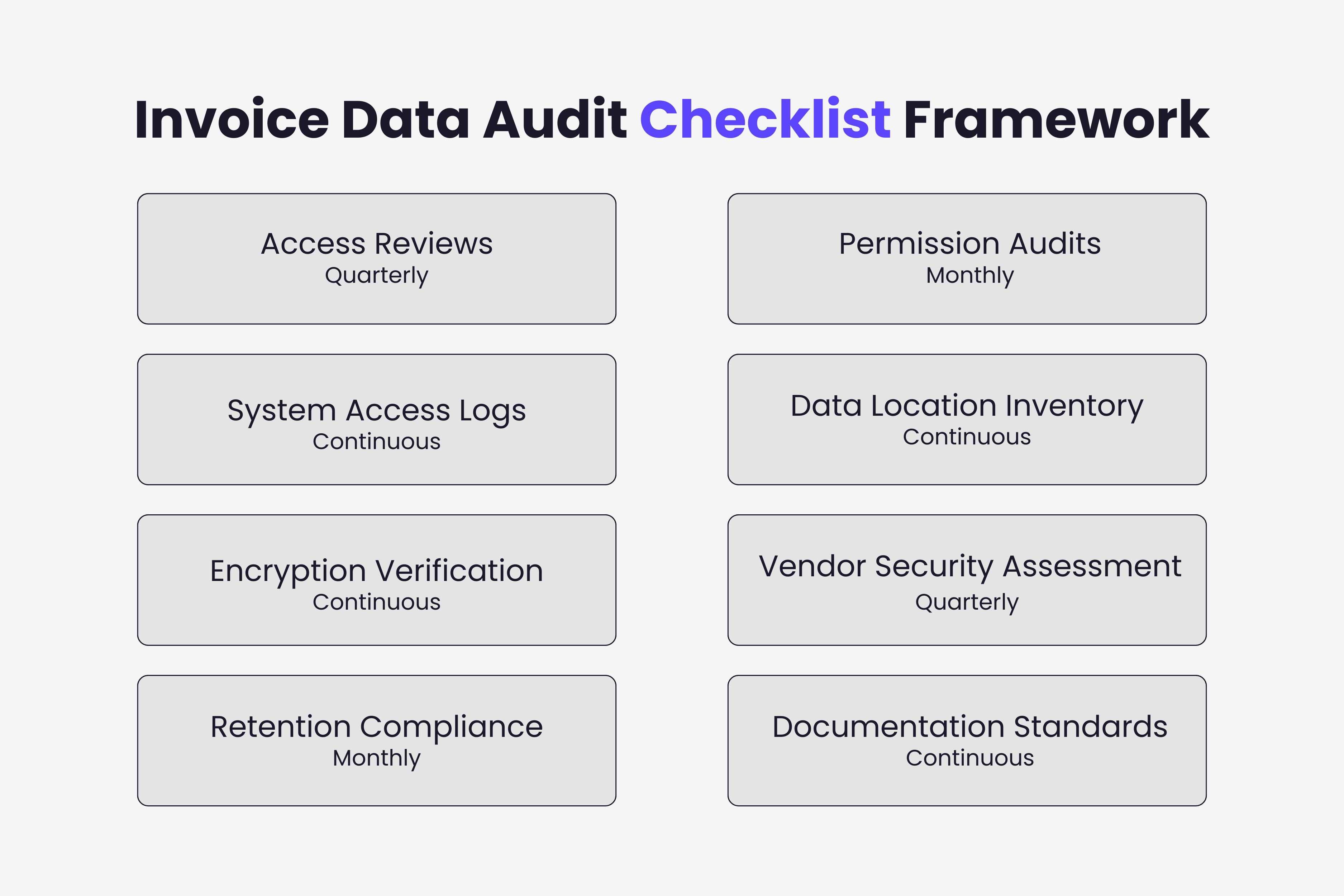
Create audit schedules defining review frequency for each audit type. Quarterly access reviews, monthly log analyses, annual vendor assessments, and continuous monitoring each serve different purposes.
Maintain audit findings records. Document what was reviewed, issues discovered, risk assessments performed, and remediation actions taken.
Track remediation progress. Identified issues require timely resolution. Maintain status tracking showing open findings and target completion dates.
Prepare summary reports for management. Executive leadership needs visibility into invoice security posture.
Regular invoice data access audits prevent security incidents, demonstrate compliance with regulatory requirements, and establish systematic security management. Organizations implementing this audit framework maintain visibility into invoice access patterns, identify vulnerabilities proactively, and respond to emerging threats before they cause damage.
Ready to automate your invoices?
Start extracting invoices from your email automatically with Gennai. Free plan available, no credit card required.
Start FreeRelated Articles
Future-Proofing Invoice Compliance: 2026 Regulations
Navigate 2026 invoice compliance requirements including EU AI Act, intensified GDPR enforcement, US state privacy laws, and data localization. Practical steps for regulation-ready workflows.
Guide5 Invoice Security Mistakes That Lead to Data Breaches
Discover the five most common invoice security mistakes that cause data breaches. Learn how shared credentials, unencrypted email, and weak vendor controls expose your financial data.
GuideThe Hidden Risks of Email Invoice Management
Discover the security risks of managing invoices through email: BEC attacks, attachment vulnerabilities, verification gaps, and practical controls to prevent fraud.