
Shared inbox vs distribution list for AP: which one actually works (and when)
Shared inbox vs distribution list for AP: a shared inbox wins on ownership and tracking, but both leave invoices uncaptured. Here is when each one works.

TL;DR
- A shared inbox (one mailbox the team opens) beats a distribution list (a copy to each person) for accounts payable, because it gives every invoice a clear owner and a visible status.
- A distribution list still works when a single person books everything, for pure notifications, or at very low volume.
- The average invoice takes 8.2 days to process (Ardent Partners, 2025 State of ePayables), and much of that delay is triage that ownership fixes.
- Both setups hit the same ceiling: neither extracts invoice data, flags duplicates, or exports to Xero, QuickBooks, or Holded. They organize manual work, they do not remove it.
- The durable fix is a capture layer on the inbox you already use, which reads and exports invoices automatically.
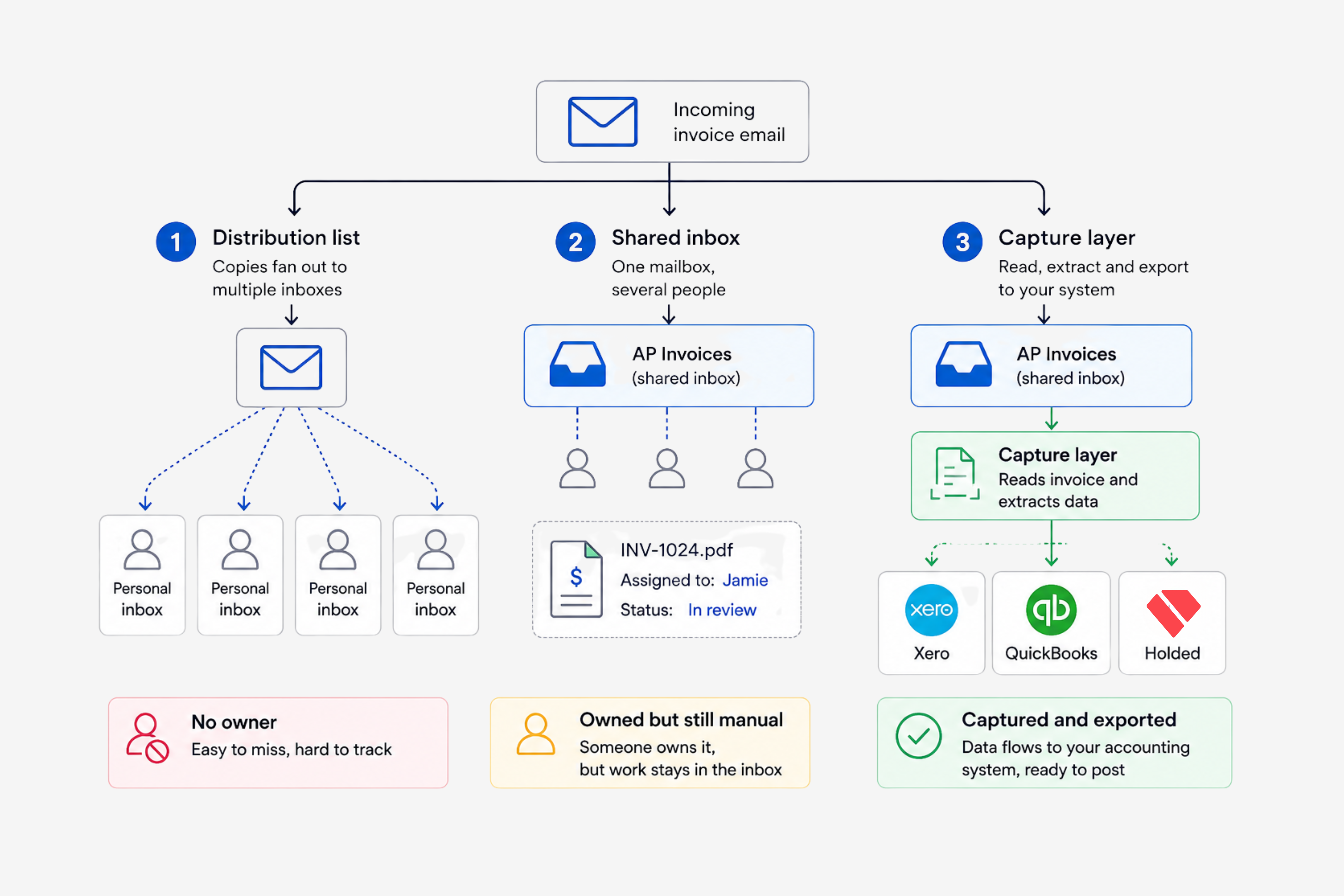
Shared inbox vs distribution list for AP comes down to one question: who owns the invoice once it lands. A shared inbox, meaning one mailbox that several people open, keeps every bill in a single place with an owner and a status. A distribution list, which drops a copy into each person's own inbox, scatters that same bill across the team. For accounts payable, the shared inbox wins, and the only real question is when a distribution list is still good enough.
If your invoices arrive at an address like ap@ or invoices@, you have already made this choice, often without noticing. The plumbing behind that address decides whether a bill is seen once and booked, or seen by everyone and booked by no one. Here is how the two setups differ, when each is the right call, and the ceiling they both run into.
What a distribution list and a shared inbox actually are
The two look identical from the outside. Both are an email address your suppliers send to. Under the hood they behave nothing alike.
A distribution list (also called a distribution group or a mailing list) is the simpler of the two. It holds a set of addresses, and when a supplier emails it, every member gets a copy in their own personal inbox. There is no mailbox sitting behind it, so there is nothing central to open, assign, or mark as done. Its whole purpose is to send one message to many people at once, which is a strength for announcements and a liability for accounts payable.
A shared inbox is a single mailbox that several people open and work from together. In Microsoft 365 this is a shared mailbox, which Microsoft defines as a common account such as info@contoso.com that a group of people can monitor and send email from, with replies appearing to come from the address rather than the individual. Google Workspace has no true shared mailbox, but its equivalent is a Collaborative Inbox, a Google Group where members can take a conversation, assign it to someone, and mark it complete, duplicate, or no action needed. Both give you the one thing a distribution list cannot: a single copy of the invoice that the whole team works from.
Why ownership is the whole game in accounts payable
In AP, the failure mode is rarely that nobody saw the invoice. It is that everybody saw it and each person assumed someone else had it. A distribution list manufactures that exact situation. Three people get the same bill, all three glance at it, and it quietly ages because it was never anyone's job.
That diffusion has a cost. The average invoice takes 8.2 days to process, according to Ardent Partners' 2025 State of ePayables, and a real share of that delay is triage rather than approval: working out who is handling what before anyone touches the accounting. A shared inbox attacks that directly. One person takes the invoice, its status is visible to the rest, and nobody reopens something already in motion. If your team already feels underwater, it is worth diagnosing the cause properly, because the worst AP bottlenecks are structural rather than personal.
A distribution list also has no memory. A new hire who joins the list sees only invoices sent after they were added, so the history stays scattered across colleagues' personal inboxes. A shared inbox keeps the full thread in one place, which is also how invoices stop getting lost between personal inboxes.
Shared inbox vs distribution list, side by side
The differences that matter for AP are not about features in the abstract. They are about whether an invoice has an owner and whether the team can see what is happening to it.
| What matters for AP | Distribution list | Shared inbox |
|---|---|---|
| Where the invoice lands | A copy in each member's personal inbox | One mailbox the whole team opens |
| Single source of truth | No, copies diverge | Yes, one shared copy |
| Assign an owner | No | Yes, take or assign |
| Status tracking | No | Yes: open, assigned, done |
| Shared, searchable history | No | Yes |
| New team member sees past invoices | No | Yes |
| Best suited to | Notifications and low volume | Active accounts payable |
When a distribution list is actually fine
A shared inbox is not automatically the right answer. A distribution list still earns its place in a few cases, and pretending otherwise would be dishonest.
- One person books everything. If a single bookkeeper owns AP end to end, the ownership problem does not exist. A list that copies them plus a backup is simpler to run.
- Pure notifications. For payment confirmations or statements that nobody needs to action, fan-out to several inboxes is harmless. Nothing is being worked, so nothing is being dropped.
- Very low volume. At a handful of invoices a month, the overhead of a shared inbox can outweigh the benefit. The cracks only show as volume climbs.
- As a feeder, not the workspace. A list can forward invoices into a tool that does the real capture, which is a different job from being the place your team actually works.
The honest rule: the more invoices you handle and the more people touch them, the worse a distribution list performs.
The ceiling both of them hit
Here is the part most comparisons skip. A shared inbox beats a distribution list, but both top out in the same place, because both are still just email.
Neither one reads the invoice. Neither pulls out the supplier, the amount, the tax, or the due date. Neither catches the duplicate that slips in under a slightly different file name. Neither codes the bill to your chart of accounts, and neither pushes anything into Xero, QuickBooks, or Holded. You have made the triage cleaner, which is worth doing, but every invoice still gets opened, read, retyped, and exported by a person. A shared inbox organizes the manual work. It does not remove it.
That is why arguing about the two is the wrong frame past a certain volume. The real shift is from managing an inbox to email-first capture.
What actually works: a capture layer on the inbox you already have
The setup that removes the work sits on top of whichever email pattern you already use. Instead of a person watching a mailbox, a capture layer connects to your Gmail or Outlook, recognizes which incoming messages are invoices, and pulls the data out before anyone opens them.
This is the gap Gennai fills. It connects to your inbox with a one-time secure authorization, detects invoices and receipts as they arrive, extracts the fields, flags duplicates, and organizes everything in one view, then exports clean data to Xero, QuickBooks, or Holded. Your accountant gets direct access to the same view, so you stop forwarding bills to them one at a time. It also scans the history already in the mailbox, so the months buried in personal inboxes get pulled in too.
You do not have to throw away your shared inbox or your ap@ address to do this. You keep the address suppliers already know and add the layer that does the reading, the deduping, and the export. The shared inbox stops being a to-do list and becomes a clean front door.
Frequently asked questions
Is a shared mailbox the same as a distribution list?
No. A distribution list sends a copy of each email to every member's own inbox, with nothing central to manage. A shared mailbox is one inbox several people open together, where invoices can be assigned, tracked, and searched as a team.
Should AP invoices go to a shared inbox or a distribution list?
For active accounts payable, a shared inbox, because it gives each invoice an owner and a status. A distribution list only holds up when one person books everything or volume is very low.
Does Gmail have a shared mailbox?
Not in the way Microsoft 365 does. The closest option in Google Workspace is a Collaborative Inbox, a Google Group where members can take and assign conversations and mark them resolved. Mailbox delegation is the other route for one person to manage another's mail.
Can a shared inbox replace invoice automation?
No. A shared inbox organizes the manual work, but someone still reads each invoice, types the data, checks for duplicates, and exports it. Capturing invoices automatically from the inbox is what removes that work.
Picking a shared inbox over a distribution list cleans up who owns each invoice. It does not stop you from opening, reading, and retyping every one of them. Gennai captures the invoices arriving in the inbox you already use and sends the clean data straight to your accounting. Connect a mailbox and try it free, no card needed.