
Forward Invoices to Your Accountant Automatically (2026)
Stop forwarding invoices to your accountant one by one. How a shared accountant portal removes the email chase and gives your accountant real-time access.

Sending invoices to your accountant should take zero minutes a month. In practice, it takes eight hours. Three of those hours are spent forwarding emails one by one. Another three are spent answering your accountant's emails asking for the four invoices you forgot. The last two are spent searching your inbox for an invoice your accountant swears you never sent.
This is what the accounting industry calls the client chase, and it is the single biggest time sink in the relationship between a business and its accountant. The good news is that the fix is structural, not behavioural. The fix is to stop forwarding altogether and give your accountant standing access to every invoice as it lands in your inbox.
TL;DR. Forwarding invoices one at a time to your accountant is the slowest possible version of a shared workflow. Industry research (Financial Cents, Karbon, Neudash) puts the annual cost of the document chase at 8 to 15 hours per client per tax season for the firm alone, before counting the client's time. A shared accountant portal that reads your inbox directly removes the forwarding step entirely. Your accountant sees what you see, in real time, without you having to be the bottleneck.
Why the back-and-forth never stops on email alone
The chase is not a personal failing. It is built into the design of email as a shared workflow. When you forward an invoice, you have to remember to do it. When your accountant needs an invoice you did not forward, they have to ask. When they ask, you have to find it. When you find it, you have to forward it. Each step costs five minutes, runs through a separate inbox thread, and depends on someone remembering to act on it.
Karbon, the practice management platform used by thousands of accounting firms, has written extensively about what they call the client chase: the cumulative cost of requesting documents, chasing reminders, correcting wrong submissions, and following up on the same items repeatedly. A Financial Cents 2023 survey of 132 accounting firm owners ranked chasing clients for additional documents as the second most challenging part of leading an accounting team.
The mechanics break down into five points of friction, every single month:
- You forget to forward. An invoice arrives on a Tuesday morning between two meetings. By Friday it is buried under 300 emails. By the end of the month it is invisible.
- The forward chain loses context. A vendor's original email had three attachments. You forwarded one. Your accountant asks for the others. You have to find the original thread.
- The accountant searches blind. Without inbox access, your accountant cannot verify whether an invoice exists. They have to ask. Every "do you have invoice from X?" question is a chase email.
- Duplicate forwarding sneaks in. You forward the same invoice twice because you forgot you had already sent it. Your accountant has to deduplicate manually.
- The history vanishes. When you switch accountants, the new firm starts with nothing. All the forwarded invoices live in the old accountant's inbox.
The structural fix: a shared portal, not a shared inbox
The instinct most people have is to give the accountant access to their inbox. Do not do this. Sharing an inbox creates four problems: your personal email becomes visible to a third party, the accountant has no way to mark an invoice as handled, there is no record of what was processed when, and revoking access means changing your email password and notifying every service that uses it. A shared inbox is a security and audit disaster waiting to happen.
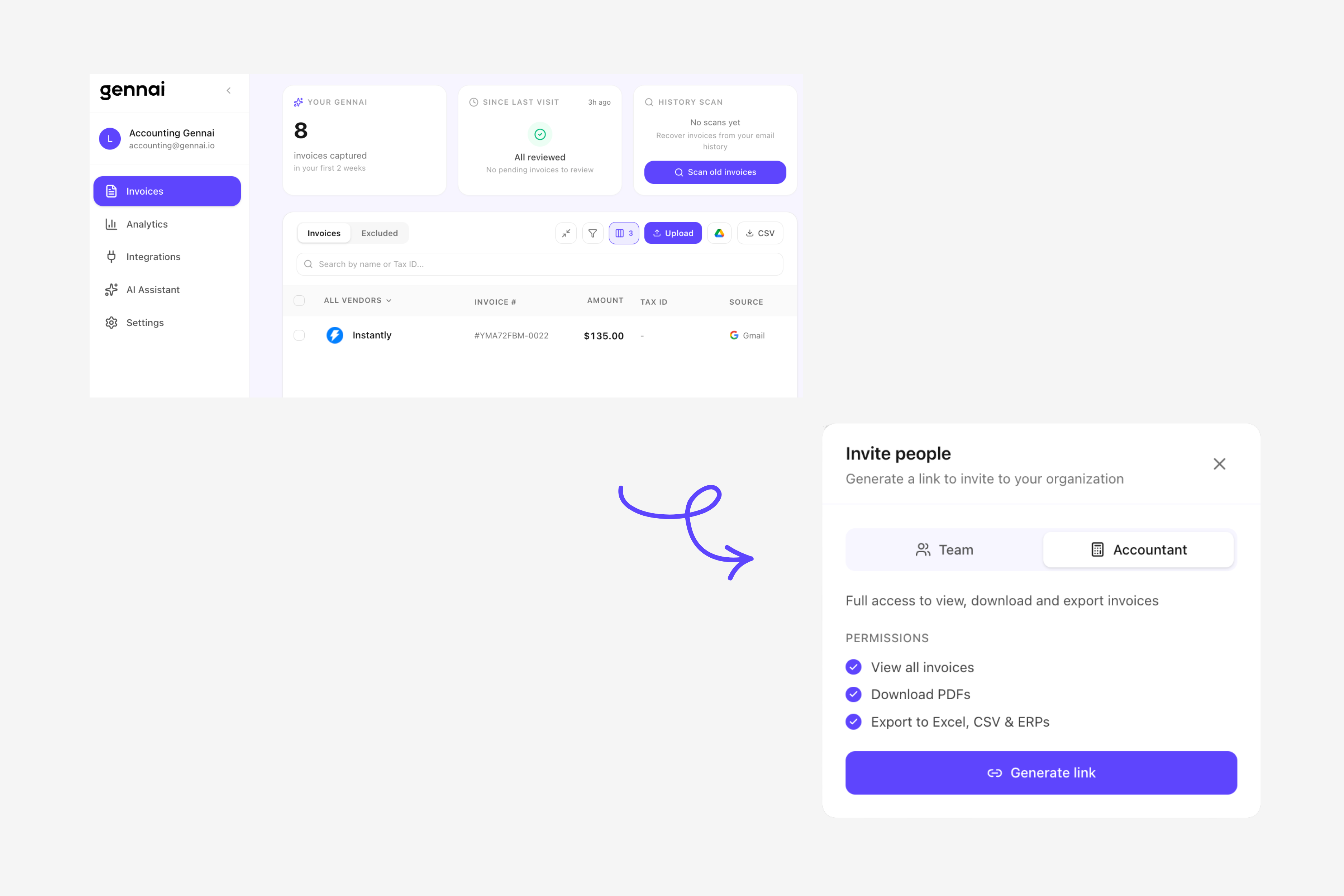
What works instead is a shared accountant portal sitting on top of your inbox. The portal reads every incoming email, identifies invoices automatically, extracts the data, and shows your accountant exactly what you would see, organised, deduplicated, and tagged by status. Your inbox stays private. Your invoices become a shared dataset.
This is how Gennai's accountant portal works. You connect your Gmail, Outlook 365 or shared AP mailbox via OAuth. You then generate an invite link from inside the portal and share it with your accountant however you prefer: email, WhatsApp, Slack, or paste it into the next call. Your accountant opens the link, creates their own login, and from that point every invoice in your inbox appears in their dashboard, with vendor, date, amount, tax and a confidence score. They can mark invoices as reviewed, export them to your accounting software, or request corrections from you on specific items, all without sending a single follow-up email.
What changes on day one of running this setup
Four concrete differences between the forwarding workflow and the shared portal workflow, starting the first time both sides log in.
| Friction point | Manual forwarding | Shared accountant portal |
|---|---|---|
| Forgotten invoices | Common. Anything not forwarded is invisible to the accountant | Zero. The portal sees every email the moment it arrives |
| "Do you have this invoice?" emails | Several per close cycle, one per missing invoice | Zero. Accountant can search and verify directly |
| Onboarding a new accountant | Days. Have to forward historical context manually | Minutes. New accountant inherits the full invoice history |
| Switching accountants | Painful. Old accountant retains access to forwarded emails | Clean. Revoke access in one click, no data left behind |
Setting up shared accountant access in under ten minutes
The setup runs once, from your side, with one action required from your accountant.
1. Connect every inbox where invoices arrive. Gmail, Outlook 365, or a shared AP mailbox like ap@yourcompany.com. OAuth-based, so you never share a password. Multi-inbox is the norm: founder card receipts, software subscriptions, and AP@ aliases all benefit from being captured in one place. The deeper version of how the extraction works end to end is in our email invoice extraction guide.
2. Let the retroactive scan run. The first sync pulls every invoice email in your inbox, across the entire mailbox history. There is no time limit on how far back the scan reaches. Your accountant inherits the full back catalogue, not just what arrives going forward.
3. Invite your accountant with a link. Generate an invite link inside the accountant portal and send it to them however you prefer: email, WhatsApp, Slack, or hand it over in person. They open the link, create their own login, and gain read access to the extracted invoice data. They do not get access to your inbox itself, only to the invoice dataset Gennai built from it.
4. Choose the export destination. Xero, QuickBooks Online, Holded or a structured CSV export your accountant can import elsewhere. The export can be triggered manually by your accountant during close, or pushed automatically as invoices are reviewed.
5. Stop forwarding. That is the entire change for you. Your accountant now sees what you see, in real time, without you having to send a single email.
For the deeper version of the inbox-side setup specifically, our step-by-step guide to connecting Gmail to your accountant walks through the five-minute connection in screenshots.
What this fixes on the accountant's side
Most articles about invoice forwarding stop at the client's experience. The bigger gains happen on the accountant's side, because the accountant is the one absorbing the cost of every missing invoice across every client.
- The close gets shorter. The Journal of Accountancy 2025 close-cycle benchmark puts the average month-end close at 8 to 10 business days. A significant portion of that delay traces back to waiting on client-provided documents. Removing the wait removes the bottleneck.
- The chase emails stop. No more weekly "can you send me the receipt from X" messages. If a vendor sent an invoice, the accountant can see it. If they cannot see it, the vendor did not send it, which is now a vendor problem, not a chase problem.
- Capacity goes up without hiring. Karbon's industry research shows that the largest single time investment in client work for small and mid-size firms is the chase, not the actual accounting. Removing it lets the same headcount handle 30 to 50 percent more clients.
- Client relationships stop being adversarial. Accountants do not want to be naggers, and clients do not want to feel chased. A portal removes the human friction from the transactional part of the relationship, leaving the genuinely valuable conversations intact.
If you are running an accounting firm and not just one client account, the full operational play is in our piece on the complete invoice workflow for accounting firms.
When manual capture still makes sense (and how to make it painless)
Two scenarios where the email-first portal is not enough on its own. Both have a fix that does not involve going back to manual forwarding.
- One-off receipts that never touch your inbox. A taxi receipt snapped at an airport, a coffee paid in cash, a hotel folio handed over at checkout. These never arrive by email, so the inbox scan cannot see them. Instead of forwarding the photo to yourself, send it to Gennai through WhatsApp or Telegram. Our WhatsApp and Telegram capture guide walks through the setup: a photo of any paper receipt becomes a structured invoice in your dashboard in about 30 seconds, no email step required.
- Vendors who deliver invoices through their own portal. Two different situations here, and they matter. If the vendor emails a notification with the invoice attached as PDF, or with the invoice content embedded in the email body itself, Gennai captures it automatically. If the email is only a notification telling you to log into the portal to download, capture has to happen from the portal directly. For that case, the simplest path is to download the PDF once and send it to Gennai via WhatsApp, Telegram, or as an email attachment. Either way, the data still lands in the same dashboard your accountant sees.
Three side-effects you probably did not anticipate
The forwarding workflow has costs that only show up once you stop. Three that catch most businesses by surprise once the portal is running.
- You stop missing the deduction window. Invoices that previously sat in your inbox unforwarded now appear in your accountant's view in real time. Tax deductions you would have missed because the invoice never reached the right person now get claimed.
- Duplicate payments drop. The Institute of Finance and Management 2025 report puts duplicate payment rates at 0.1 to 0.5 percent of mid-market invoices. Most duplicates come from the same invoice arriving by email and by portal. A shared dataset deduplicates automatically; a forwarding workflow cannot.
- You discover invoices you forgot you had. The retroactive scan sweeps your entire mailbox history with no time limit, so it routinely surfaces invoices from years back that never reached your accountant. For some businesses, this means a meaningful retroactive deduction in the first quarter of using the portal.
On the deduplication mechanics in particular, our piece on fixing duplicate invoice detection problems covers why rules-based duplicate checks miss 30 to 40 percent of cases and what AI-based fingerprinting adds.
Frequently asked questions
Does my accountant need to be using the same accounting software as me?
No. The portal sits between your inbox and whatever accounting software your accountant uses on their end. Gennai pushes structured invoice data into Xero, QuickBooks Online, Holded, or exports to a CSV / XLSX file your accountant can import into another tool. The software on either end is independent.
Will my accountant be able to read my personal emails?
No. The portal extracts invoice data from your inbox and shows the accountant only that extracted data, plus the original invoice attachment. Non-invoice emails stay invisible. Your accountant cannot search your inbox, read threads, or access any email content that was not classified as an invoice.
How do I revoke access if I switch accountants?
One click in the accountant portal removes their access immediately. Because the data lives in your Gennai workspace, not in their email, there are no forwarded emails sitting in their inbox after revocation. Your invoice history stays with you and follows you to the next accountant.
What happens to invoices the accountant has already exported to my accounting software?
Those stay in your accounting software as bills, expenses or receipts, exactly as they would if entered manually. The portal is the capture and review layer; once an invoice is pushed to Xero or QuickBooks, it lives there independently.
Can multiple people from the accounting firm have access?
Yes. The accountant who is invited can in turn invite team members from their firm. Junior bookkeepers can handle day-to-day extraction review while a senior accountant handles month-end close, all sharing the same view of your invoice data.
Stop forwarding, start sharing
The forwarding workflow worked when invoices arrived monthly and businesses had a single vendor relationship that mattered. It does not work in a world where a typical small business receives invoices from forty different vendors across three inboxes, half of which look nothing like a traditional bill. The chase is a symptom of a workflow that has outgrown its tools. Replace the workflow and the chase goes away on its own.
Give your accountant standing access to every invoice in your inbox, without sending another forwarded email. Start free or see how the accountant portal works.
Ready to automate your invoices?
Start extracting invoices from your email automatically with Gennai. Free plan available, no credit card required.
Start FreeRelated Articles
Extract Subscription Invoices From Email Automatically (SaaS, Ads, Cloud and the Rest)
Capture every SaaS, ads, and cloud subscription invoice from your inbox. Inline emails, PDF attachments and vendor portal receipts, all extracted automatically.
GuideHow to Extract Invoices From Outlook Automatically (2026)
Extract invoices from Outlook automatically. Connect Microsoft 365 via OAuth, scan your full inbox history, and push every bill to Xero, QuickBooks, or Holded.
GuideHow to Capture Invoices via WhatsApp and Telegram: From Photo to Accounting in 30 Seconds
Send a photo of any invoice or receipt to WhatsApp or Telegram and have it captured, extracted, and synced to your accounting tool automatically. The fastest way to digitize paper receipts.