
AP Bottlenecks: Why Your Team is Drowning in Invoices
Five common AP bottlenecks that cause invoice backlogs, late payments, and team burnout. Diagnose where your accounts payable process is breaking down.

Your AP team isn't slow. They're stuck.
The invoices keep coming, the pile keeps growing, and no matter how hard everyone works, the backlog never seems to shrink. It's not a people problem. It's a process problem, and most finance teams are dealing with the same five bottlenecks creating the same cascading delays.
According to the Institute of Financial Operations and Leadership, 22% of AP teams cite time spent on invoice exceptions as their top challenge, while 21% say they're buried in manual data entry. Another 30% report that processing challenges cause significant stress to the team.
If that sounds familiar, here's where your process is likely breaking down.
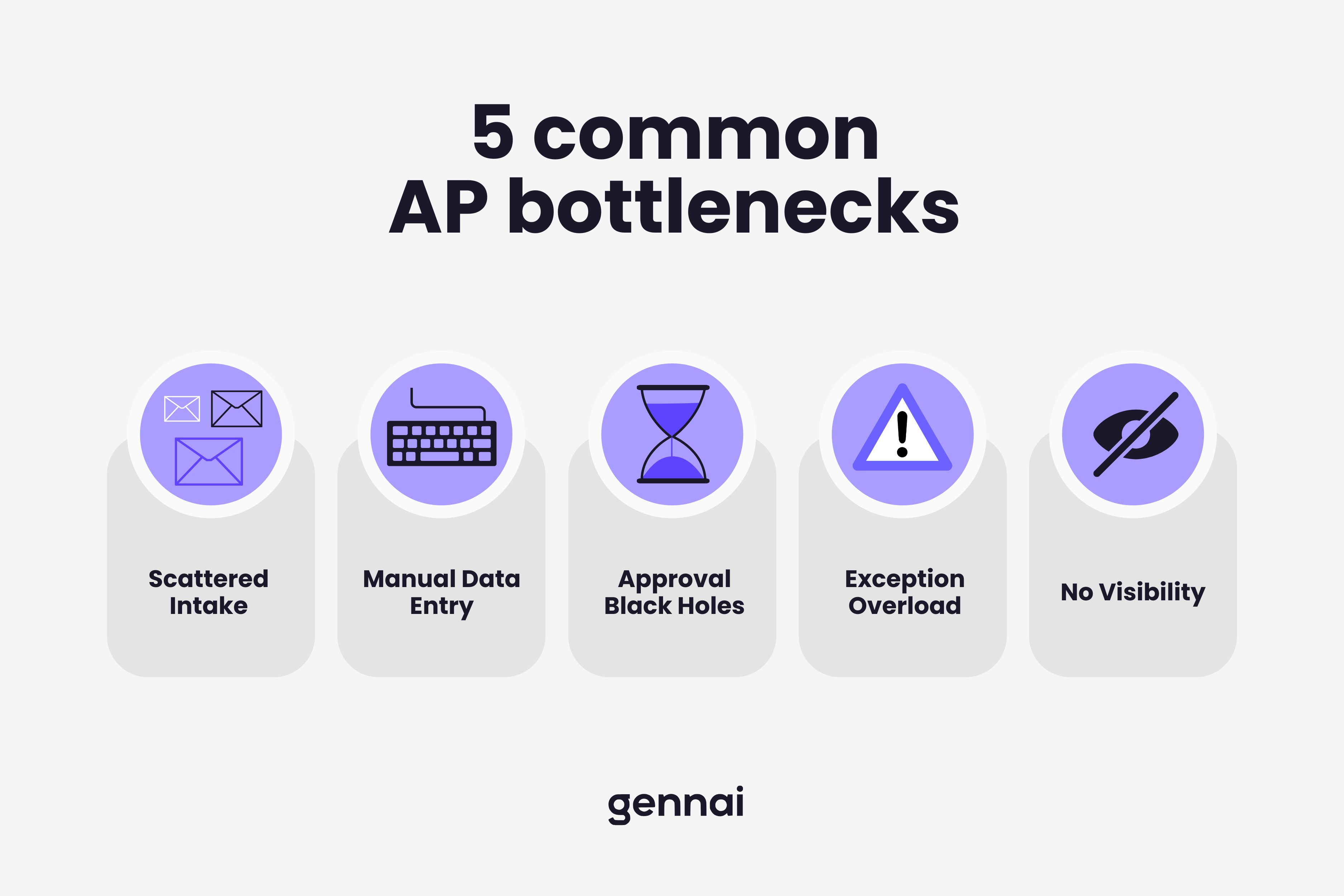
Bottleneck 1: Invoices Arrive Everywhere
Invoices come through email, sometimes to multiple inboxes. They arrive via supplier portals. Some vendors still mail paper copies. A few send them through messaging apps or shared drives.
When there's no single intake point, invoices get lost. They sit in someone's inbox for days before anyone realizes they're there. They get forwarded between team members with no tracking. Duplicates slip in because nobody knows if the invoice that came by email is the same one that arrived through the portal.
This scattered intake is the first domino. Everything downstream depends on knowing what invoices you have, and if your intake is fragmented, you're starting behind. The worst part: you don't know what you're missing until a vendor calls to say they haven't been paid. By that point, you're already playing catch-up.
Bottleneck 2: Manual Data Entry Eats Hours
Once an invoice finally surfaces, someone has to manually open it, read it, and type the details into your accounting system. Vendor name, invoice number, date, line items, amounts, tax, payment terms. Every single field, typed by hand.
This is where 57% of AP time goes, according to industry data. For a team processing 500 invoices a month, that's hundreds of hours annually spent on pure data entry. And every keystroke introduces the chance of error, which creates more work later when those errors need to be found and fixed.
The frustrating part: this is exactly the kind of work that AI extraction tools handle automatically. The technology exists to eliminate this bottleneck entirely, but 68% of businesses still key invoices manually into their systems.
Bottleneck 3: Approvals Disappear Into a Black Hole
The invoice is entered. Now it needs approval. You send an email to the approver. They're busy. They don't respond. You send a follow-up three days later. Still nothing. A week passes. The vendor calls asking where their payment is.
Approval delays account for more than 60% of total invoice processing time in many organizations. The problem isn't that approvers don't care. It's that the process gives them no structure. There's no automatic routing, no escalation when someone doesn't respond, and no mobile option for quick sign-offs between meetings. If this sounds familiar, we've outlined five quick wins to speed up invoice approval that you can implement this week.
Every day an invoice sits waiting for approval is a day closer to a late payment penalty and a day further from capturing an early payment discount. And the ripple effect is real: late payments damage vendor relationships, which leads to less flexible terms, which creates even more pressure on your cash flow. It's a cycle that feeds itself.
Bottleneck 4: Exceptions Pile Up With No Clear Path
A PO number doesn't match. A vendor sent a different amount than expected. An invoice is missing tax information. These exceptions are normal, every business deals with them, but without a system for handling them efficiently, each one becomes a time sink.
Research shows that 53% of AP teams identify exceptions as their single biggest operational challenge. And it makes sense: exceptions require investigation, communication with vendors, manual adjustments, and re-processing. One complicated exception can consume as much time as processing ten clean invoices.
The real damage happens when exceptions start accumulating. When your team is constantly fighting fires, the routine invoices get pushed back, and the entire queue slows down.
Bottleneck 5: Zero Visibility Into What's Happening
Ask most AP managers where a specific invoice is in the process right now, and they'll need to check multiple systems, email threads, and possibly ask colleagues before they can give you an answer.
Without real-time visibility, you can't identify bottlenecks before they become crises. You can't tell which approver is holding up the queue. You can't see which vendors consistently send problematic invoices. You can't forecast cash flow accurately because you don't know what's been approved versus what's still pending.
This lack of visibility affects 42% of finance leaders, who say improving AP process visibility is a top priority. But visibility isn't something you can achieve with spreadsheets and email. It requires a centralized system where every invoice's status is tracked automatically from arrival to payment. Without it, your team spends more time answering "where's my payment?" questions than actually processing payments.
The Bottlenecks Compound Each Other
These five problems don't exist in isolation. Scattered intake feeds into manual data entry. Manual entry creates errors that become exceptions. Exceptions pile up because approvals are slow. And nobody can see where things are stuck because there's no centralized tracking.
Fix one bottleneck and you improve the whole chain. Fix the weakest link first, which for most teams is either intake or data entry, and the downstream improvements happen automatically. You don't need to overhaul everything at once. Removing one chokepoint frees up capacity that immediately reduces pressure on the rest of the process.
If you're ready to start unclogging your AP process, here's how to automate invoice processing in five simple steps. For a more comprehensive plan covering phased rollout, ROI measurement, and team change management, see our complete AP automation implementation guide. And if you're a small team where these bottlenecks hit even harder because there's no bench, see our AP automation guide for teams under 10 employees.
The fastest way to eliminate bottleneck 1 and 2? Connect your email to an AI extraction tool that captures and reads invoices automatically. Start free with Gennai and stop drowning in invoices this week.
Ready to automate your invoices?
Start extracting invoices from your email automatically with Gennai. Free plan available, no credit card required.
Start FreeRelated Articles
Accounts Payable Turnover Ratio Explained
The accounts payable turnover ratio shows how fast you pay suppliers. Get the formula, a worked example, benchmarks and what your number really means.
GuideNet 30 vs Net 60: What Payment Terms Really Mean for Your Cash
Net 30 vs net 60 explained for business owners: what each term means, when the clock really starts, and how the gap hits your cash on both sides.
GuideThe Accounts Payable Process, Step by Step (for Owners)
The accounts payable process has five steps: receive, verify, approve, pay, and record each invoice. Here is how each works and where owners lose money.