
How to Process Invoices in Multiple Languages
A practical guide to multilingual invoice processing: the three layers of the language problem, why template-based OCR fails across languages, and what to verify in your setup.

Most invoice processing problems are described as volume problems or accuracy problems. For companies working with international suppliers, there is a third category that gets less attention: language problems. And unlike volume, you cannot solve language problems by hiring more AP staff.
A German invoice labels the invoice number field "Rechnungsnummer." A Spanish supplier writes "Fecha de emisión" where you expect "Invoice Date." A Japanese document mixes kanji, hiragana, and Latin characters in a single line item. These are not exotic scenarios. Cross-border B2B payment volumes are growing at a rate that outpaces most companies' ability to adapt their AP workflows, and the language layer is where the cracks show first.
This is a practical guide to understanding what multilingual invoice processing actually requires, where standard tools fail, and what a functioning setup looks like. It picks up where the broader question of what happens to invoice data after extraction leaves off, focusing specifically on the language dimension.
The Three Layers of the Language Problem
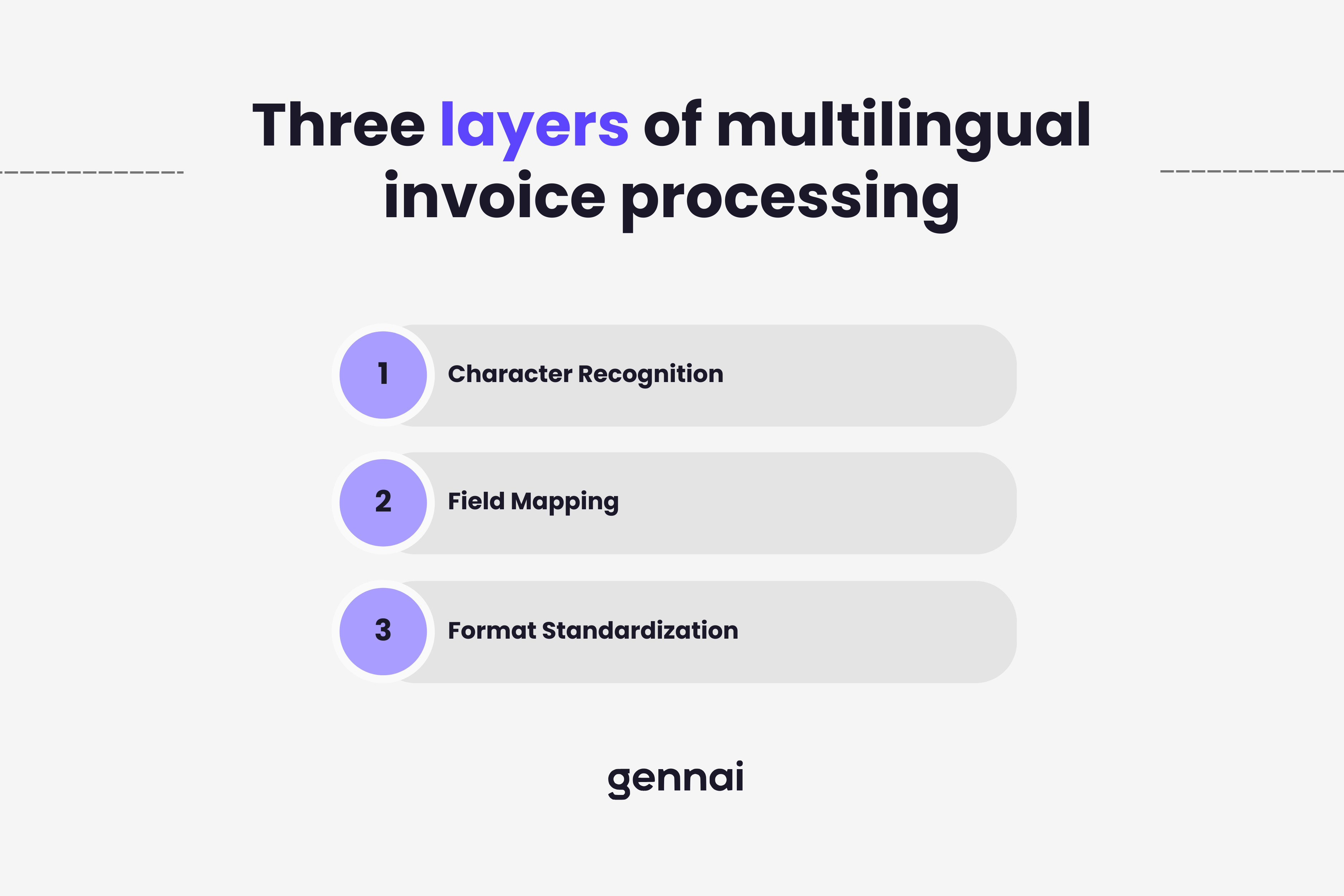
When people talk about multilingual invoice processing, they usually mean character recognition: can the system read Cyrillic, Arabic, or Chinese? That is the most visible layer, but it is not the hardest one.
There are three distinct layers, and they require different solutions.
Character recognition is the entry point. Traditional OCR systems were built around Latin character sets and degrade significantly on right-to-left scripts (Arabic, Hebrew), logographic systems (Chinese, Japanese, Korean), or scripts with complex ligature rules (Devanagari, Thai). Getting the raw text off the page correctly is the prerequisite for everything else.
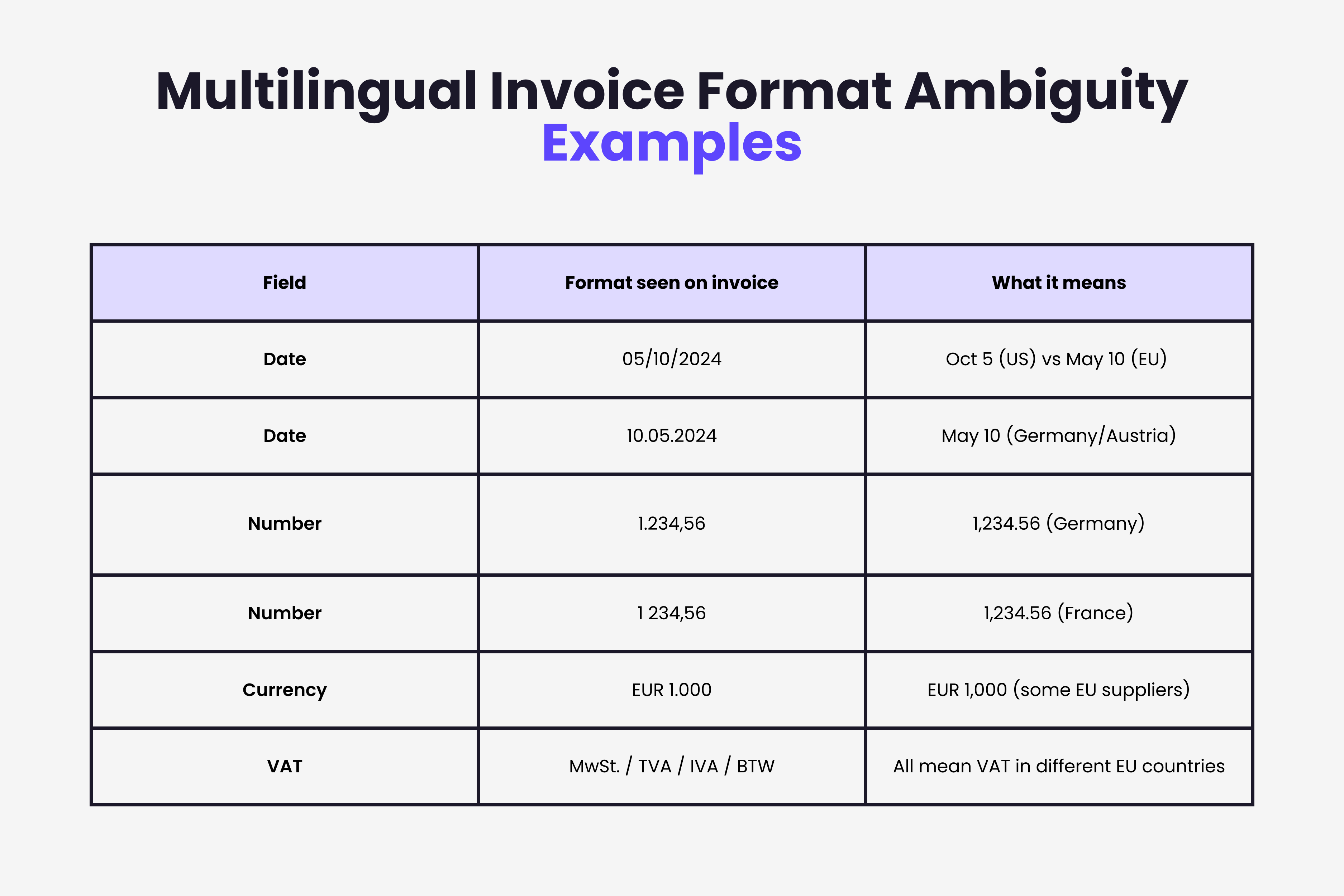
Field mapping is where most template-based systems break. Even if you can read the characters, you need to know that "Rechnungsnummer" means invoice number, that "Netto" refers to the pre-tax amount, and that "MwSt." is the German abbreviation for VAT. A system that relies on fixed field labels will fail on any invoice that uses terminology it was not explicitly trained on.
Format standardization is the layer that causes the most downstream errors because it looks like it was handled when it was not. The date 05/10/2024 means October 5 in the US and May 10 in most of Europe. The number 1.234,56 means 1,234.56 in Germany but reads as just over one in English-speaking contexts. These format differences are silent errors: the extraction succeeds, the value is wrong, and no exception is triggered.
Why Template-Based OCR Cannot Scale Across Languages
Traditional OCR invoice processing works by matching incoming documents against a library of vendor templates. You configure one template per supplier: field positions, label names, expected formats. The system then applies the right template when it recognizes an incoming document.
This approach has a hard ceiling for international operations. Every new foreign-language supplier requires a new template. Maintaining those templates as suppliers change their invoice layouts is ongoing manual work. And the approach does not generalize: a template built for one German supplier does not help with a new German supplier whose layout is different.
The deeper problem is that template systems do not understand language. They match patterns. A label that shifts position by a few pixels, or a vendor who changes "Invoice No." to "Invoice #", breaks the match. Multiply this fragility across twenty languages and fifty suppliers and you have a maintenance burden that grows faster than the business it is supposed to support.
This is distinct from the general limitations of invoice OCR. The language problem is specifically about semantic understanding, not just character recognition. A system that can read Chinese characters but does not know which one means "total amount" is not solving the problem.
What AI-Based Extraction Does Differently
Modern AI extraction approaches the problem without templates. Instead of pattern matching against a fixed layout, the model is trained to understand the semantic content of invoice fields regardless of language or layout. The AI invoice processing guide covers the broader methodology — here we focus on the multilingual dimension.
In practice this means the system reads "Rechnungsnummer" and understands it as an invoice number field without needing an explicit rule. It understands that the number appearing after a tax label is a tax amount regardless of what language the label is in. It handles date and number format normalization as part of extraction rather than as a post-processing step.
The accuracy profile is different from template-based systems. Template systems are highly accurate on known suppliers and break completely on unknown ones. AI systems perform more consistently across all suppliers, known and new, but may require review on unusual document structures. For most international AP operations, the consistency trade-off is preferable to the brittleness of per-supplier templates.
Right-to-left languages (Arabic, Hebrew, Farsi) and logographic scripts (Chinese, Japanese, Korean) still represent the hardest cases for extraction accuracy. The field mapping layer handles them more reliably than character recognition alone, but it is worth verifying extraction quality with a representative sample of your actual supplier documents before deploying at scale.
Setting Up Multilingual Processing: What to Verify
If you are evaluating or configuring a multilingual invoice processing setup, there are specific things worth testing rather than taking at face value.
| What to Verify | Why It Matters |
|---|---|
| Test with your actual supplier documents, not demos. | Vendors typically demonstrate their strongest language pairs. The only way to know how a system handles your specific supplier mix is to run a batch of real documents from your top foreign-language suppliers and check field-by-field extraction accuracy. |
| Verify date and number format handling explicitly. | Ask specifically how the system resolves ambiguous formats like DD/MM/YYYY vs MM/DD/YYYY. The answer should be either "we normalize to a target format based on detected locale" or "we output ISO 8601 dates." Anything vague here is a flag. |
| Check what happens on extraction failure. | No system handles every document correctly. The question is whether failures are surfaced clearly, routed to a review queue, and documented with enough context to resolve them quickly. A system that silently outputs wrong values is worse than one that flags uncertainty. |
| Confirm your accounting system receives normalized data. | Extracting multilingual invoices into structured data is only half the problem. That data needs to land in your accounting system in the format it expects: dates in one standard, amounts in your base currency, vendor names matched to existing records. Verify the full path, not just the extraction step. |
The Accounting System Side of the Problem
Processing a foreign-language invoice correctly is necessary but not sufficient. The extracted data still needs to integrate with your accounting system in a usable form.
Vendor matching is one of the more common friction points. A supplier whose name is extracted in Japanese characters needs to be matched to a vendor record in your accounting system, which may use a romanized version of the same name. This mismatch is typically handled through a vendor alias or lookup table, but it requires upfront configuration per supplier and ongoing maintenance as supplier information changes.
Tax field handling varies significantly across jurisdictions. EU VAT, Japanese consumption tax, Australian GST, and US sales tax all appear in different positions on invoices and are reported differently in accounting systems. A system processing invoices from multiple regions needs either explicit tax mapping rules per country or a model trained to recognize tax types semantically. The AP automation guide covers how these fields typically flow into Xero and QuickBooks.
Currency handling is more straightforward if your accounting system supports multi-currency natively. The invoice amount gets extracted in the source currency, the exchange rate at transaction date is applied, and the base-currency equivalent is recorded. Where this breaks down is when invoices do not clearly state the currency, which is more common in domestic-focused suppliers who assume a single currency context. The invoice system integration guide covers more of the end-to-end pattern for ensuring extracted data reaches your target system correctly.
The Practical Scope
Most companies do not need to handle two hundred languages. The realistic scope is usually five to fifteen, covering the primary countries in their supplier network. Starting with that set and verifying extraction quality on real documents from those suppliers is a more useful exercise than evaluating maximum language coverage in vendor comparisons.
The format standardization layer deserves more attention than it typically gets during evaluation. Character recognition and field mapping are the visible parts of the problem. Silent format errors, a date transposed, an amount misread because of decimal notation, are the ones that create downstream reconciliation work without triggering any alert. That is where most of the operational risk sits.
Extract invoices from any language, directly from your inbox. Gennai connects to Gmail and Outlook and extracts structured invoice data regardless of language or format. Extracted fields are normalized before they reach your accounting system. Try it free at gennai.io
Ready to automate your invoices?
Start extracting invoices from your email automatically with Gennai. Free plan available, no credit card required.
Start FreeRelated Articles
OCR Error Cost Calculator: The Real Price of Mistakes
Calculate the true cost of OCR errors in invoice extraction. Breakdown of rework, duplicate payments, late fees and audit risk plus a free calculator.
GuideInvoice Line Item Extraction: Why It's Harder Than It Looks
Invoice line item extraction fails where header fields succeed. Learn the five structural problems that break table extraction and how modern AI solves them.
GuideWhy AI Invoice Extraction Fails (And How to Fix It)
Discover why AI invoice extraction fails and how to fix it. Learn the 6 common causes of errors and systematic troubleshooting steps for 95%+ accuracy.