
Bank transactions with no invoice: how to find the missing documents before you reconcile
A bank line with no invoice is a collection problem, not a matching problem. Sort the gaps by type, know where each document lives, and catch the suppliers that skipped a month.

A bank transaction with no invoice behind it is not a reconciliation problem yet. It is a document-collection problem that shows up at reconciliation time, because that is the first moment anyone compares what the bank says you paid with what you can prove you bought.
The fix has two halves. First, stop treating the unmatched list as one pile: a card payment for a SaaS tool, a direct debit for insurance and a bank fee are missing their documents for different reasons, and each one lives somewhere different. Second, stop working only from the statement. The transactions you can see are only part of the gap. The supplier who bills you every month and whose invoice did not arrive this month will never appear on the unmatched list, because there is no bank line to flag it.
This guide covers both halves, in the order you would actually work through them at month-end, and ends with where software can take over the collecting and matching, and where it cannot.
Why "just create the expense" does not close the gap
Xero and QuickBooks Online both let you clear an unmatched line in seconds. In Xero, a statement line with no matching bill gets the Create option, which records a spend money transaction straight from the statement. In QuickBooks Online, the equivalent is Add on the For review tab, which categorizes the downloaded transaction as an expense.
Both actions balance the bank. Neither produces the document.
That matters because the bank statement and the invoice prove different things. The statement proves that money left the account on a date, to a payee, for an amount. The invoice proves what you bought, from whom, with what tax, and that the purchase was for the business. Tax authorities want the second thing, and the rules are explicit about it:
- In Australia, the ATO requires a valid tax invoice to claim a GST credit on any purchase over A$82.50 including GST, and says you cannot claim the credit until you hold it. Bank statements and purchase orders do not count.
- In the UK, HMRC's guidance on reclaiming VAT on business expenses says you must keep records to support the claim and must have valid VAT invoices.
- In the US, the IRS lists invoices, receipts and card statements as supporting documents and notes that a combination may be needed to substantiate all elements of an expense: payee, amount, proof of payment, date and a description of what was bought. A card statement covers the first four. It rarely covers the fifth.
So an expense created from a bank line with no invoice attached is booked, but it is not supported. The gap moves from the reconciliation screen to the audit file, where it is harder to see and more expensive to fix. The practical rule is simple: collect first, then reconcile. The rest of this article is about making the collecting fast.
If the distinction between the two documents is still fuzzy, invoice vs receipt: which one your accountant actually wants covers what each one proves.
Sort the unmatched lines by type before you chase anything
The reason unmatched lists feel endless is that people work through them top to bottom, by date. Sorting by type first turns one long chase into a handful of short, repeatable ones, because every line of the same type is found in the same place.
| Type of transaction | Why the document is missing | Where it usually is | What to do |
|---|---|---|---|
| SaaS, ads and cloud subscriptions on a company card | The supplier never emails the invoice, or emails a "payment received" notice without the PDF. The invoice sits in the vendor portal | The billing or invoices page of the vendor account, usually under the login of whoever signed up | Download the month, then change the billing email on the account to the address you capture from so next month arrives on its own |
| Card payments by an employee or founder | The invoice went to the person's own mailbox, or they got a paper receipt and kept it | Personal inbox, phone photos, a drawer | Give people one place to send things the moment they pay: a forwarding address, a WhatsApp number, a shared inbox |
| Direct debits for utilities, rent, insurance, leases | The invoice arrives by post, or lands in a portal you log into once a year | Supplier portal, paper, or an old email thread from when the contract was signed | Switch the supplier to email delivery and request the missing months in one message |
| Marketplace purchases (Amazon, eBay, app stores) | The order confirmation arrived, the tax invoice did not; confirmations are not invoices | The orders page of the marketplace account, often with a separate "invoice" link per order | Download per order; for Amazon, a business account gives you tax invoices by default |
| Partial and split payments | One invoice paid in two instalments, or two invoices settled in one transfer. The invoice exists; the amounts do not match the lines | Already in your records | Match several lines to one bill, or one line to several bills, rather than creating a new expense. Both Xero and QuickBooks support this through Find and Match |
| Bank fees, interest, FX charges, payment processor fees | No invoice exists. The bank or processor is the supplier and the statement is the document | The statement itself; processors like Stripe or PayPal publish a monthly fee summary | Record from the statement with a clear description. Do not wait for a document that will never come |
| Transfers between your own accounts, loan repayments, tax payments | Not an expense at all | Not applicable | Record as a transfer or a liability payment, never as a cost |
| Refunds and credit notes | Money came back and the original supplier invoice is already matched, so the credit sits unmatched | Supplier email or portal, usually titled "credit note" rather than "invoice" | Match the credit note to the refund line; ask the supplier for one if only a refund notice exists |
| Personal spend on a business card | No business invoice exists because it was not a business purchase | Not applicable | Post to the owner's or director's loan account and keep it out of expenses |
Two things change once the list is sorted this way.
The first is that most of the real chasing collapses into two places: vendor portals and other people's inboxes. Everything else is either already in your records in a different shape, or does not need an invoice at all.
The second is that about half the lines on a typical unmatched list are repeat offenders. The subscription that is missing its invoice this month was missing it last month too. Fixing the delivery address once removes it from every future list. Treat every portal download as a one-time fix, not a monthly task. Subscription invoices in particular have their own patterns, covered in extract subscription invoices from email automatically.
The gap the statement cannot show you: the supplier who skipped a month
Everything above starts from the bank. That catches money that left without a document. It cannot catch a document that never arrived, because there is no transaction to flag.
Picture a design agency with twelve suppliers that bill monthly: the office, two cloud platforms, an ad platform, a freelancer, a contractor, the accountant, three software tools, a phone contract and a lease. In a normal month that is twelve invoices. If the freelancer forgot to invoice, the books for that month are wrong in a way reconciliation will never surface. The expense is missing, the accrual is missing, and the first anyone hears of it is when the freelancer sends two invoices in one month and the cash plan takes a hit. If the ad platform's invoice went to the inbox of someone who left, the money still went out, so the line shows up as unmatched, but nobody connects it to a predictable monthly supplier.
The way to catch this is to work from what you expect, not only from what happened.
Build a short list of recurring suppliers: anything that bills every month, or every quarter on a known date. For most SMBs it is between ten and forty names. Then, before you reconcile, check three lists against each other, not one:
- Bank lines with no document. The usual unmatched list, sorted by type as above.
- Documents with no bank line. Invoices you have captured that have not been paid, or were paid from an account you are not looking at (a personal card, a second business account, a payment made by someone else on your behalf). This list is your true payables, and it is where unpaid invoices hide.
- Expected suppliers with neither. Recurring suppliers whose invoice for the period has not been captured and whose payment has not appeared. Each one is either a supplier who has not billed yet, a document that went to the wrong place, or a subscription that was cancelled and nobody told finance.
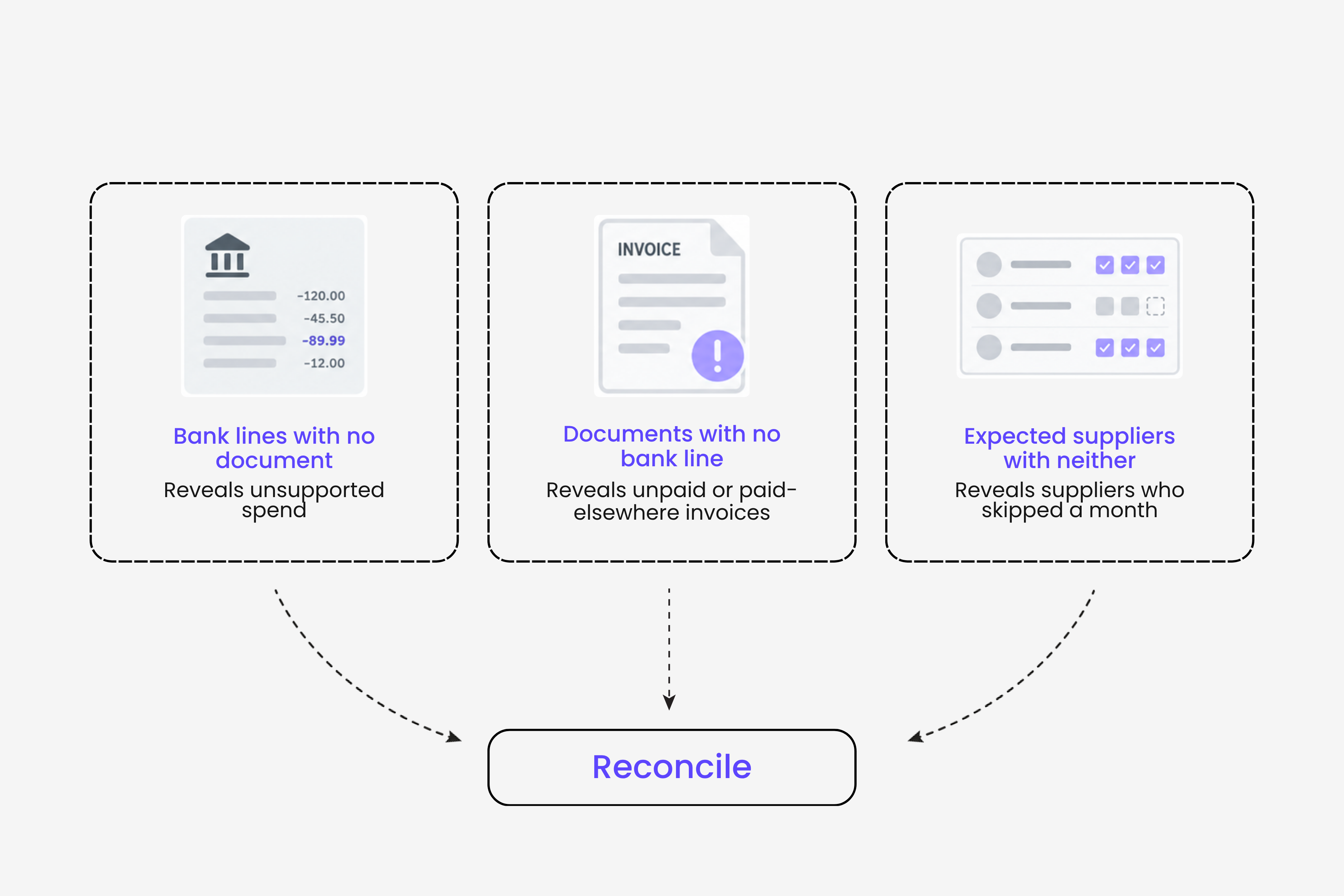
The third list is the one almost nobody keeps, and it is the cheapest to produce: last month's supplier list, minus this month's captured invoices. Anything left over gets a question before the close, not after it.
A simple way to run this without new software is a sheet with one row per recurring supplier, the expected amount, and three columns for the current month: invoice captured, payment seen, matched. A month-end where every row has three ticks is a month-end with no surprises. A row with no ticks is a conversation to have today.
Where to look, in the order that finds the most documents fastest
Once the list is sorted and the expected suppliers are known, the retrieval work follows a fixed order.
Start with the inboxes you already have. Most supplier invoices were emailed to someone. The problem is that "someone" is spread over the founder's mailbox, an accounts address nobody checks, and the mailbox of the person who set up the tool. Search each one for the supplier name and the month, and remember that a growing number of invoices arrive with no PDF at all: the amounts are in the body of the email. A search for attachments misses those. If you have several inboxes and months of backlog, a retroactive scan that reads every mailbox at once is the only version of this step that scales; the approaches and what each one misses are compared in how to extract invoices from email automatically.
Then the portals, in one sitting. Make a list of every vendor whose invoices live behind a login, download the open period for each, and change the billing email while you are there. The second half is what stops the task recurring.
Then the people. For card payments by staff, ask once with a specific list: supplier, date, amount. A vague "send me your receipts" produces nothing. A list of six lines gets six photos. Giving people a channel they already use, such as sending a photo of the receipt over WhatsApp or Telegram, removes the step where the receipt waits in a phone for three weeks.
Then the suppliers. For anything still open, ask the supplier for the invoice directly, and ask for a tax-compliant one, not a payment confirmation. In Australia the ATO sets out what to do if a supplier does not respond to a request for a valid tax invoice, including how to ask for permission to treat another document as one. If what arrives is wrong (wrong entity, wrong tax, wrong amount), do not patch it: what to do when a supplier sends the wrong invoice covers what to request instead.
Last, decide what will never have a document. Bank fees, interest, FX charges and processor fees are recorded from the statement with a clear description. Small purchases under a jurisdiction's threshold (A$82.50 including GST in Australia, for instance) still need some record, but not a full tax invoice. The mistake to avoid is parking these in a suspense or "ask my accountant" account and leaving them there. Code them properly the first time, with a note that says why no invoice exists, and they stop coming back.
What a month looks like when this runs as a routine
The difference between a business that dreads reconciliation and one that does it in an hour is rarely volume. It is whether collection happens continuously or in a panic the week before the close.
A routine that keeps the gap small has four parts:
- One capture point for everything inbound. Connected mailboxes for suppliers who email, a forwarding address for everything else, and a messaging channel for photos. The goal is that no invoice depends on a person remembering to move it.
- Billing addresses pointed at that capture point. Every portal download is also a chance to change the delivery email. After two or three months, the portal list is short.
- A weekly, not monthly, look at the unmatched list. Seven days of transactions is a list you can clear in minutes, with the purchases still fresh in people's minds. Thirty days is a project.
- The expected-supplier check before the close. The three-list comparison above, run once, before anyone presses reconcile on the last line.
What this changes downstream is worth being precise about. Reconciliation itself, the step where you confirm that the bank balance in your books equals the bank's balance, still happens in Xero or QuickBooks and still needs someone to review the exceptions. What shrinks is the number of exceptions, because the documents are already there when the matching starts. Fewer exceptions is also what makes the close faster, which is the whole argument in how to close your books faster without chasing invoices.
Where software takes over, and where it stops
Three parts of this workflow are repetitive enough to hand to software: collecting documents from the places they arrive, scanning backwards through mailboxes to recover the ones already missed, and comparing a statement against the documents you hold to show which lines have nothing behind them.
That last comparison is the part Gennai supports today. Gennai captures supplier invoices from connected Gmail, Outlook and IMAP inboxes, from forwarding, WhatsApp, Telegram and Slack, and from direct upload, including invoices written in the email body with no PDF. A retroactive scan covers any past date range, which is how a backlog of missing months gets recovered in one pass instead of one search at a time. You can then export a bank statement from your bank as CSV or XLSX, upload it, and Gennai matches each line against the invoices it has captured, updates the payment status of the matched ones, and shows the charges that have no invoice behind them. That feature is currently in beta.
It is just as important to be clear about the boundary. Gennai does not connect to your bank and never asks for banking credentials; you upload the statement. It does not post the reconciliation to your ledger or close your books: the matched invoices and their coding export to Xero, QuickBooks Online or Holded, and the reconciliation itself is confirmed there. And it cannot produce a document that was never issued. What it can do is make sure that when you sit down to reconcile, the list of lines with no invoice is as short as the real gap, and nothing longer.
If your unmatched list is mostly invoices that exist somewhere and were never collected, that is the problem Gennai is built for. Connect an inbox, run a retroactive scan on the months you are missing, and upload a statement to see what is still open. The free plan includes 10 invoices a month, with no card required.
Frequently Asked Questions
Can I reconcile a bank transaction without an invoice?
Mechanically, yes: both Xero and QuickBooks Online let you create an expense directly from the bank line. But reconciling the bank is not the same as supporting the expense. For tax purposes, a GST or VAT reclaim normally requires a valid tax or VAT invoice, and a card statement alone usually does not describe what was bought. Record the line so the bank balances, then keep chasing the document, and note on the transaction where it is expected to come from.
Is a bank statement enough evidence for a business expense?
It proves payment, date, payee and amount. It does not prove what you bought or the tax charged, which is what an invoice adds. The IRS explicitly allows a combination of documents to substantiate an expense, so a statement plus an order confirmation or a supplier email may cover the elements together. For GST and VAT claims in Australia and the UK, a compliant invoice is required above the relevant thresholds and a statement does not substitute for it.
What if the supplier will not send an invoice?
Ask in writing, for a tax-compliant invoice rather than a receipt or payment confirmation, and keep the request. In Australia, the ATO's guidance describes the route to request permission to treat another document as a tax invoice when a supplier does not respond. Elsewhere, keep every piece of evidence you do have (order confirmation, contract, correspondence, proof of payment) attached to the transaction, and let your accountant decide how to treat the claim.
How do I catch an invoice that never arrived?
You cannot catch it from the bank, because there is no transaction. Keep a list of recurring suppliers and compare it against the invoices captured for the period before you close. A supplier on the list with no invoice and no payment is either late billing, billing to the wrong address, or no longer a supplier. Each is worth knowing before the month closes, not after.
Ready to automate your invoices?
Start extracting invoices from your email automatically with Gennai. Free plan available, no credit card required.
Start FreeRelated Articles
What to do when a supplier sends the wrong invoice
A supplier sent the wrong invoice? Here is what to do: identify the error, ask for a corrected invoice or credit note, and hold payment until it is right.
GuideAccounts Payable Automation: Complete Guide
Complete guide to accounts payable automation: implementation steps, ROI calculation, phased rollout, and practical advice for finance teams of any size.
GuideThe Real Cost of Manual Invoice Processing
Calculate your true invoice processing costs. Manual processing costs $15-40 per invoice. See how much your business could save with automation.