
7 Automation Workflows Every Business Needs for Invoices
Discover the 7 essential invoice automation workflows that eliminate delays, prevent duplicate payments, and optimize cash flow. Implementation roadmap included.

Invoice automation promises efficiency, but most businesses automate the wrong workflows first. They capture data while approval bottlenecks remain. They sync to accounting while duplicates slip through. They celebrate speed while late fees accumulate.
Effective automation requires specific workflows addressing actual problems causing delays, errors, and costs.
1. Automatic Invoice Capture from Multiple Sources
Manual collection wastes hours before processing begins. Invoices arrive via email, portals, scans, EDI, and mail.
The workflow: Automatic capture consolidates all sources into one system. Email monitors extract PDF and image attachments automatically. Portal connections pull invoices on schedules. Scanners route paper to digital workflows.
Why it matters: Eliminates manual collection phase. Invoices enter processing immediately, cutting 1-2 days from cycle time.
2. Intelligent Data Extraction with Validation
Basic OCR struggles with vendor matching, line items, and GL coding requiring business context.
The workflow: AI-powered extraction combines OCR with machine learning. System matches vendors automatically, captures line items, suggests GL codes from history, validates against business rules. Configure vendor matching thresholds to control how strictly the system enforces exact matches versus fuzzy matching.
Why it matters: Achieves 90-95% straight-through processing versus 60-70% for basic OCR. Validation catches errors immediately.
3. Automated Duplicate Detection
Duplicate payments cost 0.5-2% of AP spend. Vendors resubmit when payment delays. Departments receive copies. Similar invoice numbers confuse.
The workflow: Compares each invoice against historical records using invoice numbers, amounts, dates, PO numbers, line items. Flags duplicates before approval.
Why it matters: Prevents cash flow loss. Business processing 1,000 invoices monthly at $500 average with 1% duplicate rate loses $60,000 annually.
4. Rules-Based Approval Routing
Manual routing requires AP to determine correct approvers based on amount, department, GL code, vendor. Email approval creates tracking challenges and bottlenecks.
The workflow: Automated routing applies rules instantly: amount thresholds, GL accounts, cost centers, vendor categories, project codes. Multi-level approvals trigger sequentially or parallel. Mobile approval enables on-the-go authorization. Configure routing rules by GL code, cost center, and vendor using automation platforms that support conditional logic.
Why it matters: Eliminates manual assignment. Invoices reach approvers within seconds. Clear audit trails show who approved what and when.
5. Three-Way Matching Against Purchase Orders
Manual matching compares invoices to POs and receiving documents field by field, consuming significant time.
The workflow: Automated matching compares line items instantly. Verifies item numbers, quantities, prices within tolerances. Minor variances pass automatically. Significant discrepancies route to exceptions.
Why it matters: Prevents payment for undelivered goods. Processing in seconds versus minutes. Tolerance handling reduces manual intervention.
6. Scheduled Payment Batching
Manual payment processing sorts by due date, checks cash, selects invoices, prepares files. Results in early payments wasting capital or late payments incurring penalties.
The workflow: Automated batching groups by due date, method, cash availability. Prioritizes early payment discounts. Schedules to hit due dates. Generates ACH, check, wire files automatically.
Why it matters: Business with $1M monthly AP and 2/10 net 30 terms on 30% of invoices captures $6,000 annually through optimized timing.
7. Exception Handling with Escalation
Exceptions without automation create bottlenecks. Invoices without POs, missing vendors, amount discrepancies pile up in review queues.
The workflow: Automatically categorizes issues, routes to resolvers by type, tracks aging with escalation, provides context for resolution, returns resolved invoices to workflow.
Why it matters: Prevents automation breakdown. Few problem invoices otherwise negate automation benefits. Escalation ensures timely resolution.
Implementation Strategy
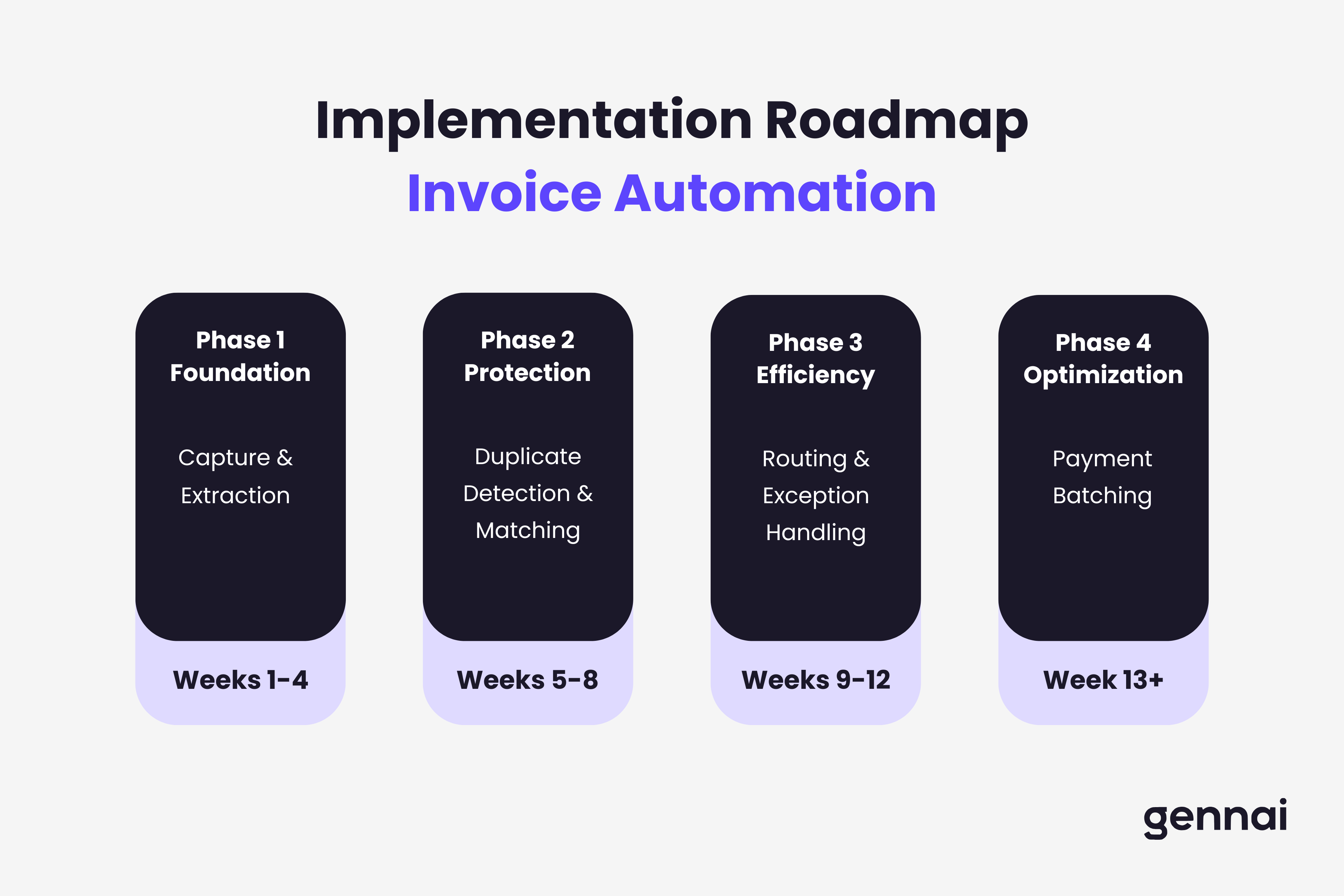
Start with workflows solving your most acute pain points. Phase 1 (Weeks 1-4): Capture and extraction eliminate manual entry. Phase 2 (Weeks 5-8): Duplicate detection and matching prevent losses. Phase 3 (Weeks 9-12): Routing and exception handling remove bottlenecks. Phase 4 (Weeks 13+): Payment optimization maximizes financial benefit.
Each workflow builds on previous implementations. These workflows deliver immediate visible impact by eliminating manual data entry when connected across your invoice processing systems. Sequential deployment achieves higher automation rates than comprehensive attempts immediately. Prove value early, then expand systematically for sustainable transformation.
TL;DR
- Automatic capture consolidates invoices from email, portals, scans, and EDI into one system, cutting 1-2 days from cycle time
- AI-powered extraction with validation achieves 90-95% straight-through processing versus 60-70% for basic OCR
- Duplicate detection prevents cash flow loss - a business processing 1,000 invoices monthly at $500 average with 1% duplicate rate loses $60,000 annually
- Rules-based routing eliminates manual approval assignment, delivering invoices to approvers within seconds with full audit trails
- Three-way matching automates PO verification in seconds versus minutes, with tolerance handling for minor variances
- Payment batching optimizes timing to capture early payment discounts - $6,000+ annually on $1M monthly AP
- Exception handling with escalation prevents problem invoices from negating automation benefits
- Implement in phases: capture and extraction first (weeks 1-4), then protection (weeks 5-8), efficiency (weeks 9-12), and optimization (weeks 13+)
Ready to automate your invoices?
Start extracting invoices from your email automatically with Gennai. Free plan available, no credit card required.
Start FreeRelated Articles
Accounts Payable Turnover Ratio Explained
The accounts payable turnover ratio shows how fast you pay suppliers. Get the formula, a worked example, benchmarks and what your number really means.
GuideNet 30 vs Net 60: What Payment Terms Really Mean for Your Cash
Net 30 vs net 60 explained for business owners: what each term means, when the clock really starts, and how the gap hits your cash on both sides.
GuideThe Accounts Payable Process, Step by Step (for Owners)
The accounts payable process has five steps: receive, verify, approve, pay, and record each invoice. Here is how each works and where owners lose money.