
PDF Invoice Extraction: Complete Technical Guide
Learn how PDF invoice extraction works for native and scanned PDFs. Technical guide covering OCR, text parsing, ML approaches, and accuracy optimization.

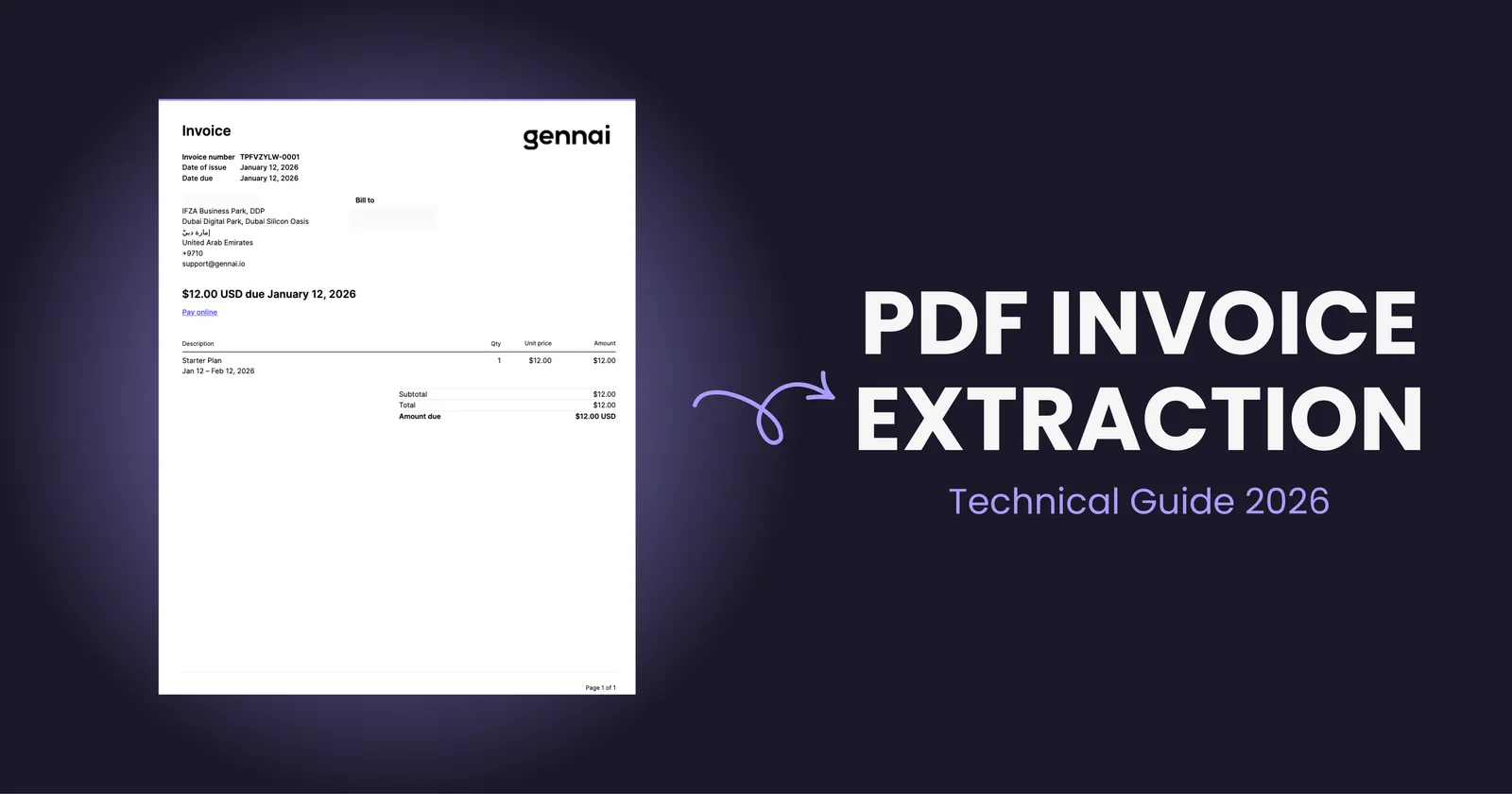
PDF invoices are everywhere in business. They arrive via email, get downloaded from vendor portals, and pile up in accounting folders. But here's the problem: a PDF is essentially a digital image of information, not structured data your accounting system can actually use.
Getting invoice data out of PDFs and into your finance workflow requires understanding what type of PDF you're dealing with and applying the right extraction technology. The technical approach for a native PDF generated from accounting software is fundamentally different from handling a scanned paper invoice saved as PDF.
This guide breaks down exactly how PDF invoice extraction works, what technologies power it, and how to choose the right approach for your specific PDF types.
The Two Types of PDFs That Matter
Not all PDFs are created equal. Before diving into extraction methods, you need to understand this critical distinction.
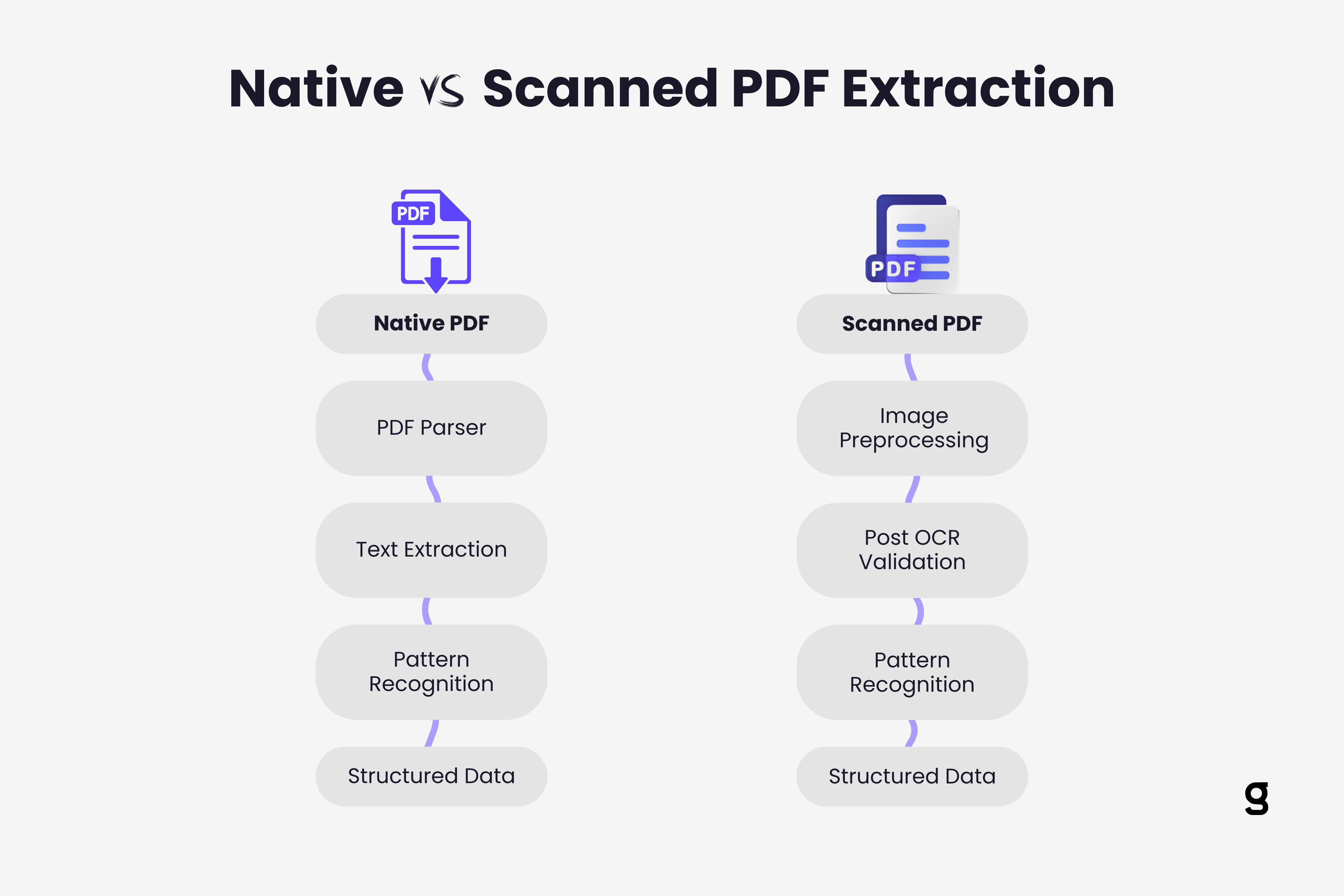
Native PDFs are generated directly from software applications like accounting systems, ERPs, or word processors. When you click "Save as PDF" or "Export to PDF" in QuickBooks, you create a native PDF. These files contain actual text data embedded in the document structure. The text isn't an image of characters. It's selectable, searchable text that exists as data within the PDF file.
Scanned PDFs are created when you scan paper invoices with a physical scanner or phone camera and save the output as PDF. These files contain images of pages, not actual text data. When you try to select text in a scanned PDF, nothing happens because there is no text data, only pixels representing what text looks like.
This difference completely changes how extraction works. Native PDFs can be parsed directly. Scanned PDFs require optical character recognition to convert pixel patterns into actual characters first.
Most businesses receive both types. Sophisticated vendors send native PDFs. Smaller suppliers might scan paper invoices. Your PDF extraction system needs to handle both seamlessly, often without you manually identifying which is which.
How Native PDF Extraction Works
Extracting data from native PDFs is theoretically straightforward but practically complex.
PDF structure parsing forms the foundation. PDFs store content in a complex format with text objects, coordinates, fonts, and layout information. Extraction tools must navigate this structure to locate where text appears on the page and in what order.
The challenge is that PDFs don't store information in reading order. Text might be encoded in the file in a completely different sequence than how humans read it on screen. A PDF parser must reconstruct logical reading order from positional coordinates, figuring out that text at coordinates (50, 700) comes before text at (50, 650) because Y coordinates decrease as you move down the page.
Text extraction pulls the actual character data out of the PDF structure. Libraries like PyPDF2, pdfplumber, or Apache PDFBox can extract raw text, but getting structured data requires more sophistication.
Consider a typical invoice. The amount "$1,250.00" appears on the page, but knowing it's the invoice total (not a line item or tax amount) requires understanding context. Where does it appear relative to labels like "Total:" or "Amount Due"? This is where simple text extraction falls short.
Pattern recognition and positioning add intelligence to extraction. Advanced systems analyze the spatial relationship between labels and values. They recognize that a number appearing 2 inches to the right of "Invoice Total:" is probably the total amount. Machine learning models trained on thousands of invoices learn these spatial patterns across different invoice layouts.
Table detection represents the hardest part of native PDF extraction. When invoices contain line item tables, extraction systems must identify table boundaries, detect columns and rows, and associate values with the correct headers. PDFs don't mark where tables begin and end, so the extraction system must infer table structure from text positioning and spacing patterns.
Modern approaches use computer vision techniques even on native PDFs, treating the PDF as an image to detect table structures visually before extracting the underlying text data. Learn more about how AI actually reads invoices to understand the full process.
How Scanned PDF Extraction Works
Scanned PDFs require a completely different technical approach because they contain no text data to extract.
Optical Character Recognition (Invoice OCR) converts image pixels into characters. The OCR engine analyzes pixel patterns to identify letter shapes, then translates those patterns into text. Tesseract, Google Cloud Vision, and AWS Textract represent common OCR technologies.
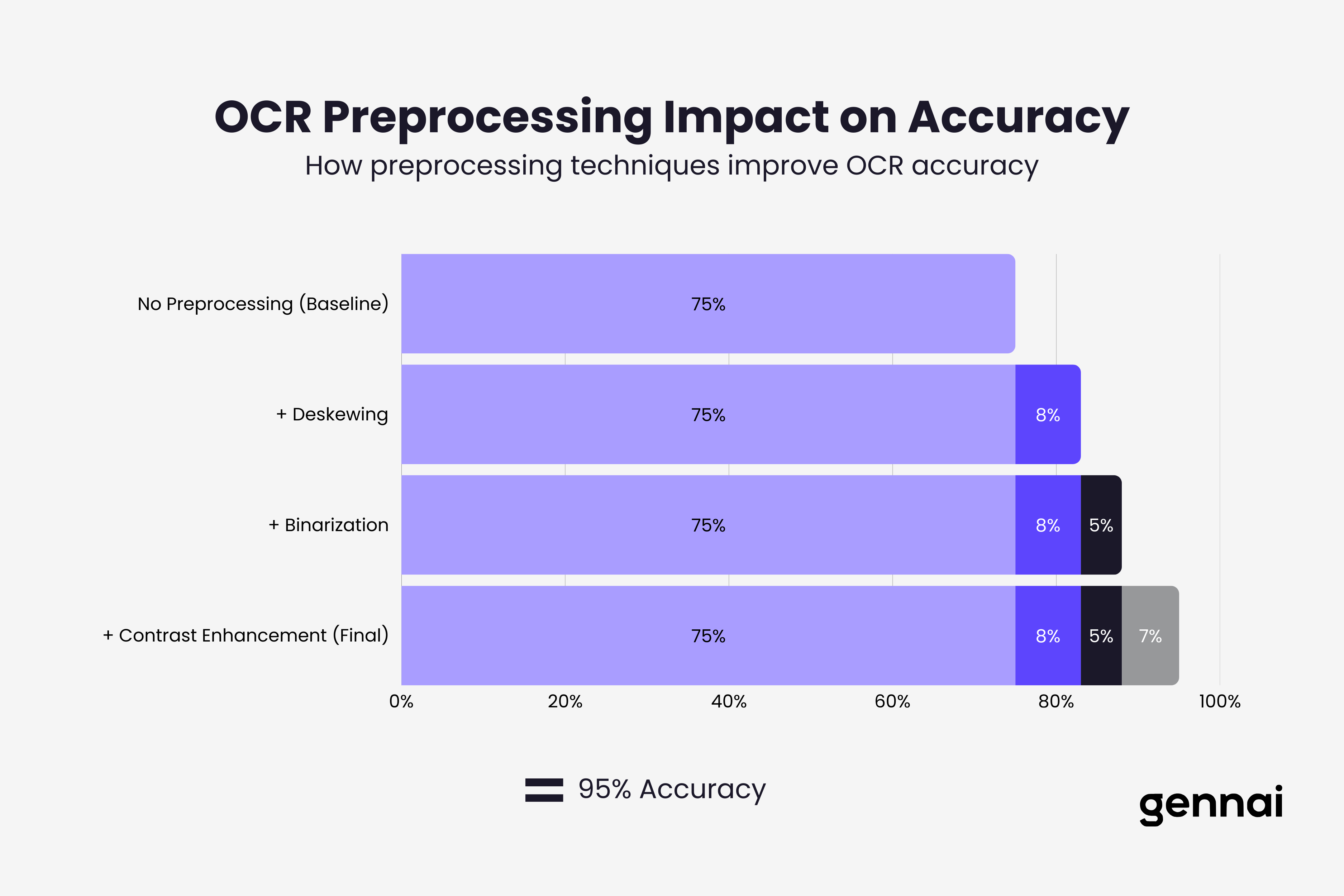
OCR accuracy depends heavily on image quality. Clear, high contrast scans with proper lighting produce 98-99% accuracy. Faded text, skewed pages, poor lighting, or low resolution drop accuracy dramatically. A scanned invoice photographed at an angle under dim lighting might achieve only 75% character recognition.
Preprocessing improves OCR results significantly. Before OCR runs, sophisticated extraction systems apply image enhancement:
- Deskewing corrects rotated or tilted pages
- Binarization converts images to pure black and white for clearer character boundaries
- Noise reduction removes specks and artifacts
- Contrast enhancement makes faded text readable
- Resolution upscaling improves low quality scans
These preprocessing steps can boost OCR accuracy by 10-20 percentage points on challenging invoices.
Post OCR validation catches and corrects errors. After OCR generates text, validation systems check for impossible values. An invoice date of "2O26" (with letter O instead of zero) gets flagged and corrected. Amounts containing letters or invoice numbers with special characters trigger review.
Machine learning models trained on invoice formats learn common OCR error patterns. The number "5" and letter "S" look similar and get confused frequently. Validation systems learn these patterns and apply corrections based on context. For example, "INVO1CE" becomes "INVOICE" automatically.
Technical Challenges Specific to PDFs
PDF invoice extraction faces unique technical obstacles that don't exist with other document formats.
Multipage invoices complicate extraction when line items span multiple pages. The system must correctly associate page 1 header data (invoice number, date, vendor) with line items that continue onto pages 2 and 3. Page breaks might split a single line item, requiring intelligent reconstruction.
Mixed content types appear in many invoices. A single PDF might contain text for standard fields, an image of a company logo, embedded signatures as images, and scanned portions where someone added handwritten notes. Extraction systems must identify which portions require OCR and which don't.
PDF security features like password protection or restricted permissions can prevent extraction. Some vendor PDFs disable text selection intentionally. Extraction systems must either work around these restrictions (where legally permitted) or fail gracefully and flag these invoices for manual handling.
Embedded fonts and encoding issues cause extraction failures when PDFs use custom fonts or character encodings. Text might display correctly on screen but extract as gibberish because the font doesn't map characters to standard Unicode values. This happens frequently with invoices containing non Latin characters or special symbols.
Layout complexity increases exponentially with invoice sophistication. Simple invoices with fields arranged in predictable locations extract reliably. Multicolumn layouts, nested tables, merged cells, and dense formatting create extraction ambiguity. The system must determine which "Total:" label out of three on the page represents the actual invoice total.
Practical Extraction Approaches for Different Scenarios
Choosing the right extraction method depends on your specific PDF profile and accuracy requirements.
Rule based extraction works well when you receive standardized invoices from a limited set of vendors. You create templates defining where each field appears on specific vendor invoices. Template based extraction achieves 99%+ accuracy on known formats but fails completely on new layouts.
This approach makes sense for large enterprises with major suppliers sending thousands of invoices in identical formats. The upfront template creation cost pays off through high volume accuracy.
Machine learning based extraction handles format variation better. ML models learn patterns from training data and generalize to new invoice layouts. Instead of rigid templates, models recognize that fields labeled "Invoice #" or "Inv No." or "Invoice Number" all mean the same thing, regardless of position.
The tradeoff is ML requires training data (hundreds or thousands of sample invoices) and never reaches 100% accuracy. You balance flexibility against occasional errors that need human review. That's why OCR accuracy matters more than pure speed.
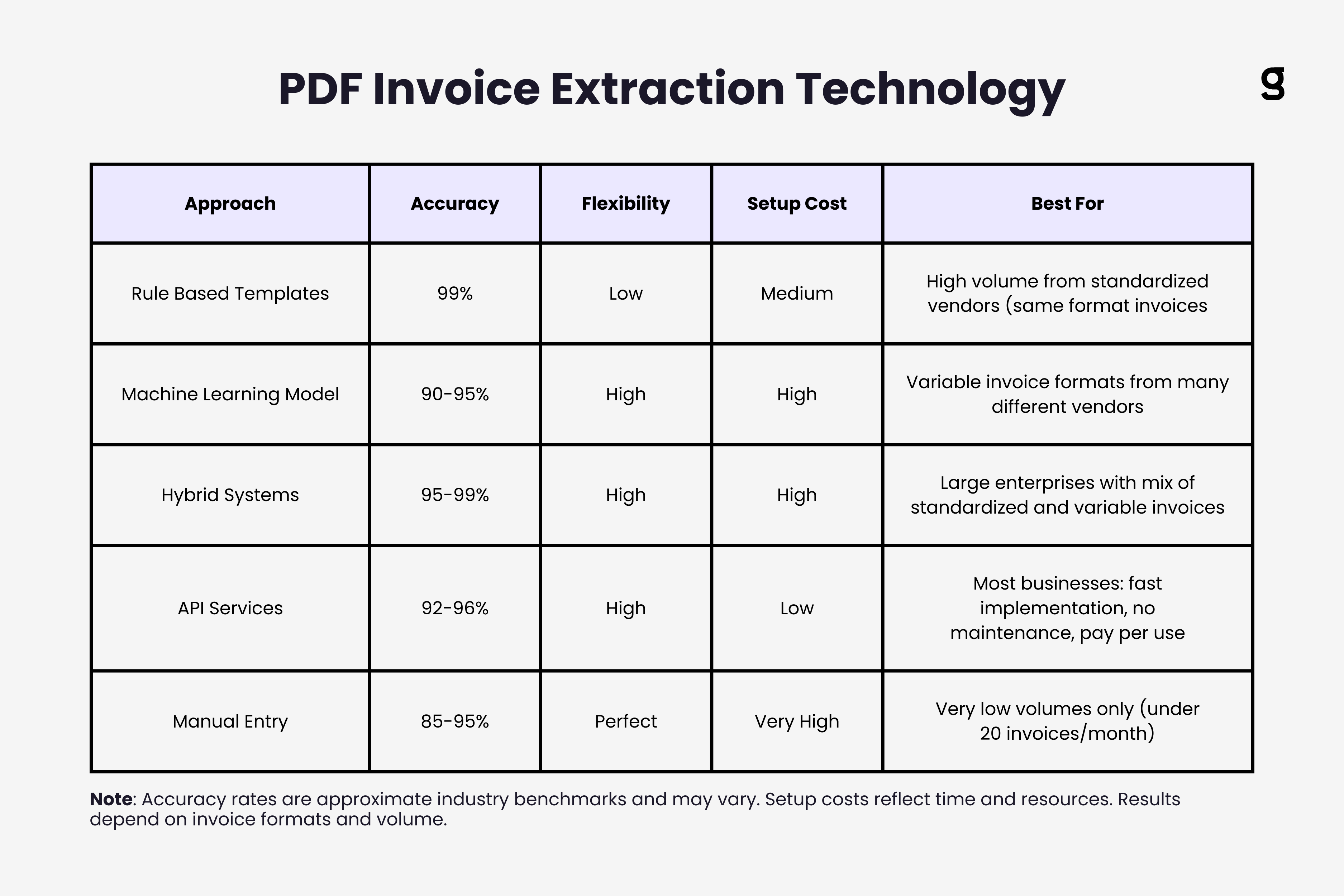
Hybrid approaches combine rule based and ML extraction. Use templates for high volume known vendors (fast and accurate), fall back to ML models for unknown formats (flexible but slower), and flag low confidence extractions for human review.
This delivers the best of both worlds: 99% accuracy on standardized invoices, 90-95% accuracy on variable formats, and manual review only for genuinely ambiguous cases.
API based extraction services like AWS Textract, Google Document AI, or specialized invoice extraction APIs handle all technical complexity. You send PDF bytes, get structured JSON back. These services use sophisticated ML models trained on millions of documents.
The tradeoff is cost per document (typically $0.01 to $0.05 per page) and dependency on external services. But for most businesses, API services deliver better accuracy with less technical investment than building extraction systems in house. Compare the best OCR software and API services to find the right fit.
Optimizing Extraction Accuracy
Several practical steps dramatically improve PDF invoice extraction accuracy.
Standardize input quality by configuring scanners for optimal settings: 300 DPI minimum, color or grayscale (not pure black and white), automatic brightness adjustment. If vendors are scanning invoices before sending, provide scanning guidelines to improve quality at the source.
Implement confidence scoring where extraction systems flag fields they're uncertain about. Instead of blindly accepting all extracted data, review only the 5-10% flagged as low confidence. This catches most errors while minimizing manual work.
Use validation rules that check extracted data for logical consistency. Invoice dates shouldn't be in the future. Totals should match the sum of line items plus tax. PO numbers should match expected formats. These rules catch extraction errors automatically.
Maintain feedback loops where corrections to extraction errors train the ML models. When someone fixes a misread vendor name, that correction improves future extractions from that vendor. Over time, accuracy improves continuously.
Segment by document type and apply different extraction approaches to different invoice categories. Use aggressive OCR preprocessing on poor quality scans. Apply strict validation on high value invoices. Fast track simple single page invoices through basic extraction.
Key Takeaways
PDF invoice extraction requires different technical approaches depending on whether you're handling native PDFs with embedded text or scanned PDFs that need OCR.
Native PDF extraction parses document structure and uses spatial positioning to identify fields, but must handle complex layouts, tables, and reading order reconstruction. Scanned PDF extraction runs OCR to convert pixels to text, requiring image preprocessing and post OCR validation to achieve acceptable accuracy.
The biggest technical challenges include multipage invoices where data spans pages, mixed content requiring both text extraction and OCR, layout complexity with dense formatting, and PDF security features that block extraction.
Practical approaches range from rule based templates (high accuracy, low flexibility) to machine learning models (flexible, moderate accuracy) to hybrid systems combining both. Most businesses benefit from API based extraction services that handle technical complexity while delivering strong accuracy.
Optimize extraction by standardizing input quality, implementing confidence scoring to flag uncertain fields, using validation rules to catch logical errors, maintaining feedback loops where corrections improve the system, and segmenting invoices by type to apply appropriate extraction methods.
The extraction approach that works best depends on your specific mix of invoice formats, volume, accuracy requirements, and technical resources. Start with API based services for immediate results, then optimize based on actual performance data from your real invoices.
PDF extraction is one component of the broader AI invoice processing pipeline that includes classification, extraction, validation, and integration.
TL;DR
- PDF invoice extraction requires different technical approaches for native PDFs (embedded text) versus scanned PDFs (requiring OCR)
- Native PDF extraction parses document structure and uses spatial positioning to identify fields, but must handle complex layouts, tables, and reading order reconstruction
- Scanned PDF extraction requires OCR with preprocessing steps like deskewing and contrast enhancement that can boost accuracy by 10-20 percentage points
- Key technical challenges include multipage invoices, mixed content types, PDF security features, embedded font issues, and layout complexity
- Extraction approaches range from rule-based templates (99%+ accuracy, low flexibility) to ML models (90-95% accuracy, high flexibility) to hybrid systems combining both
- API-based extraction services handle technical complexity for most businesses, delivering strong accuracy without building systems in-house
- Optimize accuracy by standardizing input quality, implementing confidence scoring, using validation rules, maintaining feedback loops, and segmenting by document type
Ready to automate your invoices?
Start extracting invoices from your email automatically with Gennai. Free plan available, no credit card required.
Start FreeRelated Articles
Accounts Payable Turnover Ratio Explained
The accounts payable turnover ratio shows how fast you pay suppliers. Get the formula, a worked example, benchmarks and what your number really means.
GuideNet 30 vs Net 60: What Payment Terms Really Mean for Your Cash
Net 30 vs net 60 explained for business owners: what each term means, when the clock really starts, and how the gap hits your cash on both sides.
GuideThe Accounts Payable Process, Step by Step (for Owners)
The accounts payable process has five steps: receive, verify, approve, pay, and record each invoice. Here is how each works and where owners lose money.